00192471-03.pdf - 第9页
User Manual SIPLAC E HS-50 1 Introduction Software Version SR.50x.xx 01/2006 US Edition 1.1 General 9 1 Introduction These o perating instructi ons pro vide a ma nual or ref erence wo rk for 1 – oper atin g and – setti n…
Contents User Manual SIPLACE HS-50
01/2006 US Edition
8
5.3.6 Automatic width adjustment on the dual conveyor . . . . . . . . . . . . . . . . . . . . . . . . 152
5.3.7 Technical data - dual conveyor . . . . . . . . . . . . . . . . . . . . . . . . . . . . . . . . . . . . . . . 152
5.3.8 Maintenance . . . . . . . . . . . . . . . . . . . . . . . . . . . . . . . . . . . . . . . . . . . . . . . . . . . . . 152
5.4 PCB barcode . . . . . . . . . . . . . . . . . . . . . . . . . . . . . . . . . . . . . . . . . . . . . . . . . . . . . . . . . . . . . . . . 153
5.4.1 Overview . . . . . . . . . . . . . . . . . . . . . . . . . . . . . . . . . . . . . . . . . . . . . . . . . . . . . . . . 153
5.4.2 Laser safety instructions . . . . . . . . . . . . . . . . . . . . . . . . . . . . . . . . . . . . . . . . . . . . 155
5.4.3 Functional description . . . . . . . . . . . . . . . . . . . . . . . . . . . . . . . . . . . . . . . . . . . . . . 155
5.4.3.1 PCB barcode reader for the single conveyor. . . . . . . . . . . . . . . . . . . . . . . . . . . . . 155
5.4.3.2 PCB barcode reader for the dual conveyor . . . . . . . . . . . . . . . . . . . . . . . . . . . . . . 156
5.4.4 Technical data . . . . . . . . . . . . . . . . . . . . . . . . . . . . . . . . . . . . . . . . . . . . . . . . . . . . 156
5.4.5 Assembly options for the PCB barcode reader . . . . . . . . . . . . . . . . . . . . . . . . . . . 157
5.4.6 Configuring the PCB barcode reader . . . . . . . . . . . . . . . . . . . . . . . . . . . . . . . . . . 158
5.4.7 Displaying the PCB barcode . . . . . . . . . . . . . . . . . . . . . . . . . . . . . . . . . . . . . . . . . 158
5.5 Ceramic substrate centering . . . . . . . . . . . . . . . . . . . . . . . . . . . . . . . . . . . . . . . . . . . . . . . . . . . 160
5.5.1 General . . . . . . . . . . . . . . . . . . . . . . . . . . . . . . . . . . . . . . . . . . . . . . . . . . . . . . . . . 160
5.5.2 Possible centering types . . . . . . . . . . . . . . . . . . . . . . . . . . . . . . . . . . . . . . . . . . . . 160
5.5.3 Mechanical centering. . . . . . . . . . . . . . . . . . . . . . . . . . . . . . . . . . . . . . . . . . . . . . . 160
5.5.3.1 General . . . . . . . . . . . . . . . . . . . . . . . . . . . . . . . . . . . . . . . . . . . . . . . . . . . . . . . . .160
5.5.3.2 Assembling and dismantling the ceramic substrate centering unit . . . . . . . . . . . . 160
5.5.3.3 Maintenance . . . . . . . . . . . . . . . . . . . . . . . . . . . . . . . . . . . . . . . . . . . . . . . . . . . . . 161
5.5.4 Technical data . . . . . . . . . . . . . . . . . . . . . . . . . . . . . . . . . . . . . . . . . . . . . . . . . . . . 162
5.5.5 Optical centering with oblique lighting . . . . . . . . . . . . . . . . . . . . . . . . . . . . . . . . . . 163
5.5.5.1 General . . . . . . . . . . . . . . . . . . . . . . . . . . . . . . . . . . . . . . . . . . . . . . . . . . . . . . . . .163
5.5.5.2 Fiducial mark recommendation for ceramic substrates . . . . . . . . . . . . . . . . . . . . . 164
5.5.6 Optical centering with the multicolor PCB camera . . . . . . . . . . . . . . . . . . . . . . . . 166
5.5.6.1 General . . . . . . . . . . . . . . . . . . . . . . . . . . . . . . . . . . . . . . . . . . . . . . . . . . . . . . . . .166
5.5.6.2 Types of illumination for the multicolor PCB camera. . . . . . . . . . . . . . . . . . . . . . . 166
5.6 PCB data transfer. . . . . . . . . . . . . . . . . . . . . . . . . . . . . . . . . . . . . . . . . . . . . . . . . . . . . . . . . . . . . 168
5.6.1 Functional description . . . . . . . . . . . . . . . . . . . . . . . . . . . . . . . . . . . . . . . . . . . . . . 168
5.6.2 Activating the ’PCB data transfer’ option. . . . . . . . . . . . . . . . . . . . . . . . . . . . . . . . 168
5.7 Feeder position recognition . . . . . . . . . . . . . . . . . . . . . . . . . . . . . . . . . . . . . . . . . . . . . . . . . . . . 170
5.8 Fine calibration . . . . . . . . . . . . . . . . . . . . . . . . . . . . . . . . . . . . . . . . . . . . . . . . . . . . . . . . . . . . . . 171
5.8.1 Overview . . . . . . . . . . . . . . . . . . . . . . . . . . . . . . . . . . . . . . . . . . . . . . . . . . . . . . . . 171
5.8.2 System requirements. . . . . . . . . . . . . . . . . . . . . . . . . . . . . . . . . . . . . . . . . . . . . . . 171
5.8.3 Measuring equipment and tools . . . . . . . . . . . . . . . . . . . . . . . . . . . . . . . . . . . . . . 171
5.8.4 Functional description . . . . . . . . . . . . . . . . . . . . . . . . . . . . . . . . . . . . . . . . . . . . . . 172
5.9 Vacuum tooling . . . . . . . . . . . . . . . . . . . . . . . . . . . . . . . . . . . . . . . . . . . . . . . . . . . . . . . . . . . . . . 173
5.9.1 Description of the functions . . . . . . . . . . . . . . . . . . . . . . . . . . . . . . . . . . . . . . . . . . 173

User Manual SIPLACE HS-50 1 Introduction
Software Version SR.50x.xx 01/2006 US Edition 1.1 General
9
1 Introduction
These operating instructions provide a manual or reference work for 1
– operating and
– setting up
the HS-50 placement system. 1
The header of each chapter indicates the 1
– release and
– software version
from which these instructions apply. 1
1.1 General
1.1.1 For further information
If you have any questions concerning these instructions or would like further information on a par-
ticular topic, please contact your local Siemens dealer or write to us directly at: 1
SIEMENS AG, Automation and Drives
Electronics Assembly Systems
Rupert-Mayer-Str. 44
D-81359 Munich 1
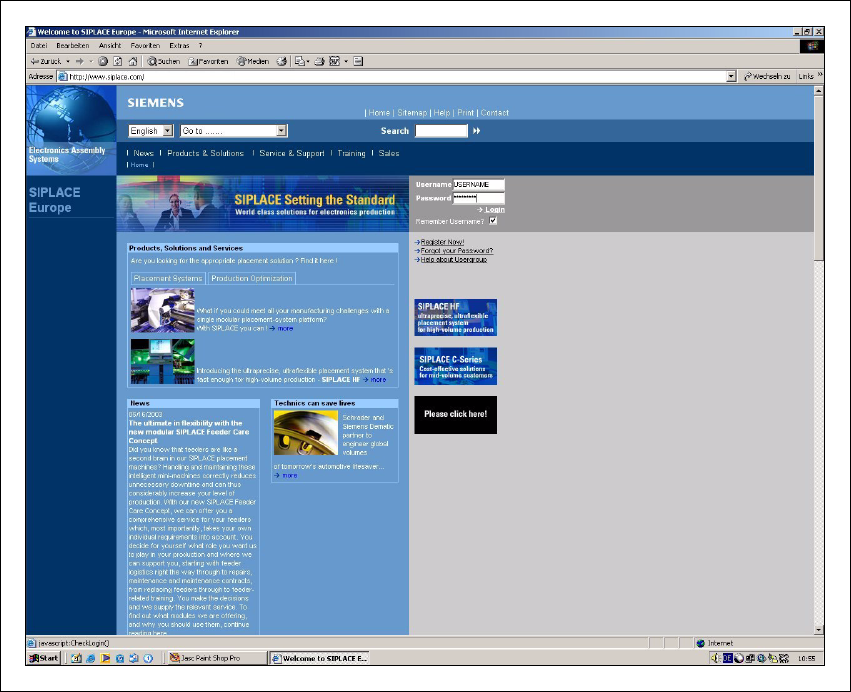
1.1.2 SIPLACE on the World Wide Web (WWW)
We also have our own site on the Internet. Why not log onto our SIPLACE home page at http://
www.siplace.com? 1
All the menus and other information are available in two languages: German and English. 1
1
1
1 Introduction User Manual SIPLACE HS-50
1.1 General Software Version SR.50x.xx 01/2006 US Edition
10
1
Fig. 1.1 - 1 The SIPLACE home page
The various headings contain information on 1
– our products
– services
– contacts, etc.
Registered customers can also access the SIPLACE User Group, where you can call up special
information on our placement systems, such as 1
– technical documentation
– Technical Infos
– spare parts lists, etc.
Registering for access to the User Group is sheer child’s play: 1
Æ Click on ’Register now’.
Æ Complete the registration form and just send it off.
You will then quickly receive access authorization with USER ID and a password. 1