FCM_User Reference Manual.pdf.pdf - 第135页
4022 591 96082 User Re ference Manual 02.02 FCM Multiflex 5-43 MIS 5. 3.3 Pr oce ss Outpu t 5.3.3.1 [ R eports] > [Pr oducti on times ...] T ABL E 5-18 Qui ck Refer ence Actions ■ select [Funct i ons...] i n the MIS p…

MIS
User Reference Manual 4022 591 96082
5-42 FCM Multiflex 02.02
5.3.2.6 SMD Counting, General Remarks
Looking at the MIS process reports and process graphs, you will notice that there
are inconsistencies within the SMD counting.
To have the MIS data interpreted correctly, please take following restrictions into
account.
■ During alignment of one SMD, more than one failure type may occur.
For instance, - in the case of a LAS placement module - a misalign error on both
[Length] and [Width] may occur.
Thus, the sum of the detailed misalignments does not always equal the sum
of the pick retries.
■ As dumped SMDs on LAS placement modules are not counted, a discrepancy
between [Picked], [Placed] and [errors] exists. Normally, pick and place actions
are completed, but not when the FCM Multiflex transport prevents LAS
placement modules to do so. In this case, on production restart the SMDs
involved are dumped without being counted.
■ When on error recovery a retry is issued and this retry fails,
[Auto retries] is
incremented, but
[Manual] is not.
■ Manual errors that occur on a production (re)start from the FCM Multiflex’s
[Stopped] status, by pressing <F5> and again <F5>, are not counted. Only once
the FCM Multiflex status is [Running] or [Waiting]1 , these errors are counted.
■ Manual errors are updated in MIS only if the error has been solved. So, if the
recovery action of a manual error is
[Skip Board] or [Skip Action], this error is
not counted.
■ The
[Auto retries] data are only updated on a MIS data collection action.
4022 591 96082 User Reference Manual
02.02 FCM Multiflex 5-43
MIS
5.3.3 Process Output
5.3.3.1 [Reports] > [Production times...]
TABLE 5-18 Quick Reference
Actions ■ select [Functions...] in the MIS pull-down menu
■ select [Reports]
■ select [Production times...]
Conditions ■ supervisor access level
■ order active
Information ■ FCM Multiflex machine identification and serial no.
■ MIS period name + start/stop date/time
■ action spec name
■ order name
■ report date/time
■ total time for which production
• has been running
• has been paused (stopped by the operator)
• was waiting for a board to enter/leave the run-in/
run-out section
■ total setup time
■ total uptime
■ waiting-for-operator time
■ downtime (machine related + not machine related)
■ power down time
■ data lost due to power down
■ total downtime
■ total elapsed time (= total uptime + total downtime)
■ number of processed boards
■ number of empty production cycles (empty
transport carriers)
■ average cycle time during production =
production running time
number of processed boards + number of empty production cycles
■ number of SMDs mounted
Display Options -
MIS
User Reference Manual 4022 591 96082
5-44 FCM Multiflex 02.02
fcm0543a.tif
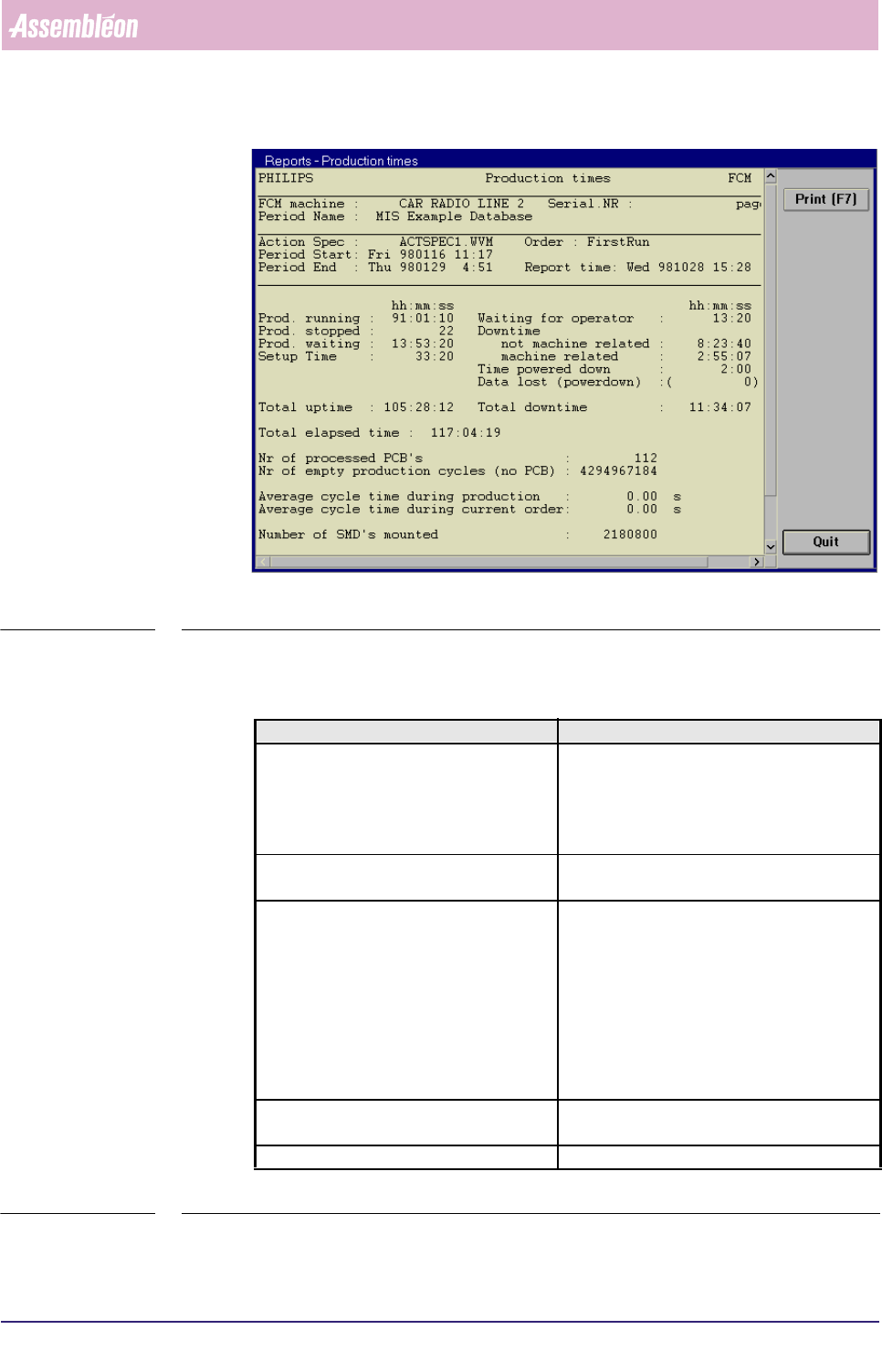
SCREEN 5-35 [Production times...] screen example
✱✱Detailed Information
▼Displayed Information
TABLE 5-19
Report text Explanation
Prod. running
■ the total time for which production has
been running
■ please note that this time is defined as the
sum of the [Running] and [Waiting (board
in runin/runout)] times
Prod. stopped the total time for which the production has
been paused (stopped by the operator)
Prod. waiting the total time the FCM Multiflex was
■ waiting for a board to enter the run-in
section while all carriers were empty
■ waiting for a board to leave the run-out
section while all carriers were occupied +
all SMDs have been placed (for instance,
no boards allowed to leave the run-out
section as a SMEMA-busy signal was given
by the upstream unit)
Setup Time the time between order entry and production
start + the time after the order was completed
Total uptime the sum of the previous 4 items