FCM_User Reference Manual.pdf.pdf - 第177页
4022 591 96082 User Re ference Manual 02.02 FCM Multiflex 5-85 MIS F oll ow in g f ormat s a dvic e is give n. T ABLE 5- 42 Examp l es A fra gmen t of a MI S export fil e gen er ated with the [Q uote d st ri ngs ] file f…
MIS
User Reference Manual 4022 591 96082
5-84 FCM Multiflex 02.02
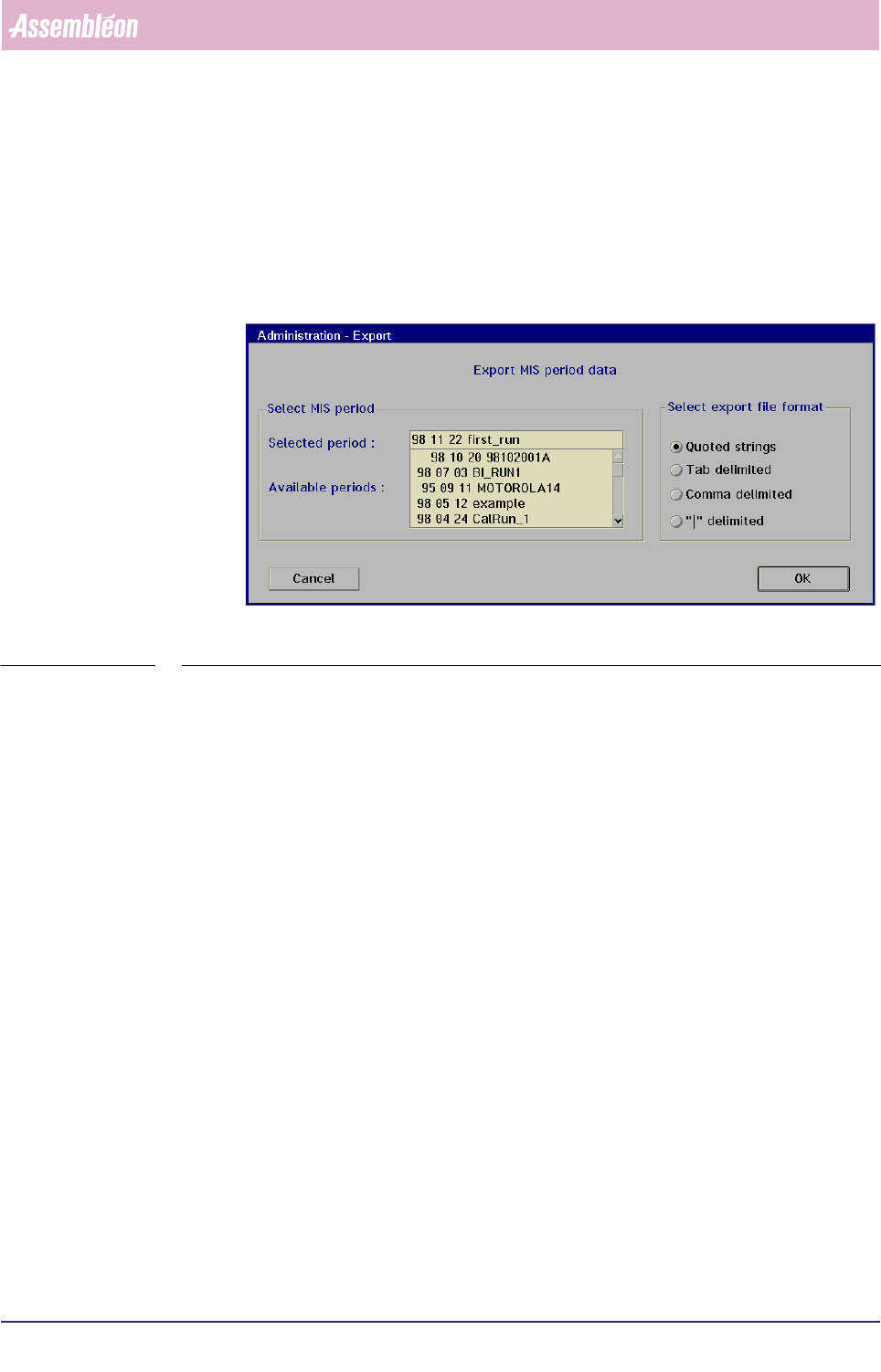
▼Controls
■ select the MIS period from the [Available periods] window in the [Export...]
menu (see SCREEN 5-49) from which you want to export its data
■ select the proper export format in the
[Select export file format] window
■ select
[OK] to export the MIS data
■ select [Cancel] to quit the menu
fcm0572a.tif
SCREEN 5-64 [Export...] screen example
If you selected a past MIS period, an export file is immediately created with all MIS
data from that period.
If you selected a running MIS period, an export file is immediately created with all
MIS data so far. Each time you give this command again, a new, extra file will be All
these files will be numbered as “MANEXPxx.TXT”, where
MAN = manual
1 ;
EXP = export;
xx = serial number.
Numbering is from 00 through 99; after number 99 is reached, MIS will overwrite
the old exports, starting with the number 00.
Selected export file format
Within the
[Export...] menu (see SCREEN 5-49), you can select different export file
formats. All formats are in ASCII text, and they differ only in what delimiter
format is used.
1. This text was only functional in the former MIS
version to distinguish between manual and auto-
matic export.
4022 591 96082 User Reference Manual
02.02 FCM Multiflex 5-85
MIS
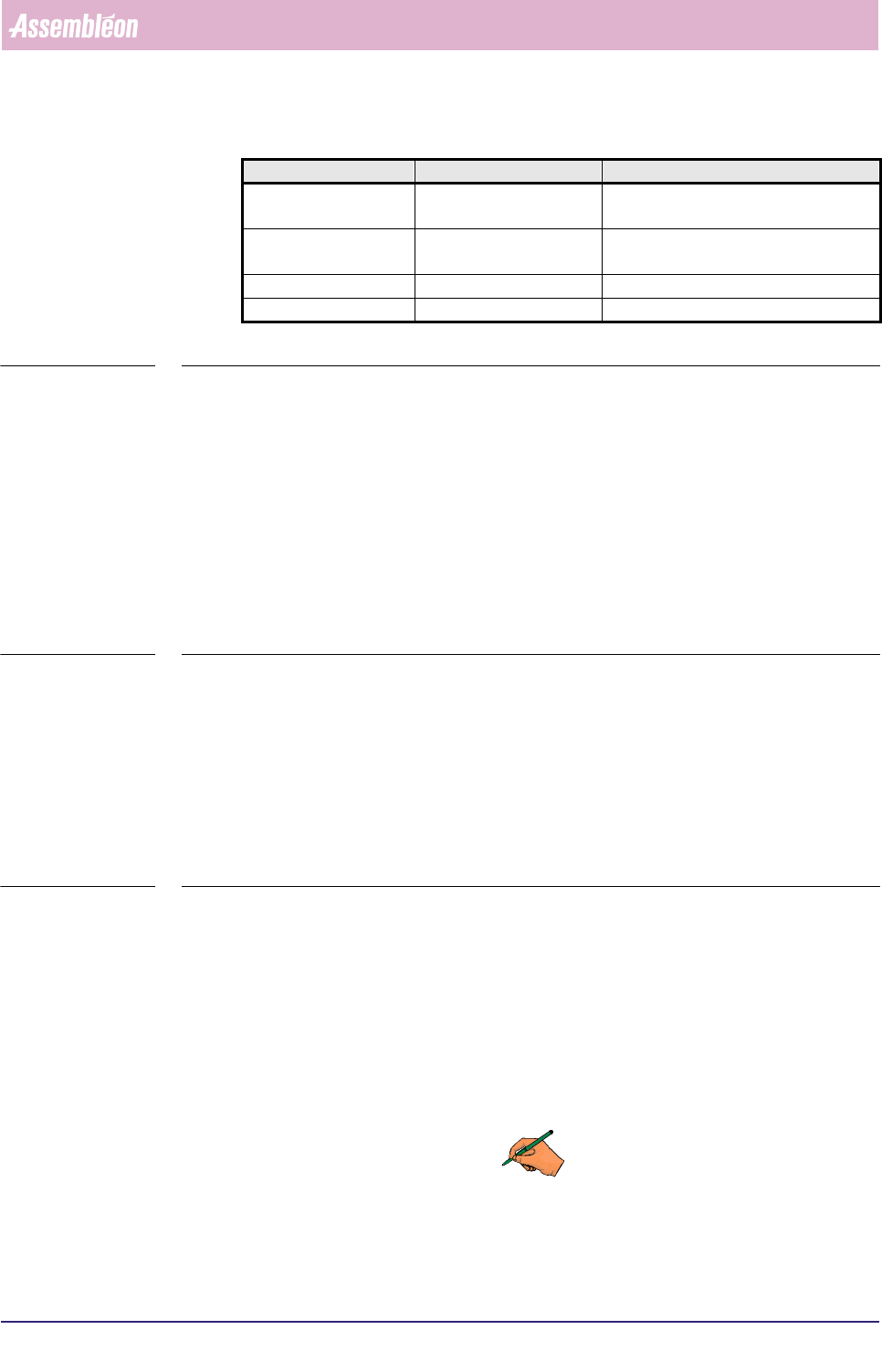
Following formats advice is given.
TABLE 5-42
Examples
A fragment of a MIS export file generated with the
[Quoted strings] file format
option could look as follows:“Module:” “PIP 1”
“Label” “feed_pos” “pick_pos” “n_pick” “Aut.AP” “Aut.AA” “Man.AA” “Man.AP” “Lost.AA” “Ret.AP” “skipped” “placed”
“COUNTS” 1 1 2086 0 2 0 0 2 0 1 2080
“COUNTS” 2 1 3124 1 1 0 0 3 0 0 3120
“COUNTS” 3 1 1048 2 2 1 0 0 3 1 1040
“COUNTS” 4 1 1045 0 2 1 0 0 1 1 1040
“COUNTS” 5 1 2083 0 2 1 0 0 0 1 2080
“COUNTS” 6 1 3134 3 0 1 0 4 0 0 3120
TABLE 5-43
The same fragment
[Comma delimited] would read:
Label feed_pos pick_pos n_pick Aut.AP Aut.AA Man.AA Man.AP Lost.AA Ret.AP skipped placed
COUNTS 1 1 2086 0 2 0 0 2 0 1 2080
COUNTS 2 1 3124 1 1 0 0 3 0 0 3120
COUNTS 3 1 1048 2 2 1 0 0 3 1 1040
COUNTS 4 1 1045 0 2 1 0 0 1 1 1040
COUNTS 5 1 2083 0 2 1 0 0 0 1 2080
COUNTS 6 1 3134 3 0 1 0 4 0 0 3120
TABLE 5-44
▼Export file description
Each export file is split up into:
■ Period info
■ Time registration
■ Production counts
■ Process errors
■ Machine errors
REMARK: PLease bear in mind that not all MIS reports data are included in the export
files.
Delimiter External program Remarks
[Quoted strings] Lotus 1-2-3 import into Lotus 1-2-3 with command
[File] > [Import; Delimited text file]
[Tab delimited] MS-Excel and OS/2-
Excel
open file in Excel as [Text file]
[Comma delimited] dBase or MS-Excel
[“|” delimited] SQL databases e.g. Informix
MIS
User Reference Manual 4022 591 96082
5-86 FCM Multiflex 02.02
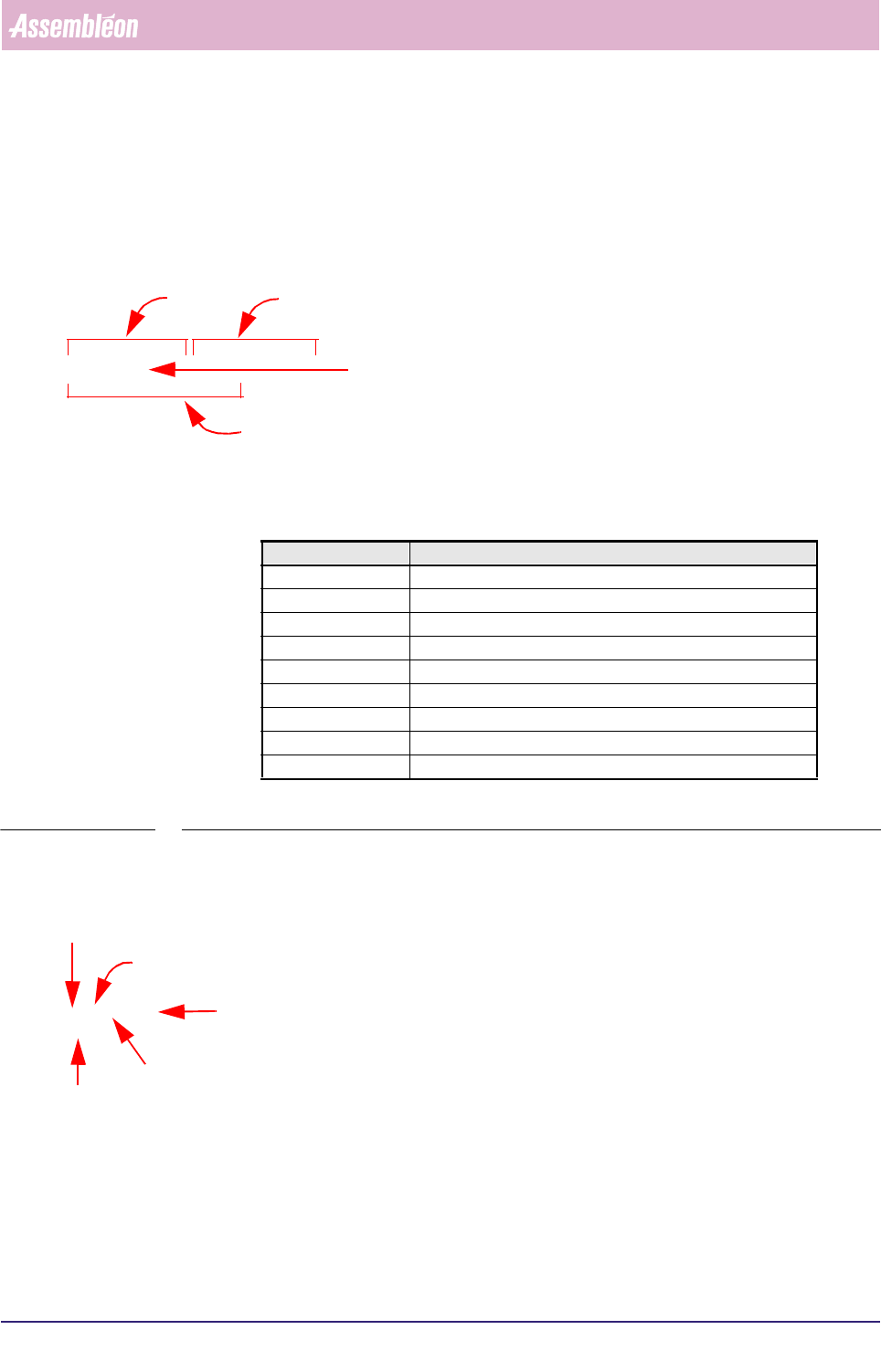
To keep it quite plain, following explanation will be based on practical examples
fragments.
Period info
"Period info"
"ORDTIME" "Tue 981020 9:10" "Tue 981020 21:30"
"ORDERID" "98102001"
"ACTSPEC" "..\ACTSPEC\5830A002.AF2"
Time registration
"Time registration"
"Production times in seconds"
"RUN" 20718
"STOP" 7796
"WAITING" 7869
"SETUP" 327
"RESPONSE" 6526
"OERR" 749
"MERR" 445
"DOWN" 0
"LOST" 0
TABLE 5-45
Production counts
"Production counts"
"boardS" 259 0 7 306
"SMDS" 289193
period start
period end
action spec name
identification name of the order
Text Explanation
“RUN” total time production has been running
“STOP” total time production has been stopped
“WAITING” total time the FCM was waiting
“SETUP” setup time
“RESPONSE” waiting-for-operator time
“OERR” not-machine-related down time
“MERR” machine-related down time
“DOWN” total of power down time
“LOST” total time for which MIS data was lost due to power down
number of finished boards
number of incomplete boards
number of skipped boards
number of production cycles
number of placed SMDs