FCM_User Reference Manual.pdf.pdf - 第188页
MIS User Re ference Manual 4022 5 91 96082 5-96 F CM Mult ifl ex 02.02 5.4.2 C onventio ns 5.4.2.1 Menu Item T ext Lay-out In this man ual , all references t o menu items are declar ed by te xt w i thi n square bra c ket…
4022 591 96082 User Reference Manual
02.02 FCM Multiflex 5-95
MIS
5.4 Glossary and Conventions
5.4.1 Glossary
Most abbreviations are explained within the text of this manual. Though, for your
convenience, a survey of the most important used abbreviations are listed below in
alphabetic order.
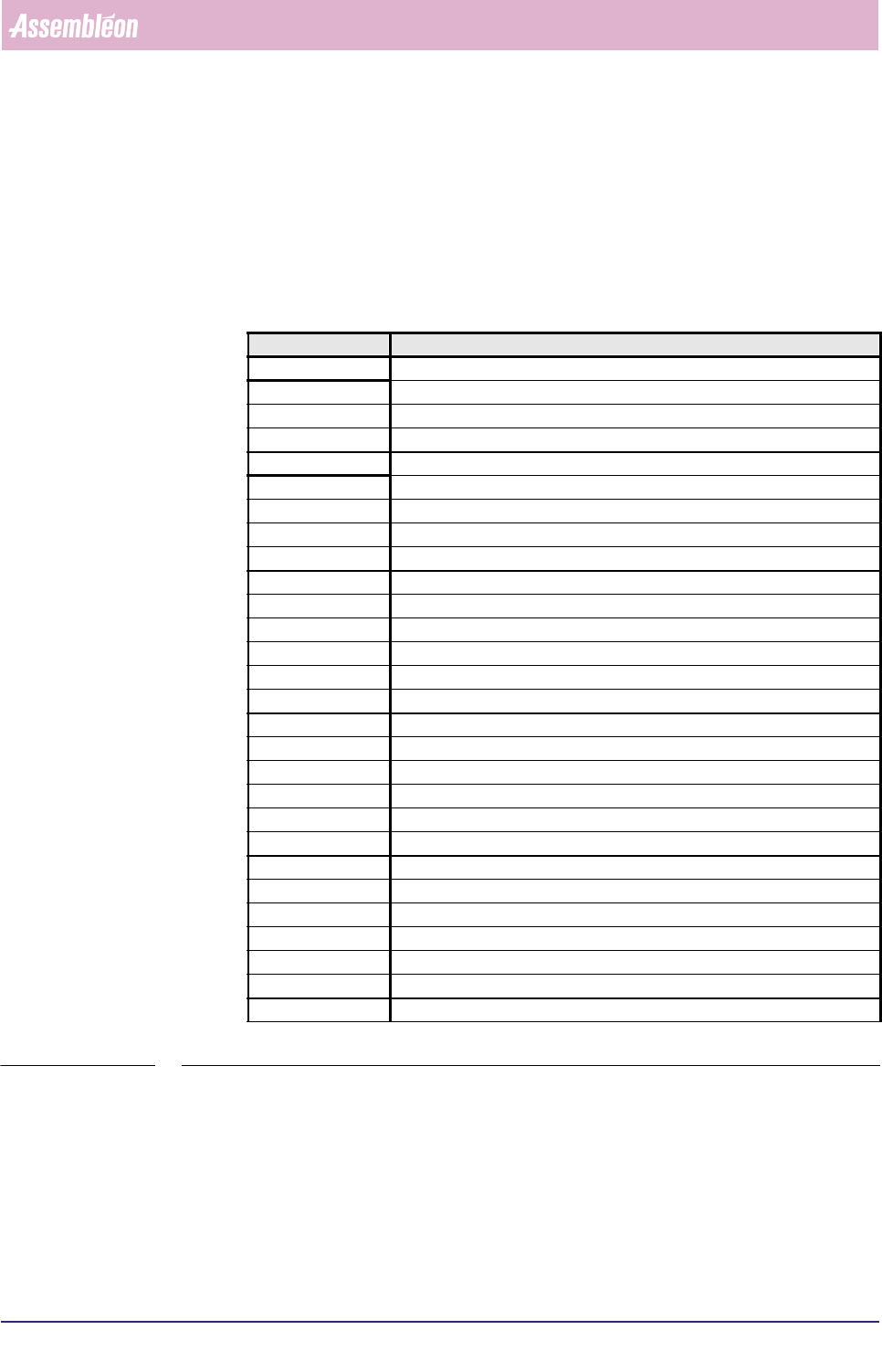
TABLE 5-55
Abbreviation Meaning
action spec action specification
AM Automation Module
BBRAM Battery Backup Random Access Memory
BI Barcode Identification
BMS Bad Mark Sensing
BVM Board Vision Module
DC DFA/BMS Controller
DFA Dynamic Fiducial Alignment
EPD Electrical Proximity Detector
EPROM Erasable Programmable Read Only Memory
FCM Multiflex Fast Component Mounter
GPM General Purpose Module
LA Laser Align
LAS placement module with Laser Align System
MIS Manufacturing Information System
MUP Multi User Pipette
board Printed Circuit Board
PIP PIck and Placement module
PPM Parts Per Million
PPS Production Preparation System
PPU Placement Phi Unit
PROM Programmable Read Only Memory
SBIP Single Board Image Processor
SECS-II SEMI Equipment Communications Standard - Part II
SMD Surface Mounted Device
SMEMA Surface Mount Equipment Manufacturers Association
TC Transport Controller
WVM Wide Vision Module
MIS
User Reference Manual 4022 591 96082
5-96 FCM Multiflex 02.02
5.4.2 Conventions
5.4.2.1 Menu Item Text Lay-out
In this manual, all references to menu items are declared by text within square
brackets.
For example, the command “select
[Functions...]” means that you should place the
mouse pointer on the menu text “Functions...”, and then activate the function by
clicking the mouse knob.
A figure caption “
[Process graph...] screen example” means that this example
results from the
[Process graph...] command.
If you should select two or more menu items one after another, the needed
selections are denoted as above, the respective selections being connected with a
“>” sign.
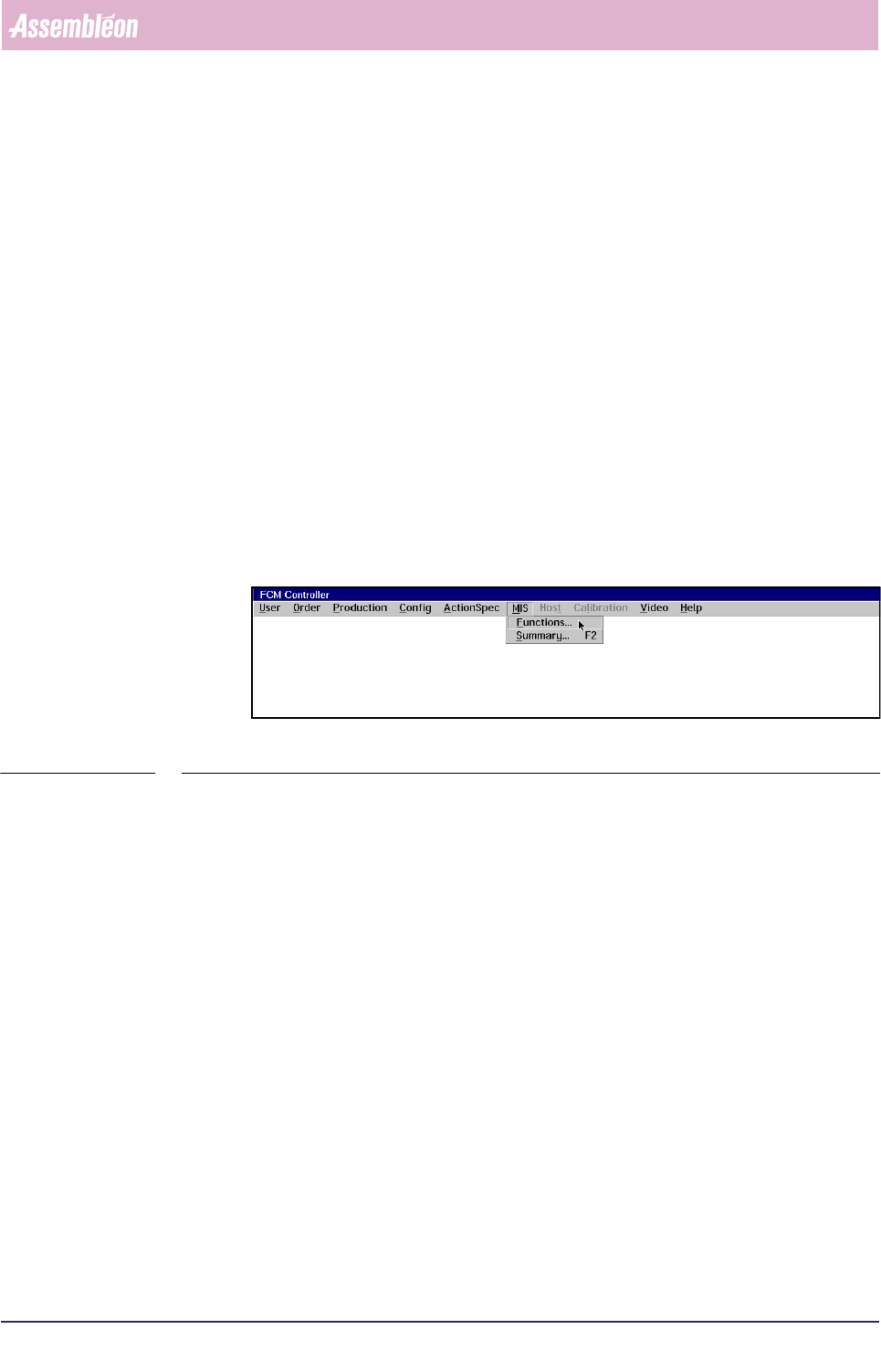
For example, the command select “
[MIS] > [Functions...]” means that you first
should select “MIS” in the FCM Multiflex main menu, and then directly select the
MIS sub-menu “Functions”. (see SCREEN 5-70).
fcm0506a.tif
SCREEN 5-70 MIS pull-down menu
5.4.2.2 Key Selection Text Lay-out
To state that you should push a specific key from the keyboard, the key’s name is
declared by text within “<...>” in this manual.
For example, the command “press
<F7>” means that you should press the function
key F7 on your keyboard.

4022 591 96082 User Reference Manual
02.02 FCM Multiflex 5-97
MIS
5.5 Index
A
abbreviations 95
All modules 18
All modules, Averages 30
All modules, Details 32
all process errors 9
All reports 91
all reports 78
associated MIS export files 83
Auto retries 42
auto retries 13, 16, 29, 49
automatic MIS data collection 4
Automatic MIS Period Creation 5
Available periods 84
average cycle time 43
Average cycle time during current
order 46
Average cycle time during
production 46
B
Backup 5
badly placed SMDs 48
bar-graphs 28, 49
BI 25
BVM 24
C
carriers were empty 44
chronological log 62
circuit number 48
Collect data 77
collection command 3
command from the supervisor 3
consistent data 76
Controls 10, 14, 26, 40, 51, 56, 60,
71, 73, 75, 77, 84
Conventions 95
Copy from archive 80
Copy to archive 81
D
Data Collection 3
data from the FCM controller 81
database 82
Date + Order name 3
dBase 85
define automatic MIS periods 93
Delete 89
delimiter format 84
Detailed 44
Detailed Information 7, 12, 16, 28,
44, 48, 54, 57, 62, 74, 76, 79, 82,
93
Displayed Information 44
down time 54
Downtime 45
Drift 54
drift 57
dumped SMDs 42
E
empty transport carriers 43
error by a numeric code 54
error cause number 63
Error causes 92
error levels 12
Error type code list 63
Export file description 85
export file formats 84
export MIS data 82
F
feeder position 28
File Handling 80
from the FCM controller to archive 82
G
General data 10
General Remarks 42
Glossary 95
Graph explanation 50
graphical overview 9, 28
H
Help Function 2
Hold 79
Human Interface 1
I
inconsistencies 42
Informix 85
insert a temporary MIS period 74
item code 51