FCM_User Reference Manual.pdf.pdf - 第189页
4022 591 96082 User Re ference Manual 02.02 FCM Multiflex 5-97 MIS 5.5 I nde x A abbre via tion s 95 All modul e s 18 All mod ul es, Av era ges 30 All modul e s , D etail s 32 al l p r oc e ss er r o r s 9 All repo rt s …
MIS
User Reference Manual 4022 591 96082
5-96 FCM Multiflex 02.02
5.4.2 Conventions
5.4.2.1 Menu Item Text Lay-out
In this manual, all references to menu items are declared by text within square
brackets.
For example, the command “select
[Functions...]” means that you should place the
mouse pointer on the menu text “Functions...”, and then activate the function by
clicking the mouse knob.
A figure caption “
[Process graph...] screen example” means that this example
results from the
[Process graph...] command.
If you should select two or more menu items one after another, the needed
selections are denoted as above, the respective selections being connected with a
“>” sign.
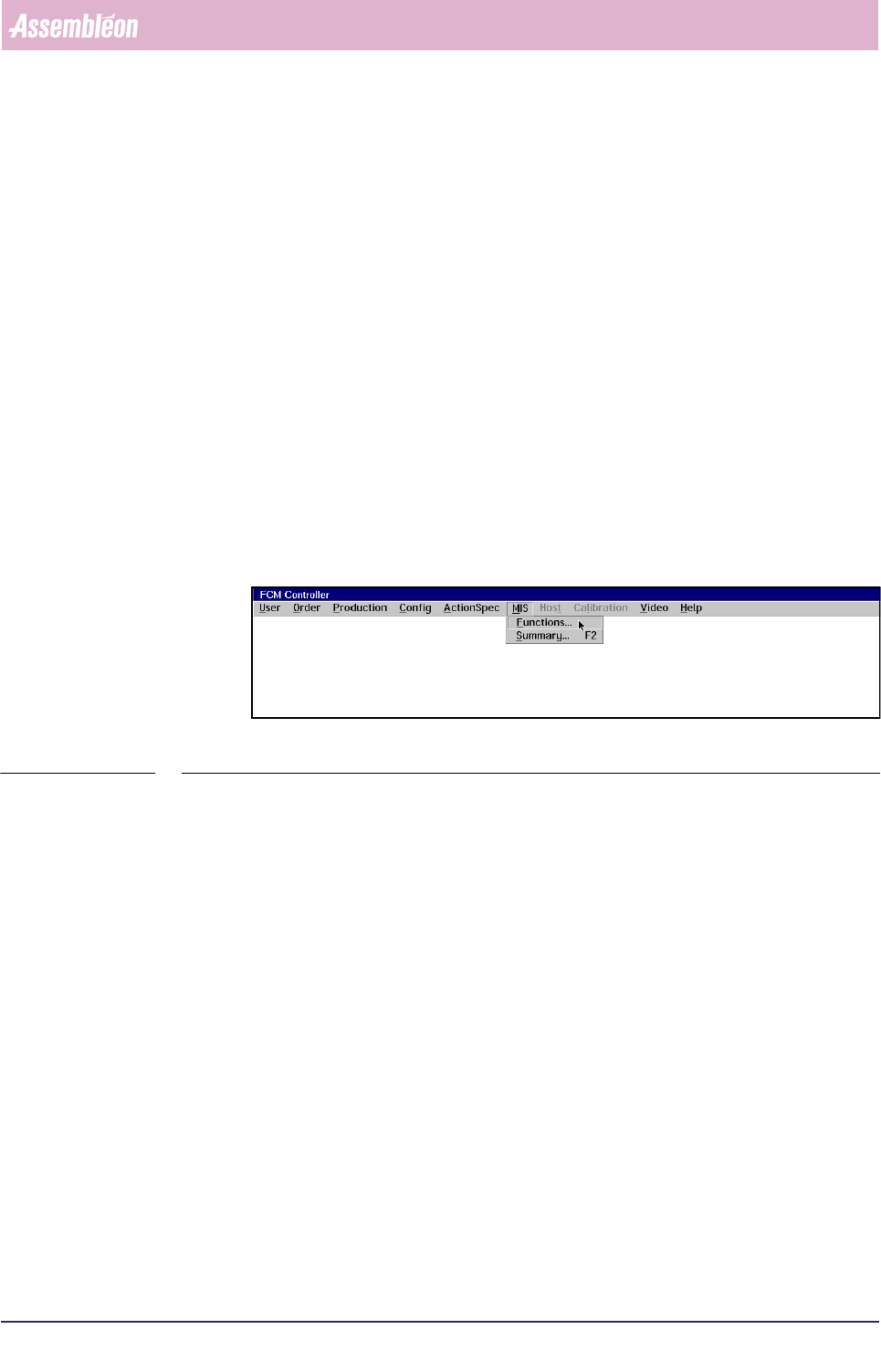
For example, the command select “
[MIS] > [Functions...]” means that you first
should select “MIS” in the FCM Multiflex main menu, and then directly select the
MIS sub-menu “Functions”. (see SCREEN 5-70).
fcm0506a.tif
SCREEN 5-70 MIS pull-down menu
5.4.2.2 Key Selection Text Lay-out
To state that you should push a specific key from the keyboard, the key’s name is
declared by text within “<...>” in this manual.
For example, the command “press
<F7>” means that you should press the function
key F7 on your keyboard.

4022 591 96082 User Reference Manual
02.02 FCM Multiflex 5-97
MIS
5.5 Index
A
abbreviations 95
All modules 18
All modules, Averages 30
All modules, Details 32
all process errors 9
All reports 91
all reports 78
associated MIS export files 83
Auto retries 42
auto retries 13, 16, 29, 49
automatic MIS data collection 4
Automatic MIS Period Creation 5
Available periods 84
average cycle time 43
Average cycle time during current
order 46
Average cycle time during
production 46
B
Backup 5
badly placed SMDs 48
bar-graphs 28, 49
BI 25
BVM 24
C
carriers were empty 44
chronological log 62
circuit number 48
Collect data 77
collection command 3
command from the supervisor 3
consistent data 76
Controls 10, 14, 26, 40, 51, 56, 60,
71, 73, 75, 77, 84
Conventions 95
Copy from archive 80
Copy to archive 81
D
Data Collection 3
data from the FCM controller 81
database 82
Date + Order name 3
dBase 85
define automatic MIS periods 93
Delete 89
delimiter format 84
Detailed 44
Detailed Information 7, 12, 16, 28,
44, 48, 54, 57, 62, 74, 76, 79, 82,
93
Displayed Information 44
down time 54
Downtime 45
Drift 54
drift 57
dumped SMDs 42
E
empty transport carriers 43
error by a numeric code 54
error cause number 63
Error causes 92
error levels 12
Error type code list 63
Export file description 85
export file formats 84
export MIS data 82
F
feeder position 28
File Handling 80
from the FCM controller to archive 82
G
General data 10
General Remarks 42
Glossary 95
Graph explanation 50
graphical overview 9, 28
H
Help Function 2
Hold 79
Human Interface 1
I
inconsistencies 42
Informix 85
insert a temporary MIS period 74
item code 51

User Reference Manual 4022 591 96082
5-98 FCM Multiflex 02.02
MIS
K
Key Selection Text Lay-out 96
keyboard 96
L
laser dirty error 37
Last report 78
line-graph 28, 49
Lotus 1-2-3 85
M
machine errors 53
Machine errors sections 88
Machine identification 90
Machine performance 53
machine performance 1
manual retries 13, 16, 29, 49
Manufacturing Information System
(MIS) 1
Menu Item Text Lay-out 96
MIS data collection command 76
MIS Data Control 73
MIS database 3
MIS period data from archive 80
MIS period name 73
MIS Period Naming 3
MIS software module 1
MIS software version 72
MS-Excel 85
N
Number of SMD’s mounted 46
O
old exports 84
old MIS periods 3
P
Parameter Settings 90
past MIS periods 73
Period info 86
placement module is busy 77
placement module position 28
positions and part numbers 10
Print 78
Print Options 78
Print set 91
printer settings 79
Printer setup 79
Process errors sections 87
Process graph 30
process graph 48
Process Output 43
process output 1
Process Performance 9
process performance 1
Product Item Code Plot-drawing 51
Production counts 86
production order 3
Q
Quick Reference 7, 11, 15, 27, 43, 47,
53, 57, 61, 74, 76, 79, 82, 93
R
recovery action number 63
refires 13, 17, 29, 49
Report text explanation 14, 54
response time 54
S
schematic survey 6
SECS-II 4
Selected export file format 84
Servo diagnostic 60
Servo diagnostics 54
servo increment pulses 54
servo warnings 54
Servo ..... tracking warnings 54
shift schedule 5, 93
Show version 72
slip 54
SMD Counting 42
SMD parameters 48
SMD’s item code 48
SMD’s reference identification 51
SMEMA-busy signal 44
Specific LAS module, Misalign
errors 36
Specific module, All errors 34
Specific placement module 21
Specific WVM module, Misalign
errors 38
SQL databases 85
square brackets 96
Summary 9