FCM_User Reference Manual.pdf.pdf - 第193页
4022 591 960 82 Us er Reference Man ual 02.02 FC M Multif lex 6-1 Pr oduc t Ch ang e Ov er CHAPTER 6 Pr oduct Ch ange Ov er Normal Product Chang e Over is described in the Operatin g Manual (see gray flow). Exceptions on…

User Reference Manual 4022 591 96082
5-100 FCM Multiflex 02.02
MIS
4022 591 96082 User Reference Manual
02.02 FCM Multiflex 6-1
Product Change Over
CHAPTER 6 Product Change Over
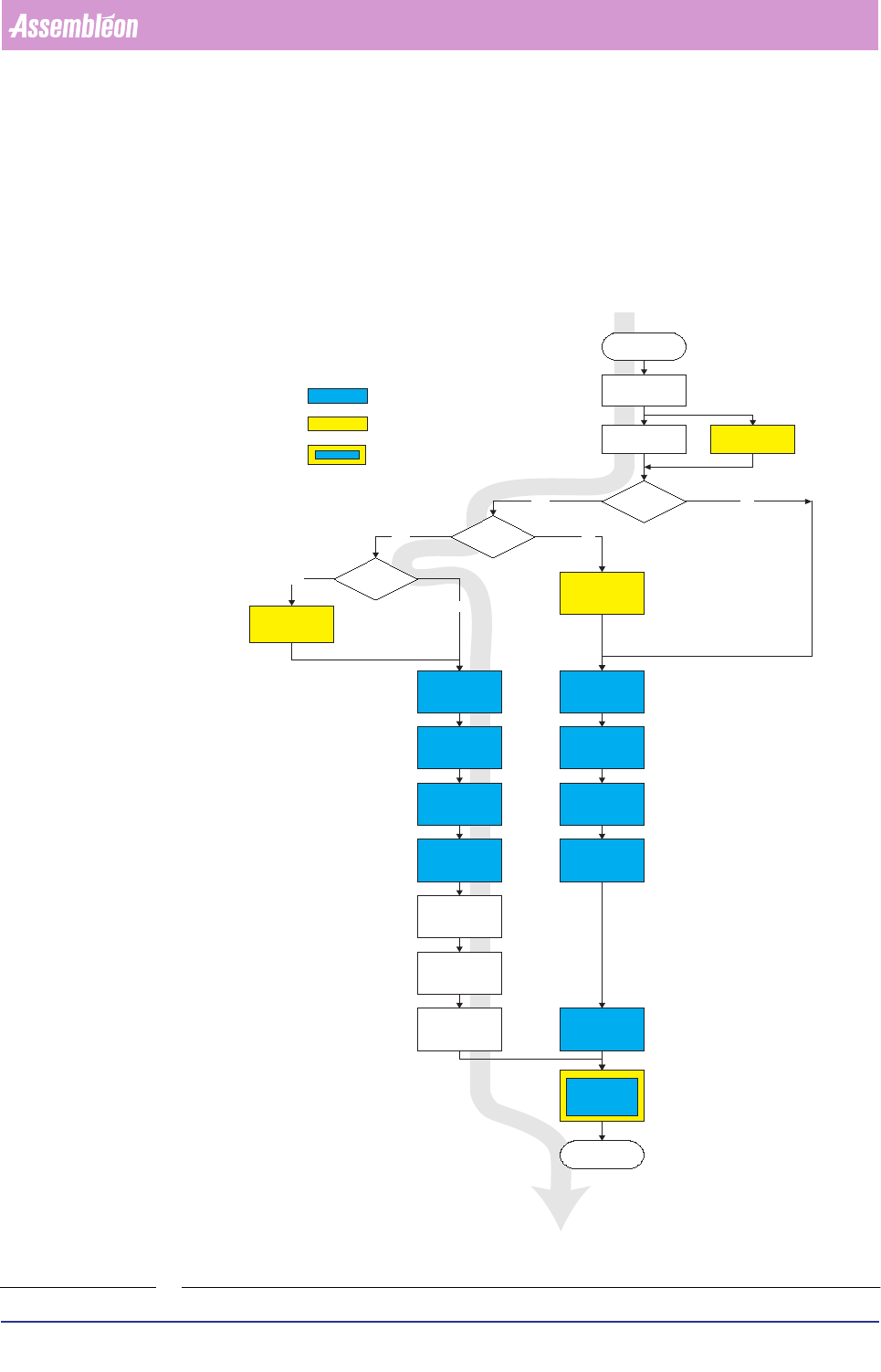
Normal Product Change Over is described in the Operating Manual (see gray flow).
Exceptions on the regular Change Over are marked yellow in the flowchart below.
Occasionally Fiducials, Badmarks and Component files need to be updated These
actions should be done just before start-up production.
FIGURE 6-1 On line activities
Order Entry
Order Scheduling
Calibration
required ?
Ye s
Calibrate
product ?
Ye s
Exchange carrier
Adjust Width &
Height
Adjust Stoppers
Runin & Runout
Exchange
calibration nozzles
Start Calibration
No
Link new product
action spec with
exsisting calibrion
file
Exchange carrier
Adjust Width &
Height
Adjust Stoppers
Runin & Runout
Exchange Nozzles
Start-up
Production
On line activities
No
Use default
Strip & Ref
positions
Ye s
Set correct
strip&referencepin
positions.
No
Exchange feeders
& Trolleys
Exchange feeders
& Trolleys
Described in User Reference Manual
Optional action
Exchange Nozzles
Advanced Order
Scheduling
Teach
Fiducials
Badmarks
Optional action & described in User
Reference Manual
Product Change Over
User Reference Manual 4022 591 96082
6-2 FCM Multiflex 02.02
6.1 Copy New as to FCM Multiflex Controller
Order Preparation
This section describes how to prepare new Action Specs for the use during a batch
change. It explains how to:
■ Copy a new Action Spec to the FCM Controller
■ Associate a new Action Spec with a System Calibration File
■ Associate a new Action Spec with a BVM Calibration File
■ Enter one or more orders
■ Schedule orders for a coming production period.
After the Order has been prepared, the Machine Setup can be performed.
6.1.1 Copying a New Action Spec to the FCM Multiflex Controller
An Action Spec is normally generated on floppy and delivered by the supplier or
PPS department. If the Action Spec is not present in the FCM Controller, it is
necessary to copy it first.
Procedure:
1. Change to Supervisor Level in the “User” pull-down menu.
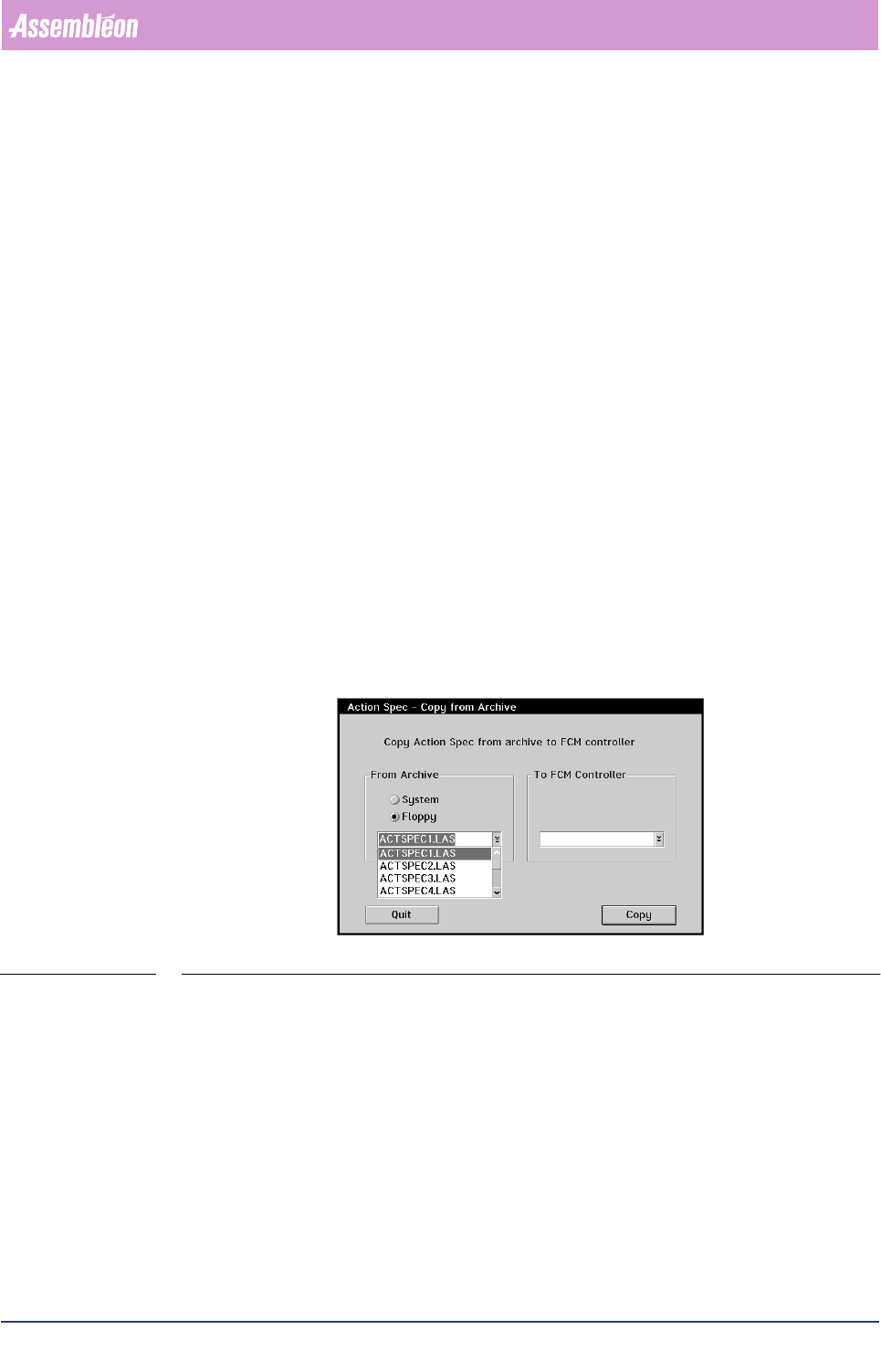
2. Select the “Copy from Archive” function in the “Action Spec” pull-down menu of
the main screen. The following dialogue will appear:
SCREEN 6-1 Copying a new Action Spec to the FCM Controller
3. Insert the floppy with the new Action Spec in the disk drive
4. Select {Floppy}
5. Tap the touch pad on the drop-down button in the “From Archive” box. A
scrollable list of all available Action Specs on the floppy will be displayed.
6. Select the requested Action Spec from the list.
7. If you want to rename the original Action Spec, enter the new file name in the
entry field of the “To FCM Controller” box. If not, the same name as the original
file will be used,
8. Select [Copy] or press <Enter> to perform the copy process,
9. Select [Quit] or press <Esc> to return to the Main Screen.
10.Change back to Operator Level in the “User” pull-down menu.