FCM_User Reference Manual.pdf.pdf - 第238页
Pr oduc t Ch ang e Ov er User Re f eren ce Manu al 4022 591 960 82 6-46 FCM M ult ifle x 02.02 6.6 SMD Info Files 6.6.1 CLM 6.6.1. 1 Intr oductio n In or d er t o be abl e t o align a c ompon en t by la ser al ignm en t,…
4022 591 96082 User Reference Manual
02.02 FCM Multiflex 6-45
Product Change Over
6.5.1.4 Load Badmark Teach Data...
TABLE 6-16
!
WARNING: THE OLD TEACH DATA OF ALL BADMARK TYPES IN THE CURRENT (ACTIVE)
DATABASE WILL BE OVERWRITTEN!
6.5.1.5 Copy From Archive...
TABLE 6-17
The archive disk can be a floppy disk drive or any other in- or external disk drive.
From there it can be moved to the current (active) database by the
[Load Badmark
Teach Data...]
command.
6.5.1.6 Copy To Archive...
TABLE 6-18
The archive disk can be a floppy disk drive or any other in- or external disk drive.
6.5.1.7 Delete...
TABLE 6-19
)XQFWLRQ $XWKRUL]DWLRQ
Copy teach data from a selected file on disk to the current (active)
database.
- Supervisor
- Maintenance/ Service Engineer
)XQFWLRQ $XWKRUL]DWLRQ
Copy teach data from the archive disk drive to a file on the (system)
disk.
- Supervisor
- Maintenance/ Service Engineer
)XQFWLRQ $XWKRUL]DWLRQ
Copy teach data from a file on the (system) disk to the archive disk
drive.
- Supervisor
- Maintenance/ Service Engineer
)XQFWLRQ $XWKRUL]DWLRQ
Delete badmark teach data files. - Supervisor
- Maintenance/ Service Engineer
Product Change Over
User Reference Manual 4022 591 96082
6-46 FCM Multiflex 02.02
6.6 SMD Info Files
6.6.1 CLM
6.6.1.1 Introduction
In order to be able to align a component by laser alignment, it is necessary to have
all relevant information concerning this component available.
For each package type, this information is available in an SMD information file, the
so-called “SMD Info File”. The FCM Multiflex database you received with your FCM
Multiflex software package contains SMD information files for the most commonly
used component package types, ranging from type 0402 up to SO16. Each package
type out of the Package Type Data Base
1
is linked to a unique SMD info file.
The supervisor or maintenance/service engineer has the possibility to edit a
specific SMD info file, using the [Edit SMD Info] function.
When editing, the user can either change the current values, or define a new SMD
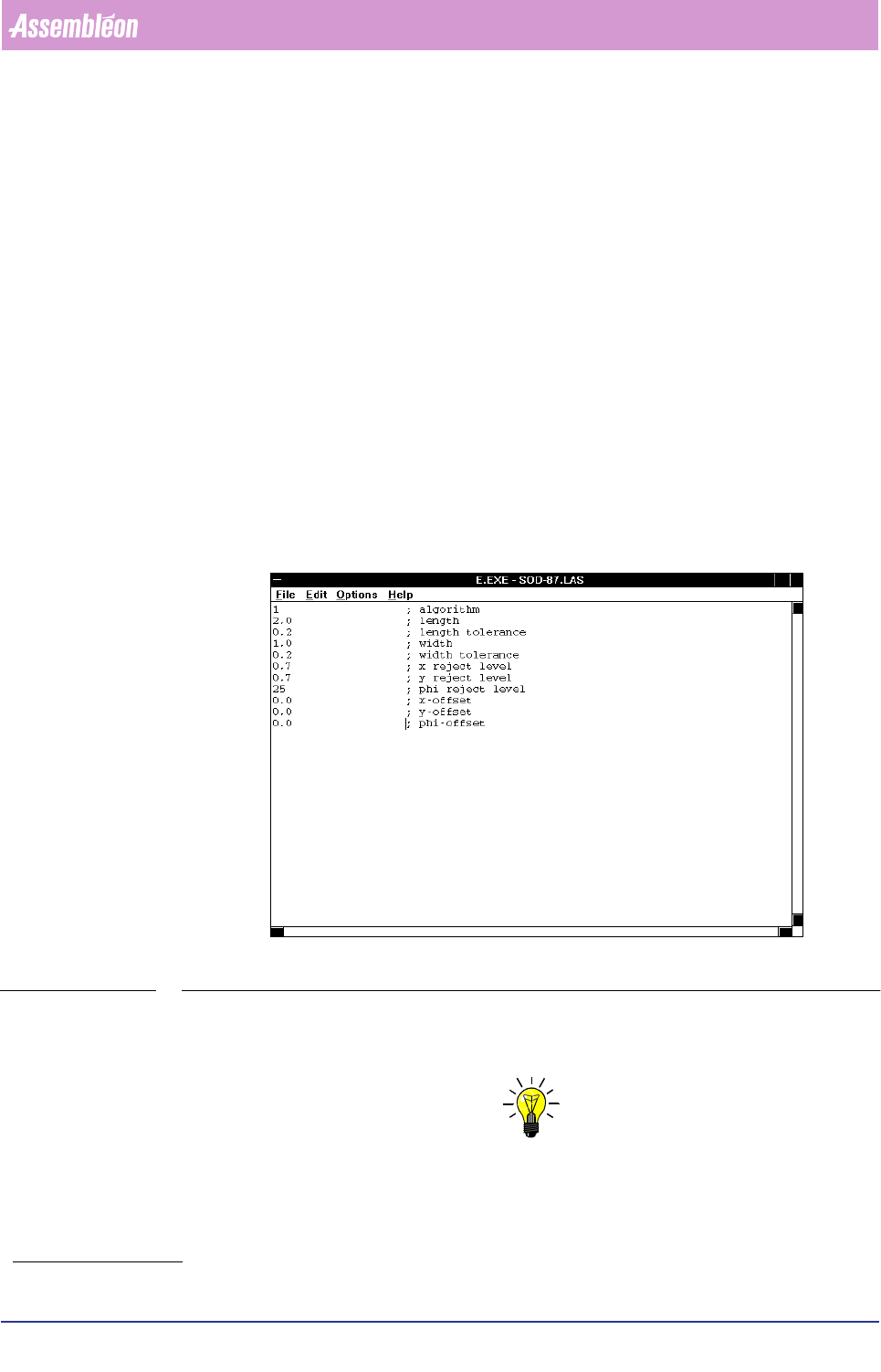
info file type; see FIGURE 6-15.
FIGURE 6-15 Editing an SMD info file
When an existing SMD info file has been modified, it is advised to save it under a
new name. In this way, the original file will not be corrupted.
NOTE: Inform the PPS department when you have created a new SMD info file; in
this way they can use this new file name whenever new action specs should
be generated!
1. See the Package Type Data Base list.
4022 591 96082 User Reference Manual
02.02 FCM Multiflex 6-47
Product Change Over
6.6.1.2 Algorithm
In order to determine the algorithm which should be used for calculating the X, Y,
and Phi offsets, it is necessary to know how the component is positioned in the
laser beam.
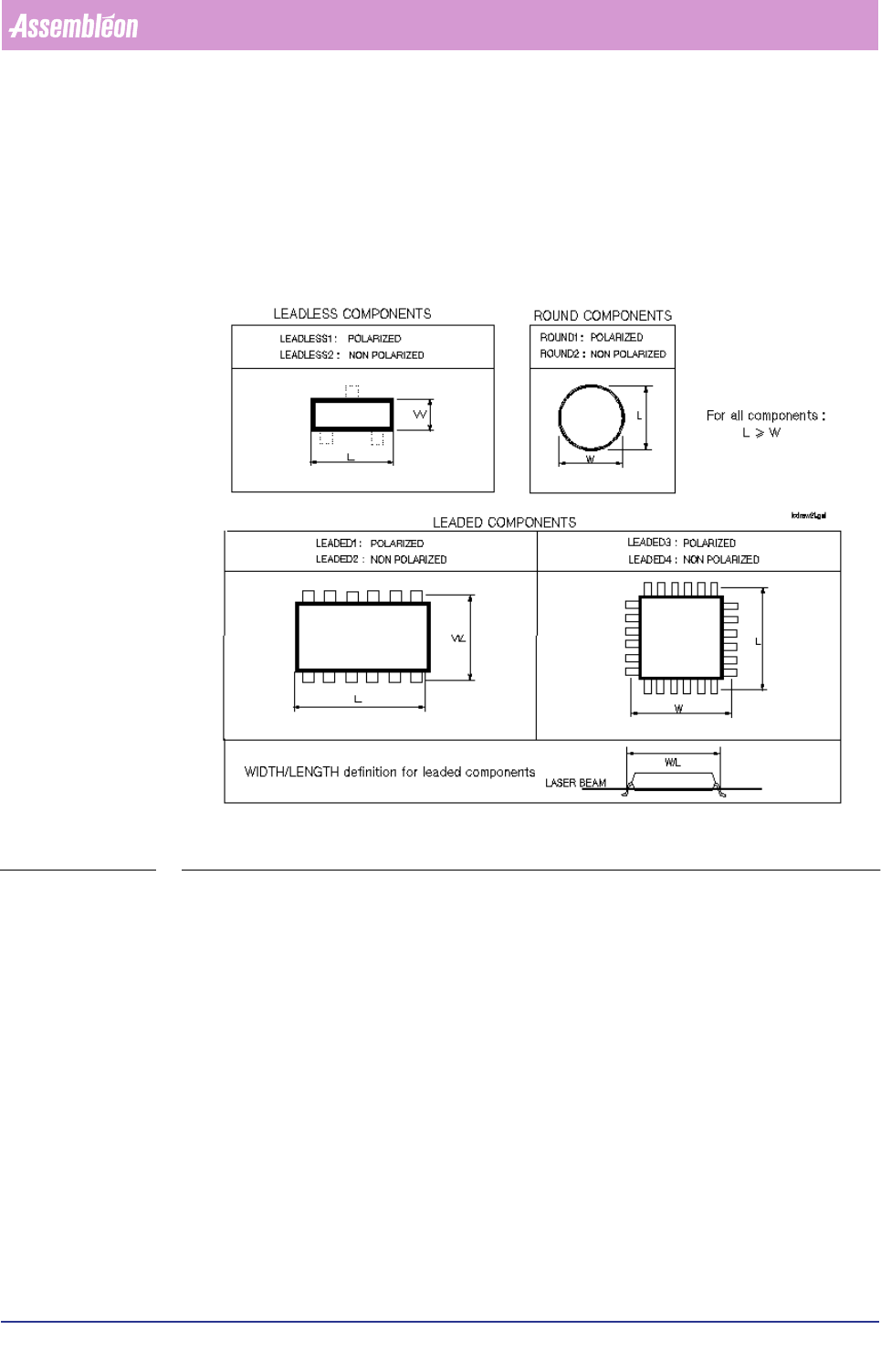
For this purpose we defined various component types; FIGURE 6-16.
FIGURE 6-16 Component types
Component Type Definitions
■ LEADLESS
A component type is defined as “LEADLESS” if it contains no leads, or all leads
remain beyond the laser beam.
In both cases, the component’s body determines its centre.
We define two leadless component types:
• LEADLESS 1 = polarized
• LEADLESS 2 = non-polarized
■ LEADED
A component type is defined as “LEADED” if the laser beam shines on one or
more (pair of) leads.
In this case, the component’s leads determines its centre.