FCM_User Reference Manual.pdf.pdf - 第282页
Pr oduc t Ch ang e Ov er User Re f eren ce Manu al 4022 591 960 82 6-90 FCM M ult ifle x 02.02

4022 591 96082 User Reference Manual
02.02 FCM Multiflex 6-89
Product Change Over
▼ General important information
• Ruler offsets are adjustable in the SMD info file; normally the value 3 is used
for most components (5 or 7 is also possible if you have components with a
bigger lead width). Ruler offset is in pixels; one pixel = 75x 75 µm. Always
use odd ruler widths in order to get valid mean calculation results.
• The body length and width in the SMD info file must be correct, because they
determine the positions of the leads together with the number of leads and
the lead pitch.
• For the ruler threshold, the value is normally between 20 and 30, but it
depends on the specific component type and the amount of light used.
• The search area as indicated in the drawings matches the reject level in the
SMD info file.
• With this algorithm, you can describe more lead groups a side (North/South/
East/West).
• You can enable/disable the skew angle detection by using the NT editor. (For
details about skew angle detection, see QFP algorithm.)

Product Change Over
User Reference Manual 4022 591 96082
6-90 FCM Multiflex 02.02
4022 591 96082 User Reference Manual
02.02 FCM Multiflex 7-1
Advanced Order Scheduling
CHAPTER 7 Advanced Order Scheduling
7.1 Scheduling Orders
After all the necessary orders have been entered, it is possible to prepare an order
schedule for the coming production period. Normally this is not an obligatory part
of the Order Preparation procedure, and can be skipped if necessary.
However, when using the optional Board Identification Module in front of your
machine, activating of orders is obligatory. Please refer to the “Option Manual FCM
Multiflex Board Identification FC 6.1” for further details.
Anyway, scheduling orders gives a better overview on your total production
schedule, with or without using Board Identification. This section explains how to:
■ Activate orders which are going to be run in the coming period.
■ Suspend orders which temporarily are not going to be used.
■ Delete orders which will not be used any more.
7.1.1 Activating Orders
Activating orders has the advantage that you can determine the changeover method
of a next order. This gives the operator the possibility to take precautionary
measures before the order is started (e.g. prepare a next feeder setup).
Procedure:
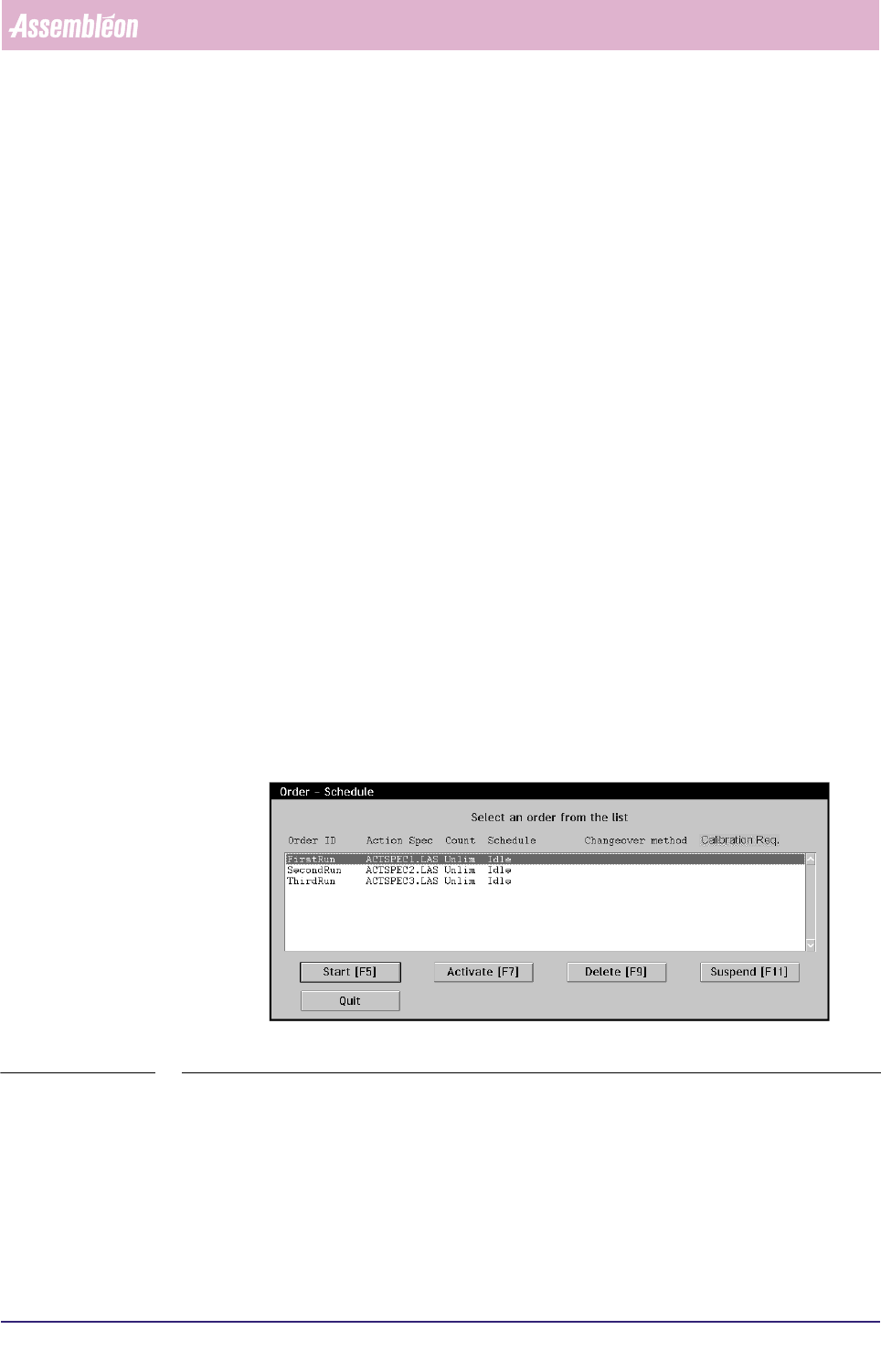
1. Go to the “Order” Menu and select “Schedule”. The Order - Schedule Dialogue will
now appear (see SCREEN 7-1).
SCREEN 7-1 Order Schedule before activating Orders
All orders which were previously entered are being displayed with their Order ID
and Action Spec name. New entered orders all have the status “Idle”.
2. Select the Order you wish to activate from the List Box.