AQ-2 spec book LR - 第35页
33 of 44 Options T he SECS-II / GEM Inter face on the AQ-2 of f ers remote monitoring and contr ol ability . SECS-I I / GEM is an industry wide standard for communication between semiconductor equipment and Manufacturing…
Options
32 of 44
Proprietary interfaces
If users wish to have other interfaces than the two listed above, (for example if
the user has built his own system); this can be quoted for the implementation of
the interface. Please contact your Assembléon sales support representative for
further information.
Performance monitoring
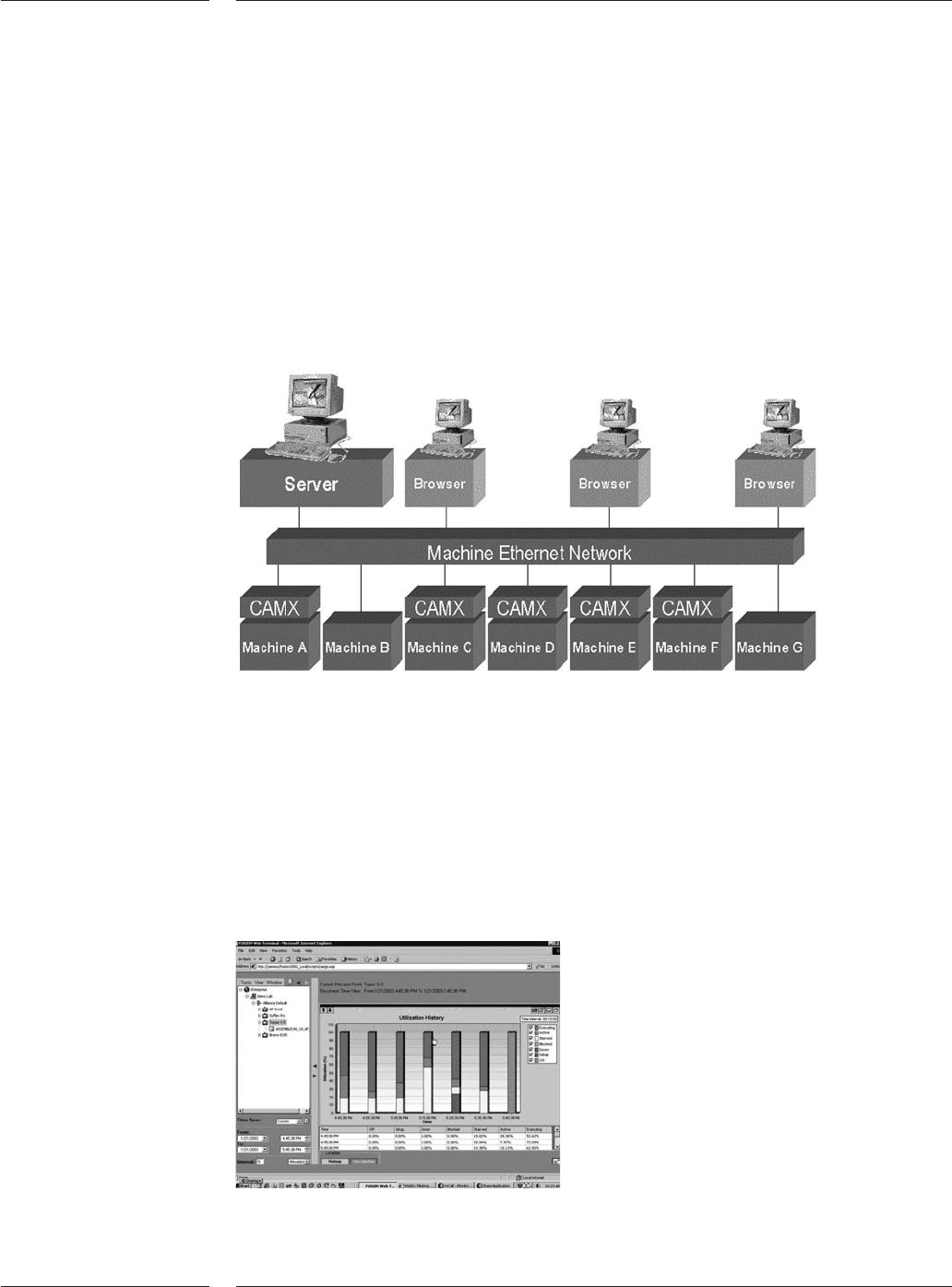
The AQ-2 can be connected to our performance monitoring solution using the
CAMX-interface. With the performance monitoring solution, information can be
viewed anytime and anywhere (using internet technology).
The performance data can be made available both real-time as historical.
The solution offers the following information:
Production rate history (Products per hour)
Cycle time history
Utilization history (Up/down time)
Alarm history
Fault history per head – feeder - part
Component consumption per feeder
CPH vs PPM History
Screens of the performance analysis solution
Setup scheme for performance analysis
Figure 27
Figure 28

33 of 44
Options
The SECS-II / GEM Interface on the AQ-2 offers remote monitoring and control
ability. SECS-II / GEM is an industry wide standard for communication between
semiconductor equipment and Manufacturing Execution Systems or Production
Control Systems (host system). Through this communication line, the host can
monitor and partially control the equipment.
The following SECS-II / GEM functionality is offered on the AQ-2:
Monitor functions:
•Variable and status data collection: host can query equipment data variables
and equipment status information to monitor the equipment activity
•Event data collection and notification: host notification when equipment
events occur.
•Dynamic event report configuration: allow the host to modify the equipment
event-reporting set-up.
• Alarm management: host notification and management of alarm conditions.
•Material movement: host notification of material movement.
Control functions:
•Remote control: provides the host with a level of control of the equipment
operations. E.g. start / stop processing or select a process program.
• Equipment constants: allows the host to read and change the value of selected
equipment constants.
•Process program management: the host can manage process programs and
recipes.
A software key will enable this option.
CAD Conversion and machine program creation is one of the most important
steps to bring a new product into production. Maximized output combined with
maximum flexibility doing it the first time right is what counts. PPS-Pro takes
care of this task.
Features of PPS-Pro
• Generation and optimization of placement programs for any configuration of
AX-3, AX-5 and AQ-2.
•Fully integrated line balancer.
• Support of most CAD formats either by build in column and text converters or
by optional dedicated CAD converters. PPS-Pro accepts FTIP, GenCAD, column
oriented files and optional ±30 CAD formats (Mentor, PCAD etc.)
• Supports the import of BOM files.
• Includes complete component database, supporting most used packages
including definition for nozzles, feeders, vision files and other machine specific
data (Tested and verified by Assembléon) as well as pre-configured Assembléon
machines for a fast start.
• Supports family optimization.
• Generation of setup reports and other operator instructions.
• Optional support for 3rd party machines.
•Minimizing production down-time by “first-time-right” offline program
generation.
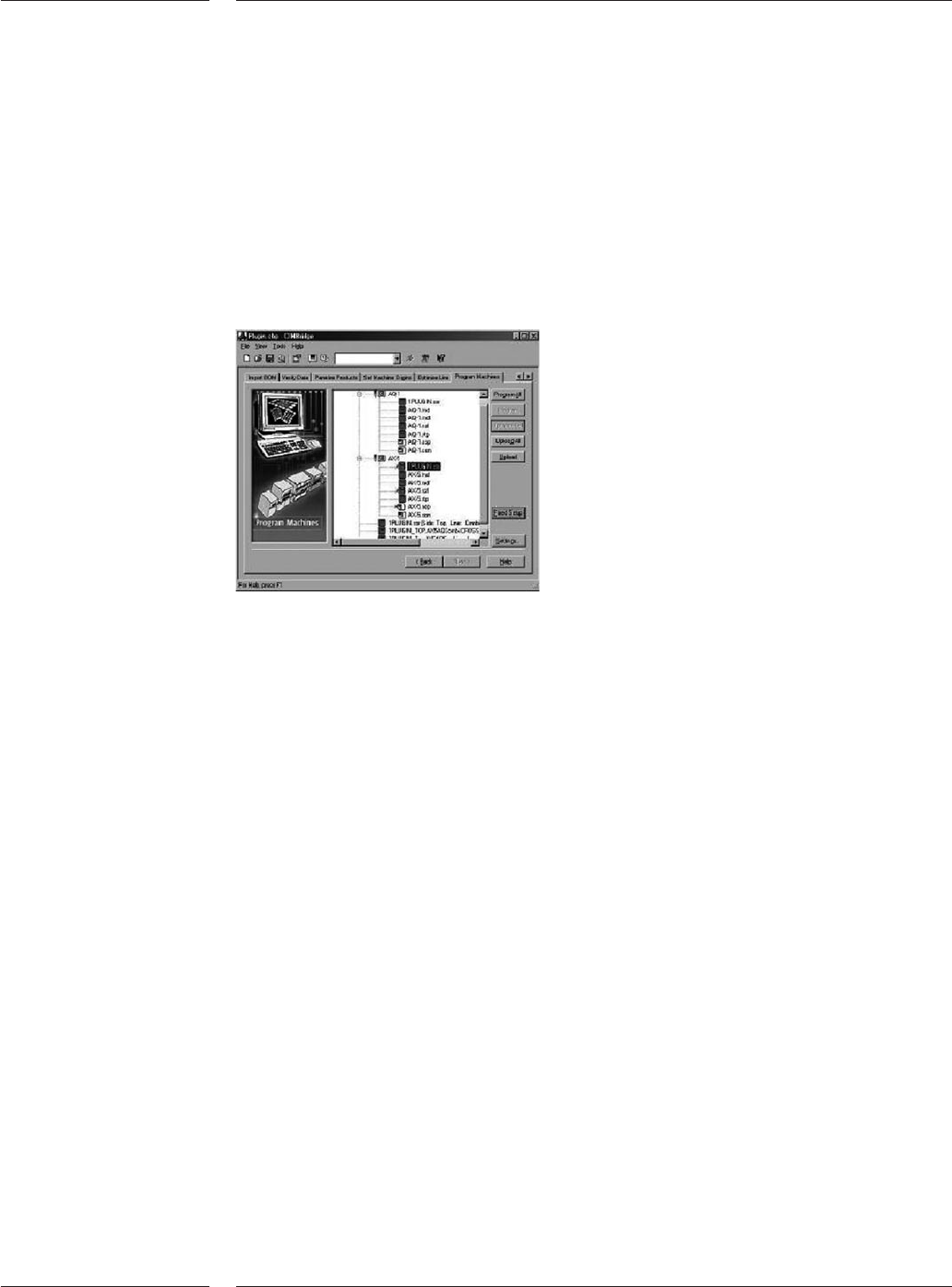
•A powerful Graphical User Interface (GUI) visualizes each process step of the
production preparation. Providing help to detect missing information before
information is brought to the placement systems.
3.11.2 SECS/GEM
3.12 Production
Preparation
System
(PPS-Pro)
34 of 44
•Full graphical edition of board data which allows the user to enter missing
product data and manufacturing related features such as fiducials, board and
panel outlines, image offsets and mechanical parts. Support for multiple master
badmarks and circuit arrangements.
• Ability to manage the factory configuration Management using the familiar
Explorer view to manage factory, machines, line configurations and tooling
inventory.
•Can be used to calculate “what-if” analysis with user configured line models.
•Export to SVS-Pro provides offline feeder set-up ready for the next production
batch.
PPS System requirements
The PPS-Pro software is NOT delivered with a computer. Assembléon advises the
following configuration:
Hardware
• Minimum Pentium IV or better, > 2,4 GHz
• 512 Mb internal memory
• 3.5” disk + CD-ROM drive
• Free hard disk space 1 Gb
• Monitor and video card that support at least 800x600x256
Software
• Windows XP
Figure 29
PPS Pro Graphical User Interface
Options