00197543-01_SM_JTF-S_ JTF-M_en - 第26页
Service Works Overview SIPLACE JTF-Sections 2. 2.1 Dismounting C onveyor Section from Base Section 26 Service Manual SIPLACE JEDEC Tray Feeder Disconnect control board ► Disconnect all cables and unplug at connectors J1,…
Service Works
2.2.1 Dismounting Conveyor Section from Base Section Overview SIPLACE JTF-Sections
Service Manual SIPLACE JEDEC Tray Feeder 25
2.2.1
2.2.1 Dismounting Conveyor Section from Base Section
Dismounting Conveyor Section from Base Section
2.2.1.1
2.2.1.1 Disconnect Control Board
Disconnect Control Board
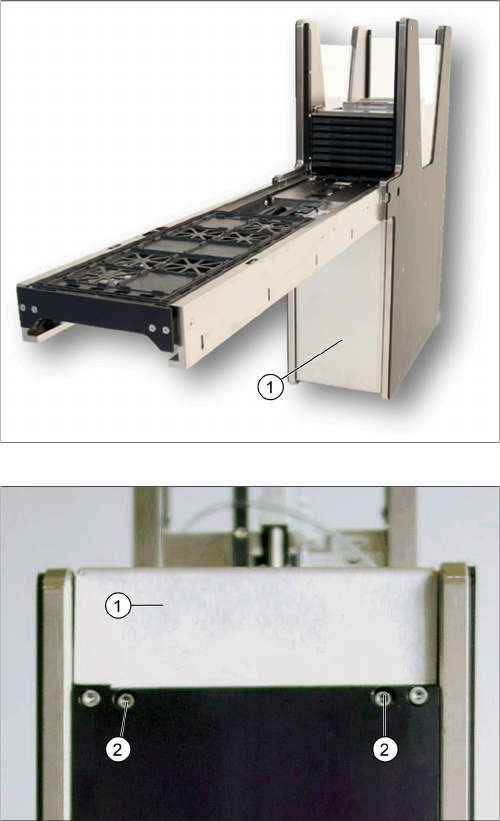
Remove cover
Front cover screws
► Remove cover (1) by releasing two front cover
screws (2) at the bottom of the base to have access
to the control board.
Service Works
Overview SIPLACE JTF-Sections 2.2.1 Dismounting Conveyor Section from Base Section
26 Service Manual SIPLACE JEDEC Tray Feeder
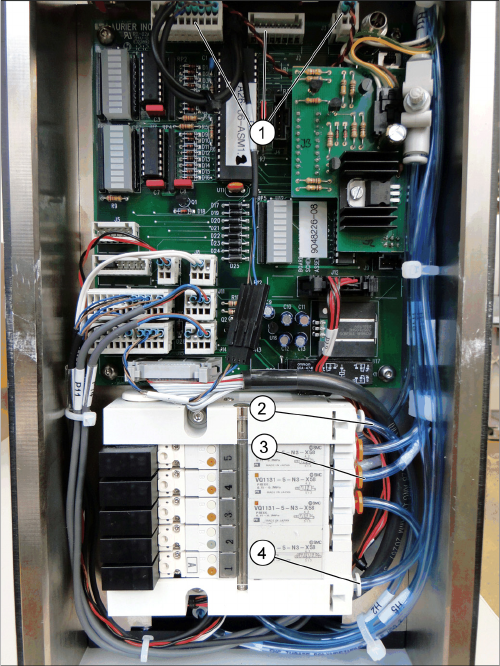
Disconnect control board
► Disconnect all cables and unplug at connectors J1,
J2, J3 and J18, cut cable ties where needed (1), in
case J9 needs to be disconnected as well.
► Disconnect all tubes from the solenoid valve block at
H7, H8, H9 and H10 (3).
► Disconnect all tubes from the air pressure regulator
(2) and air pressure check tube (4).
► The valve block is different between SIPLACE JTF-S
(5 blocks, as seen in picture "Disconnect control
board") and SIPLACE JTF-M (3 blocks).
Service Works
2.2.1 Dismounting Conveyor Section from Base Section Overview SIPLACE JTF-Sections
Service Manual SIPLACE JEDEC Tray Feeder 27
2.2.1.2
2.2.1.2 Disconnection Conveyor from Base
Disconnection Conveyor from Base
Disconnection Conveyor from Base
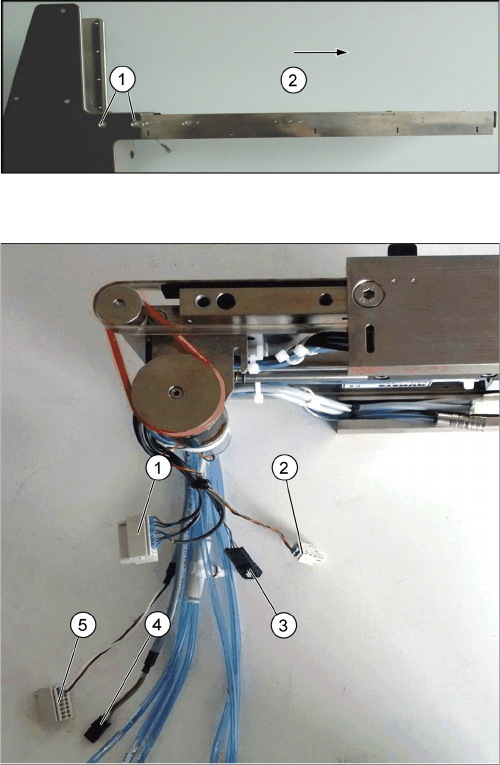
► Remove the screws holding the conveyor to the base
(1).
► The conveyor is mounted with two screws on each
side of the base.
► Slide the conveyor from the base (2) and place it
carefully on a bench.
Disconnected conveyor connection
1. P1
2. P3
3. P18
4. P9 (in case)
5. P2