00197543-01_SM_JTF-S_ JTF-M_en - 第41页
Service Works 2.5.4 Tray Slow-Down Delay Adjustmen ts Setup and Adjustment Conv eyor Unit Service Manual SIPLACE JEDEC Tray Feeder 41 2.5.4 2 . 5 . 4 T r a y S lo w - D o w n D e la y A d ju s t m e n t s Tray Slow-Down …
Service Works
Setup and Adjustment Conveyor Unit 2.5.3 Tray Clamp Adjustments
40 Service Manual SIPLACE JEDEC Tray Feeder
▪ Slow-down delay - The tray is still loaded at this point, so it should not stop too suddenly. Adjust to
get the fastest cycle speed, while still providing a smooth motion. The die must remain in place on
the tray.
▪ End clamp - Should hold the tray fi rmly.
Tray moving in:
▪ Conveyor speed - Operates at full speed.
▪ Slow-down delay - The tray is loaded, so it should not stop too suddenly. Adjust to get the fastest
cycle speed, while still providing a smooth motion. The die must remain in place on the tray.
▪ In feed pusher - The tray is loaded. Adjust to get a smooth motion, without "snapping" or moving the
tray too suddenly.
2.5.3
2.5.3 Tray Clamp Adjustments
Tray Clamp Adjustments
The following adjustments apply to the tray clamp assembly on SIPLACE JTF-M feeders:
► (1) Check the condition of the tray clamp rubber. Replace it if necessary.
► (2) Make sure the tray clamp cylinder opens all the way.
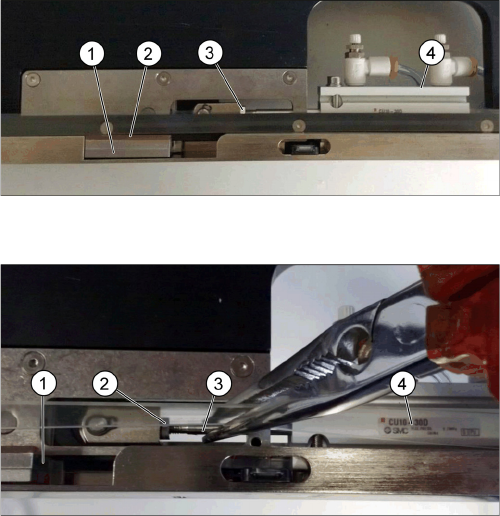
(3) The tray clamp foot should be in the proper location when unclamped (see figure "Tray Clamp As-
sembly"). In the unclamped state, the foot should not extend outside the side wall of the conveyor rail.
► If adjustment is necessary, refer to step 4.
► (4) Make the adjustment.
► Remove air pressure from the system.
► Remove the black belt guide strip underneath the conveyor belt.
► Manually pull the tray clamp assembly away from the cylinder towards the tray open position until
the cylinder rod stops as shown in figure "Adjusting the shaft length on the pneumatic cylinder".
► Loosen the locking nut and turn the cylinder shaft with pliers. Grasp the shaft as close to the end as
possible and use care not to damage it.
► After the adjustment is complete, tighten the locking nut and turn on the air pressure to the system.
► (5) Manually move the tray clamp assembly to the open position.
► Make sure a tray can pass the rubber without touching it.
Tray Clamp Assembly
The tray clamp assembly shown in this photograph is in
the unclamped state.
1. Clamp foot
2. To avoid blocking the tray's forward motion, the rub-
ber should not touch the tray as it passes.
3. Locking nut
4. Pneumatic Cylinder
Adjusting the shaft length on the pneumatic cylinder
1. Unclamped position
2. Pneumatic cylinder lock nut
3. Pneumatic cylinder shaft
4. Pneumatic cylinder
Service Works
2.5.4 Tray Slow-Down Delay Adjustments Setup and Adjustment Conveyor Unit
Service Manual SIPLACE JEDEC Tray Feeder 41
2.5.4
2.5.4 Tray Slow-Down Delay Adjustments
Tray Slow-Down Delay Adjustments
During a tray index, the "forward" slow down delay adjustment must slow the tray's forward motion
enough to prevent the tray from “bouncing” when it reaches the end of the conveyor. The "return to stack"
slow down delay adjustment must slow the tray's forward motion as it enters the base. This delay adjust-
ment is set so the back edge of the tray slows down just as it passes the slowdown sensor. If there is
too much delay time, the tray will be moving too fast as it enters the base, possibly causing components
in the tray to be “upset.” The return pusher may not have time to assist the tray, causing uneven stacking
of trays. If there is not enough delay time, the tray will start slow speed before the back edge of the tray
passes the slowdown sensor, increasing the overall tray ex- change cycle time.
Use the following procedures to set the correct slow down delays and get the maximum ef fi ciency from
the feeder. Before adjusting, set the feeder to operate in fast mode.
Tray "FORWARD" SLOW DOWN DELAY ADJUSTMENT:
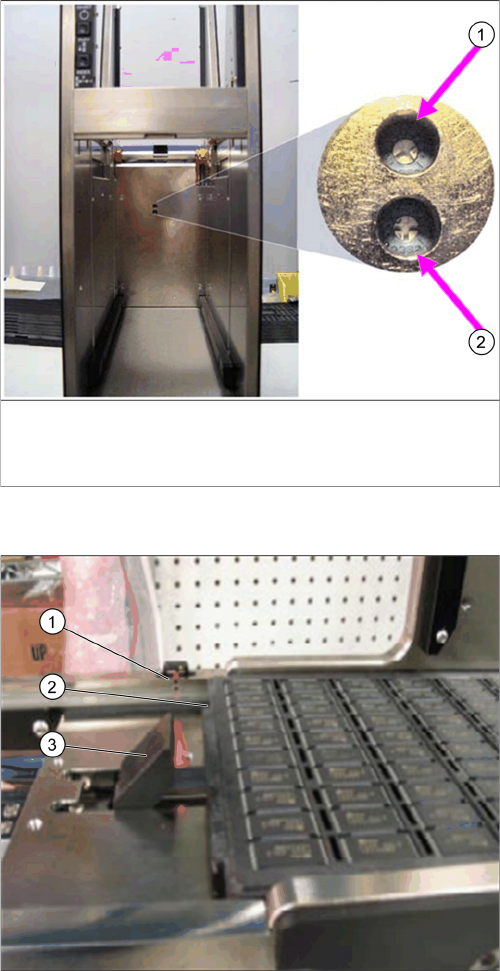
► (1) Turn the "forward" slowdown delay potentiometer all the way clockwise (increase the delay) as
shown in figure "Conveyor and Stack Slow Down Adjustments".
► (2) Index a tray and observe the tray as it stops at the end of the conveyor.
⇨ If the tray reaches the end of conveyor and is clamped without “bouncing” off the end, the adjustment
is set correctly.
► If the tray does “bounce” off the end, turn the "forward" slowdown potentiometer counter-clockwise
(decrease the delay) until the tray does not “bounce.
► Make a small adjustment, and then test the setting.
Tray "RETURN TO STACK" SLOW DOWN DELAY ADJUSTMENT:
► (1) With a tray at the end of the conveyor, initiate a tray index and observe the back edge of tray in
relation to the slowdown sensor.
⇨ The tray should start the slowdown speed after the rear edge of the tray passes by the "return" slow
down sensor.
► If the tray slows down before the rear edge passes the "return" slow down sensor, see step 2.
► If the tray slows down too far after passing the "return" slow down sensor, see step 3.
► (2) If the slowdown speed begins with back edge of tray positioned before the "return" slow down
sensor, turn the "return to stack" potentiometer clockwise and repeat step (see figure "Incorrect: Tray
Starts Slow Down Before Passing Sensor").
► If necessary, make repeated small changes, and test after each change until you reach the correct
adjustment.
► (3) If the slowdown speed begins with the back edge of the tray positioned too far past the "return"
slow down sensor, turn the "return to stack" potentiometer counter clock- wise and repeat step 1 (see
figure "Correct: Tray Starts Slow Down After Passing Sensor").
► If necessary, make repeated small changes, and test after each change until you reach the correct
adjustment.
NOTICE
Too much force
If you turn the potentiometer with too much force, it can be “stripped” so that it will not work cor-
rectly. To avoid this problem, be careful when adjusting the potentiometer.
NOTICE
Turning range
Potentiometer only have an overall turning range of 270 degrees (3/4).
Service Works
Setup and Adjustment Conveyor Unit 2.5.4 Tray Slow-Down Delay Adjustments
42 Service Manual SIPLACE JEDEC Tray Feeder
Conveyor and stack slow down adjustments.
Return to stack conveyor slow down delay adjustment –
reverse.
1. CW = increase delay time for slow down
Conveyor forward slow down delay adjustment – forward.
1. CW = increase delay time for slow down
Correct: Tray starts slow down after passing sensor.
1. Return slow down sensor
2. The rear edge of the tray has passed the return slow
down sensor.
3. Tray return pusher