00197543-01_SM_JTF-S_ JTF-M_en - 第44页
Service Works Setup and Adjustment Conveyor Unit 2.5.6 Return Pusher Pneumatic Adjustment 44 Service Manual SIPLACE JEDEC Tray Feeder ► To increase the sp eed of the pushing function, turn adjustment screw B counter cloc…
Service Works
2.5.5 Tray Clamp Pneumatic Adjustment Setup and Adjustment Conveyor Unit
Service Manual SIPLACE JEDEC Tray Feeder 43
2.5.5
2.5.5 Tray Clamp Pneumatic Adjustment
Tray Clamp Pneumatic Adjustment
▪ The pneumatic tray clamp performs two functions. One function is to secure the tray at the end of
the conveyor (the "clamping" function). The fl ow control for this function must be set so the clamping
action does not dislodge components from the tray.
▪ The second function pushes the tray back onto the conveyor to return a tray to the stack (the "push-
ing" function). The fl ow control for this function must be set so the tray is pushed onto the conveyor
without dislodging components.
The following steps outline how to adjust the pneumatics for each function. Before performing these ad-
justments, check that the input pressure to the feeder is 60 psi (see section "2.6.1 Main Air Regulator
Adjustment" [ ➙ 47]).
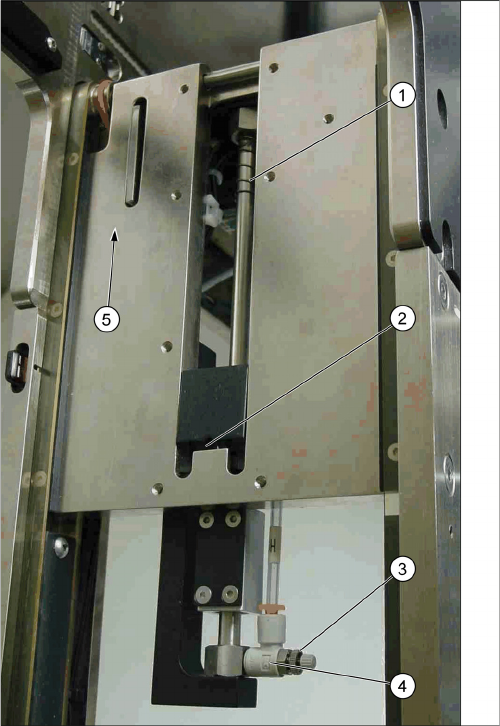
► To adjust the speed of the clamping function, unlock the adjustment screw by loosening locking nut
A, shown in figure "Flow Control Locations - Tray Clamp".
► To increase the speed of the clamping function, turn adjustment screw A counter- clockwise.
► To decrease the speed of the clamping function, turn adjustment screw A clockwise.
► Tighten locking nut A when adjustment is complete.
► To adjust the speed of the pushing function, unlock the adjustment screw by loosening locking nut
B, also shown in figure "Flow Control Locations - Tray Clamp".
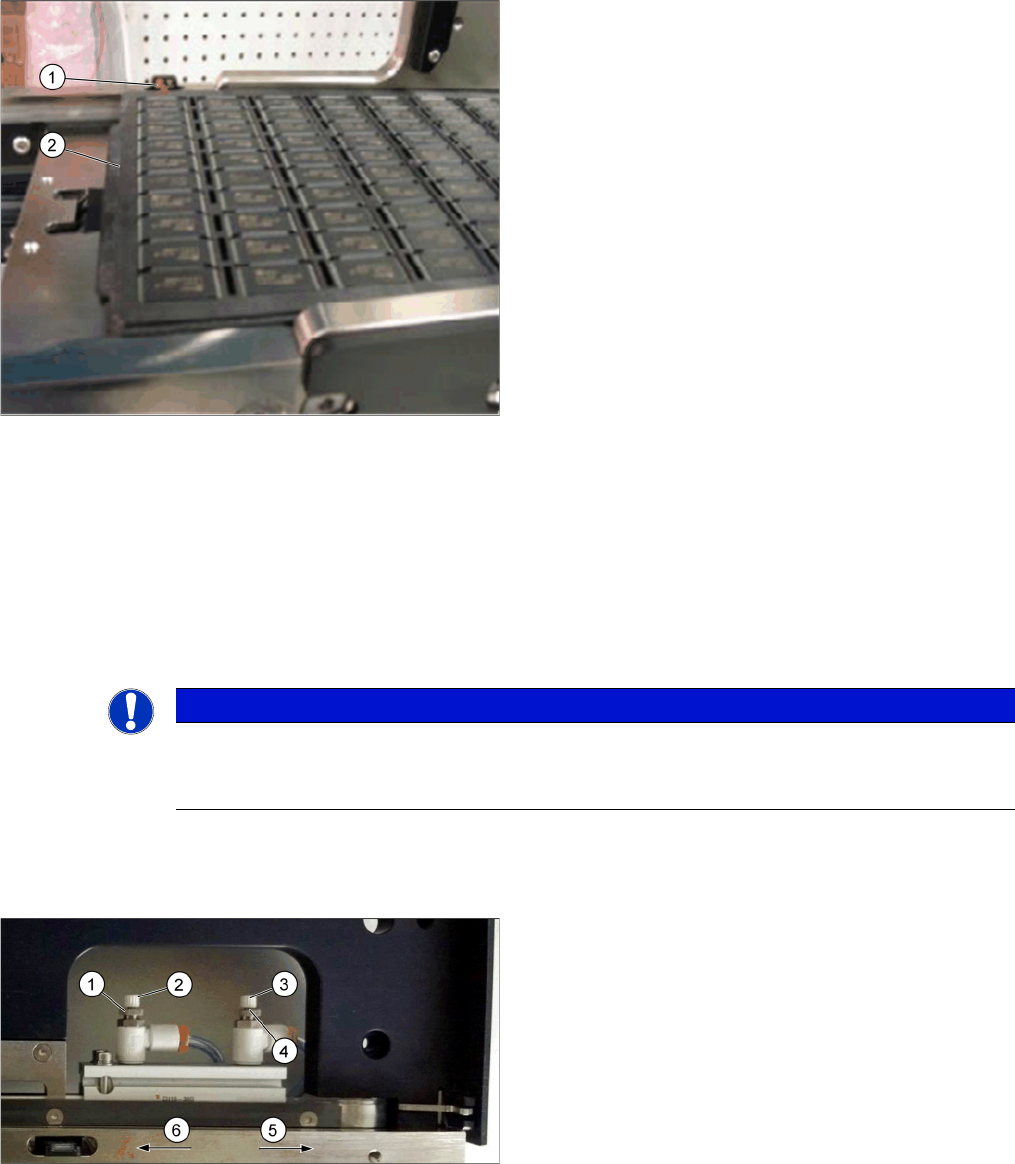
Incorrect: Tray starts slow down before passing sensor.
1. When the sensor sees the tray, the orange LED is
lighted.
2. The slowdown period starts before passing the return
slow down sensor.
NOTICE
Tray clamp mechanical adjustments
Before adjusting the fl ow controls, be certain the tray clamp mechanical adjustments are cor-
rect.
Flow control locations - Tray clamp
1. Tray Push function locking nut B
2. Pushing function adjustment screw B
3. Tray Clamp function adjustment screw A
4. Tray Clamp function locking nut A
5. Tray clamp direction
6. Tray push direction
Service Works
Setup and Adjustment Conveyor Unit 2.5.6 Return Pusher Pneumatic Adjustment
44 Service Manual SIPLACE JEDEC Tray Feeder
► To increase the speed of the pushing function, turn adjustment screw B counter clock- wise.
► To decrease the speed of the pushing function, turn adjustment screw B clock- wise.
► Tighten locking nut B when adjustment is complete.
2.5.6
2.5.6 Return Pusher Pneumatic Adjustment
Return Pusher Pneumatic Adjustment
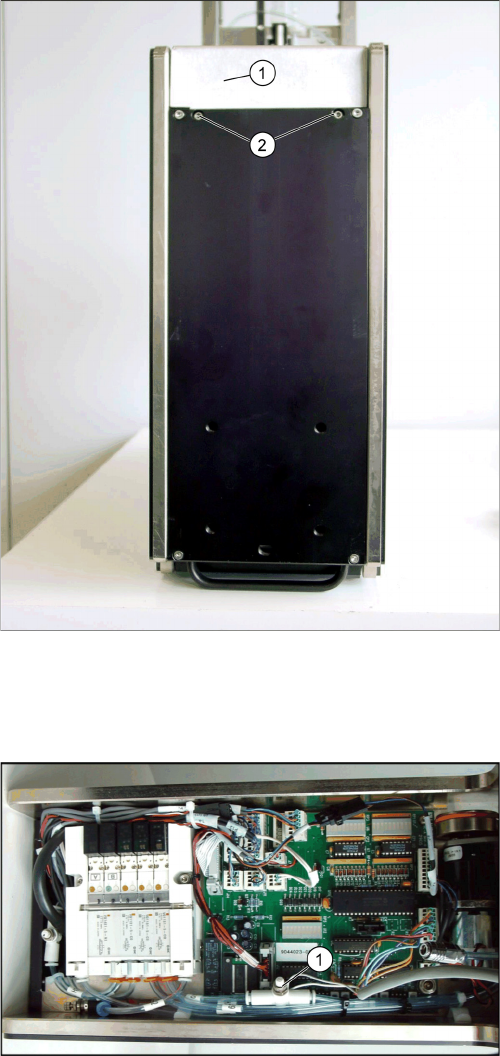
Two fl ow control valves control the speed of the return pusher function. The fl ow control at the end of the
return pusher assembly controls the "return to home" speed (see figure "Flow Control Locations - Return
Pusher").
The "forward push" fl ow control valve is located next to the control board under the front cover (see Fig.
"Flow Control Locations - Return Pusher"). The following procedure outlines adjustments for both func-
tions.
► Be certain the internal air pressure is 60 psi before making these fl ow control adjustments (see Sec-
tion "2.6.1 Main Air Regulator Adjustment" [ ➙ 47]).
► When adjusting the "forward push" speed, set the speed fast enough to overcome the slowdown
spring tension, but slow enough not to dislodge components from the trays, if the trays being re-
turned will not be empty.
► Adjust the "return to home position" speed so pusher returns to the home position without any hesi-
tation.
► To adjust the "return to home position" speed, unlock the adjustment screw by loosening the locking
nut (see figure "Flow Control Locations - Return Pusher").
► To increase the "return to home position" speed, turn the adjustment screw in a counter clockwise
direction.
Flow control locations - Return pusher
1. Slow down spring
2. Return“ pusher home position
3. Locking nut
4. „Return to home position“ flow control
5. Forward Push direction
Service Works
2.5.6 Return Pusher Pneumatic Adjustment Setup and Adjustment Conveyor Unit
Service Manual SIPLACE JEDEC Tray Feeder 45
► Decrease the "return to home position" speed by turning the adjustment screw in a clockwise direc-
tion.
► When the adjustment is correct, tighten the locking nut.
► To adjust the "forward push" speed, remove the front cover by loosening the two screws shown in
figure "Front Cover Screw Locations".
► Locate the "forward push" speed fl ow control valve (see figure "Forward Push Flow Control").
► Unlock the adjustment screw by loosening the locking nut (this is the same type of fl ow control valve
as shown in figure "Forward Push Flow Control").
► To increase the "forward push" speed, turn the adjustment screw in a counter clock wise direction.
► Decrease the "forward push" speed by turning the adjustment screw in a clockwise direction.
► When the adjustment is complete, tighten the locking nut.
► Reinstall the front cover.
Front cover screw locations
1. Front cover
2. Front cover screws The screws are recessed into bot-
tom cover.
Forward push flow control
1. Forward push speed flow control valve