00197543-01_SM_JTF-S_ JTF-M_en - 第69页
Service Works 2.8.2 Input and Sensor Status on Control Board (SIPLACE JTF-S) T roubleshooting SIPLACE JTF-S Service Manual SIPLACE JEDEC Tray Feeder 69 2.8.2 2 . 8 . 2 I n p u t a n d S e n s o r S t a t u s o n C o n t …
Service Works
Troubleshooting SIPLACE JTF-S 2.8.1 Control Panel LED Status
68 Service Manual SIPLACE JEDEC Tray Feeder
2.8
2.8 Troubleshooting SIPLACE JTF-S
Troubleshooting SIPLACE JTF-S
2.8.1
2.8.1 Control Panel LED Status
Control Panel LED Status
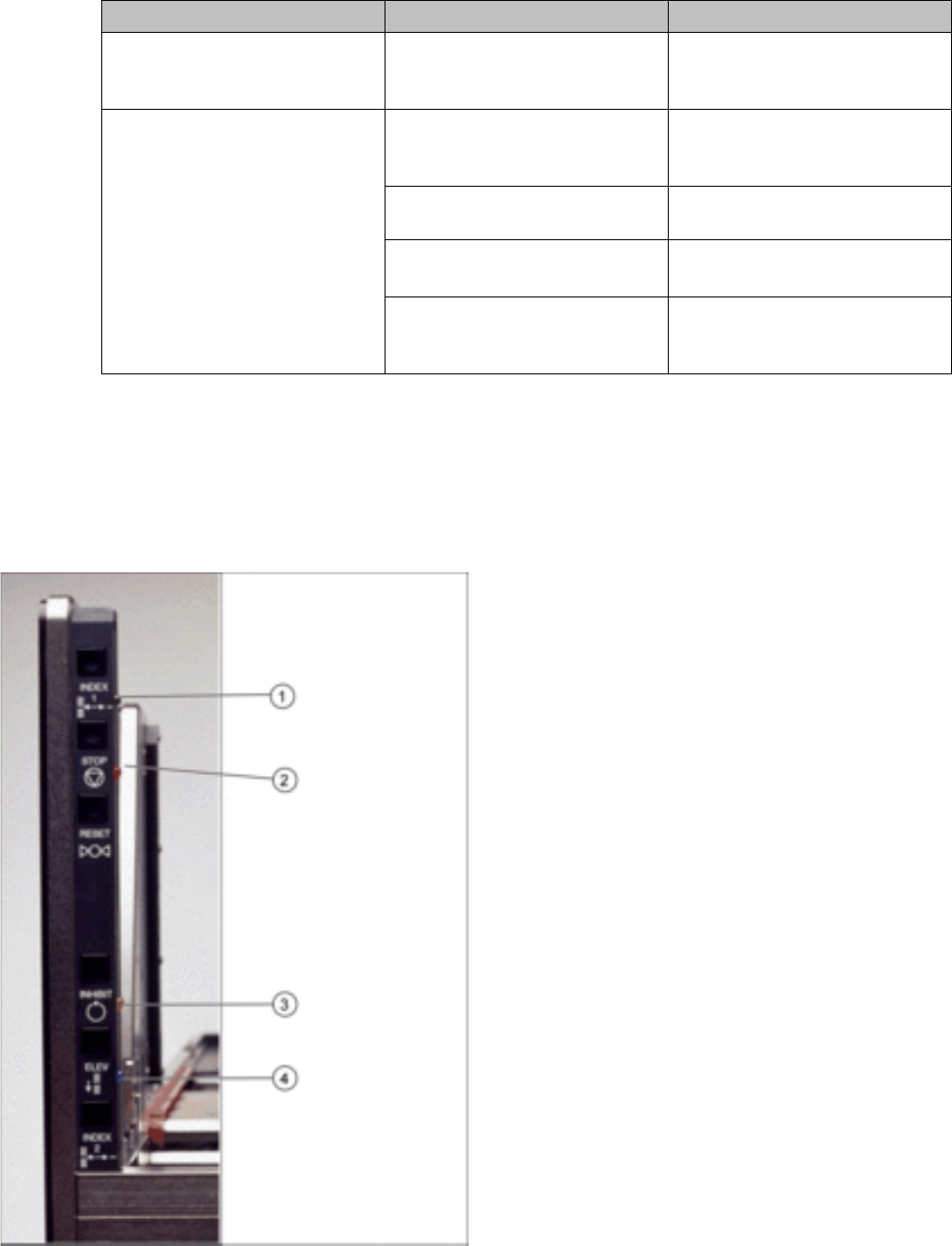
Also important and helpful are the LED status on the operator panel as shown in figure "Control panel"
for troubleshooting:
The die are knocked out of the
tray as the tray is pushed onto
the conveyor.
The action of the out feed pusher
may be too quick.
► Check the settings of the flow
controls.
The die are knocked out of the
tray as the tray reaches the end
of the conveyor.
The tray may be slowing down
too quickly during the “forward
slow down” delay.
► Check the setting for the for-
ward slow down delay.
The forward slow-down sensor
may not be working.
► Check U1-3 and the sensor.
The tray clamp may be moving
too quickly.
► Check the setting of the flow
controls.
The belt guides may be out of
alignment, causing the trays to
bounce.
► Check the alignment.
Problem Possible Cause Solution
Control panel
1. Green LED = Tray ready
2. Orange LED on = Stop button, flash = error
3. Yellow LED = Inhibit (pause)
4. Blue LED on = Magazine empty
Service Works
2.8.2 Input and Sensor Status on Control Board (SIPLACE JTF-S) Troubleshooting SIPLACE JTF-S
Service Manual SIPLACE JEDEC Tray Feeder 69
2.8.2
2.8.2 Input and Sensor Status on Control Board (SIPLACE JTF-S)
Input and Sensor Status on Control Board (SIPLACE JTF-S)
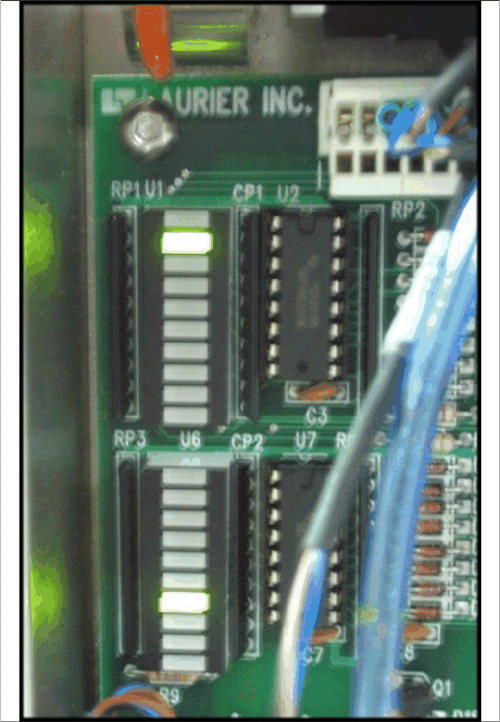
This is a list of the functions indicated by the LEDs input banks U1 and U6:
These LED status can be very helpful when trouble shoot any sensor or communication issues.
Location Function:
▪ U1-1 Lift cylinder up
▪ U1-2 Lift cylinder down
▪ U1-3 Forward slow
▪ U1-4 Stop at end
▪ U1-5 Tray position
▪ U1-6 Reset
▪ U1-7 Stop switch
▪ U1-8 Spare
▪ U1-9 Input 1
▪ U1-10 Input 2
▪ U6-1 Inhibit switch
▪ U6-2 Elevator down
▪ U6-3 Stack full
▪ U6-4 Stop at stack
▪ U6-5 Reverse slow
▪ U6-6 Elevator high
▪ U6-7 Elevator low
▪ U6-8 Door
▪ U6-9 Manual index
▪ U6-10 Host index
▪ U12-4 Full / Empty LED (blue) constant on= Input
stack is empty / Flashing = Output stack is full
▪ U12-5 Inhibit LED (yellow) constant on= Inhibit condi-
tion / Flashing = Inhibit condition, elevator moving up.
▪ U12-6 Stop/Error LED (orange) constant on= Feeder
stopped / Flashing = Error condition
Service Works
Troubleshooting SIPLACE JTF-S 2.8.3 Checking the Indicator LEDs on the Solenoid Bank (SIPLACE JTF-S)
70 Service Manual SIPLACE JEDEC Tray Feeder
2.8.3
2.8.3 Checking the Indicator LEDs on the Solenoid Bank (SIPLACE JTF-S)
Checking the Indicator LEDs on the Solenoid Bank (SIPLACE JTF-S)
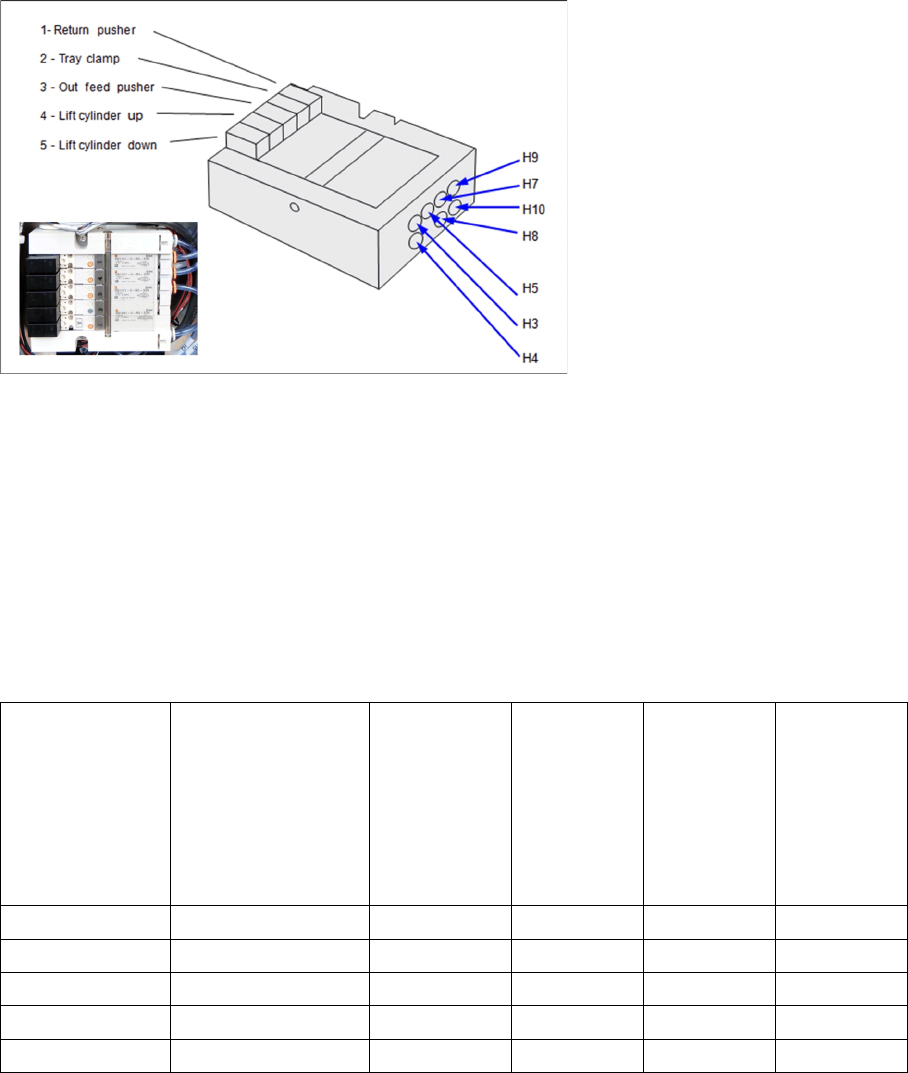
The feeder includes a bank of at least fi ve solenoids that control the pneumatic functions (see figure "
Indicator LEDs on Solenoids and Pneumatic Tube Connection"). Each solenoid includes an LED that
lights when that solenoid is active. These can also be helpful as you troubleshoot the feeder.
Indicator LEDs on Solenoids and Pneumatic Tube Connection
2.8.4
2.8.4 Start-Functions and Error Conditions to SIPLACE (SIPLACE JTF-S)
Start-Functions and Error Conditions to SIPLACE (SIPLACE JTF-S)
Different versions of the feeder behave differently on start-up. This depends mainly on the communica-
tions mode and firmware version (see "2.8.5 Troubleshooting Charts SIPLACE JTF-S" [ ➙ 71]
There are two points where the start-up functions may be different:
▪ Power-up and initialization
▪ First index
In order to troubleshoot a feeder, you need to understand these differences. Begin by referring to "2.8.5
Troubleshooting Charts SIPLACE JTF-S" [ ➙ 71] to identify the communications mode. Next, check the
table below to identify the start-up functions for the unit you are working on.
Error Conditions Reported to Host Machine
In the current version of the feeder, there is only one output signal or line for Error. However, there could
be eight separate conditions that might trigger the Error output. If the feeder reports an Error to the host,
the cause could be any of the following:
On power-up, manu-
al initialization is re-
quired. Set conveyor
speed manually. (El-
ev button for fast- or
the two Index Buttons
together for slow
speed).
On power- up,
feeder initializ-
es automati-
cally.
After initiali-
zation, tray
elevator au-
tomatically
moves up.
Feeder auto-
matically in-
dexes fi rst
tray.
Feeder stops
and waits for
index signal
for host.
Simple x x x
Intermediate x x x
Advanced x x x
Siemens x x x
Fuji x x x