YSM10安装调整(eng).pdf - 第101页
For Ser v ice E n gineer Service Information SI1610004E -000= YSM10_Proced ures for the adjustmen ts required after installing a machine 101/107 9. Save the me asurement results . : If the difference betwee n the maxim u…
For Service Engineer
Service Information
SI1610004E-000= YSM10_Procedures for the adjustments required after installing a machine
100/107
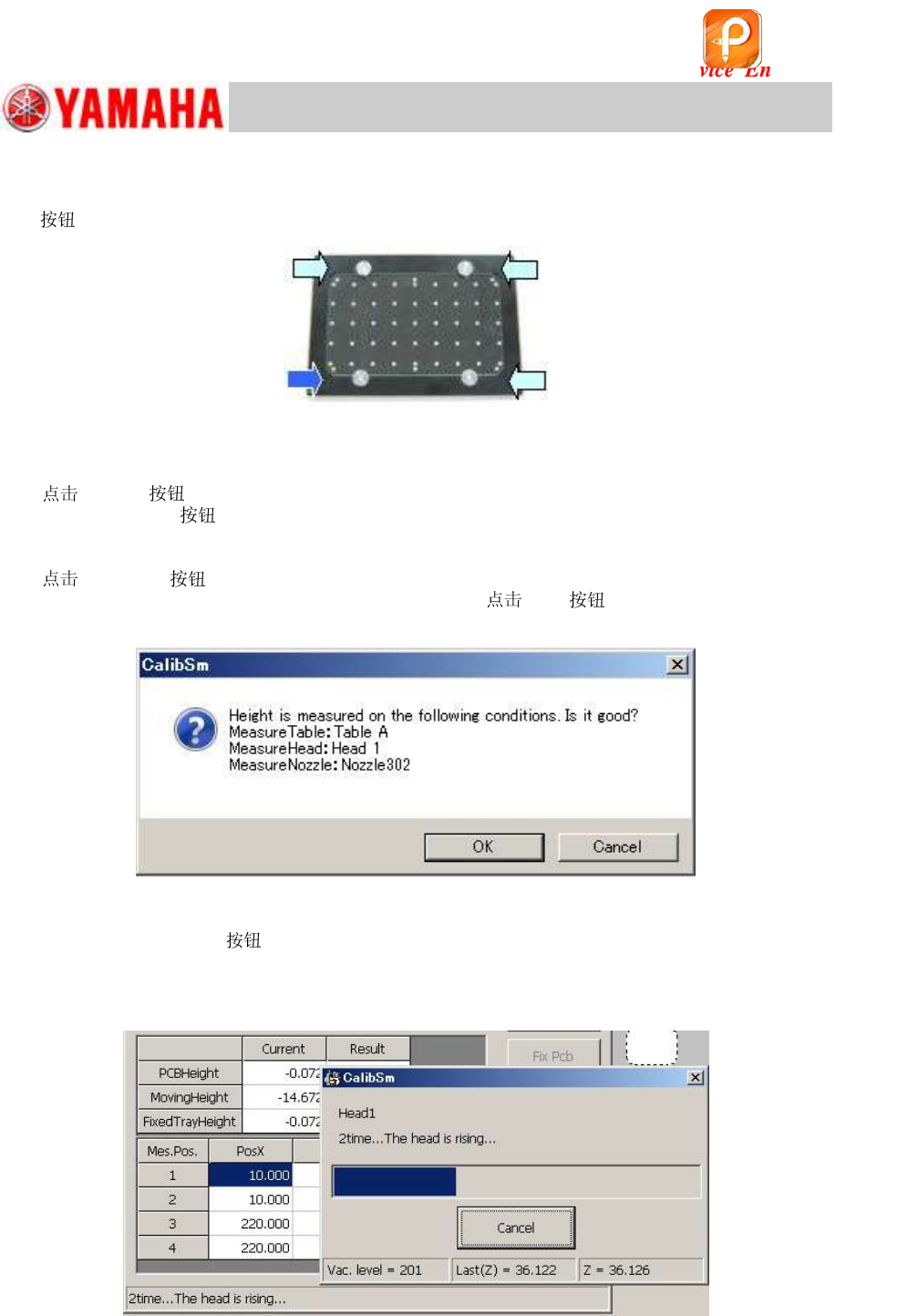
4. Set the board on the conveyor.
Set the board on the conveyor and clamp it by tapping the [Main stopper] and the [Fix Pcb]
s.
Figure 147
5. Select “Head 1” from “Teach Unit”.
6. [Trace] and move the head.
After tapping the
, put the machine into the “Emergency Stop” state and lower Head 1 by
hand to make sure that the position when it descends is appropriate (at the lower left of the
aluminum frame of the board).
7.
[Execute] .
When the dialog box appears, check the message and [OK] .
Figure 148
<When the [Execute]
is tapped…>
The four (4) points on the top surface of the aluminum frame are measured, and the height of
the lowest point is saved as the “PCB height” automatically.
Figure 149
该文档是极速PDF编辑器生成,
如果想去掉该提示,请访问并下载:
http://www.jisupdfeditor.com/
For Service Engineer
Service Information
SI1610004E-000= YSM10_Procedures for the adjustments required after installing a machine
101/107
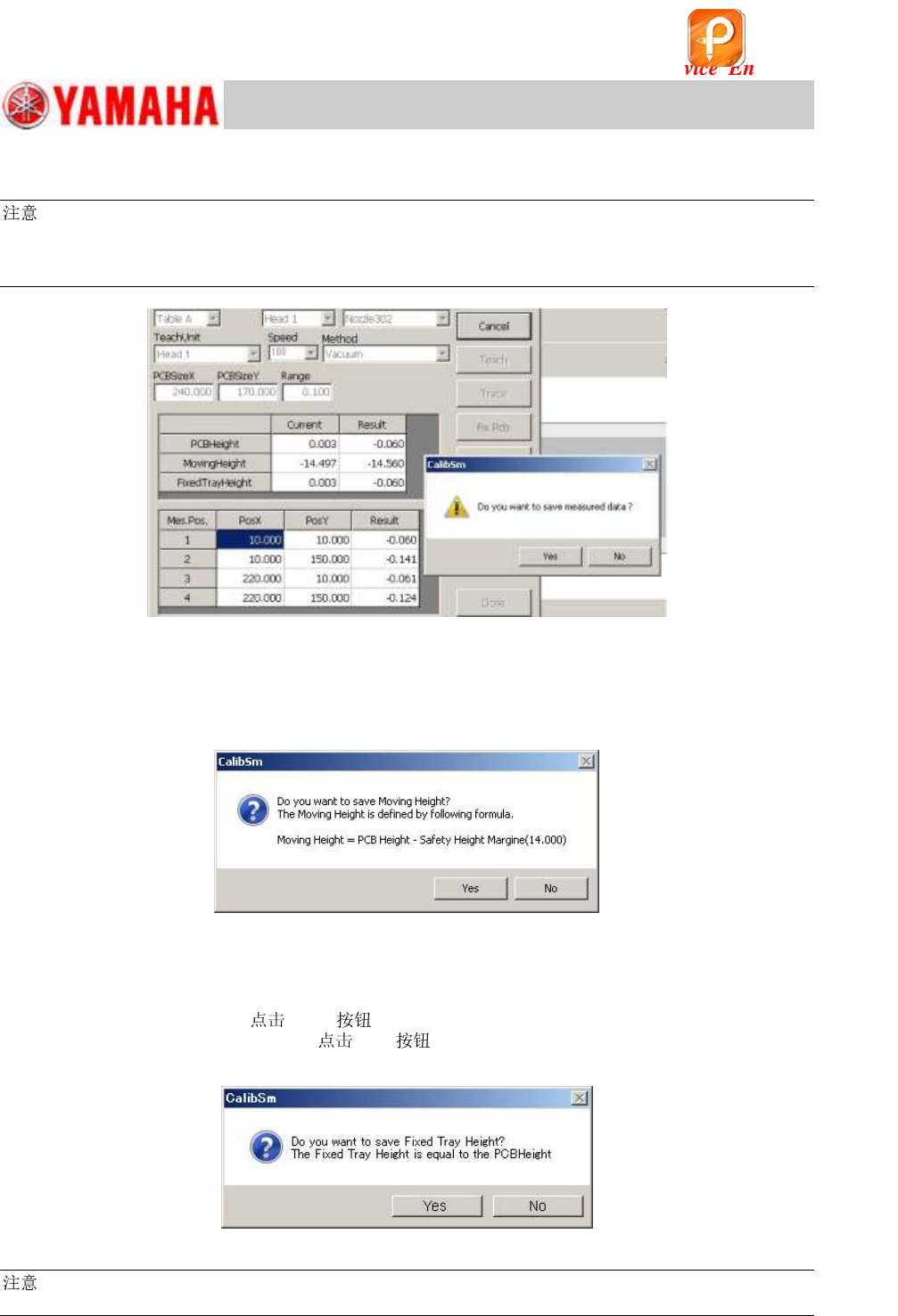
9. Save the measurement results.
:
If the difference between the maximum and the minimum values of the PCB height exceeds the
specified value, the message appears.
Check if the board is clamped properly, and then perform the adjustment again.
Figure 150
10. Check if the “Moving Height” value needs to be changed.
After saving the “PCB Height” data, the message appears asking you to save the “Moving Height”
value. As the value is calculated automatically, save the data without change except for when the
special setting is done.
Figure 151
11. Check if the “Fixed Tray Height” value needs to be changed.
After saving the “Moving Height” value, a message appears asking you to save the “Fixed Tray
Height”. Set the coordinate of the “PCB Height” as the default value of the “Fixed Height”. If the
“Fixed Tray” is NOT used,
[Yes] to change the value.
If the “Fixed Tray” is actually used,
[No] and check the “Fixed Tray Height”
separately.
Figure 152
:
Without a 302A, a 313A or a 309A , the automatic adjustment cannot be performed.
该文档是极速PDF编辑器生成,
如果想去掉该提示,请访问并下载:
http://www.jisupdfeditor.com/
For Service Engineer
Service Information
SI1610004E-000= YSM10_Procedures for the adjustments required after installing a machine
102/107
11.3.7 Multi camera – “Lightness” adjustment (Option)
Light adjuster
The “Gray and white” light adjuster is used for performing the “Lightness” adjustment of the Multi
camera.
For the adjustment of the multi camera with an elevator type side light, use a milky white light
adjuster.
:
See “2.1 Jigs for the “Lightness” adjustment of the cameras” for the types of the light adjusters.
Required
For the adjustment of the multi camera with an elevator type side light, a “ 304 (315) is
required.
:
See “2.5 Other jigs required for the adjustment” for the types of the light adjusters.
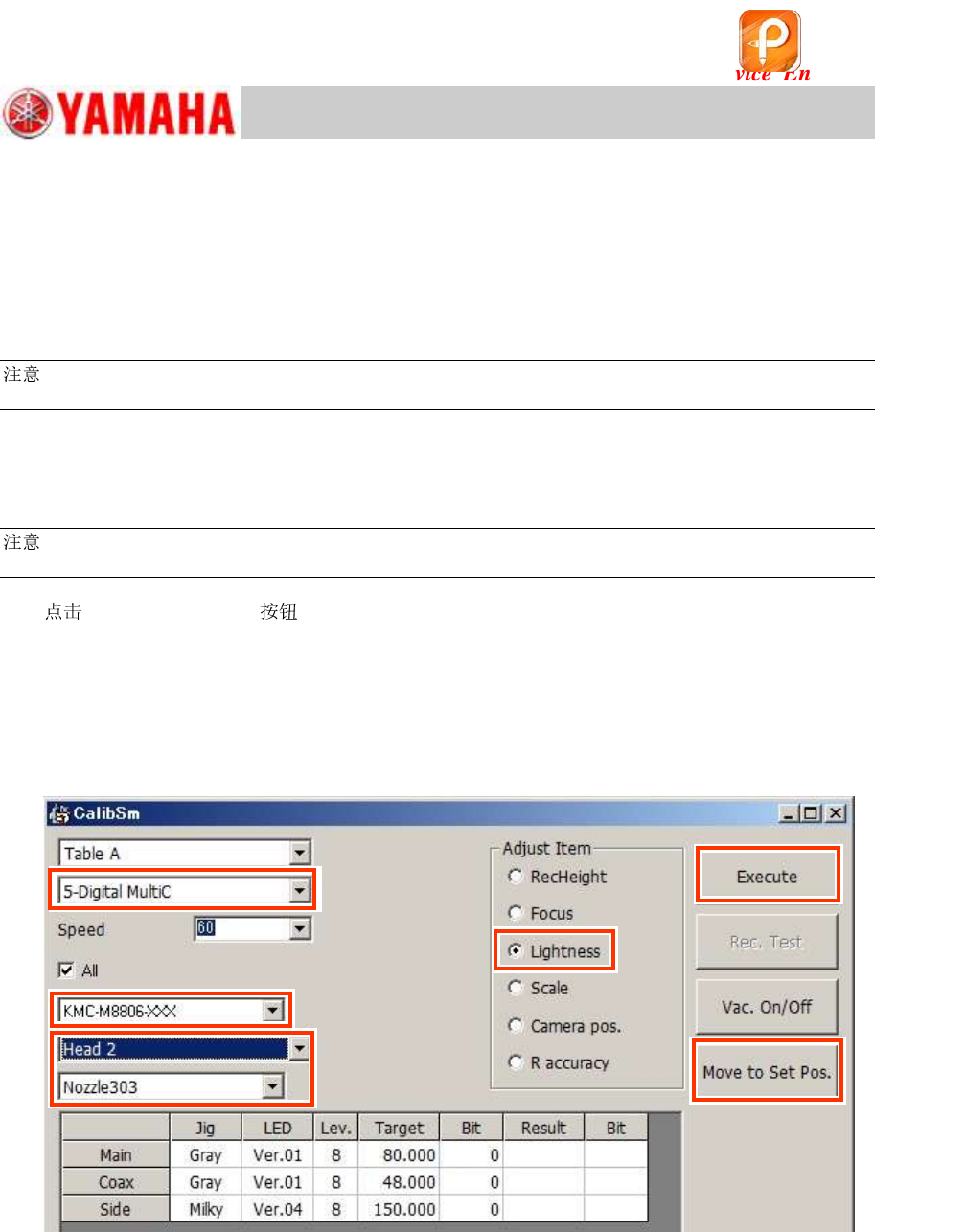
1.
[011 Multi camera] on the CalibSm main menu, and select “Lightness” from
“Adjust Item”.
2. Select the camera to be adjusted.
If the machine is equipped with one (1) Multi camera “5-digital MultiC”
If the machine is equipped with two (2) Multi cameras
<Front>: “5-Digital MultiC” <Rear>: “6-Digital MultiC”
Figure 153
3. Select the light adjuster to be used.
In the “Lightness” adjustment for the main and the coaxial lights, the target value varies depending
on the light adjuster. Make sure to select the part number of the light adjuster that is actually used
for the adjustment.
For the adjustment of the multi camera with an elevator type side light, special jigs are required.
・ Light adjuster: 32mm sq. milky white
・ 304 (315)
Step 2
Step 3
Step 4
Step 1
Step 6
Step 5
该文档是极速PDF编辑器生成,
如果想去掉该提示,请访问并下载:
http://www.jisupdfeditor.com/