YSM10安装调整(eng).pdf - 第43页
For Ser v ice E n gineer Service Information SI1610004E -000= YSM10_Proced ures for the adjustmen ts required after installing a machine 43/107 5.4 Preparation for the A C P-Chip adjustment Read the boa rd data and per…
For Service Engineer
Service Information
SI1610004E-000= YSM10_Procedures for the adjustments required after installing a machine
42/107
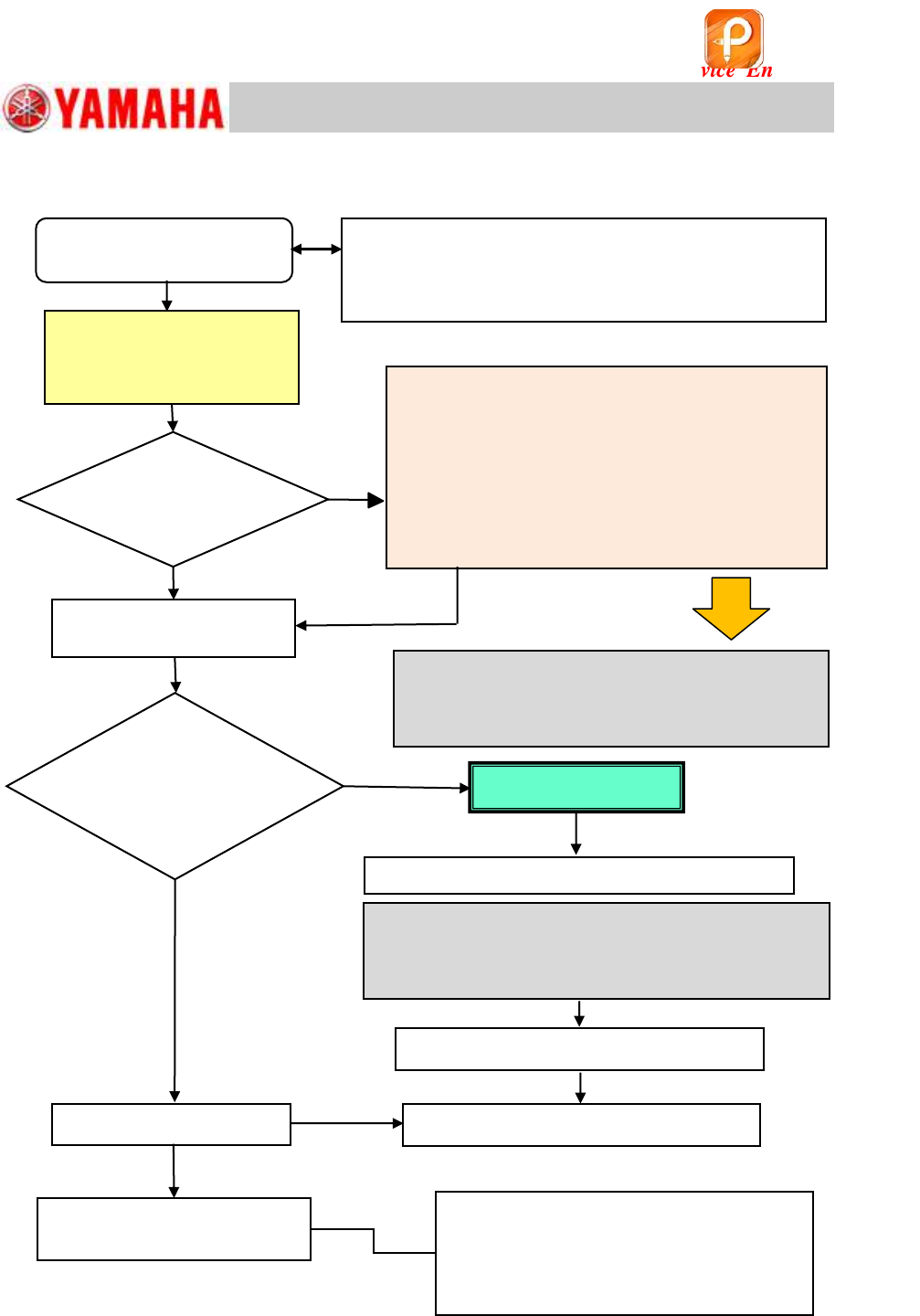
5.3 Basic flow of the ACP adjustment
Figure 55
1. Feed back the correction values
2. ACP-Chip accuracy adjustment
3. Check the AMF Index
If the result falls within the specification by
feeding back the correction values, complete
the ACP-Chip adjustment for the scan camera.
If it does not, feed back the correction values
again and check the accuracy.
Yes
No
Does the AMF
index value meet
the spec?
Check the operation of other
functions
Prepare for the ACP-Chip
adjustment
If the AMF Index value does not fall within the
spec even after feeding back the correction values
twice or more, perform all the basic adjustments.
(See “YSM10 Installation Check Sheet”)
・ Pickup position on the feeder plate
・ Operation of the Blow station
・ Edge Clamp position
・ Operation of the “ANC” (Option)
• Read the board data for adjustment.
• Initial setup for the board for adjustment.
• Recognition check for the component and the mark.
<Scan camera ACP-Chip
accuracy adjustment>
Check the AMF Index
Check the VgChart
No
Yes
Is the machine
equipped with the
Multi camera?
(Option)
Scan camera adjustment
is completed
Camera Acc. Copy
<Multi camera – ACP-Chip accuracy adjustment>
If the AMF Index value does not fall within the spec
even after feeding back the correction values twice or
more, perform the basic adjustments related to the
multi camera. (See “YSM10 Installation Check Sheet”)
Multi camera adjustment is completed
Adjustment completed
<Multi camera – ACP-Station adjustment>
该文档是极速PDF编辑器生成,
如果想去掉该提示,请访问并下载:
http://www.jisupdfeditor.com/
For Service Engineer
Service Information
SI1610004E-000= YSM10_Procedures for the adjustments required after installing a machine
43/107
5.4 Preparation for the ACP-Chip adjustment
Read the board data and perform the recognition check
1. Read the board data for the adjustment.
The board data varies depending on the board used for the adjustment.
board
Board data (10 Heads)
Board data (5 Heads)
ACP gass board
ACP_1005_10HEAD_FL.ygx
ACP_1005_5HEAD_FL.ygx
AMF board
ACP_1005_10HEAD_OLD.ygx
ACP_1005_5HEAD_OLD.ygx
Table 25
: ~ Check the setting of ”Retry Sequence” ~
In the ACP-Chip adjustment, when a pickup error or a recognition error occurs, retry should be
performed with the same head that the error occurred. Make sure that “Group” is selected from the
“Retry Sequence” pull-down menu on the [Board]-[Board] window.
2. Clamp the board.
1) Stick pieces of double-sided tape on the mounting surface of the board.
2) As the board clamp is used to secure the board, make sure to remove all the pushup pins.
3) Change the conveyor width on the [Unit] – [Conveyor] window, and clamp the board.
3. Check the “PCB Origin”.
[Trace] to move the camera to the “Board Offset” coordinate on the [Board] –
[Offset] window, and check if the
0.5mm mark at the lower left of the board is located near
the center.
:
If the mark is off the center, and cannot be recognized, check if the board is clamped properly, and the
“Edge clamp” value is appropriate. Then adjust the coordinate by performing “Teaching”.
4. Check the mark information of the mark on the board.
Make sure that the fiducial mark on the board can be recognized properly.
Select the mark No.1 “Fid_0.5_Circle” and check if the fiducial mark can be recognized
properly on the “MarkAdj” window.
5. Make sure that the 1005 ceramic chip component can be picked up and recognized
properly.
Check the pickup position of the 1005 ceramic chip component and check if it is recognized
properly. Select the Part No.1 “CERAMIC1005_t=0.5” and make sure that the mounted 1005
ceramic chip can be recognized properly on the “MarkAdj” window. Perform the adjustment if
required.
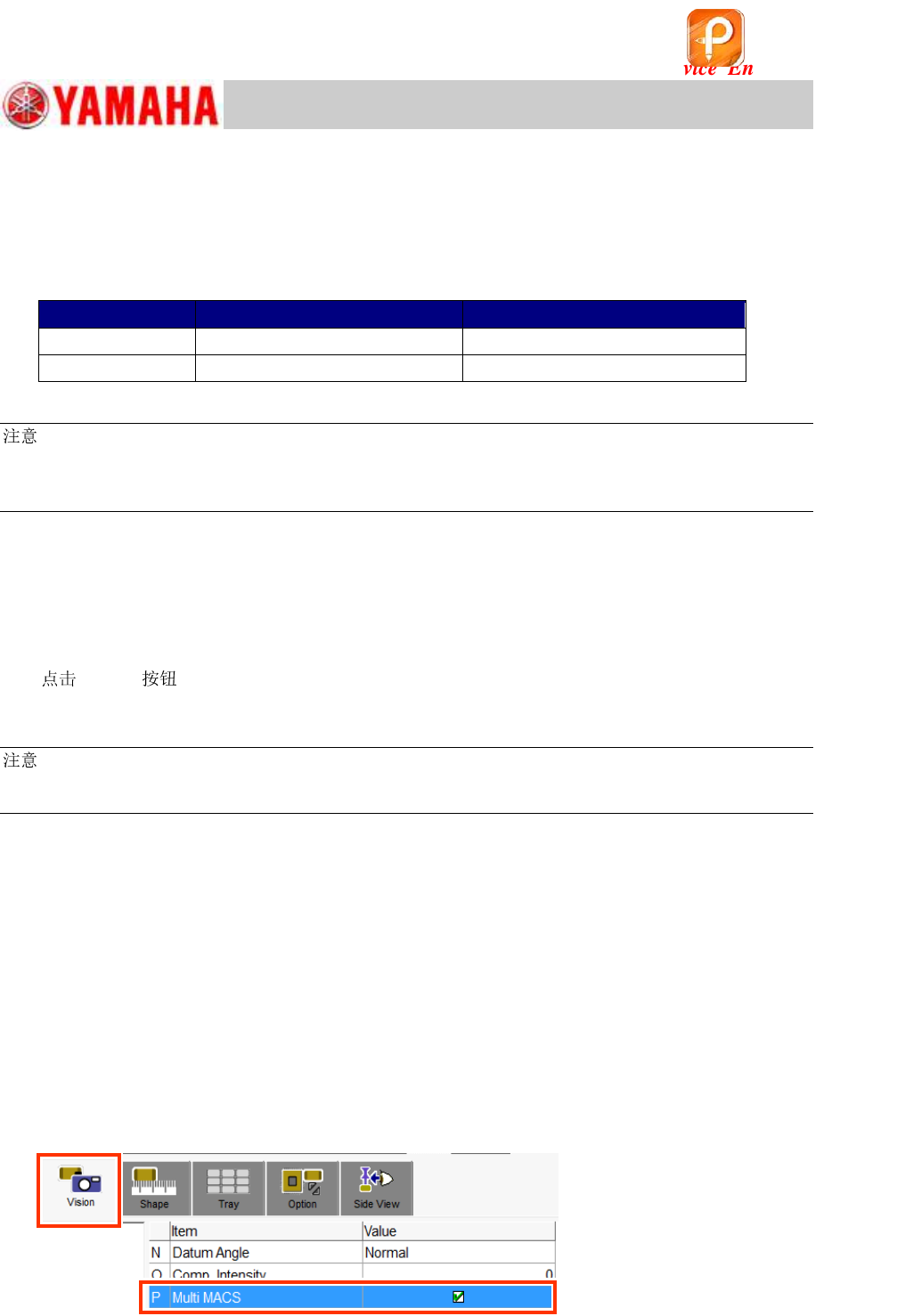
<“Multi MACS”>
When performing the ACP-Chip and the ACP-Station adjustments, the multi MACS is recognized
each time during the adjustment process. Make sure that the “Multi MACS” checkbox on the [Part]
– [Vision] window is ticked before performing the adjustment.
Figure 56
该文档是极速PDF编辑器生成,
如果想去掉该提示,请访问并下载:
http://www.jisupdfeditor.com/

For Service Engineer
Service Information
SI1610004E-000= YSM10_Procedures for the adjustments required after installing a machine
44/107
6. Make sure that the 1005 ceramic chip component on the board can be recognized
properly.
1) Leave the 1005 ceramic chip component attached to Head 1 (The component that recognition
check was done in step 5).
2) Trace one of the mounting coordinates of the board data by Head 1.
3) With the machine in the “Emergency Stop” state, lower Head 1 by hand and place the picked
up component on the sticky surface of the board.
4) Make sure that the 1005 ceramic component that was traced and attached to the board
surface can be recognized properly.
Use the mark information “No.11 CERA 1005” and perform the recognition test on the “Mark
Adjust” window.
(If the recognition cannot be performed properly, adjust the brightness on the “Mark Light”
window so that the component can easily be recognized.)
该文档是极速PDF编辑器生成,
如果想去掉该提示,请访问并下载:
http://www.jisupdfeditor.com/