YSM10安装调整(eng).pdf - 第63页
For Ser v ice E n gineer Service Information SI1610004E -000= YSM10_Proced ures for the adjustmen ts required after installing a machine 63/107 6.6.2 Change the “ Board Size Height ” to 10.0 mm Change the “Board Size Hei…
For Service Engineer
Service Information
SI1610004E-000= YSM10_Procedures for the adjustments required after installing a machine
62/107
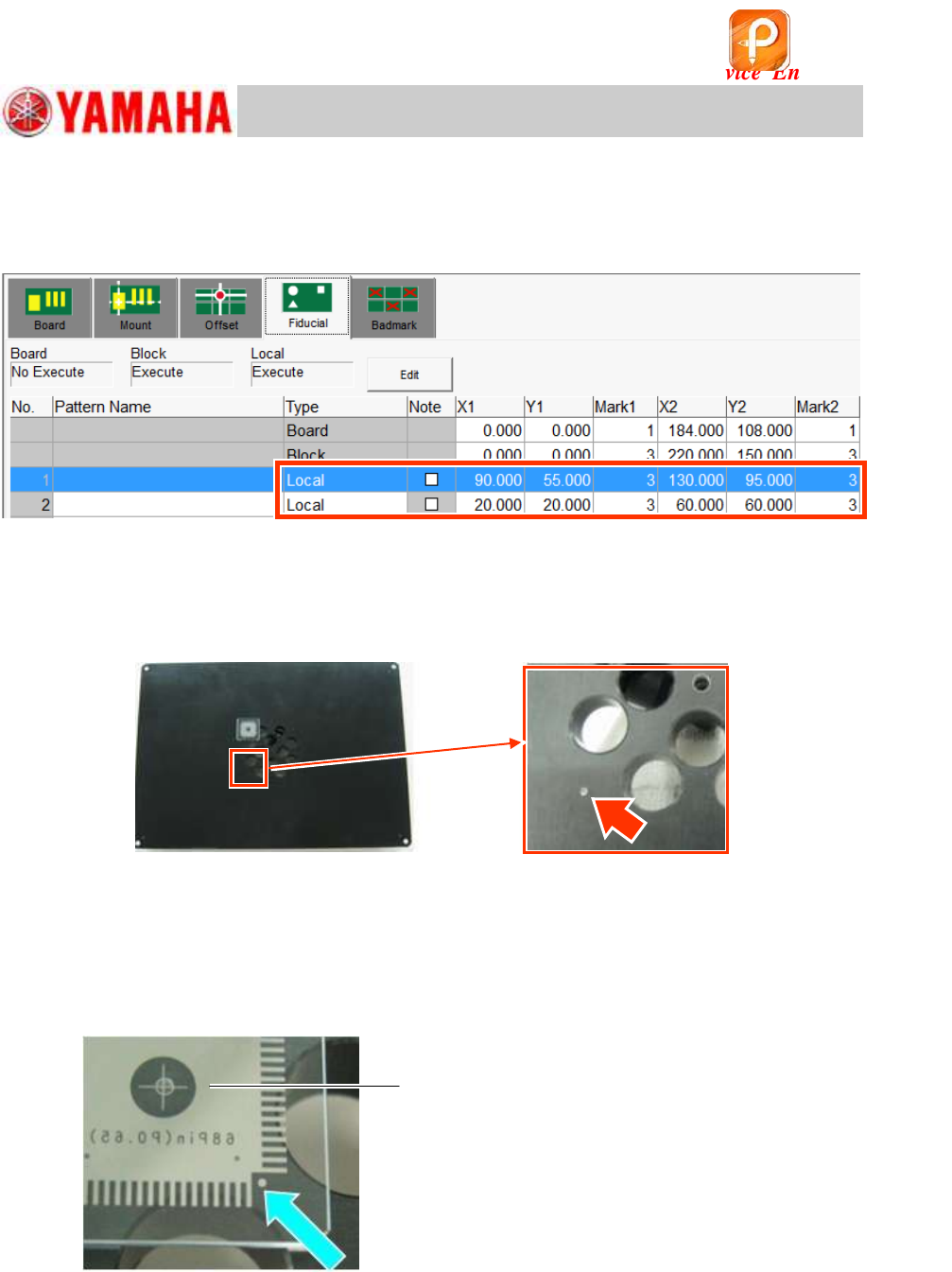
3. Check the XY coordinates of the Local fiducial and the mark number.
Use the coordinates of the local fiducial, and the mark number “3”.
Use the
1.0mm holes on the lower left and on the upper right on the station as the fiducial
marks.
Figure 82
4. Check if the fiducial mark can be recognized properly.
Make sure that the local fiducial mark can be recognized properly on the “Mark Adj” window.
Mark No.: Mark No.: No.3 “Hole_1.0_Circle/For_Station”
Figure 83
5. Check if the mark on the QFP can be recognized properly.
Place a QFP in the center of the FAMF station, and make sure that the
0.5mm marks of the
four (4) corners can be recognized properly.
(You can use either of the 68-pin QFP or the 208-pin QFP for the check.)
Mark No.: No.29 “QFP_0.5_Circle/4_Corners (Station)”
Figure 84
6. Make sure that the picked up QFP can be recognized properly.
Make the suck a 68-pin QFP, and make sure that the QFP can be recognized
properly.
Part No.: No.11 QFP68_P0.65/QFP_68Pin
Make sure to set the QFP so that the
printed side of it faces down.
该文档是极速PDF编辑器生成,
如果想去掉该提示,请访问并下载:
http://www.jisupdfeditor.com/
For Service Engineer
Service Information
SI1610004E-000= YSM10_Procedures for the adjustments required after installing a machine
63/107
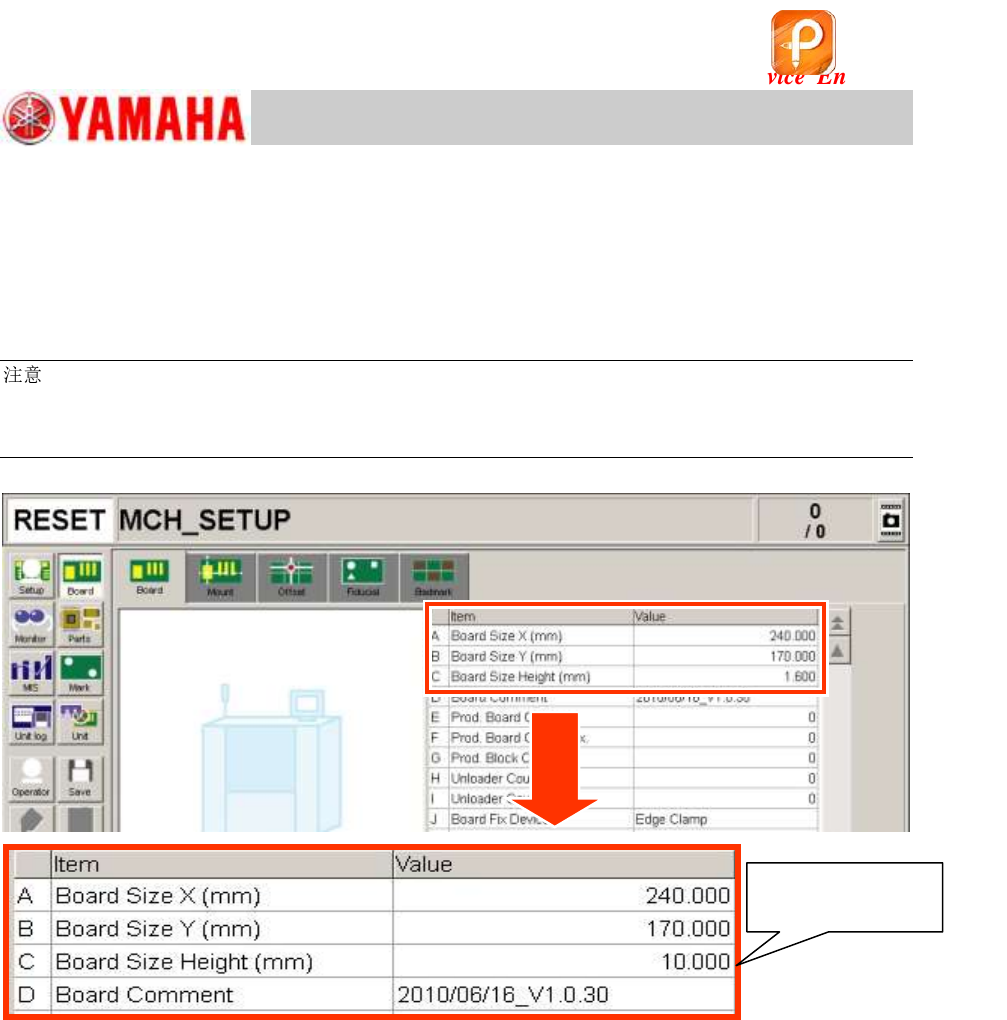
6.6.2 Change the “Board Size Height” to 10.0mm
Change the “Board Size Height” of the Board data “MCH_SETUP.ygx” before performing the
“ACP-Station” adjustment.
Board Size Height (mm): 1.6mm
10.0mm
:
The thickness of the station is 10.0mm. It is heavy with the air hose connected to it and may not be
secured properly just by the board clamp. (The station may tilt due to its own weight.)
Set the pushup pins under the 10.0mm thick part of the FAMF station in addition to the board clamp.
Figure 85
Change the setting
to “10.000”.
该文档是极速PDF编辑器生成,
如果想去掉该提示,请访问并下载:
http://www.jisupdfeditor.com/
For Service Engineer
Service Information
SI1610004E-000= YSM10_Procedures for the adjustments required after installing a machine
64/107
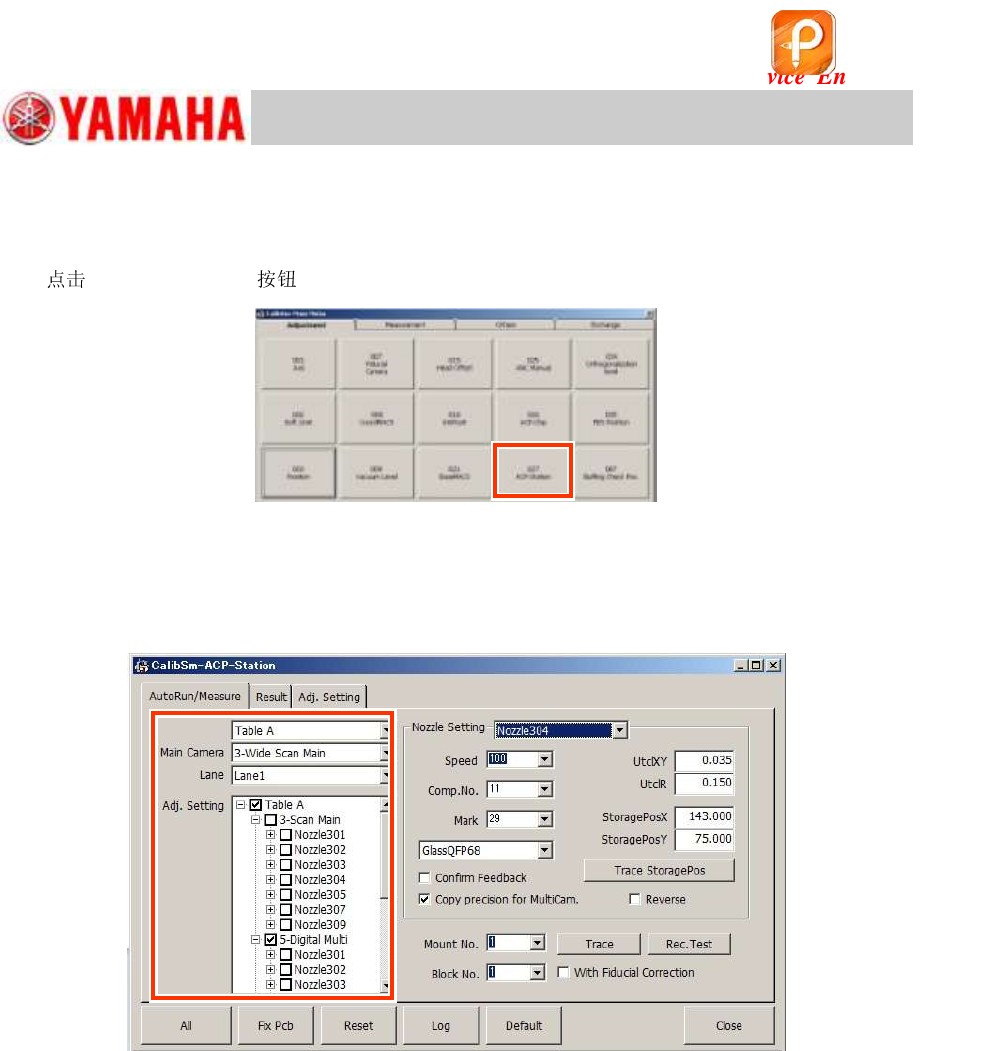
6.7 Before starting the “ACP-Station” adjustment
Startup the CalibSm adjustment utility
[027 ACP-Station] on the CalibSm main menu.
Figure 86
6.7.1 Setting for the items on the left side of the window
On the left side of the window, the settings for the table, the main camera, the camera to be
adjusted, and the s and the heads to be adjusted can be performed.
Figure 87
1. Check the setting of “Table” and “Lane”.
As YSM10 is equpped with only Table A and single lane, you do not need to change the setting.
2. Check the setting of the main camera.
The main (reference) component recognition camera for YSM10 is “3-Scan Main”.
3. Check the settings of the camera and the to be adjusted in the “Adj. Setting” area.
The adjustment can be performed consecutively by selecting all the s and the heads to be
adjusted.
When “5-Digital MultiC” is selected and the machine is equipped with two (2) multi cameras, tick
the “6-Digital MultiC” checkbox as well.
The s to be adjusted (“304(315)” and “307(318)”) are selected (the
checkboxes are ticked) referring to the head specification as default. Make sure that the correct
s are selected.
If the machine is equipped with an ANC
The s are changed automatically and the adjustment is performed consecutively.
If the machine is NOT equipped with an ANC
Attach the to the head to be adjusted by hand and perform the adjustment.
该文档是极速PDF编辑器生成,
如果想去掉该提示,请访问并下载:
http://www.jisupdfeditor.com/