YSM10安装调整(eng).pdf - 第70页
For Ser v ice E n gineer Service Information SI1610004E -000= YSM10_Proced ures for the adjustmen ts required after installing a machine 70/107 3. Check if the measurem ent and the adjustment hav e been completed prop er…
For Service Engineer
Service Information
SI1610004E-000= YSM10_Procedures for the adjustments required after installing a machine
69/107
6.8 Run the program
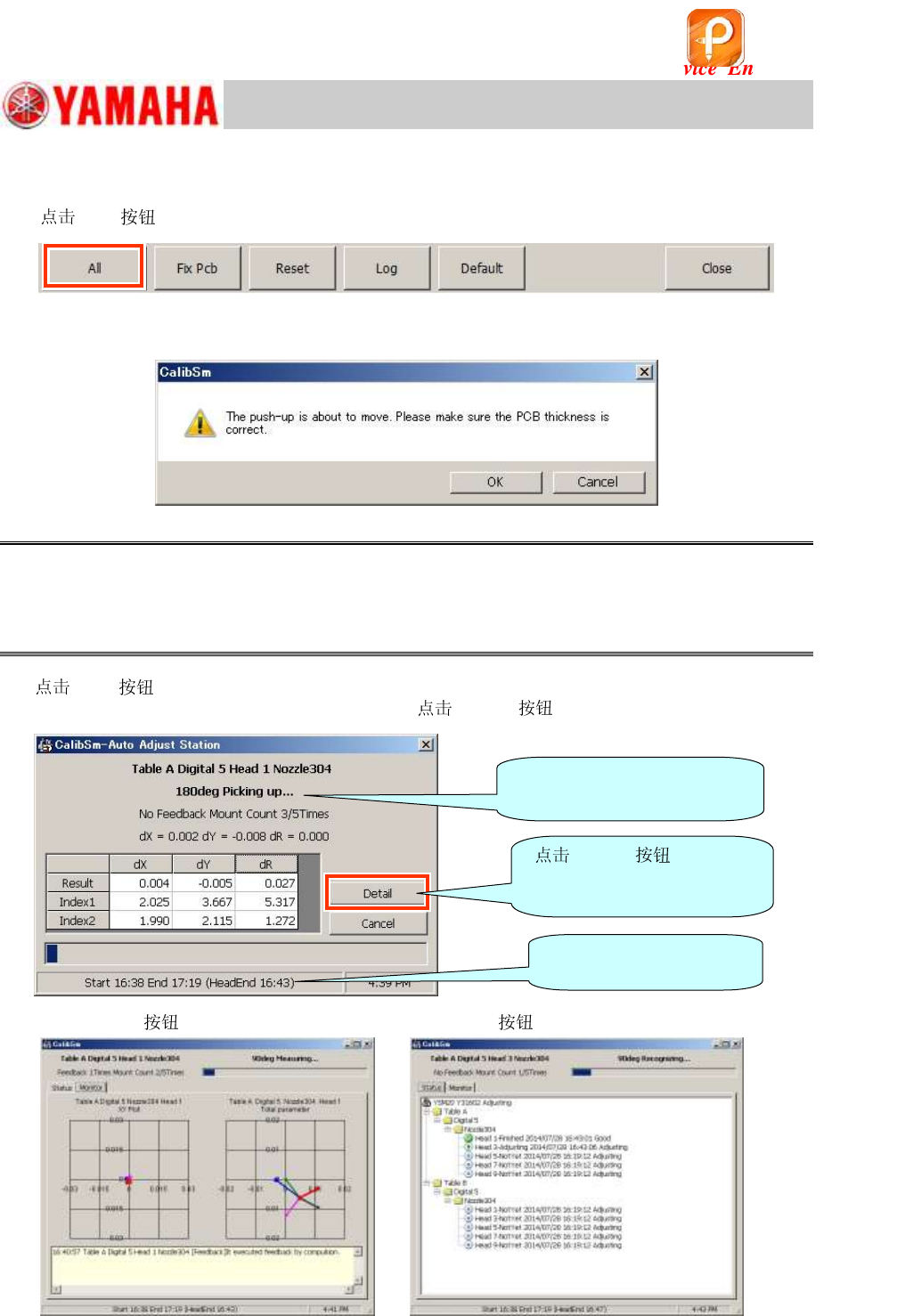
1. [All] to start the adjustment.
Figure 93
The following dialog box appears.
Figure 94
Caution:
First, a dialog box appears asking you to check the board thickness. The thickness of the station is
10.0mm. As it is heavy and the air hoses are connected to it, it cannot be secured properly only by
using the board clamp and the jig may lean. In addition to the board clamp, set the pushup pins under
the area of the station whose thickness is 10.0mm.
2.
[OK] to start the adjustment.
For checking the details of the adjustment state,
[Detail] .
[Detail] - “Monitor” tab [Detail] - “Status” tab
Figure 95
The process of the
adjustment is displayed here.
The estimated time to
complete the adjustment.
[Detail] to
display the “Monitor” window
or the “Status” window.
该文档是极速PDF编辑器生成,
如果想去掉该提示,请访问并下载:
http://www.jisupdfeditor.com/
For Service Engineer
Service Information
SI1610004E-000= YSM10_Procedures for the adjustments required after installing a machine
70/107
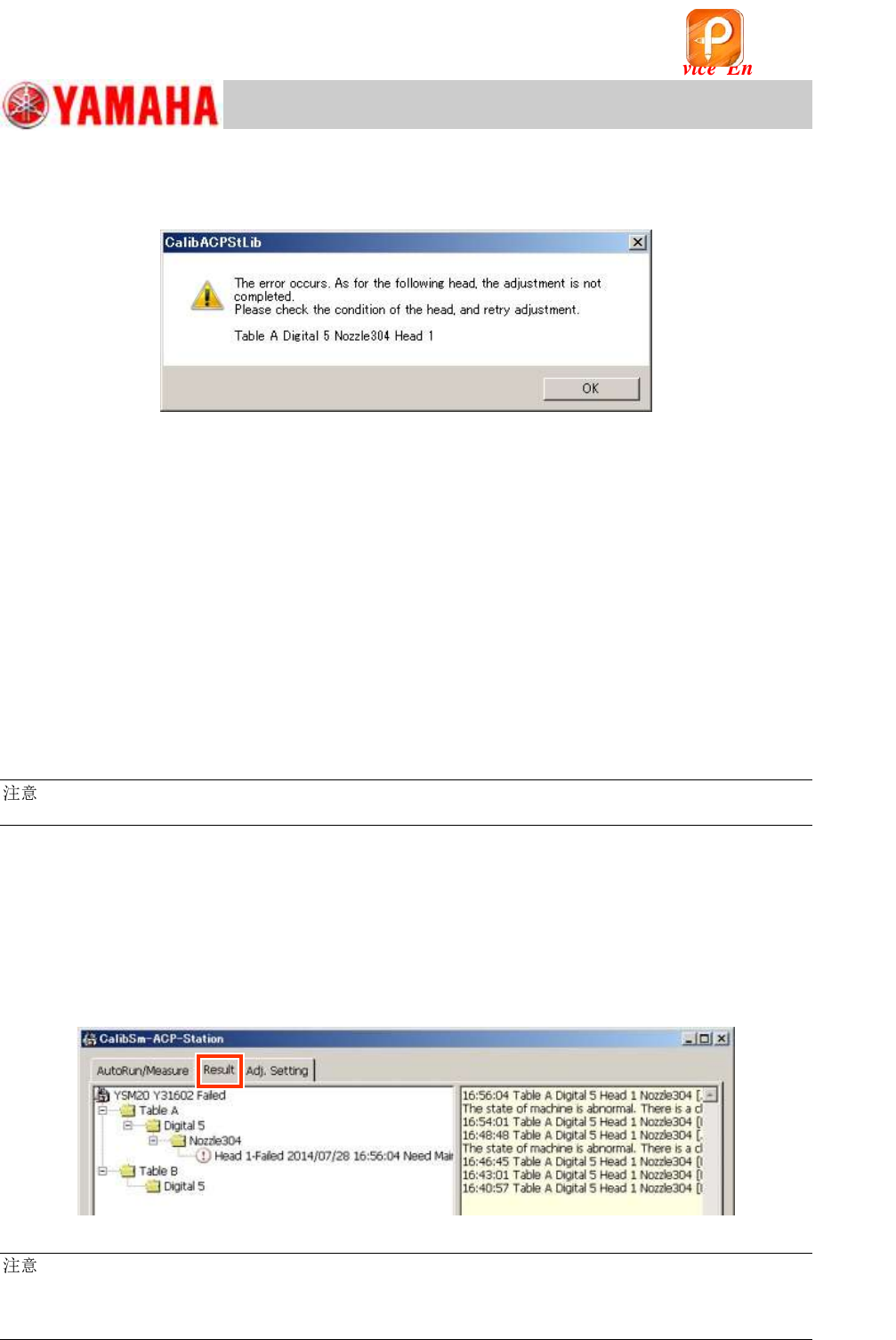
3. Check if the measurement and the adjustment have been completed properly.
If any of the adjustments for the set item cannot be completed properly, an error message
appears.
Figure 96
Check the following to identify the cause of the problem and take appropriate measures, then
perform the adjustment again.
Items to be checked:
・ The FAMF station is secured properly, and the mounting surface is level (No deformation is
found on the station).
・ The QFP can be properly mounted on the station properly during the mounting process.
Check the “Parts” information: “Body Size Z” 1.0mm, “Mount Height” 0.2mm,
“Mount Timer sec” 0.3sec
・ The O-ring at the tip is not contaminated or deformed.
・ The leaf springs are properly set to the and the holding force is sufficient.
・ The marks on the FAMF station and on the QFP can be recognized properly.
:
The measurement results can be checked on the “Result” tab as well.
4. Make sure that the adjustment has been completed on the “Result” tab.
The measurement results can be checked on the “Result” tab.
The adjustment process is shown on the left-side pane, and it remains displayed even when the
adjustment process is interrupted halfway.
When the adjustment restarts, the process starts being displayed again from the point it was
interrupted.
The right-side pane shows the adjustment process by using the character string.
Figure 97
:
The result of the adjustment is saved in the automatically created folder (with the name of the data that
the adjustment is performed) in the following address.
Address: D¥Machine¥Result¥ACPResult¥
该文档是极速PDF编辑器生成,
如果想去掉该提示,请访问并下载:
http://www.jisupdfeditor.com/
For Service Engineer
Service Information
SI1610004E-000= YSM10_Procedures for the adjustments required after installing a machine
71/107
6.9 Check the Total Index
In the “ACP-Station” adjustment, the result files are saved separately per head.
6.9.1 “FinishLog” confirmation window
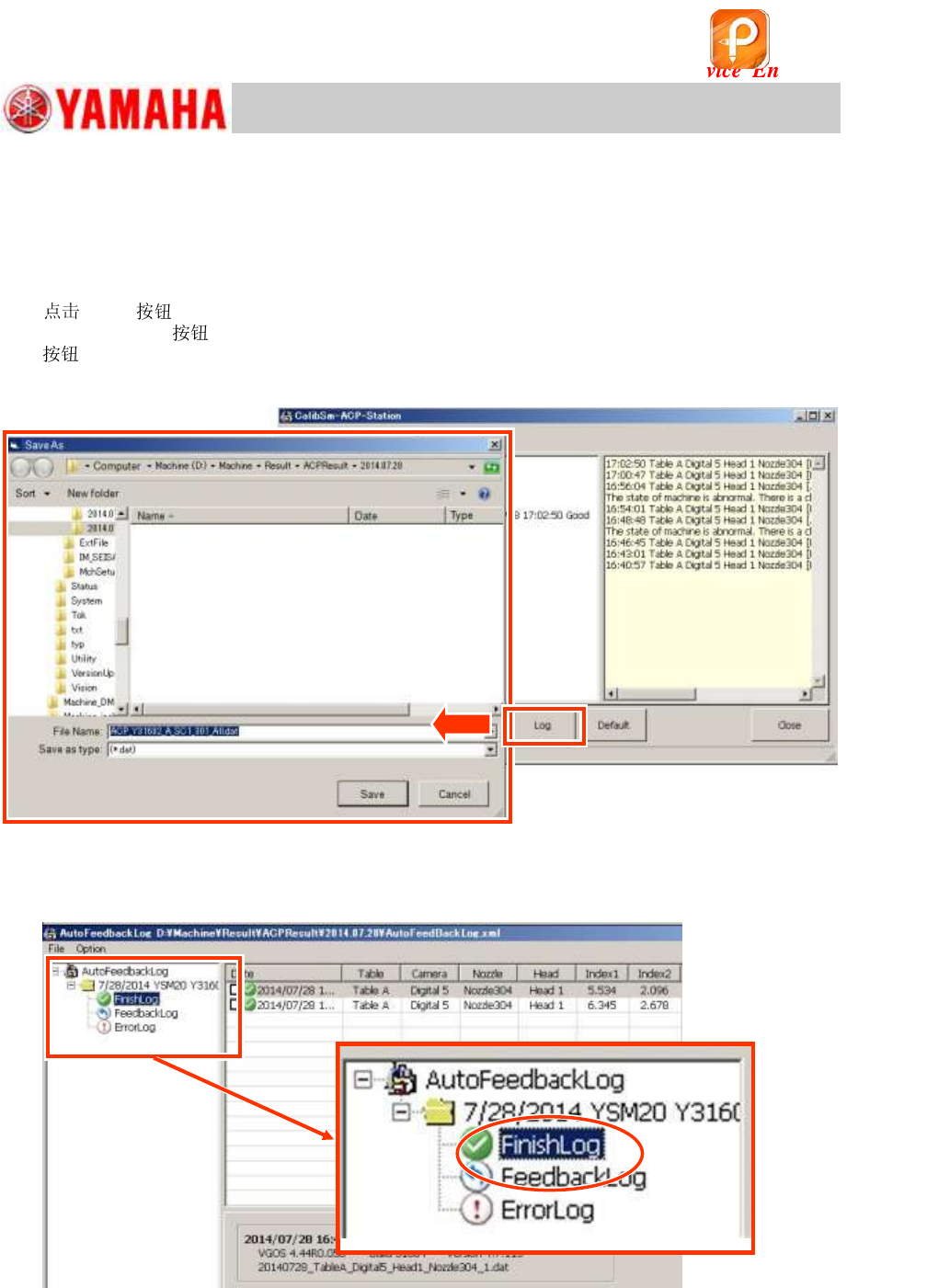
1. [Log] to open the log file.
When the [Log]
at the bottom of the window is tapped, the folder of the date when the [Log]
is tapped opens automatically. Select the “AutoFeedBackLog.xml” file and open it.
The log files are automatically created by the date of the adjustment.
Figure 98
2. Select “FinishLog”.
When the log window appears, select “FinishLog”.
Figure 99
该文档是极速PDF编辑器生成,
如果想去掉该提示,请访问并下载:
http://www.jisupdfeditor.com/