YSM10安装调整(eng).pdf - 第89页
For Ser v ice E n gineer Service Information SI1610004E -000= YSM10_Proced ures for the adjustmen ts required after installing a machine 89/107 11.3.2 Fiducial camer a – “Lig htnes s” adjustme nt If the mac hine is equip…
For Service Engineer
Service Information
SI1610004E-000= YSM10_Procedures for the adjustments required after installing a machine
88/107
11.3 Adjustments related to the mounting accuracy
When performing the basic adjustments for the machine, read the board data for adjustment
“MCH_SETUP” beforehand.
11.3.1 Fiducial camera - “” adjustment
Perform the “” adjustment by recognizing the
0.5mm mark on the board.
1. Set the board for the adjustment on the conveyor.
2. Trace the “Board offset” position (
0.5mm mark on the board).
Caution:
If the machine is equipped with the optional sub camera, the camera closer to the mark is automatically
selected. Check the camera that has moved to the mark position.
3.
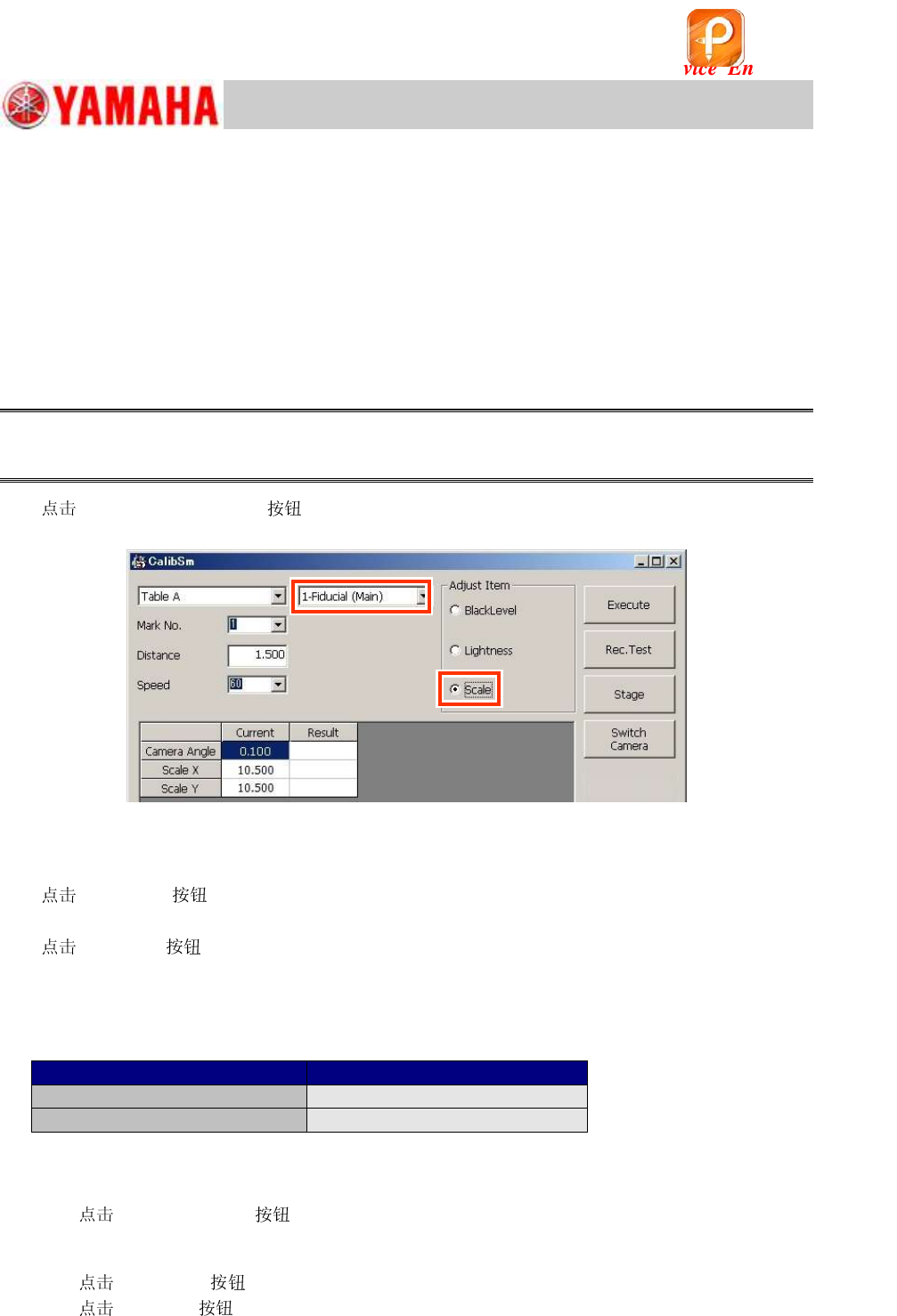
[007 Fiducial camera] on the CalibSm main menu, and select “” from
“Adjust Item”.
Figure 130
4. Select the camera.
Select the camera that has moved to above the
0.5mm mark (“Board offset” position).
5.
[Rec Test] .
After the mark is recognized, the camera moves to the center of the mark.
6.
[Execute] .
The camera moves 1.5mm to the X and to the Y directions, and the and the camera angle
are measured.
7. Check the measurement results and save the data.
Make sure that the values meet the specification and save them.
Item
Specified value
Fiducial Camera X, Y
10.280 ~ 10.880
m
Camera Angle
0.000 +/- 0.500 degrees
Table 39
8. If the machine is equipped with the optional sub camera, perform the adjustment for both
the cameras.
1) [Switch Camera] .
The other camera moves to above the
0.5mm mark and the setting of the Camera type is
switched automatically.
2)
[Rec. Test] .
3)
[Execute] .
4) Check the measurement results and save the data.
该文档是极速PDF编辑器生成,
如果想去掉该提示,请访问并下载:
http://www.jisupdfeditor.com/
For Service Engineer
Service Information
SI1610004E-000= YSM10_Procedures for the adjustments required after installing a machine
89/107
11.3.2 Fiducial camera – “Lightness” adjustment
If the machine is equipped with two fiducial cameras (Option), perform the adjustment for both the
cameras.
The “Black level” adjustment does not need to be performed. (It is required when the camera is
replaced.)
The “Target” value of the “Lightness” adjustment varies depending on the light adjuster type and
the LED version of the lights.
Select the light adjuster before performing the adjustment.
When the LED version has been changed (the part of the LED has been changed), change
the version of the LED beforehand.
:
See Service Information “SI1107002E=YS24 Series_CalibSm Adjustment Manual - 24.2. How to
change the settings of the LED version” for how to change the LED version.
:
See “2.1 Jigs for the “Lightness” adjustment of the cameras” for the types of the light adjusters.
1. Set the light adjuster.
1) Raise the pushup plate.
[Push Up] on the [Unit] – [Conveyor] window in order to raise the pushup plate.
Enter “4.0mm” in the “Thickness” field.
2) Set the pushup pins.
Set three (3) pushup pins so that the light adjuster can be placed on
them.
3) Place the light adjuster on the pushup pins with its gray surface
facing up.
If the adjuster is not level, check if the height of the pushup pins is
even.
Figure 131
2. Perform teaching for the light gray part of the light adjuster.
[Unit] and then the [Axis] . Move the head so that the light gray part of the
adjuster fills the window of the fiducial camera 1 (the camera on the right).
* If the Scan camera is under the fiducial camera, move it from under the fiducial camera.
3.
[007 Fiducial Camera] on the CalibSm main menu.
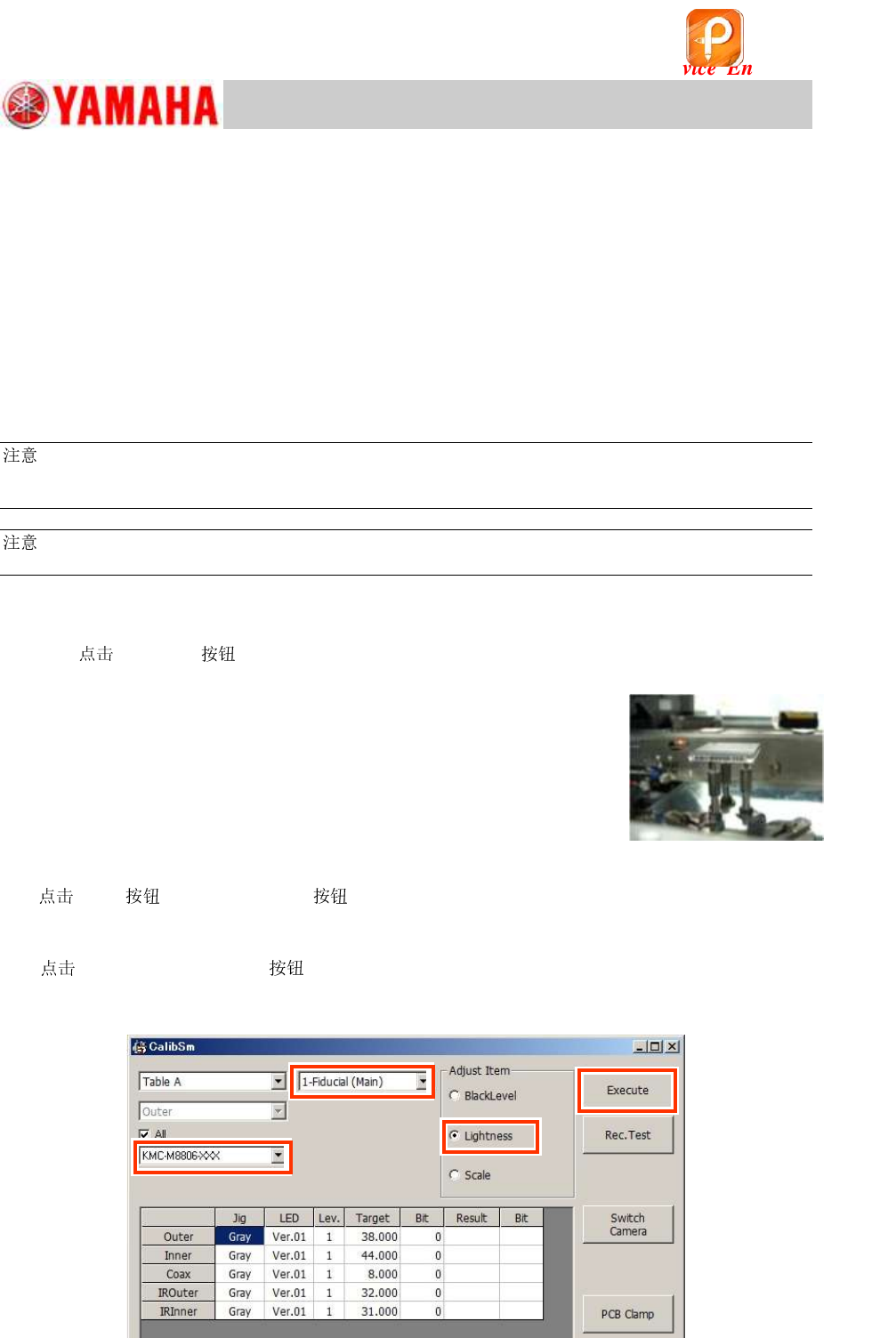
Select “Lightness” from “Adjust Item”, and make sure that “1-Fiducial (Main)” is selected from the
pull-down menu at the upper part of the window.
Figure 132
Step 3
Step 3
Step 4
Step 5
该文档是极速PDF编辑器生成,
如果想去掉该提示,请访问并下载:
http://www.jisupdfeditor.com/
For Service Engineer
Service Information
SI1610004E-000= YSM10_Procedures for the adjustments required after installing a machine
90/107
4. Select the light adjuster.
Select the part number of the light adjuster to be used for the “Lightness” adjustment.
The target values vary depending on the light adjusters to be used.
The value that the black level value is added to the set target value is displayed as “Target”
value.
:
See “2.1 Jigs for the “Lightness” adjustment of the cameras” for the types of the light adjusters.
5.
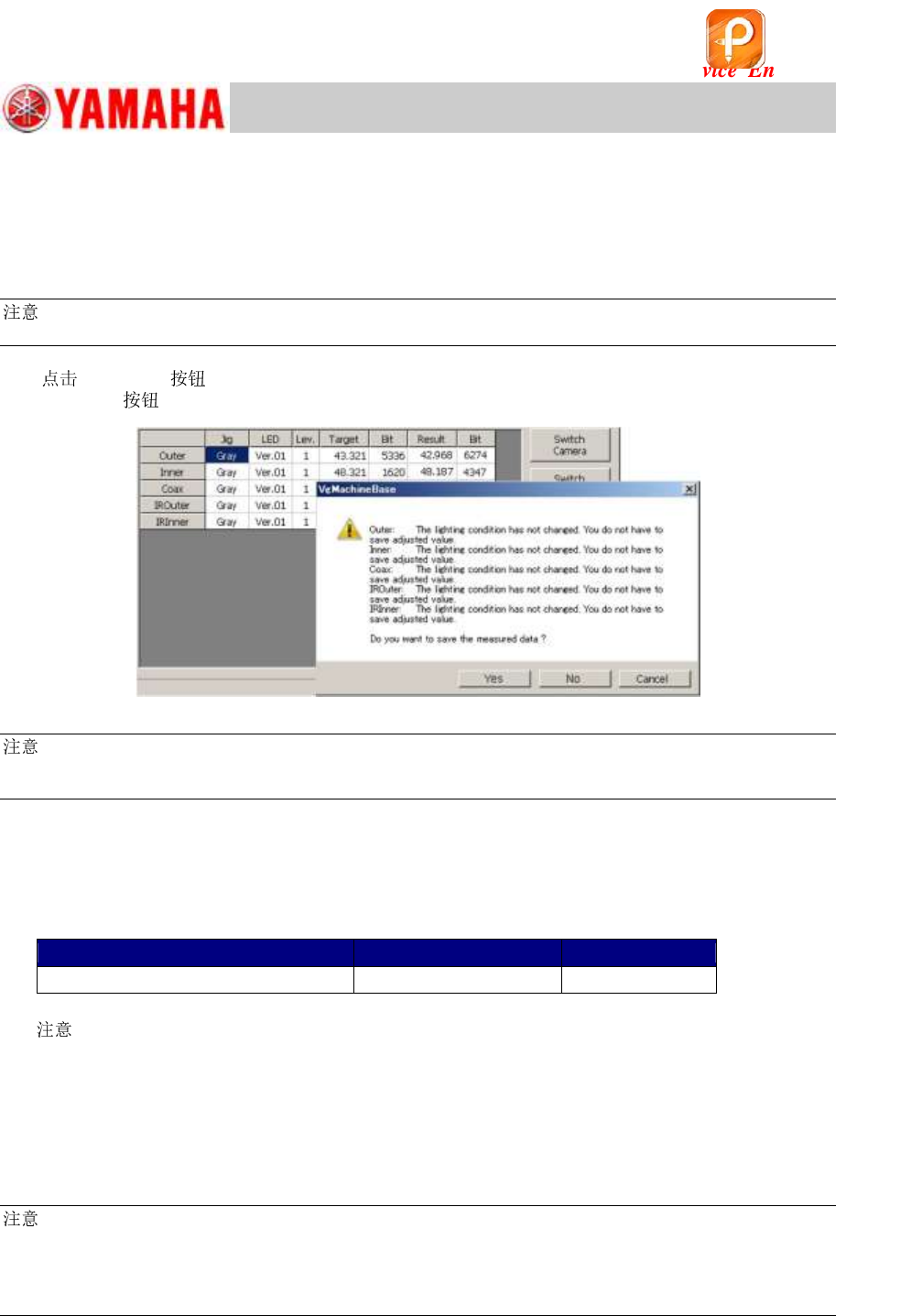
[Execute] .
When the is tapped, the “Lightness” adjustment is automatically performed.
Figure 133
:
Usually the adjustment is performed for all the lights (Outer, Inner, Coax, IR Outer and IR Inner). However if
you need to perform the adjustment separately, untick the “All” checkbox and select the light.
6. Make sure that the values in the “Result” and the “Bit” fields fall within the specification,
and save the data.
If there is no problem with the data, fill in the values on the check sheet.
[Specified value] * The target values vary depending on the light adjusters to be used.
Target value
Specification
Bit value
Target value + Black level value
Target value +/-2
256 ~ 16128
Table 40
[ ]
When the Bit value does not meet the specification, check the following.
・ Is the correct light adjuster selected?
・ Is the adjuster clean? If it is not, clean it with alcohol.
・ Is the lighting environment affecting the adjustment result?
・ Is the lighting condition normal? (Are all the LEDs lit?)
:
As the upper limit of the specified Bit value is the warning value, the adjustment can be performed even
when the value exceeds the specified value. If the measured result exceeds 16128 (the 7/8 of the limit
value), it may attribute to the deterioration of the lighting device. It is recommended to replace the light.
(Limit value of the Bit value: 18432)
* If the machine is NOT equipped with the optional sub fiducial camera, this is the end of
the ”Lightness” adjustment process.
该文档是极速PDF编辑器生成,
如果想去掉该提示,请访问并下载:
http://www.jisupdfeditor.com/