YSM10安装调整(eng).pdf - 第91页
For Ser v ice E n gineer Service Information SI1610004E -000= YSM10_Proced ures for the adjustmen ts required after installing a machine 91/107 If the machine is equ ipped with the sub fiducial camera (Option) After co…
For Service Engineer
Service Information
SI1610004E-000= YSM10_Procedures for the adjustments required after installing a machine
90/107
4. Select the light adjuster.
Select the part number of the light adjuster to be used for the “Lightness” adjustment.
The target values vary depending on the light adjusters to be used.
The value that the black level value is added to the set target value is displayed as “Target”
value.
:
See “2.1 Jigs for the “Lightness” adjustment of the cameras” for the types of the light adjusters.
5.
[Execute] .
When the is tapped, the “Lightness” adjustment is automatically performed.
Figure 133
:
Usually the adjustment is performed for all the lights (Outer, Inner, Coax, IR Outer and IR Inner). However if
you need to perform the adjustment separately, untick the “All” checkbox and select the light.
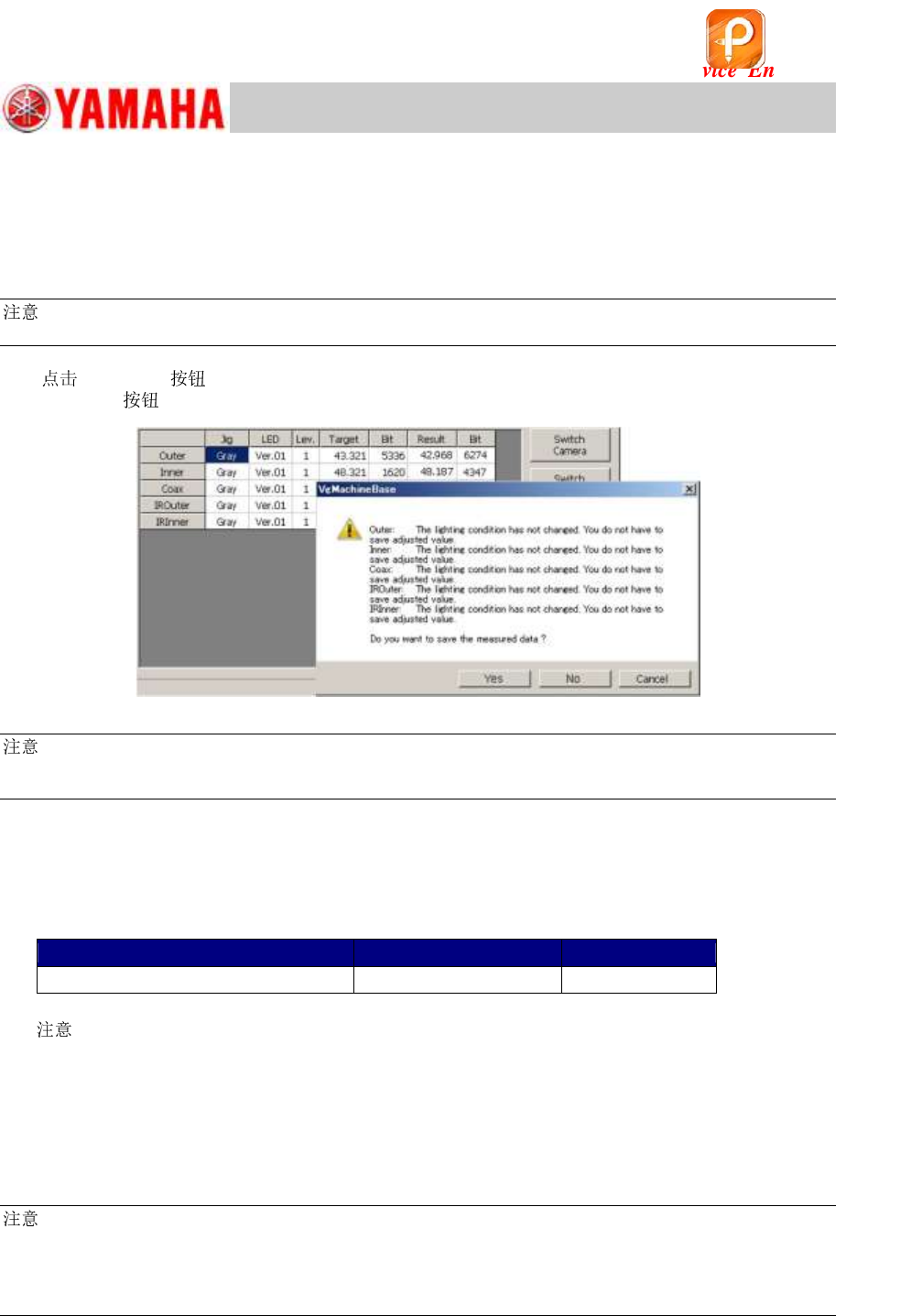
6. Make sure that the values in the “Result” and the “Bit” fields fall within the specification,
and save the data.
If there is no problem with the data, fill in the values on the check sheet.
[Specified value] * The target values vary depending on the light adjusters to be used.
Target value
Specification
Bit value
Target value + Black level value
Target value +/-2
256 ~ 16128
Table 40
[ ]
When the Bit value does not meet the specification, check the following.
・ Is the correct light adjuster selected?
・ Is the adjuster clean? If it is not, clean it with alcohol.
・ Is the lighting environment affecting the adjustment result?
・ Is the lighting condition normal? (Are all the LEDs lit?)
:
As the upper limit of the specified Bit value is the warning value, the adjustment can be performed even
when the value exceeds the specified value. If the measured result exceeds 16128 (the 7/8 of the limit
value), it may attribute to the deterioration of the lighting device. It is recommended to replace the light.
(Limit value of the Bit value: 18432)
* If the machine is NOT equipped with the optional sub fiducial camera, this is the end of
the ”Lightness” adjustment process.
该文档是极速PDF编辑器生成,
如果想去掉该提示,请访问并下载:
http://www.jisupdfeditor.com/
For Service Engineer
Service Information
SI1610004E-000= YSM10_Procedures for the adjustments required after installing a machine
91/107
If the machine is equipped with the sub fiducial camera (Option)
After completing the adjustment for the “1-Fiducial (Main)” camera, perform the adjustment for the
“2-Fiducial (Sub)” camera continuously.
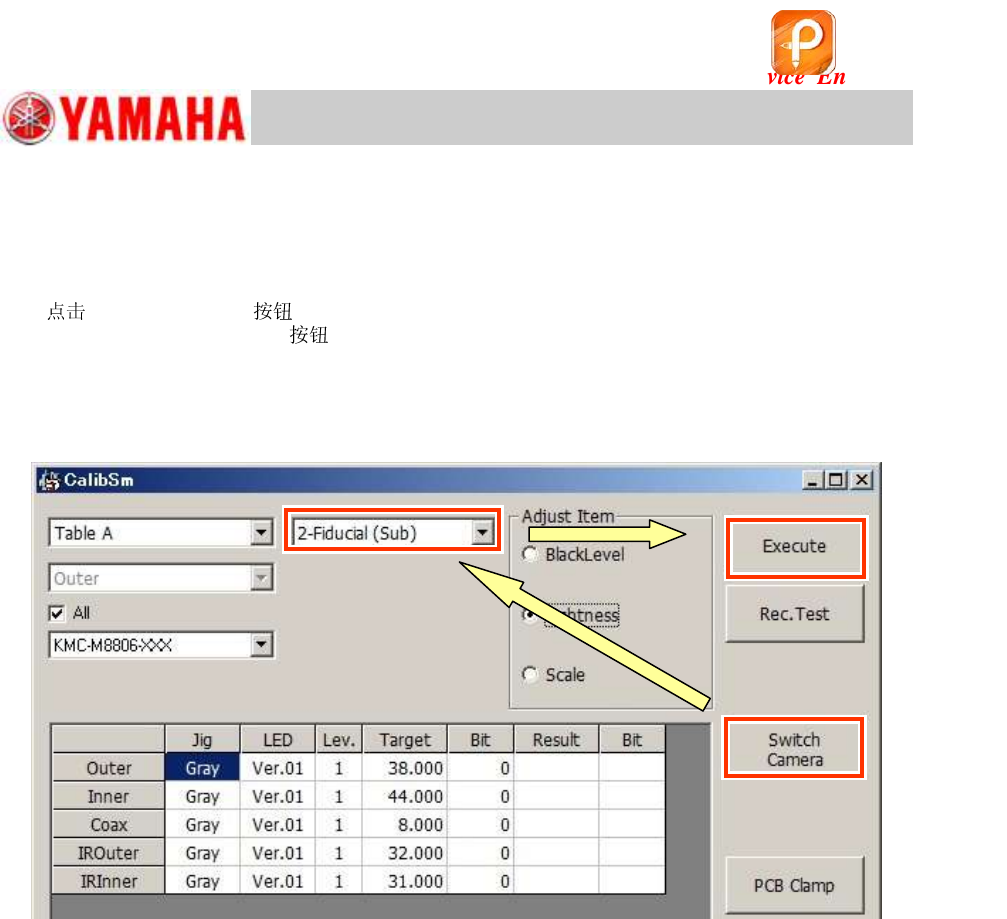
7. [Switch Camera] .
When the [Switch Camera]
has been tapped, the sub fiducial camera (2-Fiducial (Sub))
moves to above the light adjuster that is being caught by the main fiducial camera (1-Fiducial
(Main)).
After the sub fiducial camera moves to the position, the camera name is switched from “1-Fiducial
(Main)” to “2-Fiducial (Sub)” automatically.
Figure 134
8. Check the camera type, and perform the “Lightness” adjustment.
Check if the values in the “Result” and the “Bit” fields meet the specification, and save the data.
If the values fall within the specification, fill in the values on the check sheet.
该文档是极速PDF编辑器生成,
如果想去掉该提示,请访问并下载:
http://www.jisupdfeditor.com/
For Service Engineer
Service Information
SI1610004E-000= YSM10_Procedures for the adjustments required after installing a machine
92/107
11.3.3 Scan camera – “Lightness” adjustment
When performing the “Lightness” adjustment for the Scan camera, adjust the main camera and the
side view camera separately.
Light adjuster
When performing the adjustment for the main camera, make sure to use the light adjuster
dedicated to the Scan camera (11mm square) in order to avoid the interference with the scan unit.
No jigs are required for the “Lightness” adjustment of the side view camera.
Perform the adjustment with a 301A (312A) or a 302A (313A) attached to the head.
:
See “2.1 Jigs for the “Lightness” adjustment of the cameras” for the types of the light adjusters.
“Lightness” adjustment for the Main camera
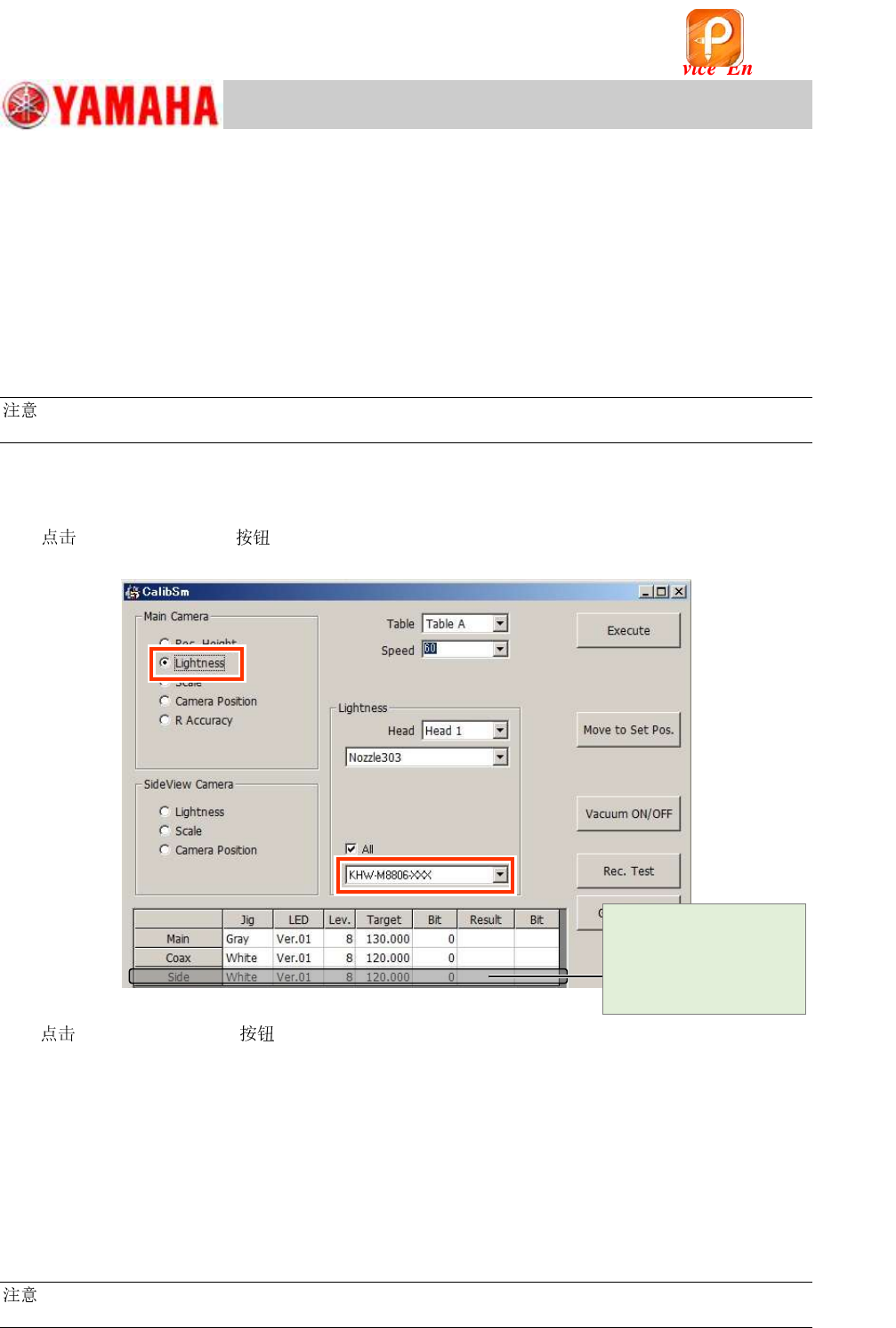
1. Select “Lightness” from “Main Camera”.
[010 Scan camera] on the CalibSm main menu and select “Lightness” from “Main
Camera”.
Figure 135
2. [Move to Set Pos.] to change the to 303A (314A) .
If the machine is equipped with an ANC, the of the head to be adjusted is changed to
“ 303A (314A)”, and the head moves to above the front-side feeder bank.
If the machine is NOT equipped with an ANC, the head to be adjusted moves to above the
front-side feeder bank.
Put the machine into the “Emergency stop” state, and attach the 303A (314A) to the
head by hand.
3. Select the light adjuster.
The target values vary depending on the light adjusters to be used. Make sure to select the part
number of the light adjuster that is actually used for the adjustment.
:
See “2.1 Jigs for the “Lightness” adjustment of the cameras” for the types of the light adjusters.
[Cancel] the
adjustment process for
the adjustment of the
Side light of the Main
camera.
该文档是极速PDF编辑器生成,
如果想去掉该提示,请访问并下载:
http://www.jisupdfeditor.com/