YSi-V_Ope_E - 第103页
A-4 Appendix n Avoid installing or storing the UPS in the following locations. · Airtight locations or locations where inflammable gases or corrosi ve gases are present. · Outdoor locations · Dusty locations Using in the…

A-3
Appendix
3. UPS (Uninterruptible Power Supply)
3.1 Safety precaution
3.1.1 Precautions when shipping or exporting the UPS
When shipping the machine equipped with a UPS, always remove the UPS from the machine and carefully
pack it in a separate box.
Take appropriate measures so that the UPS storage temperature does not exceed the rated range (-15 to +50°C).
If the storage temperature exceeds +50°C, the UPS might malfunction or dilute sulfuric acid might leak from
the UPS battery.
When the UPS is left stored for more than three months, the UPS battery may become unusable. Be sure to
recharge the UPS battery once every three months unless the machine has been installed shortly after shipping.
The UPS used at this time for YAMAHA machines does not fall under the Export Trade Control Ordinance.
3.1.2 Disposing of used battery after replacement
This UPS uses a lead battery, so do not discard it as incombustible waste. Dispose of it properly in compliance
with legal regulations in your country. If any point is unclear about the disposal method, please consult our
sales office or representative.
3.1.3 Safety precautions
When using the UPS, take the following precautions to ensure safety. Failure to follow these safety precautions
may result in serious accidents.
n
Do not connect any other than the specified unit to the UPS output receptacle.
Increased load capacity may shorten the UPS backup time or prevent the UPS from providing sufficient backup power if
an overload occurs or cause the YSi-V power to turn off. For details, refer to the instruction manual that comes with the
UPS.
n
Immediately replace the battery when no longer usable.
Dilute sulfuric acid may leak out from the UPS battery if used when worn down, causing smoke or fire.
n
Do not disassemble, repair and modify the UPS except when replacing the battery.
Electrical shock or fire may result.
n
Do not touch the UPS battery if fluid is leaking out of the inside.
Loss of eyesight or burns may result, if battery fluid gets in eyes or comes in contact with skin. Immediately wash
liberally with pure water and consult a physician for proper treatment.
n
If unusual sounds, odor or smoke is coming out from the UPS, or if battery fluid leaks out,
immediately turn off the YSi-V power switch and the UPS power switch.
Continuous operation under such conditions may cause fire. If this happens, immediately turn off the YSi-V power switch
and also all breakers located inside the rear panel of the YSi-V. Then turn off the UPS power switch.
After checking no power is supplied to the YSi-V and UPS, contact our sales office or representative..
n
Securely ground the UPS during recharging.
When recharging a UPS which is being stored, always connect the UPS to the ground pin of the AC input plug.
n
Install the UPS facing correctly in the YSi-V.
Battery fluid may leak out if the UPS is installed facing the wrong way.
n
Do not block the air intake and outlet vents on the UPS.
Blocking the air vents causes the internal temperature to rise excessively, resulting in malfunctions, breakdowns or fire.
n
Do not use the UPS in locations at high temperatures above 40°C.
The UPS battery may wear down quickly or cause fire. This may also cause breakdown or malfunction.

A-4
Appendix
n
Avoid installing or storing the UPS in the following locations.
· Airtight locations or locations where inflammable gases or corrosive gases are present.
· Outdoor locations
· Dusty locations
Using in the above locations may cause fire and must be avoided.
n
Do not get the UPS wet and do not splash with water.
Electrical shock or fire may result.
n
Do not short the UPS battery terminals.
Burns or fire may result. Use caution even when handling a used battery since electrical energy still remains inside the
battery.
n
Do not throw the battery into fire or do not destroy the battery.
The battery may explode or the internal dilute sulfuric acid might leak out.
n
When recharging the UPS battery during storage, always connect to the power outlet of the
specified AC power voltage (50/60Hz).
Connecting to a power outlet of different AC voltage may cause fire.
n
Do not insert a metallic object into the power output connector.
Electrical shock may result.
n
Do not insert the AC input plug into the power output connector.
The UPS may be damaged.
A-5
Appendix
3.2 About the UPS
The YSi series machine employs the uninterruptible power supply (UPS) to protect the data upon power failure.
Only the outline of the UPS installed in YSi series machine is described in this manual.
For details about how to handle the UPS, see the user's manual prepared by the manufacturer that is supplied
with the UPS.
n
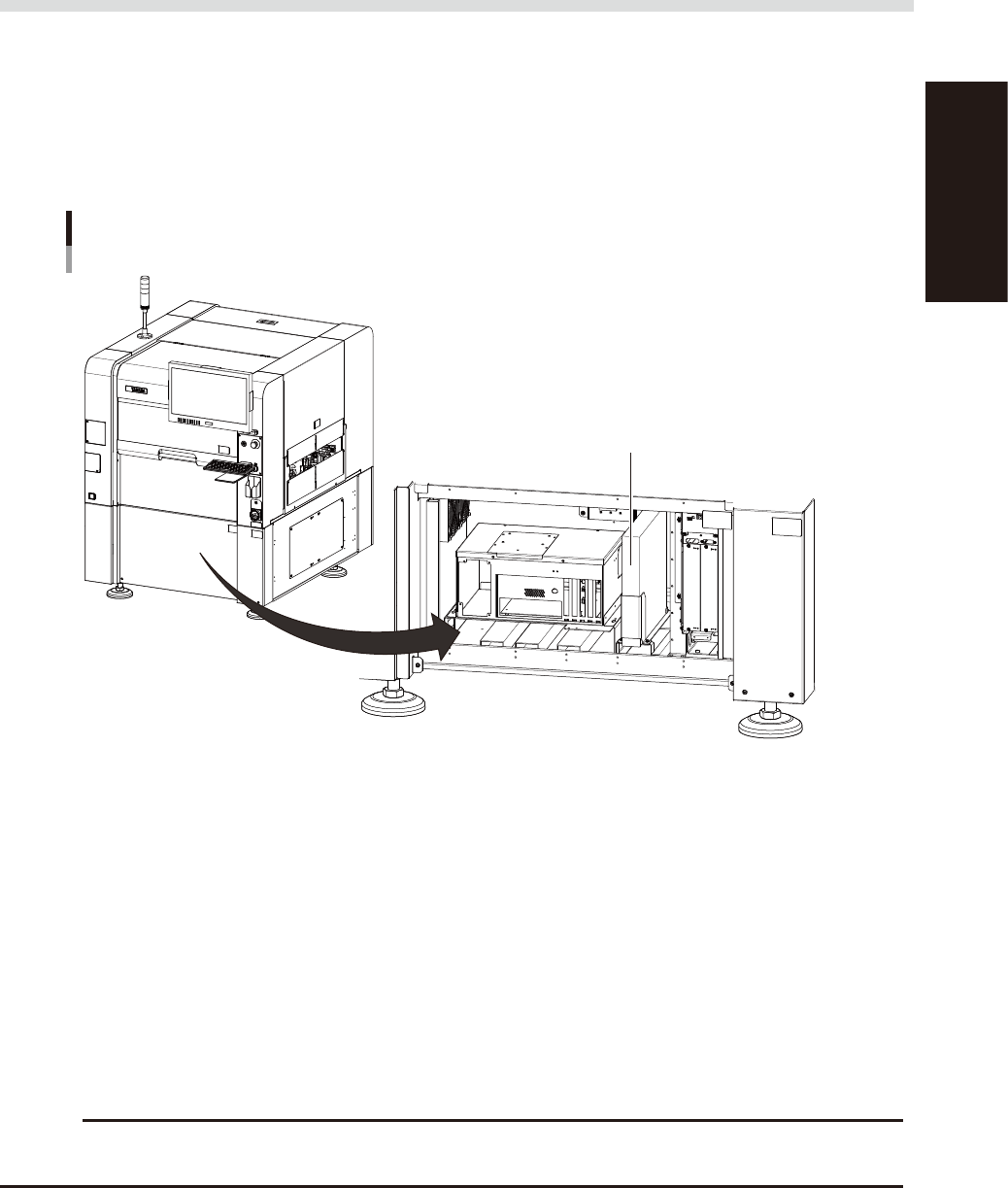
UPS installation position
When you open the front lower cover of the YSi-V, you will see the UPS installed upright in the right position.
UPS installation position
Open the YSi-V front cover.
UPS
23505-M9-00
n
Prevents the user data corruption
The UPS prevents the user data from being damaged even if power is suddenly shut off by power failure or other
accidents. Normally, the system area of the hard disk in the YSi-V is protected by a write filter so that the data in the
system area is not damaged even if power is suddenly shut off by power failure or other accidents. However, the
inspection program on editing is not protected. And the equipments as such a hard disk may be damaged by the power
failure.
If the power to the machine equipped with a UPS is shut off by power failure, the UPS provides backup power to the
control box and the monitor. According to this, the shutdown process can be performed safely without losing the user
data as such the inspection program.
n
What UPS backs up
One UPS is needed to provide backup power to one YSi-V. The UPS is connected to the secondary of the control
transformer and provides backup power to the control box.
c
CAUTION
In YSi-V equipped with a UPS, the control power is still supplied even in the event of power failure or even after the
main power switch is turned off. Therefore, turn off the UPS power switch when performing maintenance work, etc.