YSi-V_Ope_E - 第104页
A-5 Appendix 3.2 About the UPS T he YSi series machine employs the uninterruptible power supply (UPS) to protect the data upon po wer failure. Only the outline of the UPS installed in YSi series machine is described in t…

A-4
Appendix
n
Avoid installing or storing the UPS in the following locations.
· Airtight locations or locations where inflammable gases or corrosive gases are present.
· Outdoor locations
· Dusty locations
Using in the above locations may cause fire and must be avoided.
n
Do not get the UPS wet and do not splash with water.
Electrical shock or fire may result.
n
Do not short the UPS battery terminals.
Burns or fire may result. Use caution even when handling a used battery since electrical energy still remains inside the
battery.
n
Do not throw the battery into fire or do not destroy the battery.
The battery may explode or the internal dilute sulfuric acid might leak out.
n
When recharging the UPS battery during storage, always connect to the power outlet of the
specified AC power voltage (50/60Hz).
Connecting to a power outlet of different AC voltage may cause fire.
n
Do not insert a metallic object into the power output connector.
Electrical shock may result.
n
Do not insert the AC input plug into the power output connector.
The UPS may be damaged.
A-5
Appendix
3.2 About the UPS
The YSi series machine employs the uninterruptible power supply (UPS) to protect the data upon power failure.
Only the outline of the UPS installed in YSi series machine is described in this manual.
For details about how to handle the UPS, see the user's manual prepared by the manufacturer that is supplied
with the UPS.
n
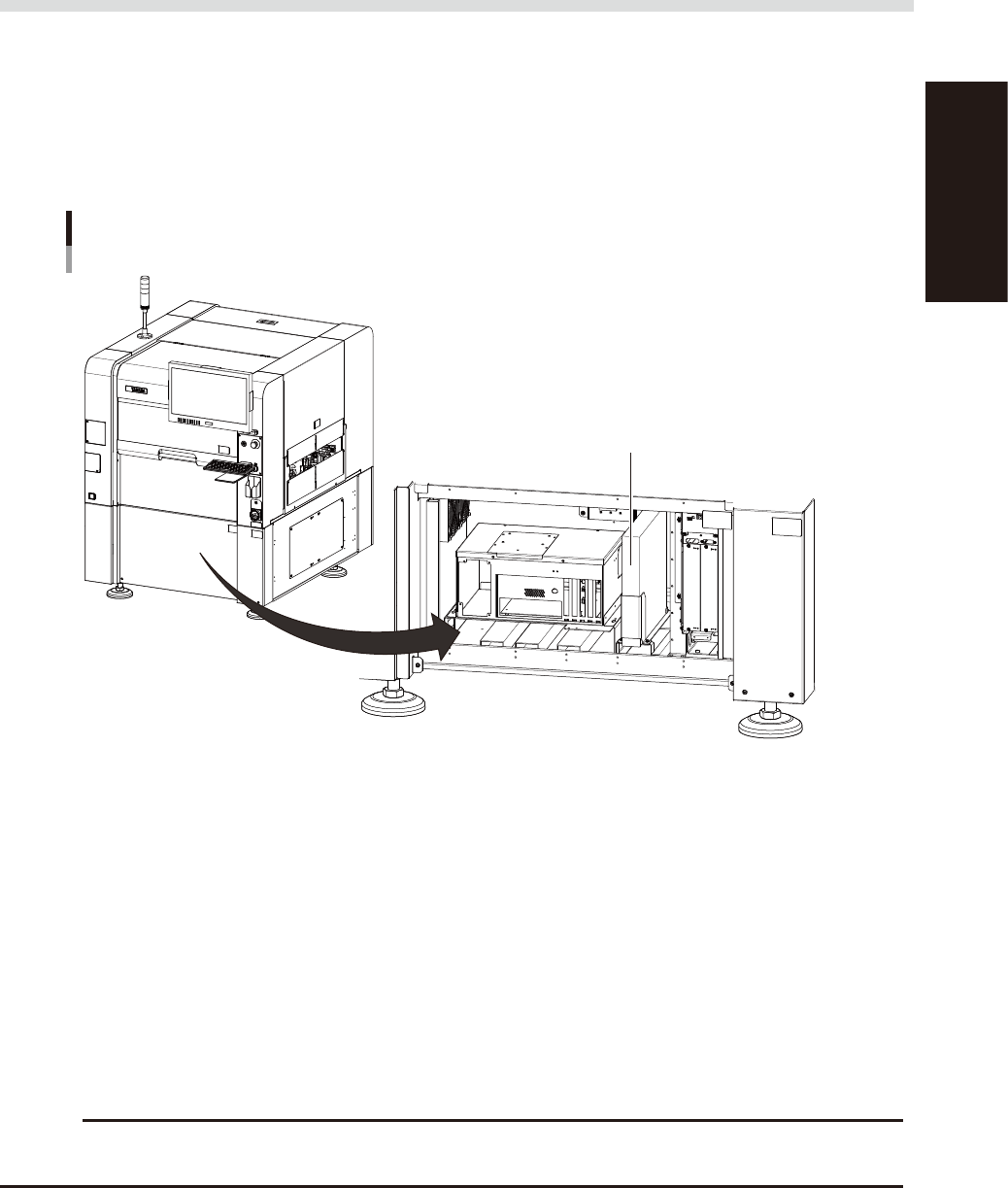
UPS installation position
When you open the front lower cover of the YSi-V, you will see the UPS installed upright in the right position.
UPS installation position
Open the YSi-V front cover.
UPS
23505-M9-00
n
Prevents the user data corruption
The UPS prevents the user data from being damaged even if power is suddenly shut off by power failure or other
accidents. Normally, the system area of the hard disk in the YSi-V is protected by a write filter so that the data in the
system area is not damaged even if power is suddenly shut off by power failure or other accidents. However, the
inspection program on editing is not protected. And the equipments as such a hard disk may be damaged by the power
failure.
If the power to the machine equipped with a UPS is shut off by power failure, the UPS provides backup power to the
control box and the monitor. According to this, the shutdown process can be performed safely without losing the user
data as such the inspection program.
n
What UPS backs up
One UPS is needed to provide backup power to one YSi-V. The UPS is connected to the secondary of the control
transformer and provides backup power to the control box.
c
CAUTION
In YSi-V equipped with a UPS, the control power is still supplied even in the event of power failure or even after the
main power switch is turned off. Therefore, turn off the UPS power switch when performing maintenance work, etc.
A-6
Appendix
3.3 Operation and setting
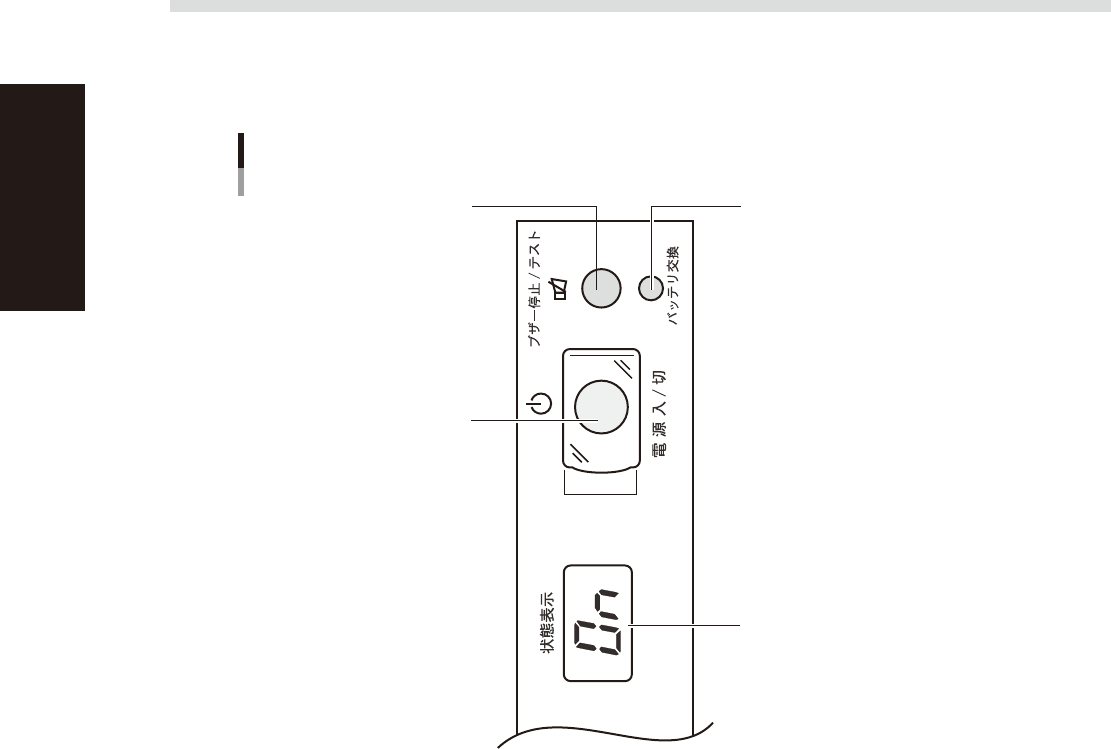
3.3.1 Front panel
The USP front panel is shown below.
Front panel
"Beep Stop / Test" switch "Battery Replacement" indicator lamp
"Power" switch
Digital "Status" display
23A02-K1-00
3.3.2 Operation during normal operation (power is normal)
No special operations are required as long as the UPS operates normally. Use the YSi-V power switch to turn
the YSi-V on and off, just as operating a YSi-V not equipped with a UPS.
3.3.3 Operation during power failure or trouble
If trouble occurs with the power supply due to a power failure or other reasons, the UPS detects the error and
automatically starts providing backup power. At the same time, the YSi-V application software receives the
error signal from the UPS and sets the YSi-V to emergency stop. The backup state is then maintained for 1
minute while waiting for the power to be restored.
When the power is restored:
Take out the board and then resume inspection.
If the power does not recover when 1 minute has passed after a power failure:
The YSi-V automatically starts shutting down the YSi software. To protect the hard disk during this shutdown
process, the data that was being edited is not saved. After AC power is restored, the YSi-V automatically turns
on and restarts YSi software.