YSi-V_Ope_E - 第107页
A-8 Appendix 3.5 T roubleshooting The UPS shows the status on the digital display and sounds a beep to alert you of an error or problem. See the table below ("Meaning of beeps and displays") for information on …
A-7
Appendix
3.4 Maintenance
The UPS battery will wear down, reaching the end of its service life after the UPS has been operated for a long
time. When the battery is low, the UPS backup time during power failures becomes short and in worst cases
the battery dies before the machine shutdown process is finished. To prevent this, the UPS battery must be
replaced periodically.
The UPS itself will also gradually wear down after extended operation time and must be replaced when the end
of its service life is reached.
3.4.1 Battery replacement period
If the auto battery test or the self-diagnostic test results in any of the following, see "3.5 Troubleshooting".
· The “Status” display flashes.
· The “Battery replacement” indicator lamp flashes.
· The “Beep” sound goes off.
n
Auto battery test function
This test checks once per 4 weeks whether the battery needs to be replaced and whether the internal circuit is operating
normally.
n
Self-diagnostic test
Press the "Beep Stop / Test" switch on the UPS for at least 0.5 seconds and then release it. A self-diagnostic test will be
run.
n
Expected UPS battery life
Average ambient temperature Expected battery life Replacement period
20°C 4 to 5 years 4 to 5 years after starting use
20°C 2 to 2.5 years 2.5 years after starting use
3.4.2 Battery replacement
When replacing the UPS battery, refer to the instruction manual that comes with the UPS. A Phillips
screwdriver is required to replace the battery.
n
NOTE
After replacing the UPS battery, write the date you replaced the battery on the labels which are stuck to the UPS and
the left side of the main switch.
3.4.3 Replacement battery storage
When the replacement battery has been stored for a long time, it must be recharged periodically. This is
because the battery gradually discharges if left stored without being recharged and will finally reach a level
where recharging is impossible.
c
CAUTION
When you store a UPS battery as a spare, connect the "AC input" plug into a power outlet once every 3 months for 12
hours or more in order to recharge the UPS. Avoid storing the UPS battery in locations subject to high temperatures.
Store it at room temperature.
A-8
Appendix
3.5 Troubleshooting
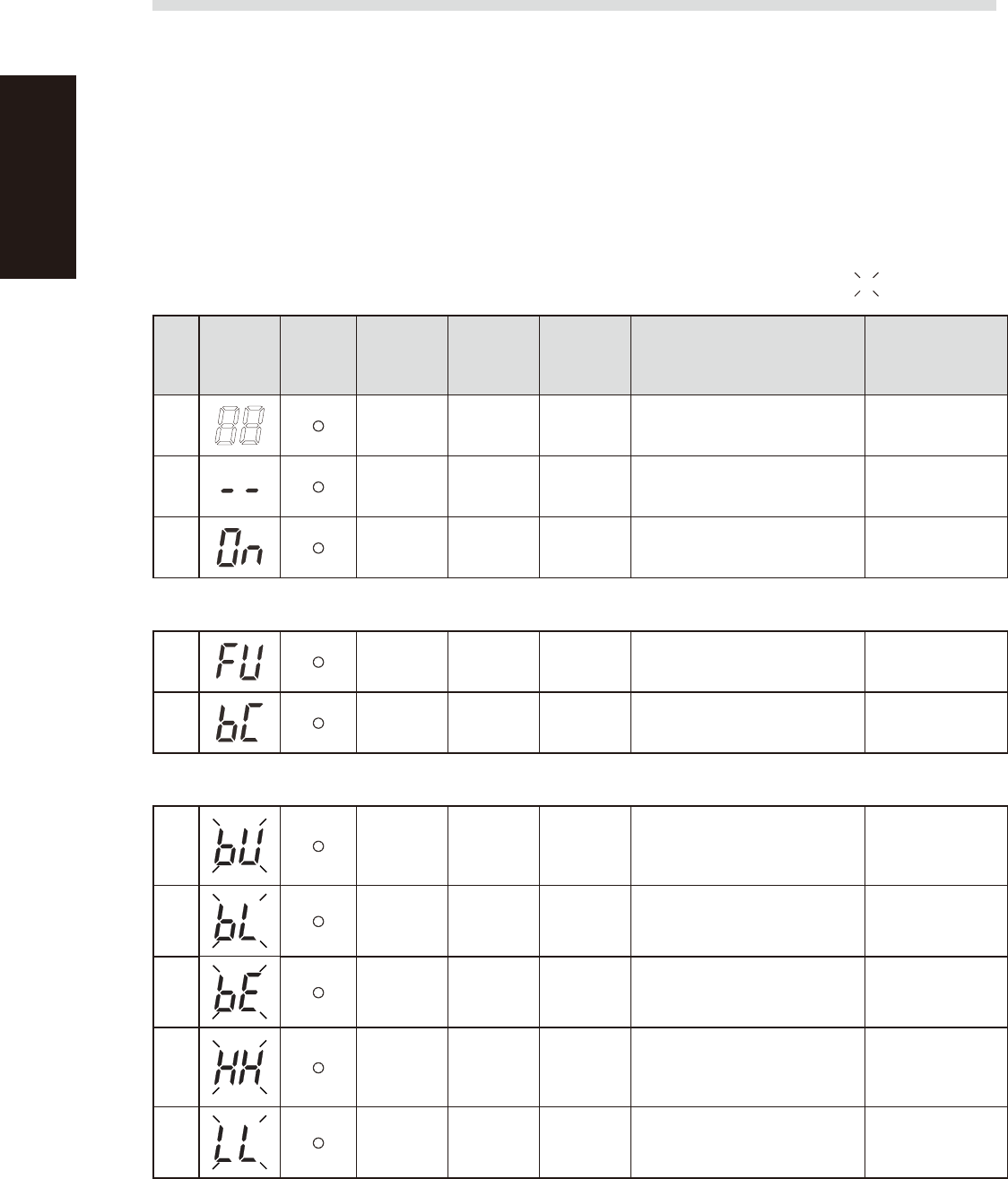
The UPS shows the status on the digital display and sounds a beep to alert you of an error or problem. See
the table below ("Meaning of beeps and displays") for information on alarms and UPS operation status and
their solutions.
n
To stop the beep
To stop the beep sound triggered by an error or problem, press the "Beep Stop / Test" button.
If another error or problem occurs, then a beep will sound regardless of whether the previous peep was stopped with this
button.
n
Meaning of beeps and displays
Displays and beeps during normal operation : Blinking
No.
Status
display
Battery
replacement
indicator
lamp
Beep Output Charging Description Solution
1
None OFF OFF
No AC power input
Operation stopped
–
2
None OFF ON
AC power is input
Power switch “OFF”
–
3
None ON ON
Power switch “ON”
Operating normally
–
Displays and beeps while testing
4 None ON
OFF
Discharging
Self-diagnostic test in progress –
5
None ON
OFF
Discharging
Auto battery test in progress –
Displays and beeps during power failure or AC input error
6
Intermittent
4-second
intervals
ON
OFF
Discharging
Backup is operating due to power
failure or AC input error. The
battery will be depleted if backup
operation continues.
Perform shutdown
operations for the
connected devices
and stop them.
7
Intermittent
1-second
intervals
ON
OFF
Discharging
(Same as above.)
Battery level is low, so output will
stop soon.
(Same as above.)
8
None OFF
OFF
Discharging
Battery is dead, so output stopped.
(This is displayed only for a few
seconds.)
Charge the battery.
9
None OFF (ON)
AC input voltage or frequency is
too high (over)
Power switch “OFF”
Use within the input
voltage/frequency
range described in
the specifications.
10
None OFF (ON)
AC input voltage or frequency is
too low (under)
Power switch “OFF”
(Same as above.)
A-9
Appendix
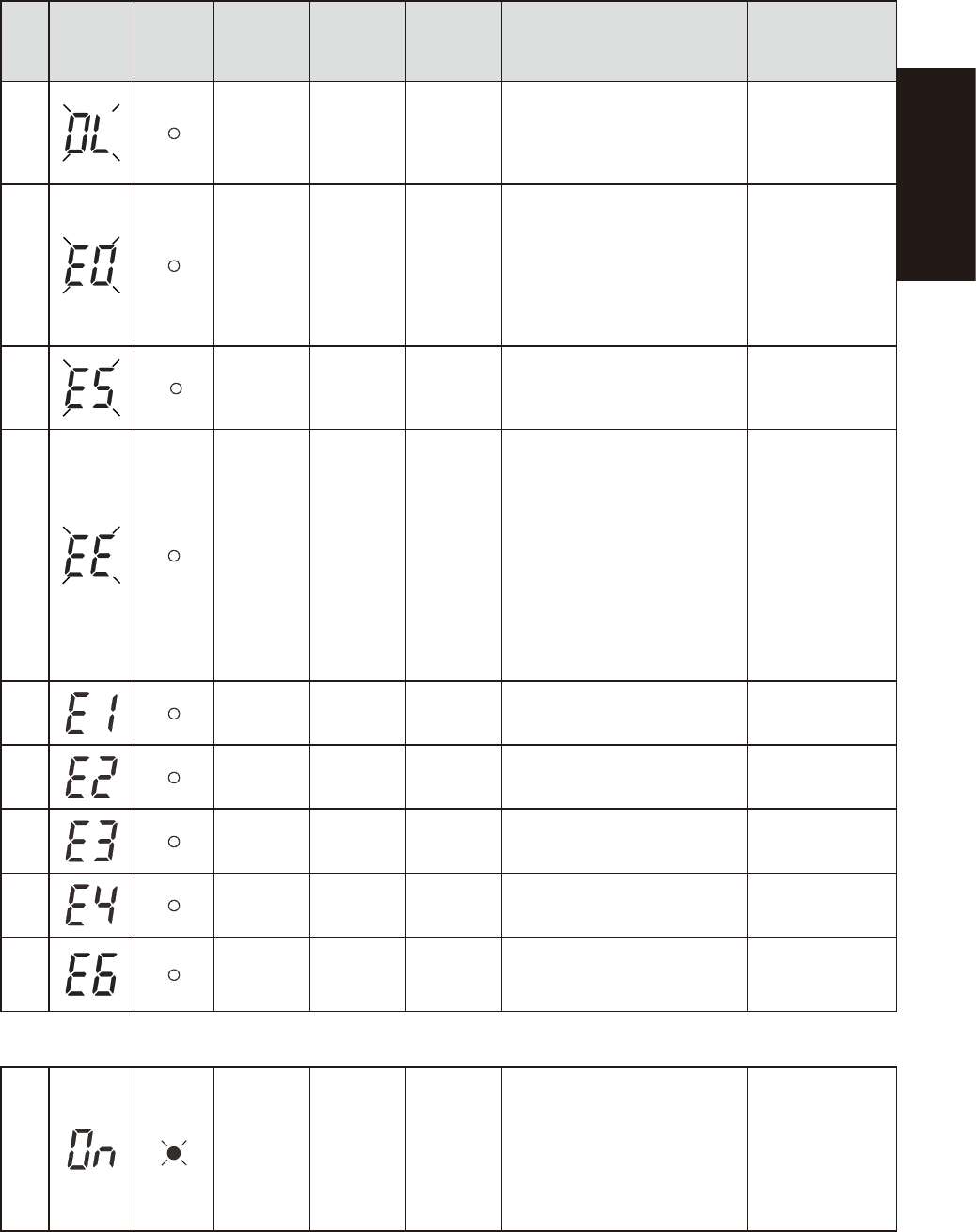
Displays and beeps when equipment failure has occurred
No.
Status
display
Battery
replacement
indicator
lamp
Beep Output Charging Description Solution
11
Intermittent
0.5-second
intervals
ON
ON or
discharging
There are too many connected
devices and the rated capacity is
exceeded. If this status continues
for 5 minutes or more, the status
No. 12 occurs and output stops.
Reduce the number
of connected
devices until the
display appears as
in status No. 3.
12
Continuous OFF
ON or
discharging
Stopped due to excess connection
capacity. If the connection
capacity exceeds 120%, this
status immediately occurs without
entering the status No. 11.
Turn OFF this unit
and all connected
devices. Reduce
the number of
connected devices,
and then turn ON
this unit and the
connected devices.
13
Continuous OFF
ON or
discharging
Output stopped due to short-circuit
with the connected devices.
Check that the AC
input of connected
devices is not short-
circuited.
14
Continuous OFF – Stopped because of failure.
Turn OFF this unit
and all connected
devices. Then, turn
the power switch
back ON for this unit
only. If the display
does not change,
there is a problem
with the UPS.
Contact our
sales office or
representative.
15
Continuous OFF –
Stopped because of excessive
output voltage (over).
(Same as above.)
16
Continuous OFF –
Stopped because of insufficient
output voltage (under).
(Same as above.)
17
Continuous OFF –
Stopped because of excessive
battery charge voltage (over).
(Same as above.)
18
Continuous OFF –
Stopped because of insufficient
battery charge voltage (under).
(Same as above.)
19
Continuous OFF –
Stopped because of abnormal
internal temperature.
(Same as above.)
Displays and beeps for battery replacement
20
Intermittent
2-second
intervals
ON ON
The battery test detected a weak
battery.
Charge the battery.
You can replace
the weak battery
with a separately
purchased
replacement battery
as needed.