YSi-V_Ope_E - 第108页
A-9 Appendix Displays and beeps when equipment failure has occurred No. Status display Battery replacement indicator lamp Beep Output Charging Description Solution 11 Intermittent 0.5-second intervals ON ON or dischargin…
A-8
Appendix
3.5 Troubleshooting
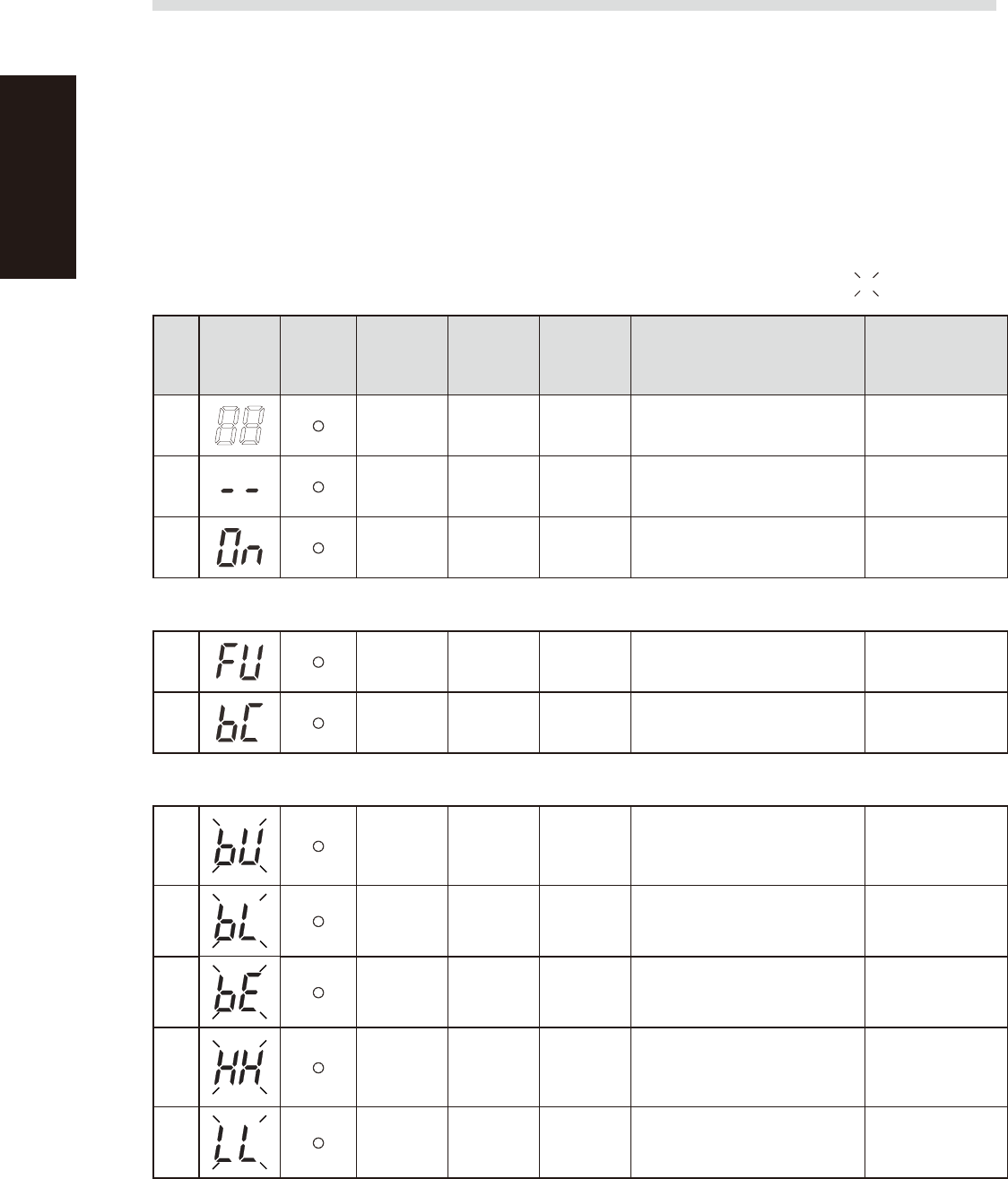
The UPS shows the status on the digital display and sounds a beep to alert you of an error or problem. See
the table below ("Meaning of beeps and displays") for information on alarms and UPS operation status and
their solutions.
n
To stop the beep
To stop the beep sound triggered by an error or problem, press the "Beep Stop / Test" button.
If another error or problem occurs, then a beep will sound regardless of whether the previous peep was stopped with this
button.
n
Meaning of beeps and displays
Displays and beeps during normal operation : Blinking
No.
Status
display
Battery
replacement
indicator
lamp
Beep Output Charging Description Solution
1
None OFF OFF
No AC power input
Operation stopped
–
2
None OFF ON
AC power is input
Power switch “OFF”
–
3
None ON ON
Power switch “ON”
Operating normally
–
Displays and beeps while testing
4 None ON
OFF
Discharging
Self-diagnostic test in progress –
5
None ON
OFF
Discharging
Auto battery test in progress –
Displays and beeps during power failure or AC input error
6
Intermittent
4-second
intervals
ON
OFF
Discharging
Backup is operating due to power
failure or AC input error. The
battery will be depleted if backup
operation continues.
Perform shutdown
operations for the
connected devices
and stop them.
7
Intermittent
1-second
intervals
ON
OFF
Discharging
(Same as above.)
Battery level is low, so output will
stop soon.
(Same as above.)
8
None OFF
OFF
Discharging
Battery is dead, so output stopped.
(This is displayed only for a few
seconds.)
Charge the battery.
9
None OFF (ON)
AC input voltage or frequency is
too high (over)
Power switch “OFF”
Use within the input
voltage/frequency
range described in
the specifications.
10
None OFF (ON)
AC input voltage or frequency is
too low (under)
Power switch “OFF”
(Same as above.)
A-9
Appendix
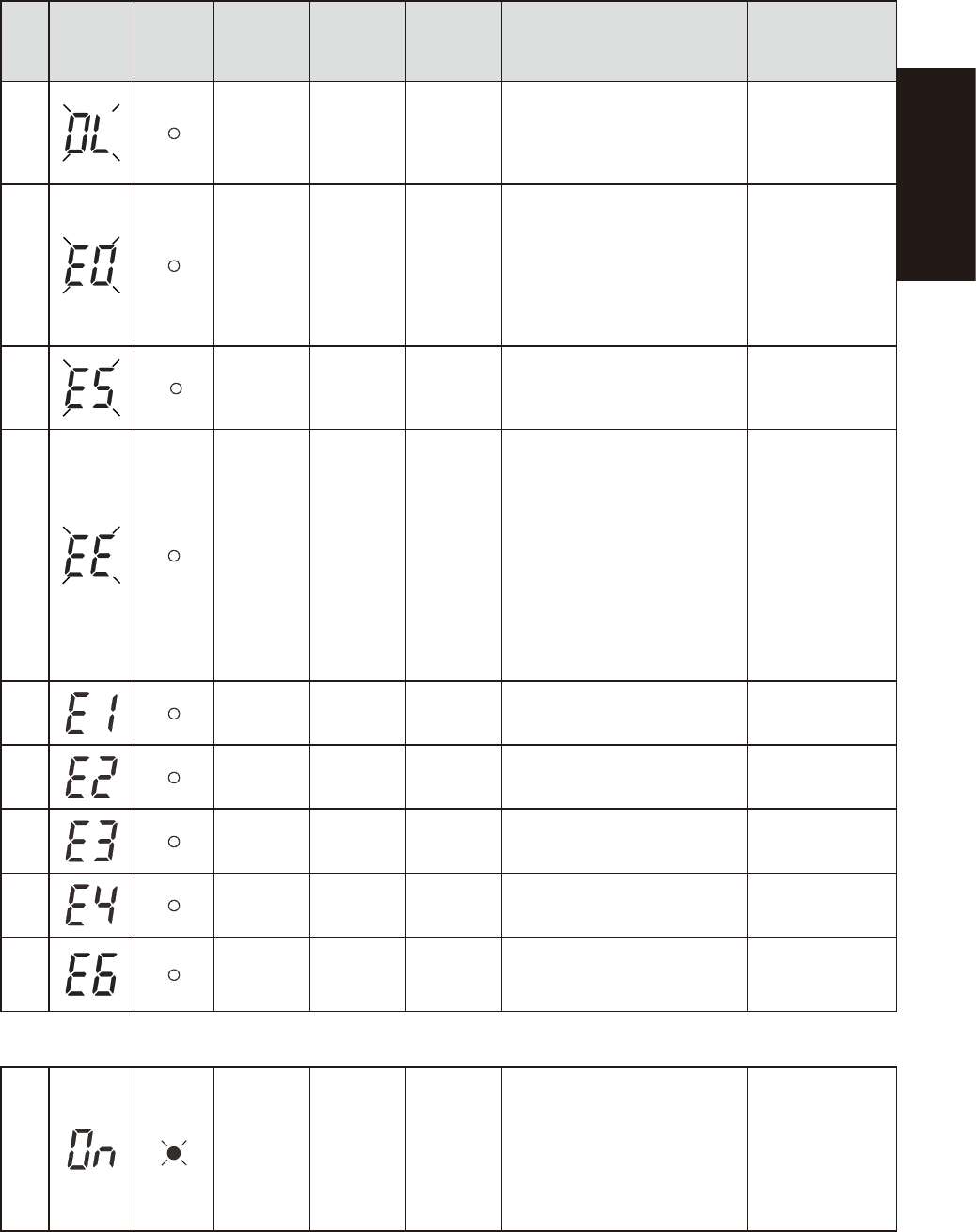
Displays and beeps when equipment failure has occurred
No.
Status
display
Battery
replacement
indicator
lamp
Beep Output Charging Description Solution
11
Intermittent
0.5-second
intervals
ON
ON or
discharging
There are too many connected
devices and the rated capacity is
exceeded. If this status continues
for 5 minutes or more, the status
No. 12 occurs and output stops.
Reduce the number
of connected
devices until the
display appears as
in status No. 3.
12
Continuous OFF
ON or
discharging
Stopped due to excess connection
capacity. If the connection
capacity exceeds 120%, this
status immediately occurs without
entering the status No. 11.
Turn OFF this unit
and all connected
devices. Reduce
the number of
connected devices,
and then turn ON
this unit and the
connected devices.
13
Continuous OFF
ON or
discharging
Output stopped due to short-circuit
with the connected devices.
Check that the AC
input of connected
devices is not short-
circuited.
14
Continuous OFF – Stopped because of failure.
Turn OFF this unit
and all connected
devices. Then, turn
the power switch
back ON for this unit
only. If the display
does not change,
there is a problem
with the UPS.
Contact our
sales office or
representative.
15
Continuous OFF –
Stopped because of excessive
output voltage (over).
(Same as above.)
16
Continuous OFF –
Stopped because of insufficient
output voltage (under).
(Same as above.)
17
Continuous OFF –
Stopped because of excessive
battery charge voltage (over).
(Same as above.)
18
Continuous OFF –
Stopped because of insufficient
battery charge voltage (under).
(Same as above.)
19
Continuous OFF –
Stopped because of abnormal
internal temperature.
(Same as above.)
Displays and beeps for battery replacement
20
Intermittent
2-second
intervals
ON ON
The battery test detected a weak
battery.
Charge the battery.
You can replace
the weak battery
with a separately
purchased
replacement battery
as needed.

S-1
INDEX
Index
Safety instructions
Cautions during power outage iv
Cautions regarding ferromagnetic fields iv
CE marking i
Components and materials to be used x
Handling batteries ix
Handling grease and oil ix
Handling heavy objects ix
Handling solvents vii
Handling the laser viii
Lock out the main switch and the air supply/
exhaust switch iii
Muzzle plate vi
Operator and service personnel iii
Safety ii
Safety message and categories xi
Typical warning text xii
Warning labels xv
3D projector 1-9
4D angular camera 1-10
A
Alarm buzzer 1-1
Axis configuration 1-5
C
Connection between machines A-2
Consumable parts 4-6
Conveyor unit 1-4
Conveyor unit setup 3-4
E
Emergency stop button 1-1
Canceling emergency stop 2-1
Error
Clearing an error 2-1
H
High-speed dual lane 1-11
I
Inspection program 3-3
L
Laser height sensor 1-8
Lubrication of each unit 5-2
M
Machine-to-machine connection
connectors 1-3
Main switch 1-2,2-2
Maintenance 4-2
Air filter 4-25
Ball screws and guides 4-12
Board sensor 4-10
Camera lighting unit 4-17
Importance of periodic inspections and
cleaning 4-3
Monthly 4-11
Replacing the conveyor belts 4-27
Three-month inspection 4-18
Weekly inspection 4-10
Maintenance list 4-4
Maintenance tools 4-7
Manual contents i
Contents of each chapter ii
Page layout iii
Using this manual i
Marker pen 1-7
Marking unit 1-7
O
Operation
Daily operation flow 3-1
Ending 2-3
Pre-operation inspection 2-2
Return-to-origin 2-2
Selecting a board 3-3
Starting 2-2
Option units 1-7
P
Power connection terminals 1-3,A-1
Pressure gauge 1-2
pressure regulator 1-2
R
[READY] button 1-1
Required tools 4-9
S
Safety cover 1-1
Signal light (signal tower) 1-1
T
Three-dimensional measurement 1-9
U
UPS
Replacing the UPS battery 4-29
UPS (uninterruptible power supply) 1-3,A-3
USB port 1-2
W
Warm-up operation 3-2
Y
YSi-V main unit 1-1