YSi-V_Ope_E - 第43页
1-3 1 Part names and functions Power connection terminals Main breaker Main power cable YSi-V main unit ■ Inside front lower part of central panel Controller UPS (uninterruptible power supply) ■ Behind lower right front …
1-2
1
Part names and functions
n
Operation display and data input unit
The keyboard and mouse to be used for YSi-V operation and data input are equipped with the YSi-V as a standard
feature.
n
Board conveyor entrance/exit
Board loading/unloading openings that are connected to the upstream and downstream conveyors.
n
Pressure gauge
Shows the supply air pressure (upper display) and pressure-drop detection level (lower display). Use the pressure
regulator knob and the pressure-drop detection level adjust buttons on the pressure gauge to set each pressure value as
follows:
• Supply air pressure (upper display) : 0.40 MPa (0.39 MPa to 0.41 MPa)
• Pressure-drop detection level (lower display) : 0.33 MPa
n
Main switch
Turns on or off the power to the YSi-V. The power is on when turned to the right.
c
CAUTION
Wait about 10 seconds before turning this power switch back on after turning it off.
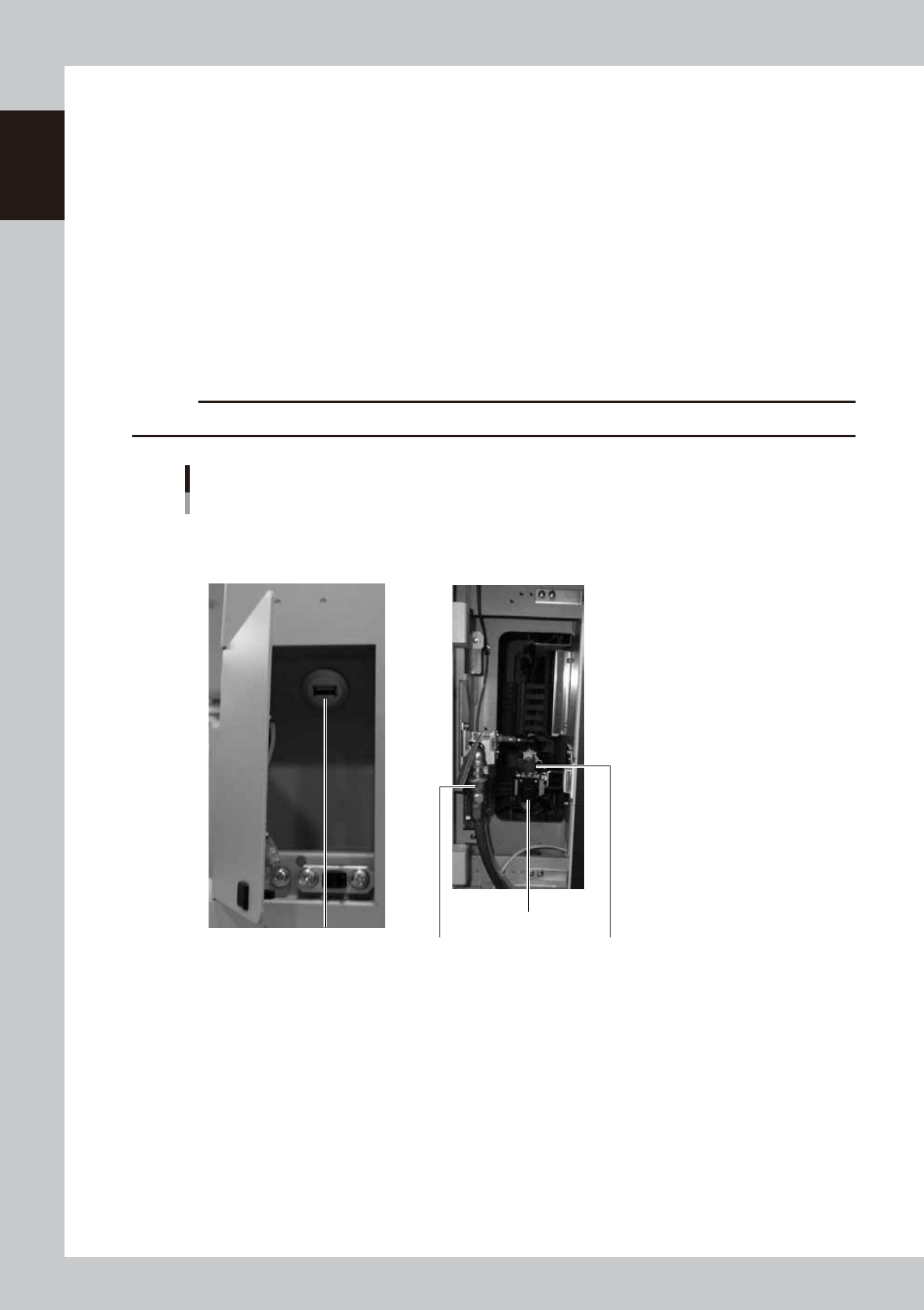
USB port
Air supply/shutoff switch
Pressure regulator
Source air connector
YSi-V main unit
■ Behind center left front panel ■ Behind center left front panel
23111-M9-00
n
USB port
Use this USB port when making a backup of data.
n
Air supply/shutoff switch
Turning this switch to the right shuts off air supply and exhausts air that remains in the air path.
n
Pressure regulator
Adjusts the air pressure supplied to this YSi-V. Turn the knob to adjust the air pressure so that the upper display on the
air pressure gauge indicates 0.40 MPa (0.39 MPa to 0.41 MPa).
n
Source air connector
Prepare an air hose with an inner diameter of at least 8mm having a 30SH socket (Nitto Kohki, or equivalent), and
connect it to this connector. Use dry, clean air passed through an air filter.
1-3
1
Part names and functions
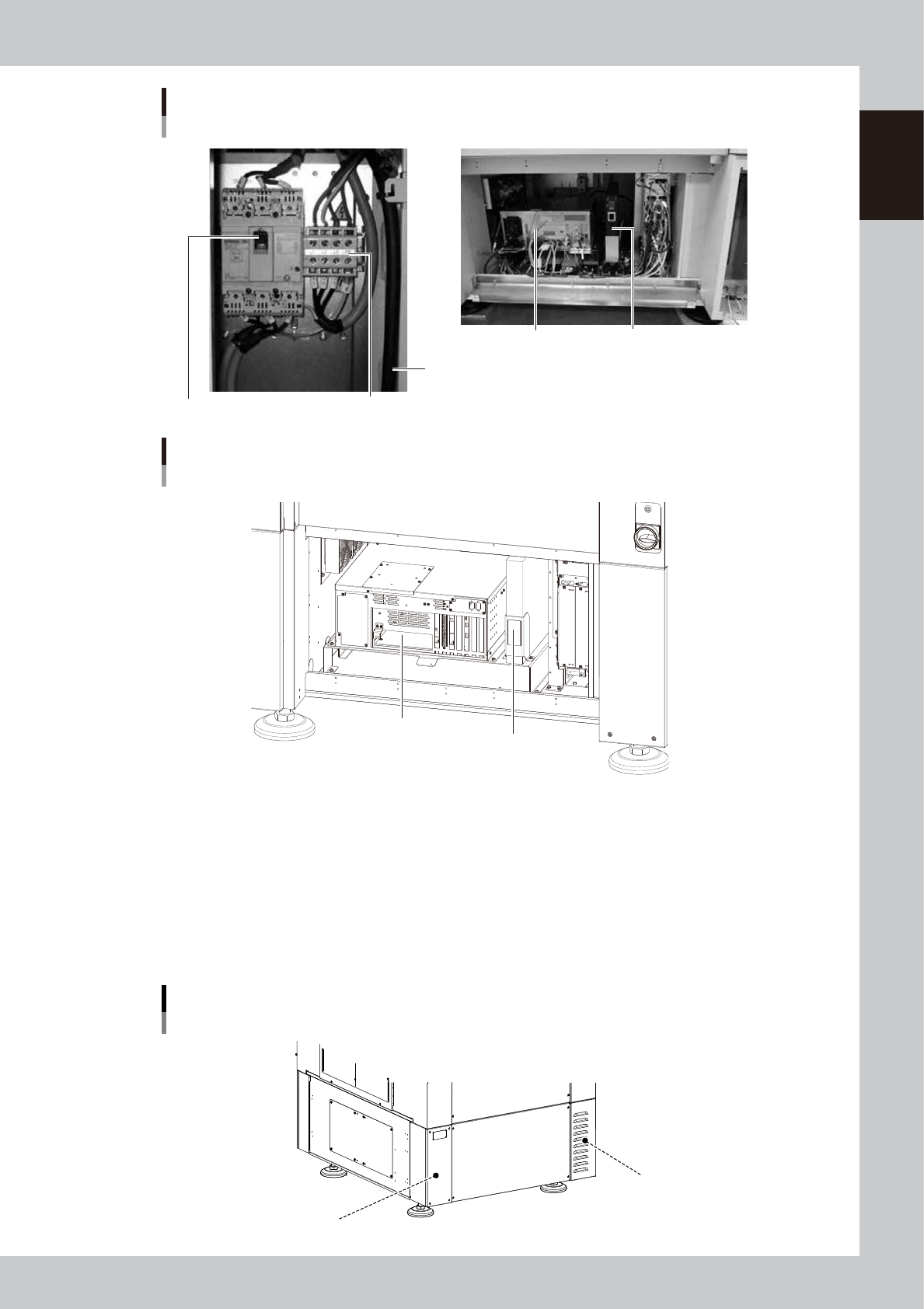
Power connection terminals
Main breaker
Main power cable
YSi-V main unit
■ Inside front lower part of central panel
Controller
UPS (uninterruptible power supply)
■ Behind lower right front panel
23112-L9-10
YSi-V main body
Type HS2 specifications
■ Inside front lower part of central panel
Controller
UPS (Uninterruptible power supply)
23115-L9-00
n
Power connection terminals
Connect a 3-phase AC power cable to this terminal block. ( (For more details, see Appendix "1. Power connection terminals".)
n
UPS (uninterruptible power supply)
The UPS retains (backs up) the power even if abnormal conditions such as power failure or voltage fluctuations occur.
(For more details, see Appendix "3. UPS (Uninterruptible Power Supply)".
n
Machine-to-machine connection connectors (Behind rear panel)
Connector labeled "NEXT INTERFACE" connects to the downstream machine, and the connector labeled "PREVIOUS
INTERFACE" connects to the upstream machine. (For more details, see Appendix "2. Connection between machines".
Machine-to-machine connection connectors
Behind rear panel
NEXT INTERFACE connector
(For connection to downstream machine)
PREVIOUS INTERFACE connector
(For connection to upstream machine)
23108-M9-00
1-4
1
Part names and functions
2. Conveyor unit
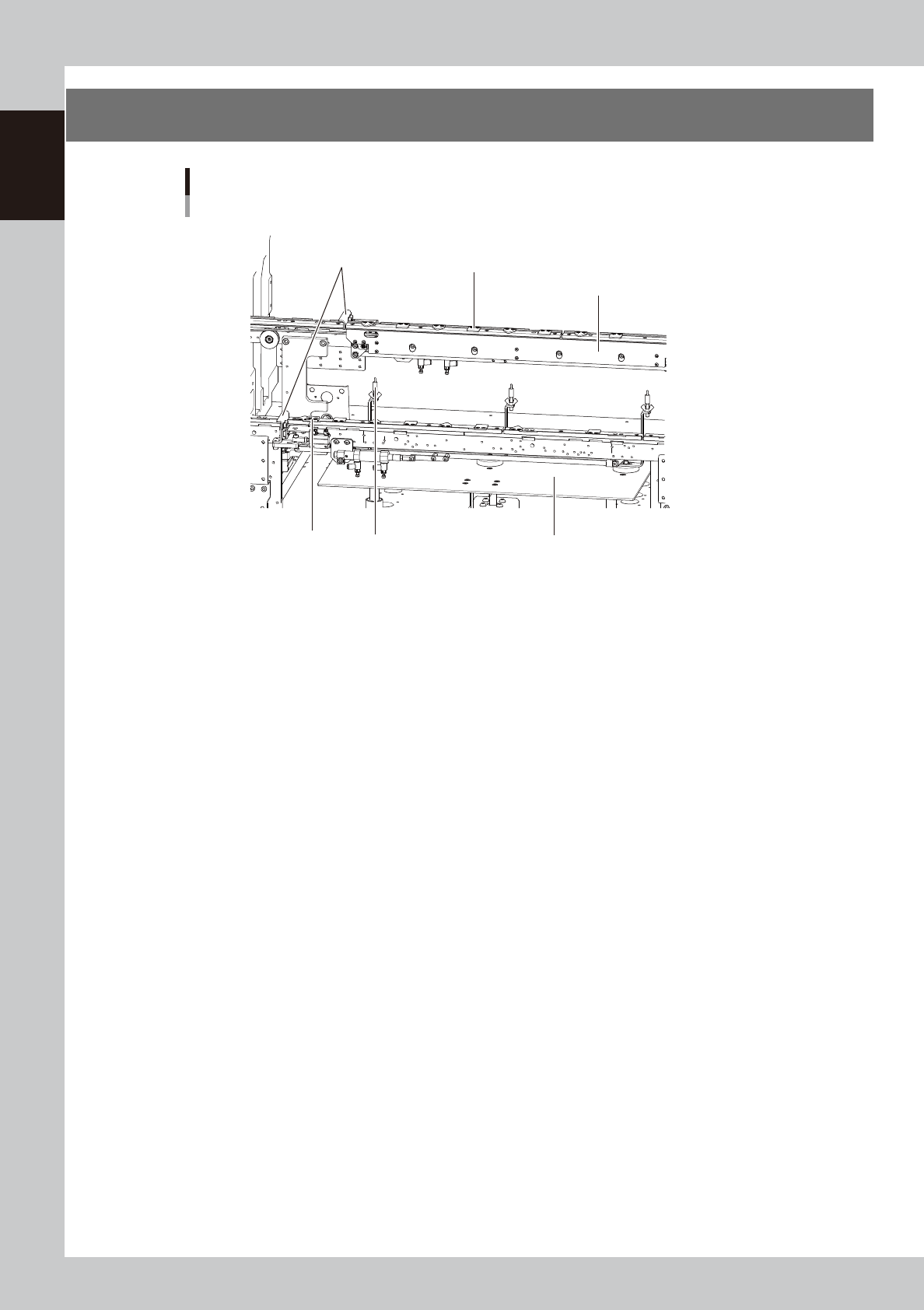
1. Main stopper
2. Push-up plate
4. Board hold plate
6. Board sensor
3. Push-up pins
Conveyor unit
YSi-V conveyor (An example of single lane)
5. Board edge clamp unit
23102-M9-00
1. Main stopper
When a board is carried in on the conveyor, the main stopper halts travel of the board in the component mounting
position.
2. Push-up plate
The push-up plate clamps the board up against the conveyor rails, with the supporter pins attached by magnet on the
push-up plate.
3. Push-up pins
Install the push-up pins on the push-up plate to support the board from the lower portion. The height of push-up pins can
be adjusted according to the board thickness.
4. Board hold plate (movable)
These plates hold the edges of the board from above when the board is clamped in the mounting position.
5. Board edge clamp unit
This unit clamps the board by pushing its edges up against the board hold plates.
6. Board sensor
Board sensors are arranged at the conveyor entrance and exit, and at the board clamp position, etc.