YSi-V_Ope_E - 第55页
2-3 2 Basic operation 2.2 Ending T o end the YSi-V operation, follow these steps. 1 Pr ess the [Off ] button in the button area. [O ff] but ton 24204-M9-10 2 The pow er-off confirmation dialog appears. F ollow the instru…
2-2
2
Basic operation
2.
Starting and ending the YSi-V and software operation
2.1 Starting
Following a pre-operation inspection, use the following procedure to start up the YSi-V and software.
w
WARNING
ALWAYS BE SURE TO PRESS THE EMERGENCY STOP BUTTON BEFORE INSPECTING THE YSI-V INTERIOR.
n
Pre-operation inspection
Check item Check content
Air
Check that the upper part of the air pressure gauge on the YSi-V reads 0.40
MPa (between 0.39 MPa and 0.41 MPa).
Power supply
Check that the specified power is connected to the power supply box located
behind the front lower right panel of the YSi-V.
Safety cover Check that the covers are closed.
Conveyor
Check that no chips or debris are on the conveyor.
Check that the conveyor units do not interfere with each other, such as push-up
pins under the conveyor rails.
Marker pen (option) Check that the pen is attached correctly.
1
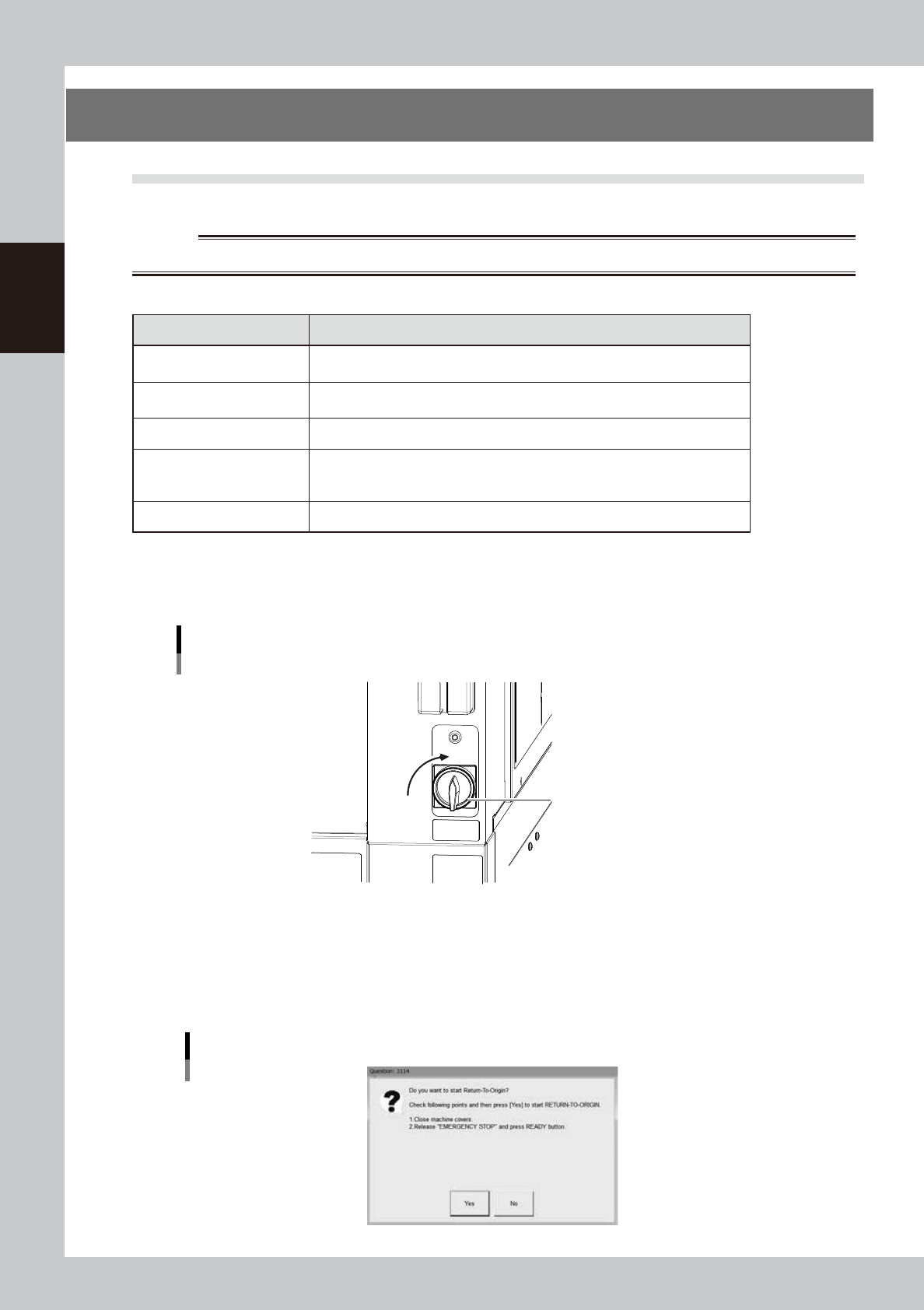
Turn the main switch ON.
The main switch is located at the lower right on the YSi-V front panel. Turn the switch clockwise to the
ON position.
Main switch
Main Switch
ONON
OFF
OFF
24201-M9-00
2
Perform return-to-origin.
1. Close the safety cover.
2. Cancel the emergency stop state and press the [READY] button.
3. Pressing the [Yes] button on the screen starts the return-to-origin operation.
Return-to-origin
24201-M9-00
2-3
2
Basic operation
2.2 Ending
To end the YSi-V operation, follow these steps.
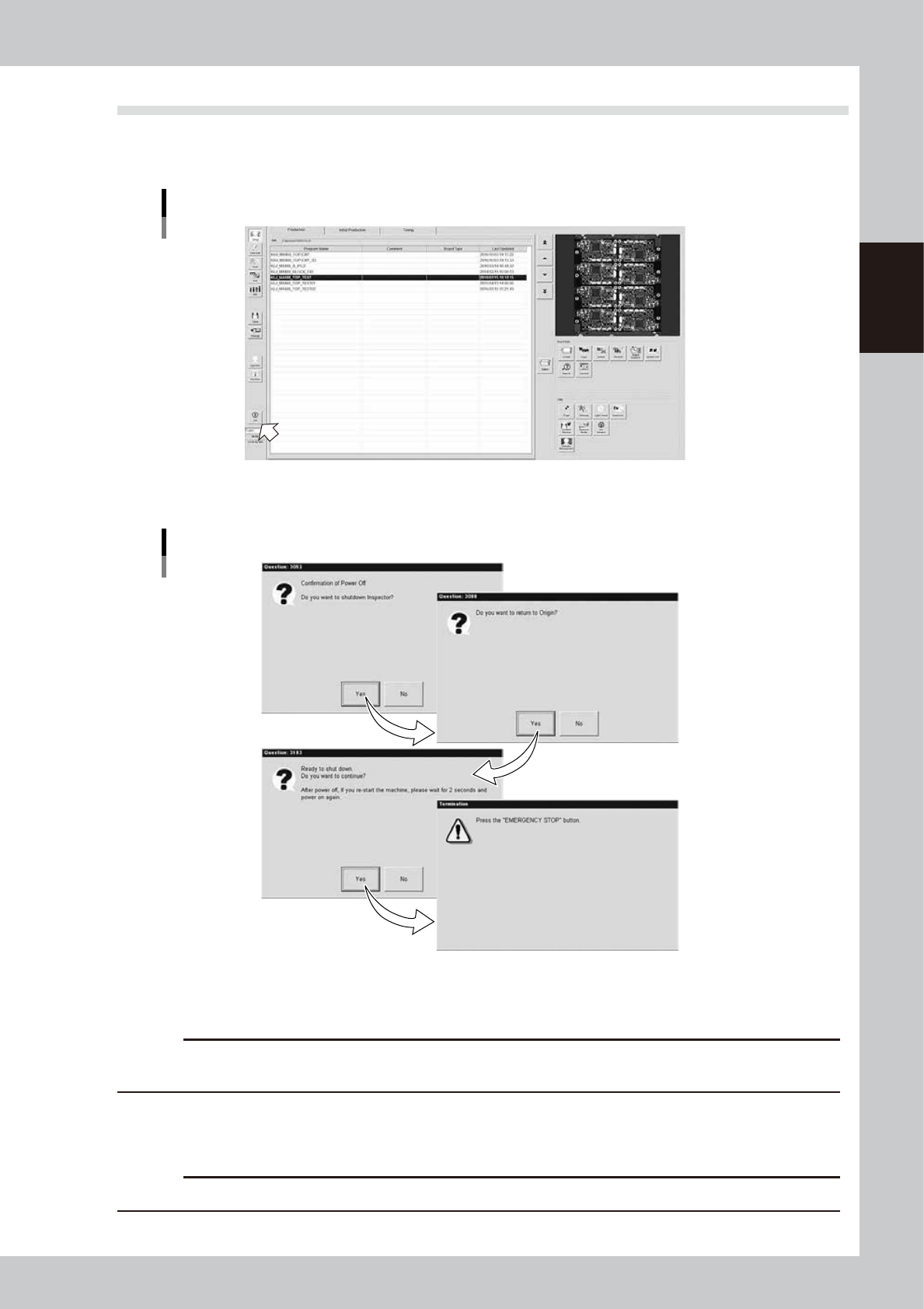
1
Press the [Off] button in the button area.
[Off] button
24204-M9-10
2
The power-off confirmation dialog appears. Follow the instructions on the screen.
Power-off screen
24205-M9-00
e
Pressing the emergency stop button exits the YSi-V application program and the Windows.
c
CAUTION
Use the emergency stop button when “having to immediately stop the YSi-V operation in an emergency situation”
and “instructed to do so in a dialog”. Do not use it while the YSi-V operates normally.
3
Turn off the main switch on the YSi-V.
When the YSi-V gets ready for turning off, turn the main switch counterclockwise on the YSi-V.
c
CAUTION
If you turn off the power without following the correct sequence, the data may be damaged.

Chapter 3 Daily operation
This chapter explains the routine operations which an operator performs, using an inspection program which
has already been created. Before reading this chapter, make sure that you understand the basic procedures
and key points explained in "Chapter 2 Basic operation". For instructions on how to create a new inspection
program and/or change the existing data, see Chapter 2, "Creating an inspection program", in the separate
"Programming Manual".
Contents
1. Overview 3-1
2. Warm-up operation 3-2
3. Selecting a board 3-3
4. Conveyor unit setup 3-4