YSi-V_Ope_E - 第63页
Chapter 4 Maintenance Contents Before beginning work 4-1 1. Maintaining YSi-V per formance 4-2 1.1 Essential conditions and working environment 4-2 1.2 Importance of periodic inspections and cleaning 4-3 1.3 Importance o…
3-6
3
Daily operation
8
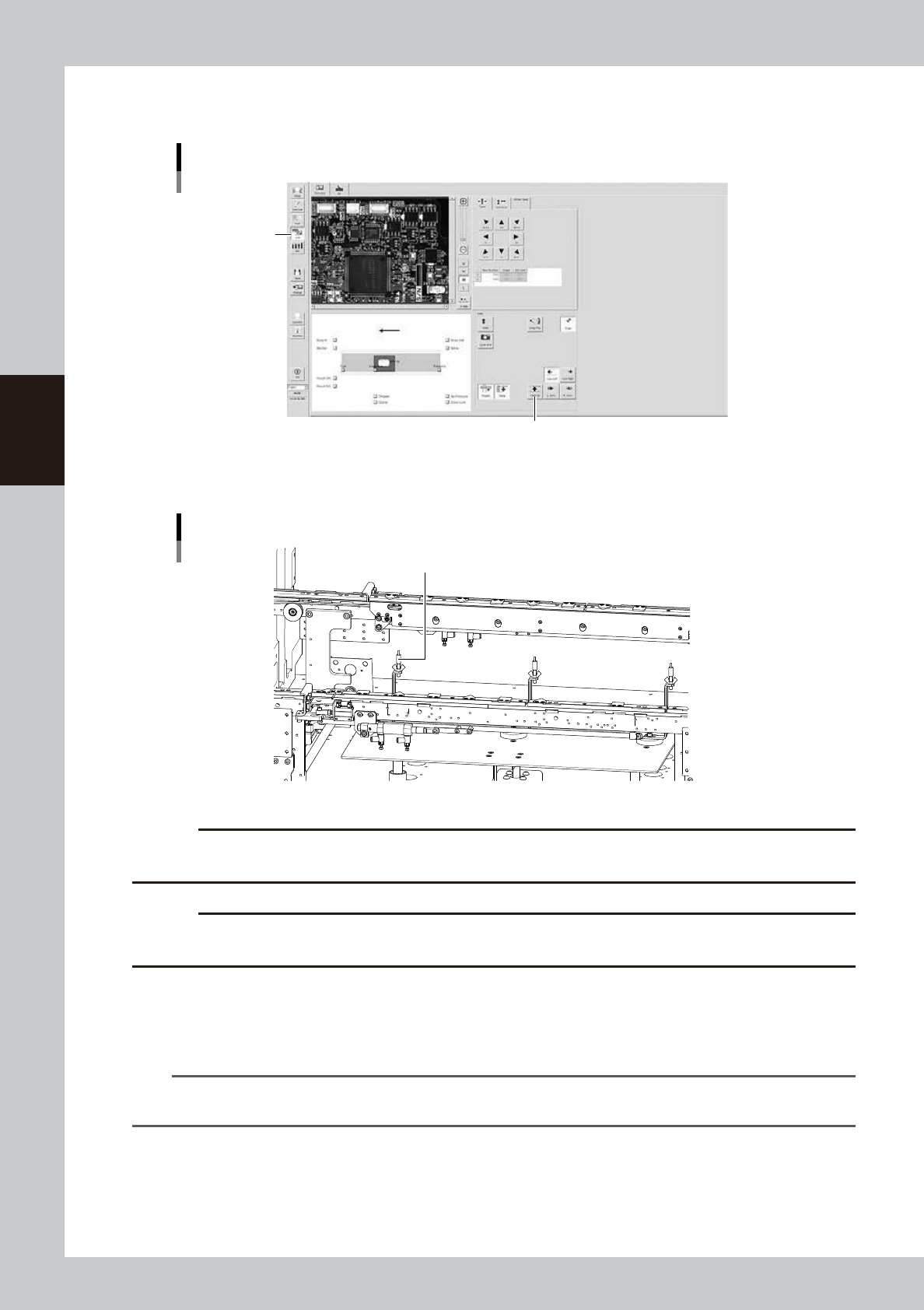
Arrange the push-up pins.
1. Press the [Unit] button in the button area, and press the [Push Up] button to lower the push-up plate.
[Push Up] button
[Push Up] button
[Unit] button
24303-M9-00
2. Arrange the push-up pins by taking the board size or mounting component positions into
consideration.
Arranging the push-up pins
Push-up pins
23303-M9-00
c
CAUTION
Be sure to lay out the push-up pins in a manner that they do not come into contact with the conveyor rails or other
components when the push-up plate is raised.
c
CAUTION
If the height of parts on the bottom of the board exceeds 30mm, do not use the push-up pin. Otherwise, the push-up
pin may interfere with a part.
9
Check that the board is uniformly clamped on the conveyor.
1. Press the [Push Up] button to raise the push-up plate.
2. Lightly press on the board by hand to check that there is no warp or play.
n
NOTE
If the tip of a push-up pin does not reach the backside of the board or pushes up the board too much, the push-up
pin height must be readjusted.
0
Unload the board.
1. Close the safety cover and reset the state of emergency stop.
2. Press the [Change] button to unload the board.

Chapter 4 Maintenance
Contents
Before beginning work 4-1
1. Maintaining YSi-V performance 4-2
1.1 Essential conditions and working environment 4-2
1.2 Importance of periodic inspections and cleaning 4-3
1.3 Importance of appropriate humidity management 4-3
2. Maintenance list 4-4
3. Preparing for maintenance tasks 4-6
3.1 Consumable parts 4-6
3.2 Maintenance tools 4-7
3.2.1 Cleaning tools 4-7
3.2.2 Lubricating tools and grease 4-8
3.3 Required tools 4-9
4. Weekly inspection 4-10
4.1 Checking the board sensor condition 4-10
4.2 Checking the board clamp condition 4-10
5. Monthly 4-11
5.1 Inspecting each axis 4-11
5.2 Cleaning and greasing the ball screws and linear guides 4-12
5.2.1 Cleaning and greasing the X axis ball screws 4-12
5.2.2 Cleaning and lubricating the X axis guides 4-13
5.2.3 Cleaning and greasing the Y axis ball screws 4-14
5.2.4 Cleaning and greasing the Y axes guides 4-16
5.3 Cleaning the camera lighting unit 4-17
6. Three-month inspection 4-18
6.1 Air intake fan filter 4-18
6.2 Cleaning and greasing the CZ axis (option) ball screws 4-19
7. Six-month inspection 4-20
7.1 Cleaning and greasing the marking unit (option) cam 4-20
7.2 Cleaning controller filter (For Type HS2 only) 4-21

8. One-year inspection 4-22
8.1 W axis 4-22
8.1.1 Cleaning and greasing the W axis ball screws 4-22
8.1.2 Cleaning and greasing the W axes guides 4-23
8.1.3 Cleaning and greasing the hexagon spline 4-24
8.2 Inspecting and cleaning the air/mist filters 4-25
9. How to replace consumable parts 4-27
9.1 Cleaning and replacing the conveyor belts 4-27
9.2 Replacing the UPS (uninterruptible power supply) battery 4-29