YSi-V_Ope_E - 第83页
4-19 4 Maintenance 6.2 Cleaning and greasing the CZ axis (option) ball screws n Required tools • Lent-free cleaning wipe • Specified grease (NSL) • Protective glasses • Protective glo ves c CAUTION W ear protective glass…
4-18
4
Maintenance
6. Three-month inspection
6.1 Air intake fan filter
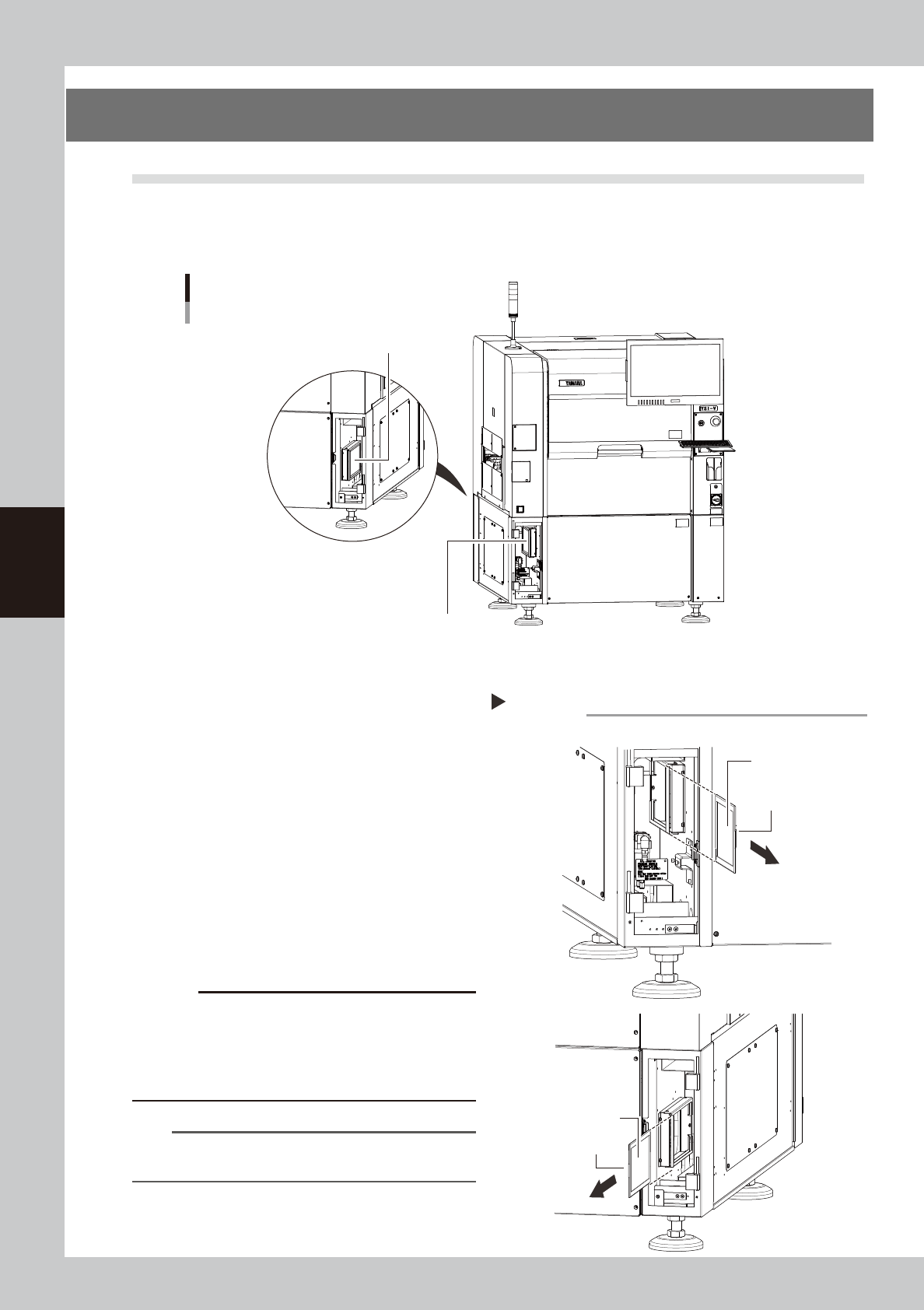
Failure to clean the filter may cause filter clogging, leading to increase in temperature inside the YSi-V. To
prevent YSi-V malfunction or shortening of the service life, be sure to clean each filter. The filter to be cleaned
is one kind and installed at two locations shown in the figure below.
Filter installation location
YSi-V front side
Filter
YSi-V rear side
Filter
53450-M9-00
n
Cleaning the filter
1
Perform the preparations for work.
1. Turn off the YSi-V power and open the
cover.
2. Prepare a vacuum cleaner to be used
for the cleaning.
2
Remove the filter.
Remove the filter as shown in the figure at
right.
53451-M9-00
3
Clean the filter.
Suck the filter with the vacuum cleaner.
c
CAUTION
When using the filter in the wet state, dust may be
solidified by moisture, causing filter clogging to easily
occur. Since the filter can be cleaned enough with the
vacuum cleaner, do not use any water to clean the
filter.
n
NOTE
If the contamination cannot be removed or the filter
deteriorates, replace the filter with a new one.
4
Reattach the filter in place.
Reattach the filter in the reverse order of the
removal procedures.
Removing the filter
■ Front filter
■ Rear filter
Step 2
Handle
Handle
Filter
Filter
4-19
4
Maintenance
6.2 Cleaning and greasing the CZ axis (option) ball screws
n
Required tools
• Lent-free cleaning wipe
• Specified grease (NSL)
• Protective glasses
• Protective gloves
c
CAUTION
Wear protective glasses and gloves when handling grease.
e
1
Press the emergency stop button.
The YSi-V must be in emergency stop to
ensure safety during work.
2
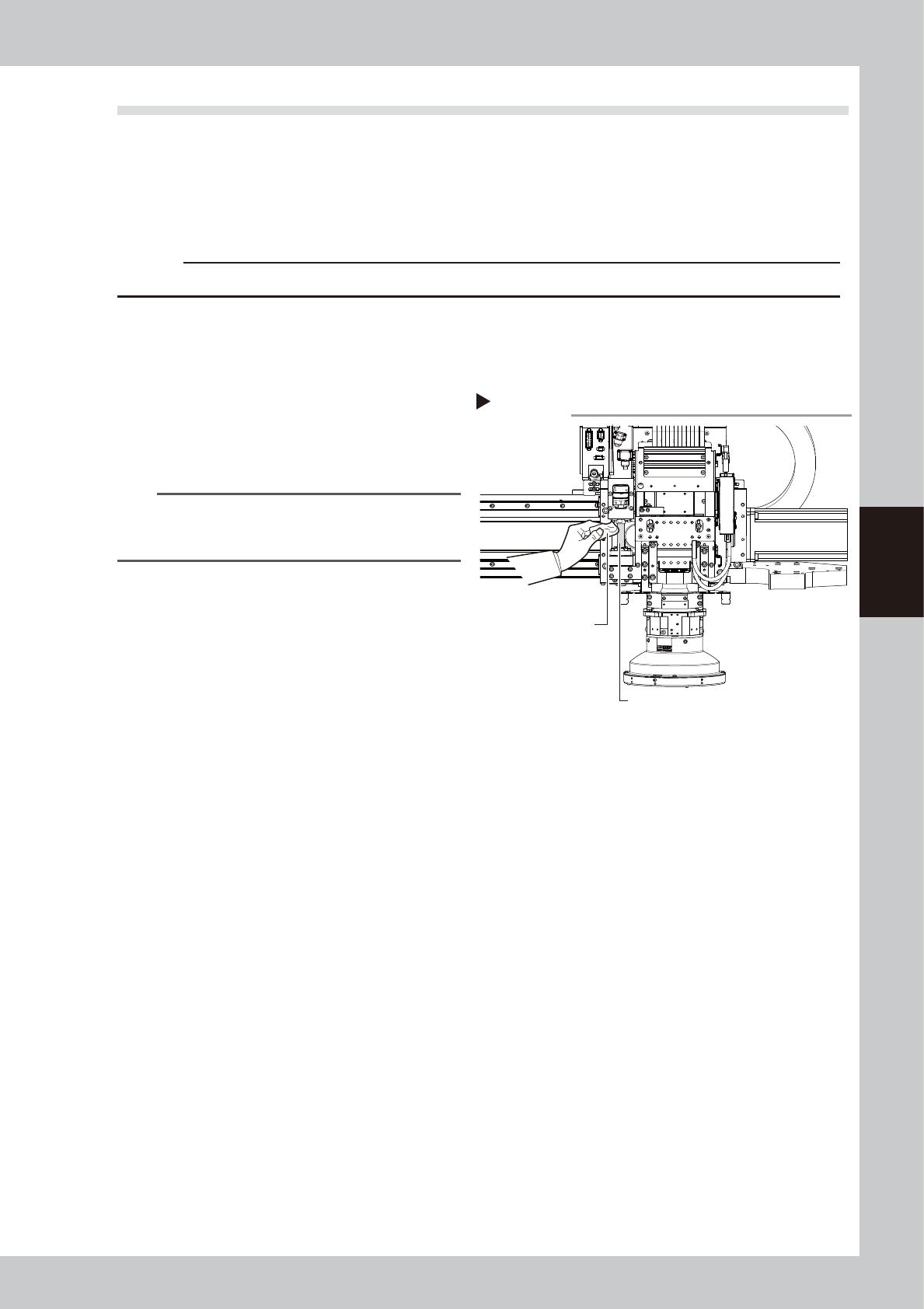
Clean the W axis ball screw.
Wipe away the old grease and dirt from the
entire ball screw with a paper wipe.
53466-M9-00
n
NOTE
Wipe away the old grease and dirt in the lead groove
of the ball screw.
Also check that no debris or residue
remains in the lead groove.
3
Apply grease to the ball screw.
Apply the specified grease (NSL) by hand
uniformly over the entire ball screws.
4
Wipe away excess grease
.
After moving the CZ axis up and down, wipe
away excess grease with a paper towel.
Cleaning theCZ axis ball screw
Step 2
Ball screw
Paper wipe
4-20
4
Maintenance
7. Six-month inspection
7.1 Cleaning and greasing the marking unit (option) cam
n
Required tools
• Lent-free cleaning wipe
• Specified grease (NSL)
• Hex wrench (3mm)
• Protective glasses
• Protective gloves
c
CAUTION
Wear protective glasses and gloves when handling grease.
e
1
Press the emergency stop button.
The YSi-V must be in emergency stop to
ensure safety during work.
2
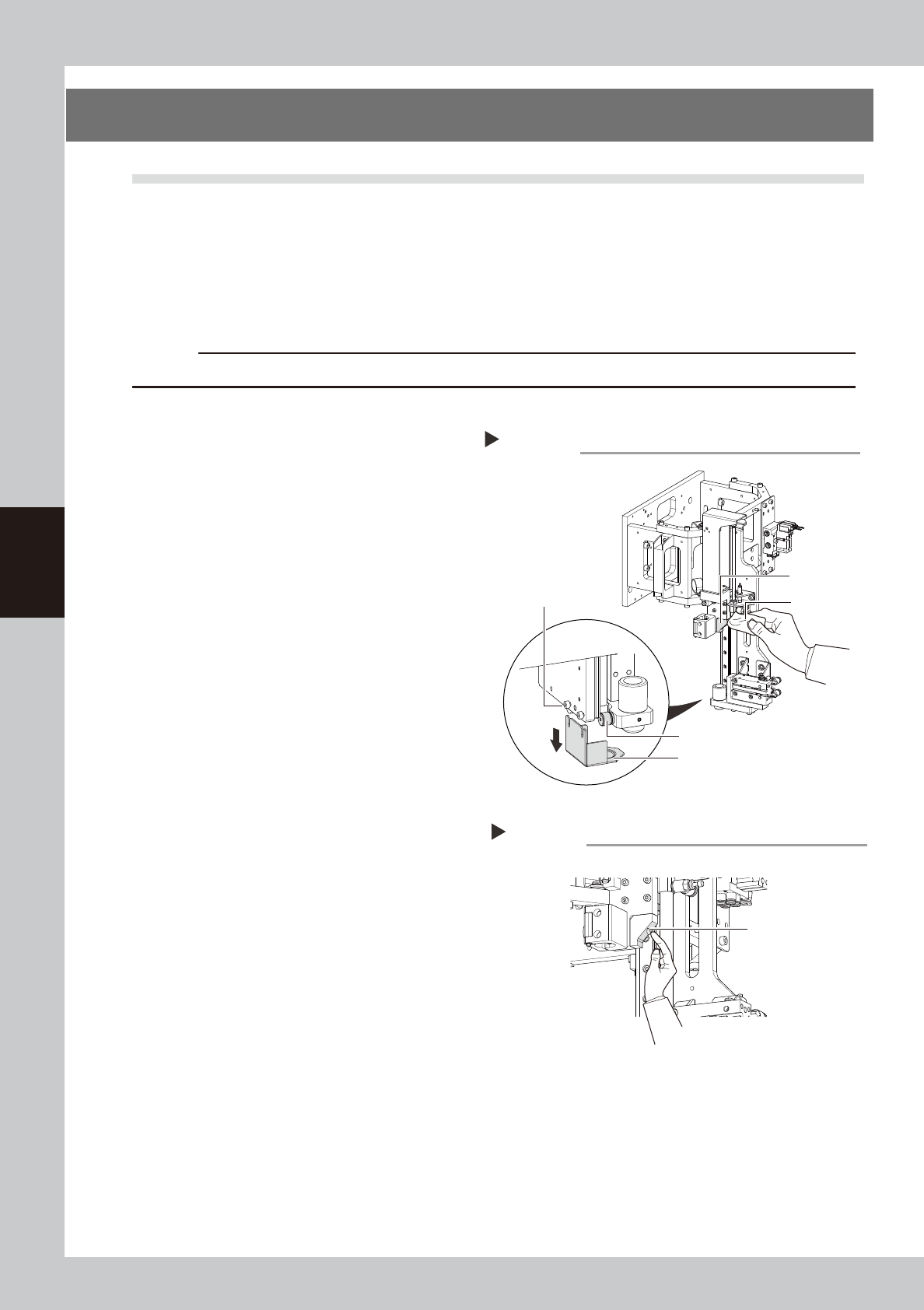
Remove the grease cover.
Using the hex wrench, loosen the bolts that
secure the grease cover and remove the
cover.
53452-M9-10
3
Clean each part.
Wipe away the old grease and dirt from the
cam block, cam follower, and grease cover
with a lint-free cloth.
4
Apply the grease.
Apply the specified grease (NSL) by hand
uniformly over the slant surface of the cam
block.
53453-M9-00
5
Remove excess grease.
After moving the marking unit up and down,
wipe away excess grease with a lint-free
cloth.
6
Reattach the grease cover.
Reattach the grease cover in place that has
been removed in Step2.
Cleaning each part
Step 2,3
Cleaning cloth
Cam block
Cam follower
Grease cover
clamp bolt (2 pieces)
Grease cover
Applying the grease
Step 4
Grease