OM-1452-002w_NP01102.pdf - 第65页
0708-001 6 3 11.6.5 11.6.5 11.6.5 11.6.5 11.6.5 语言模式的设定 语言模式的设定 语言模式的设定 语言模式的设定 语言模式的设定 设定显示系统的语言。 • 操作步骤 操作步骤 操作步骤 操作步骤 操作步骤 (1) 执行 [View( 视图 )] 指令,便显示下拉菜单。 Fig.48 Fig.48 Fig.48 Fig.48 Fig.48 (2) 选择语言模式。 切换主界面的语言显示。 11.…
0708-001 62
•
The display of the stocked number ofThe display of the stocked number of
The display of the stocked number ofThe display of the stocked number of
The display of the stocked number of
components.(components.(
components.(components.(
components.(
显示入库的元件数显示入库的元件数
显示入库的元件数显示入库的元件数
显示入库的元件数
))
))
)
作为系统界面的显示及元件信息的输入数据,“Number of
Components in Stock(入库元件数)” 成为对象。
所谓通常被显示和输入的 “Number of Components(元件
数) ” 意味着 “ 元件剩余数 ”。元件入库时,“Number of
Components in Stock” 和 “Number of Components” 为相
同数,但在数据库中 “Number of Components in Stock”
不变。
•
Tray matrix.(Tray matrix.(
Tray matrix.(Tray matrix.(
Tray matrix.(
料盘阵列输入料盘阵列输入
料盘阵列输入料盘阵列输入
料盘阵列输入
))
))
)
在 “Setting Feeder/Comp(送料器 / 元件设置)” 模式界面中,
用阵列坐标进行对盘式送料器 “Number of Components” 的
数据输入。
输入阵列时,“Number of Components” 为零。因此,进行
元件剩余数管理时请勿使用。
•
Splicing registration.(Splicing registration.(
Splicing registration.(Splicing registration.(
Splicing registration.(
接合登录接合登录
接合登录接合登录
接合登录
))
))
)
在 “Setting Feeder/Comp” 模式界面中,可以进行接合的登
录操作。
输入对应 GXH-1 系列的送料器序列号,便显示[Splicing
Mode(接合模式)]按钮。按该按钮切换模式进行通常的登
录操作,即为接合登录。
•
Spliced registration prevention of the sameSpliced registration prevention of the same
Spliced registration prevention of the sameSpliced registration prevention of the same
Spliced registration prevention of the same
components information.components information.
components information.components information.
components information.
((
((
(
防止同一元件信息的补充登录防止同一元件信息的补充登录
防止同一元件信息的补充登录防止同一元件信息的补充登录
防止同一元件信息的补充登录
))
))
)
通过接合登录服务器时,检查补充前的元件信息 “ Maker
Component Serial No.(制造商元件序列号)” 是否一致,若
一致就会出错。
通常接合登录时,检查补充前的元件信息的 “Component
ID(元件 ID)” 是否一致,若不一致就会出错。
•
Parts information Parts information
Parts information Parts information
Parts information
bb
bb
b
arar
arar
ar
cc
cc
c
ode corresponds to theode corresponds to the
ode corresponds to theode corresponds to the
ode corresponds to the
[Code128][Code128]
[Code128][Code128]
[Code128]
format.(format.(
format.(format.(
format.(
元件信息条形码的元件信息条形码的
元件信息条形码的元件信息条形码的
元件信息条形码的
[Code128][Code128]
[Code128][Code128]
[Code128]
对对
对对
对
应应
应应
应
))
))
)
可读取作为元件信息的对应 Code128 的条形码标签。与此同
时,通过键盘输入也可将 Code128 变为有效。
Code128 对于查找表编辑的 “Maker Comp ID(制造商元件
ID)” 及条形码读取式样设定项目的 “ First Character
Check(开头检查字符)” 也有效。
11.6 11.6
11.6 11.6
11.6
各种功能的设定各种功能的设定
各种功能的设定各种功能的设定
各种功能的设定
Note
Note
Note
Note
Note

0708-001 63
11.6.511.6.5
11.6.511.6.5
11.6.5
语言模式的设定语言模式的设定
语言模式的设定语言模式的设定
语言模式的设定
设定显示系统的语言。
•
操作步骤操作步骤
操作步骤操作步骤
操作步骤
(1) 执行[View(视图)]指令,便显示下拉菜单。
Fig.48Fig.48
Fig.48Fig.48
Fig.48
(2) 选择语言模式。
切换主界面的语言显示。
11.6 11.6
11.6 11.6
11.6
各种功能的设定各种功能的设定
各种功能的设定各种功能的设定
各种功能的设定
0708-001 64
11.6.611.6.6
11.6.611.6.6
11.6.6
条形码读取式样设定项目的说明条形码读取式样设定项目的说明
条形码读取式样设定项目的说明条形码读取式样设定项目的说明
条形码读取式样设定项目的说明
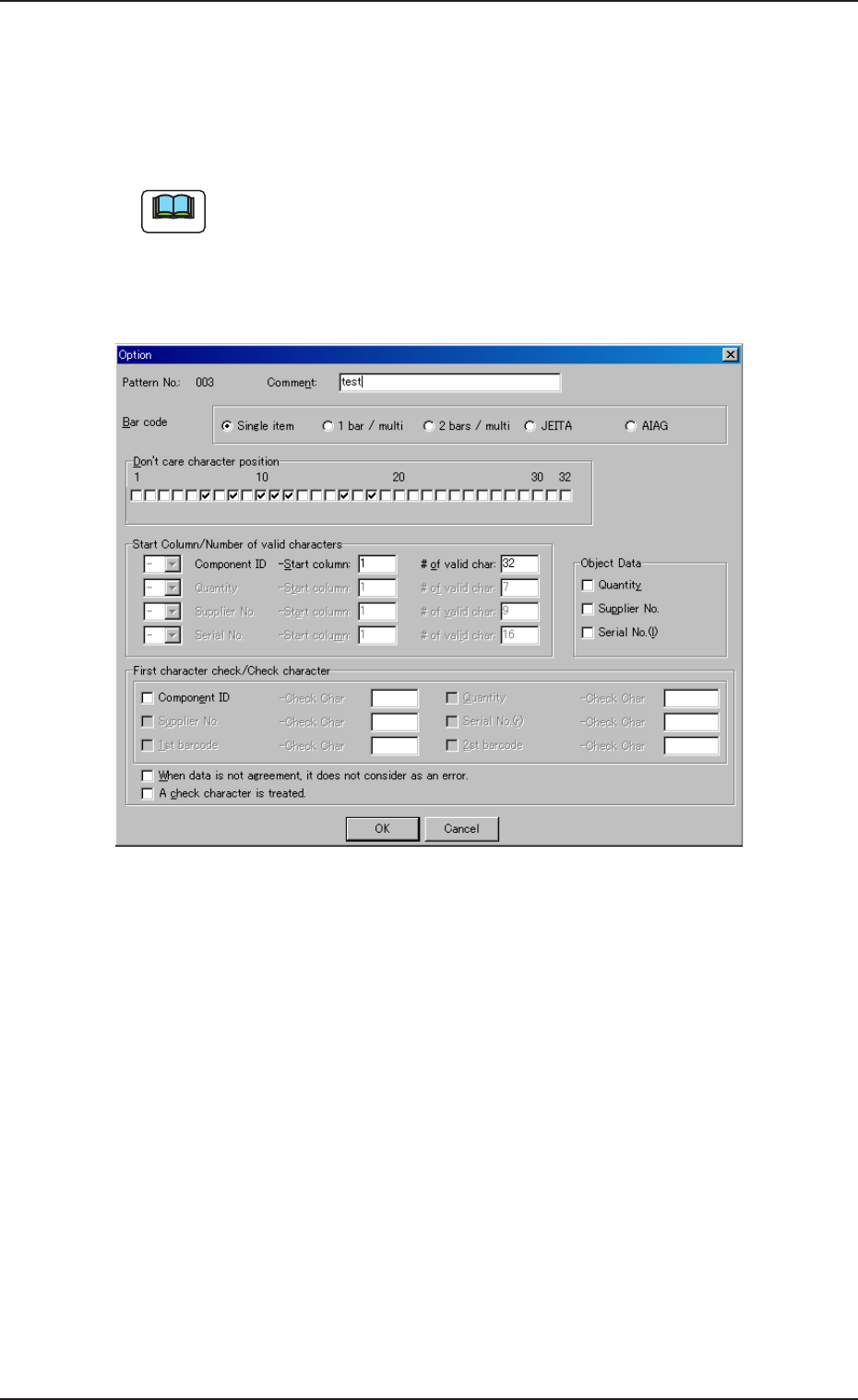
进行用条形码扫描器读取元件信息条形码的条件设定。
条形码构成有五种设定。根据选定的条形码构成,设定项目内容也
有所不同。
式样数据有两种标准,分别为[JEITA(C-3)]和[AIAG]。
安装时,在 ACV 服务器有数据。
在[Tool(工具)|Pattern(式样编辑)...]中,选择式样号,按[Edit
( 编辑)...]按钮,便显示以下界面。
Fig.49Fig.49
Fig.49Fig.49
Fig.49
•
关于选项设定项目关于选项设定项目
关于选项设定项目关于选项设定项目
关于选项设定项目
表示选项中可设定的各种数据的特征。
[Pattern No.([Pattern No.(
[Pattern No.([Pattern No.(
[Pattern No.(
式样号式样号
式样号式样号
式样号
))
))
)
,,
,,
,
Comment(Comment(
Comment(Comment(
Comment(
注释注释
注释注释
注释
)])]
)])]
)]
Customize(自定义)模式专用数据。
最多可设定 900 种读取条件,因此是为整理那些条件的数据。
“Pattern No.” 在用登录编号登录时被自动编号,“Comment” 使用
于登录式样的标题。
11.6 11.6
11.6 11.6
11.6
各种功能的设定各种功能的设定
各种功能的设定各种功能的设定
各种功能的设定
Note