F4000N_revD.pdf - 第28页
F4000N Series Operating Manual Section 4: Programming Example Part # 562187N - 1 Rev . D Sep 2012 27 © 20 12 Fisnar Inc. Instruction Display Shows 1 Follow the instructions found in SECTION 2:2 . Setup to setup the robot…
F4000N Series Operating Manual
Section 4: Programming Example
Part # 562187N-1
Rev. D Sep 2012
26
© 2012 Fisnar Inc.
1. Programming Example
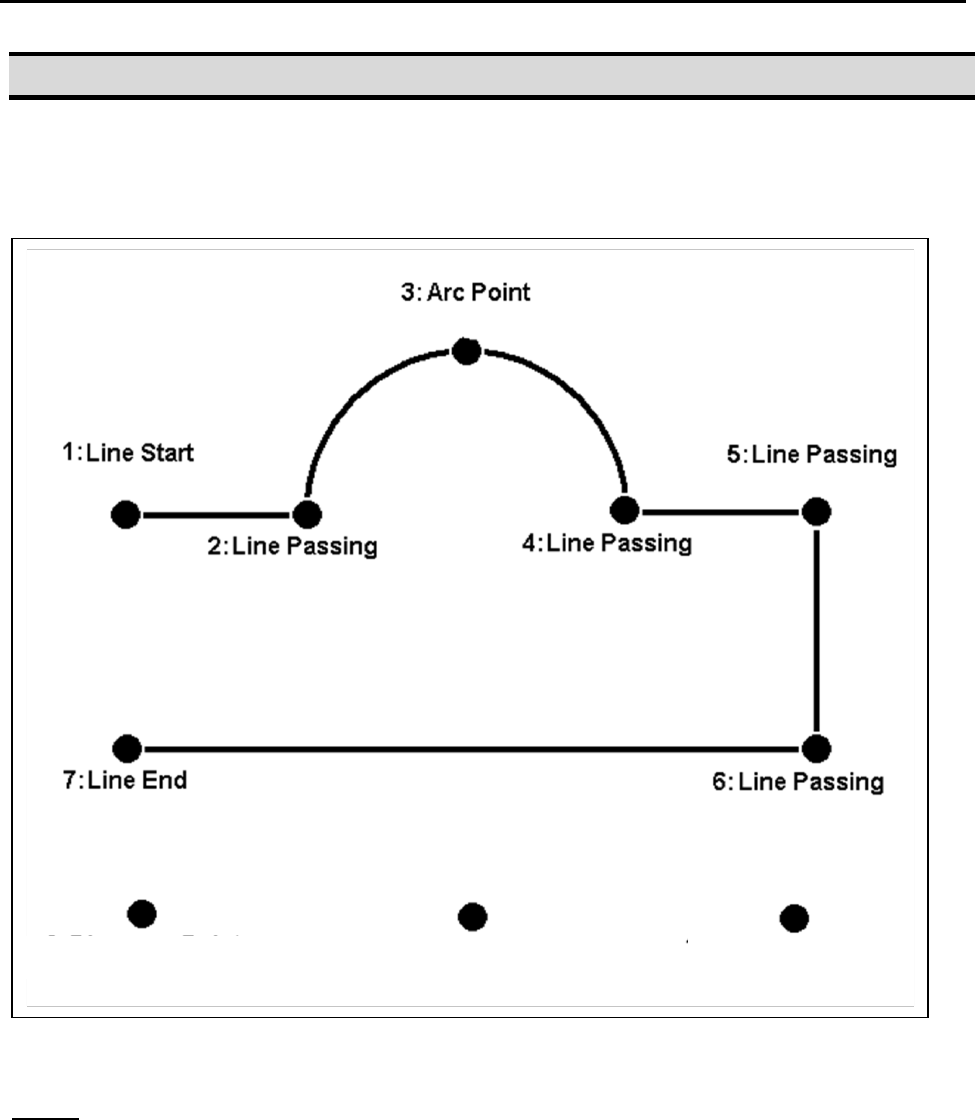
To help you become familiar with programming the robot, please follow the instructions
below to create a program, which dispenses in the following pattern:
Notes:
We will create the above program in program # 10.
We will use a line speed of 40 mm / second for the lines and arcs in the program.
For dots, we will use a dispensing time of 0.50 seconds and a waiting time of 0.1
seconds after dispensing.
9: Dispense Dot
8: Dispense Dot
10: Dispense Dot

F4000N Series Operating Manual
Section 4: Programming Example
Part # 562187N-1
Rev. D Sep 2012
27
© 2012 Fisnar Inc.
Instruction
Display Shows
1
Follow the instructions found in SECTION 2:2.
Setup to setup the robot.
2
Select program 10 using the program number
selection switches on the main unit control panel.
Turn the power on.
[MACHINE HOME]
+------------+
| START/HOME |
+------------+
3
Press the START button. The robot will move to
the home position.
ADDR:1 PROG:10
EMPTY
X:0.00 Y:0.00 Z:0.00
4
Press the F4 (Setup) key, then 1 to select Line
Speed to register a line speed of 40 mm/second
at memory address number 1.
Line Speed Setup
----------------
Speed:
unit: mm/sec
5
The robot is now waiting for the speed to be
registered. Press 40 then ENTER to register a
speed of 40 mm / second.
ADDR:2 PROG:10
EMPTY
6
The display shows we are at memory address 2
and that it is empty.
Jog the dispensing tip to the first location in the
diagram above (1: Line Start).
To jog the X and Y-axes, press the arrow keys
X, X, Y and Y.
To jog the Z-axis, press the Z and Z keys.
Press and hold the FAST key to jog fast.
7
Once the tip is at the correct X, Y, Z location for
the first point (1: Line Start), press the
F1/ENTER key, then 2 to register the location as
a Line Start point.
ADDR:3 PROG:10
EMPTY
8
The display will show we are at memory address
3 and it is empty. Jog the tip to the X, Y, Z
location of the second point (2: Line Passing).
When the location is correct, press the
F1/ENTER key, then 3 to register the location as
a Line Passing point.
ADDR:4 PROG:10
EMPTY
9
Now jog the tip to the location of the third point
(3: Arc Point). When the location is correct,
press the F1/ENTER key, then 5 to register the
location as an Arc point.
ADDR:5 PROG:10
EMPTY

F4000N Series Operating Manual
Section 4: Programming Example
Part # 562187N-1
Rev. D Sep 2012
28
© 2012 Fisnar Inc.
Instruction
Display Shows
10
Jog the tip to the location of the fourth point
(4: Line Passing). When the location is correct,
press the F1/ENTER key, then 3 key to register
the location as a Line Passing point.
ADDR:6 PROG:10
EMPTY
11
Jog the tip to the location of the fifth point
(5: Line Passing). When the location is correct,
press the F1/ENTER key, then 3 to register the
location as a Line Passing point.
ADDR:7 PROG:10
EMPTY
12
Jog the tip to the location of the sixth point
(6: Line Passing). When the location is correct,
press the F1/ENTER key, then 3 to register the
location as a Line Passing point.
ADDR:8 PROG:10
EMPTY
13
Jog the tip to the location of the seventh point
(7: Line End). When the location is correct, press
the F1/ENTER key, then 6 to register the location
as a Line End point.
ADDR:9 PROG:10
EMPTY
14
The line is now complete. The next step is to
register the dispense settings for the dots.
Press the F4 (Setup) key, then 3 to register the
dot dispensing time.
Point Dispense Setup
--------------------
Dis. Time:
Tail Time:
unit: sec
15
Type 0.5 to register a dispensing time of 0.5
seconds, and then press ENTER.
Type 0.1 to register a waiting time after
dispensing of 0.1 seconds, and then press
ENTER.
ADDR:10 PROG:10
EMPTY
16
Jog the tip to the location of first dispense dot
(8: Dispense Dot). When the location is correct,
press the F1/ENTER key, then 1 to register the
location as a Dispense Dot.
ADDR:11 PROG:10
EMPTY
17
Jog the tip to the location of second dispense dot
(9: Dispense Dot). When the location is correct,
press the F1/ENTER key, then 1 to register the
location as a Dispense Dot.
ADDR:12 PROG:10
EMPTY
18
Jog the tip to the location of third dispense dot
(10: Dispense Dot). When the location is correct,
press the F1/ENTER key, then 1 to register the
location as a Dispense Dot.
ADDR:13 PROG:10
EMPTY
19
The program is now complete.
Press F1/ENTER, then 7 to register address 13
as the END of the program.
ADDR:14 PROG:10
EMPTY
20
To run the program, press the RUN key.