F4000N_revD.pdf - 第54页
F4000N Series Operating Manual Section 5: Point T ype & Function Reference Part # 562187N - 1 Rev . D Sep 201 2 53 © 20 12 Fisnar Inc. 1.20 Dummy Point Registers the current XYZ location as a Dummy po int. The tip wi…
F4000N Series Operating Manual
Section 5: Point Type & Function Reference
Part # 562187N-1
Rev. D Sep 2012
52
© 2012 Fisnar Inc.
1.16 Wait Point
Registers a Wait Point at the current X, Y, Z location. When executed, the tip will move to
that location and wait for the specified period of time.
1.17 Stop Point
Registers a Stop Point at the current X, Y, and Z location. When executed, the tip will
move to that location and wait until the start button is pressed.
1.18 Home Point
Registers an instruction to „HOME‟ all axes, by sending them to the home position. It
works like a “Move” command.
It works like an “End Program” function when registered at the end of the program. After
program completion, the dispensing tip moves to the home position. If used in the body of
the program, the tip is moved to the home position and the next instruction is executed.
This function uses the Home Position Setup coordinates (under F4 (Setup Menu)) if a new
home position is made. Otherwise, it uses the default home position (X=0, Y=0, Z=0).
See the Setup Menu for instructions on changing the location of the home position.
1.19 Loop Address
Registers an instruction, which will execute a group of instructions a user-specified
number of times.
When the Loop Address instruction is registered, the display will prompt for an Address
and Count.
Address is the memory address to jump to from the current address. This address must
be less than the current memory address.
Count is the number of times to execute the loop.

F4000N Series Operating Manual
Section 5: Point Type & Function Reference
Part # 562187N-1
Rev. D Sep 2012
53
© 2012 Fisnar Inc.
1.20 Dummy Point
Registers the current XYZ location as a Dummy point. The tip will simply pass through this
point. A dummy point is useful for avoiding obstacles on the work piece.
1.21 Initialize
Registers an Initialize point causing the robot to perform a mechanical initialization. The tip
will home to position (0,0,0) and the robot will re-find the home position using the home
position sensors.
1.22 Label
Registers a label that can be used as a reference when used with the GOTO, Loop
address, Set I/O, Step & repeat X, Step & repeat Y and Call Subroutine commands.
Label can be used instead of Address number. A maximum of 64 labels is permitted per
program; each label can have up to 8 characters.
1.23 Display Counter
The Display Counter instruction shows a counter at the bottom of the teach pendant
screen while a program is running. Every time this instruction is executed, the counter
increases by one and is shown again on the screen. The counter begins at one (1).
1.24 Loop Counter
The Loop Counter either clears or keeps the current tally of the counter when an I/O signal
is received. The tally is cumulatively added to the current count on the display counter.
F4000N Series Operating Manual
Section 5: Point Type & Function Reference
Part # 562187N-1
Rev. D Sep 2012
54
© 2012 Fisnar Inc.
1.25 Dispense Output Setup
Dispense Output Setup assigns the dispense output port number (0-8) for the line and dot
under control of the line dispense setup and point dispense setup. The default dispense
output port number is zero.
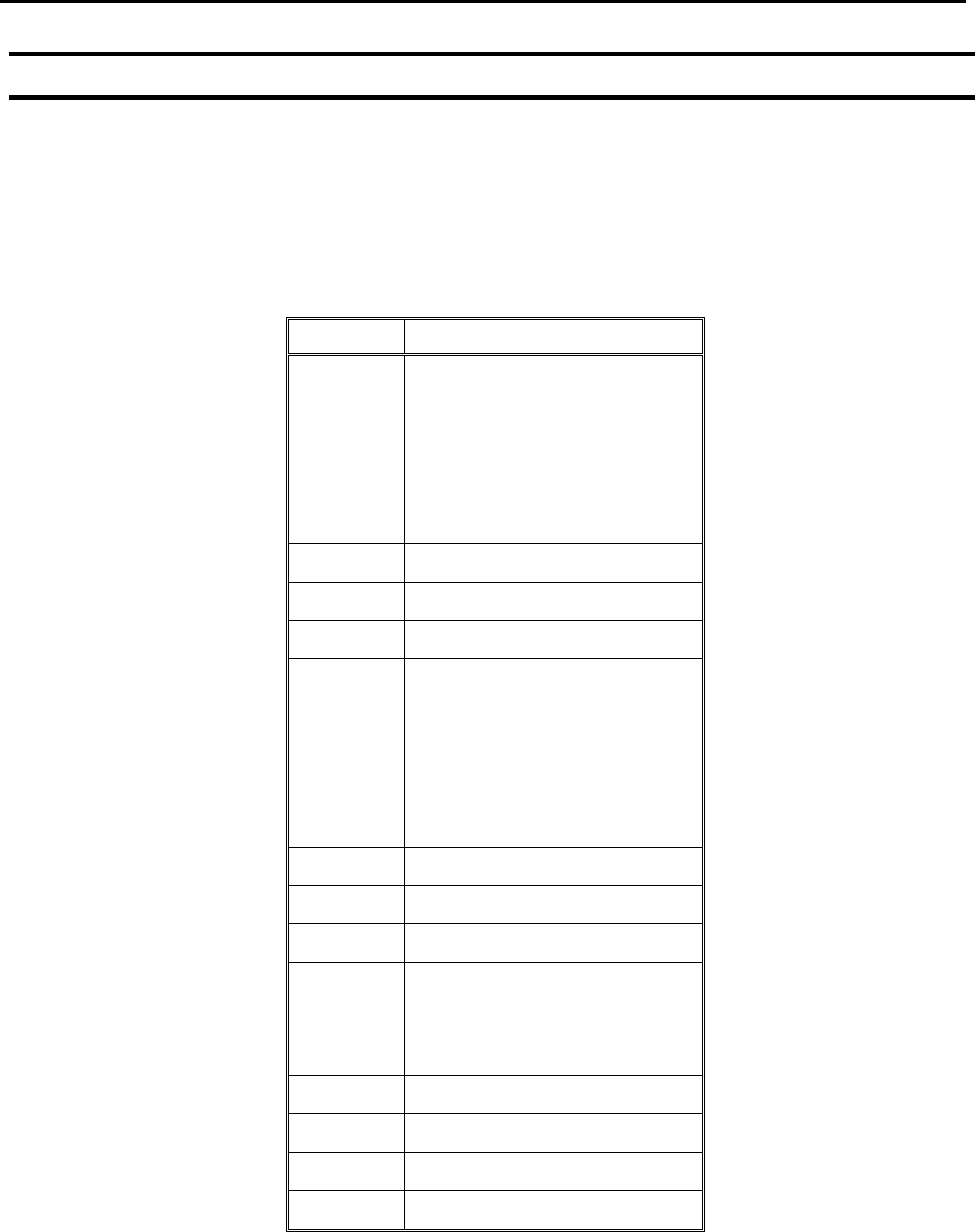
Programming Sample:
Address
Instruction
1
Line Dispense Setup
Head Time: 0.1
Tail Time: 0.1
Node Time: 0
Tail Length: 0
2
Dispense Output: 3
3
Line Start
4
Line End
5
Line Dispense Setup
Head Time: 0.15
Tail Time: 0.1
Node Time: 0
Tail Length: 0
6
Dispense Output: 2
7
Line Start
8
Line End
9
Point Dispense Setup
Head time: 0.1
Tail time: 0.1
10
Dispense output: 1
11
Dispense Dot
12
Dispense Dot
End Program