00192377-02.pdf - 第106页
2 Retrofitting Instruct. S-23 HM t o SW V 502. xx incl. RV 6-DLM1 Head (O ption) SIPLACE S -23 HM 2.8 Sequence: M odifying Hardware 07/01 Issue 106 DANGER Do not use alcoh ol for an y cleani ng work near open flame! 2 Å …
SIPLACE S-23 HM 2 Retrofitting Instruct. S-23 HM to SW V 502.xx incl. RV6-DLM1 Head (Option)
07/01 Issue 2.8 Sequence: Modifying Hardware
105
Å Insert the bar (retrofit kit) at the reject position of the nozzle changer and fasten it with the 2
socket hex head cap screws M3 (see: Fig. 2.8.19).
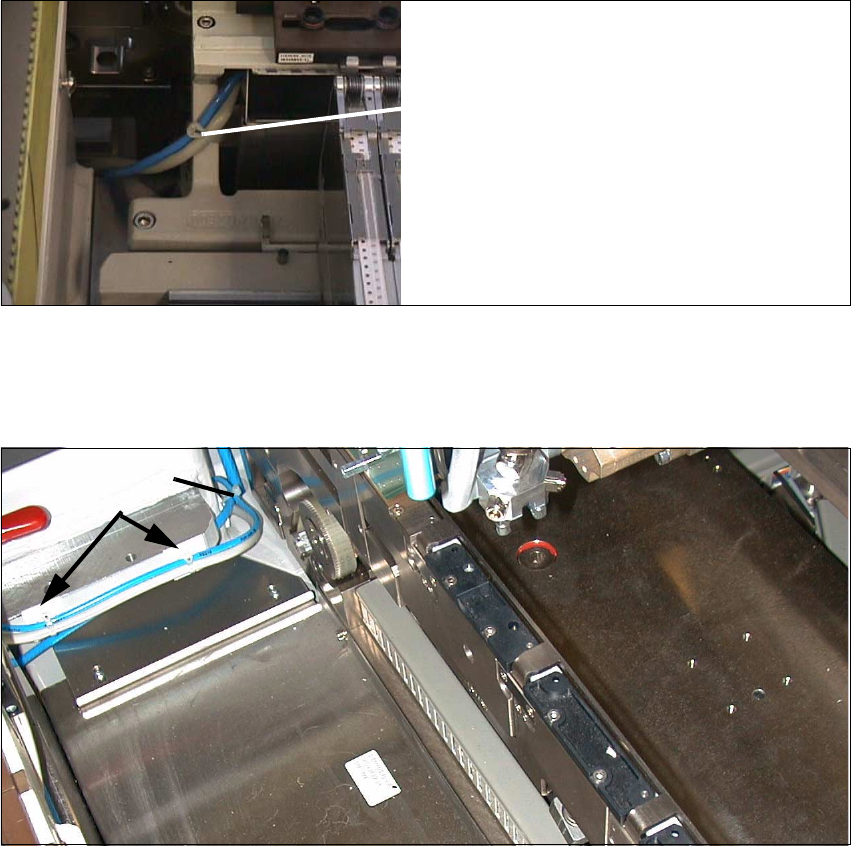
Fig. 2.8.23 Fastening the Cable and Compressed Air Hose on the Carrier for Nozzle Changer
Å Fasten the interface cable and the compressed air hose as shown above.
Fig. 2.8.24 Fastening the Cable and Pneumatic Hose of the Nozzle Changer to the Machine Frame
Key:
3. 2 Mounting pedestals, adhesive, with cable tie
4. Cable tie
Cable tie
2
3

2 Retrofitting Instruct. S-23 HM to SW V 502.xx incl. RV6-DLM1 Head (Option) SIPLACE S-23 HM
2.8 Sequence: Modifying Hardware 07/01 Issue
106
DANGER
Do not use alcohol for any cleaning work near open flame! 2
Å On the machine frame, degrease the area on which the 2 mounting pedestasl will be installed
(position, see: Fig. 2.8.22). Install the mounting pedestals.
Å Run the cable and the pneumatic hose and put on the cable ties (see: Fig. 2.8.22).
Å Remove all tools, etc., from the machine’s working area and close the doors of the machine
frame.
SIPLACE S-23 HM 2 Retrofitting Instruct. S-23 HM to SW V 502.xx incl. RV6-DLM1 Head (Option)
07/01 Issue 2.9 Sequence: Software Upgrade on the Station Computer
107
2.9 Sequence: Software Upgrade on the Station
Computer
This work can only be carried out after the hardware has been completely upgraded (see Section
2.8). You will need the following documentation: 2
– Software Version Description for Station V 502.01, Item no. 00192395-01 (German + English)
– Software Guide SITEST V 502.xx, Item no. 00192656-01 (English)
– Technical Information No. 34V05060 (operation of the CAN software)
The "scope of delivery" of the V 502.xx software for the station and line computers can be found
in the appropriate Software Version Description.
You will need: 1 CD with the Software SIPLACE Station 502/1 (502.01), Item no. 00358514-01.
DANGER
Pay close attention to the safety information for the SITEST program as described in Section 2.4.
When using the SITEST program, you are not only exposed to the normal increased risk of
accident, but also to added risk from the blades of the cutter.
The cutter and the empty tape duct must always be mounted completely.
The MTC and the component changeover table must always be docked correctly. 2
2.9.1 Checking the Firmware for Conveyor Control
You should carry out this check BEFORE installing the V 502.01 software on the station as follows: 2
Å Switch on the station:
– After approximately one minute the green "RUN" LED on the TSP210 conveyor controller
will flash = OK.
– If the red "FAIL" LED starts to flash -> load firmware with boot disk.
2.9.2 Installing the Touch Screen
NOTE:
The disk 1/1 02/99 supplied with the retrofit kit will not be required as the software for the Elo-
Touch Screen is available on the V 502.01 installation CD. 2