00192377-02.pdf - 第112页
2 Retrofitting Instruct. S-23 HM t o SW V 502. xx incl. RV 6-DLM1 Head (O ption) SIPLACE S -23 HM 2.10 SITEST: Adjust Configuration, Entry Zero Point Compens. Values RV6 Head 07/01 Issue 112 2.10.2 Configuration: RV6-DLM…

SIPLACE S-23 HM 2 Retrofitting Instruct. S-23 HM to SW V 502.xx incl. RV6-DLM1 Head (Option)
07/01 Issue 2.10 SITEST: Adjust Configuration, Entry Zero Point Compens. Values RV6 Head
111
2.10 SITEST: Adjust Configuration, Entry Zero Point
Compens. Values RV6 Head
DANGER
Note the DANGER text for the work with the SITEST program in Section 2.4. 2
2.10.1 First Start after Installing Software
Å Boot up the machine after installing the software V 502.01.
Å If the error message "Head type unknown" is displayed while running up, change over to the
SITEST program.
NOTE: This may occur with heads manufactured up to approximately October of 2000 be-
cause no head type is entered in the EPROM of these heads.
Å In this case, first enter the relevant type of DLM1 head (6-or 12-segment) in the menu "Head
exchange" as described in SITEST Software Guide V 502.xx, chapter "Head Exchange: RV
Head 1, RV Head 2".
2 Retrofitting Instruct. S-23 HM to SW V 502.xx incl. RV6-DLM1 Head (Option) SIPLACE S-23 HM
2.10 SITEST: Adjust Configuration, Entry Zero Point Compens. Values RV6 Head 07/01 Issue
112
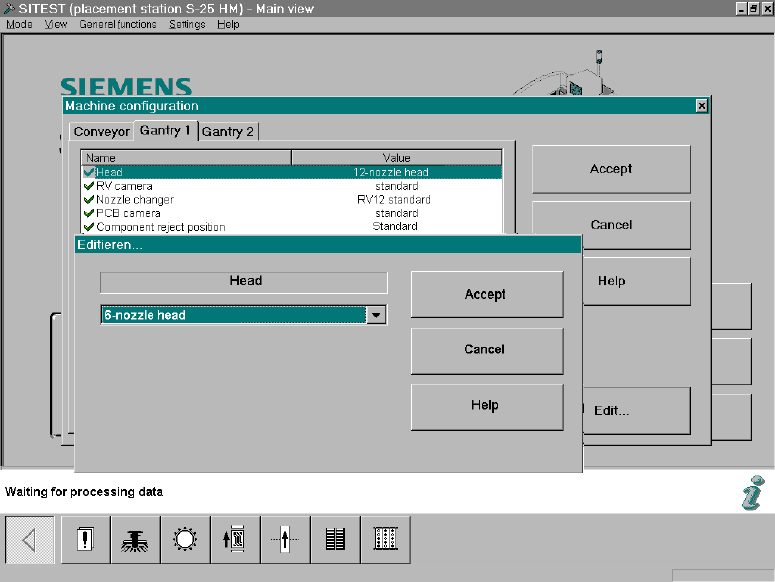
2.10.2 Configuration: RV6-DLM1 Head
In the SITEST main view select -> "Settings" ->The menu "Machine Configuration" will appear: 2
Fig. 2.10.1 SITEST: Machine Configuration, Selecting the RV Head
Å Select the "Gantry 1/2" (registration card) -> Click on the DLM1, head 6-/12-segment) mounted
on the gantry -> Select "Accept".
SIPLACE S-23 HM 2 Retrofitting Instruct. S-23 HM to SW V 502.xx incl. RV6-DLM1 Head (Option)
07/01 Issue 2.10 SITEST: Adjust Configuration, Entry Zero Point Compens. Values RV6 Head
113
2.10.3 Configuration: Nozzle changer RV6 Standard
Å
Change to the SITEST program.
Å The main view will appear.
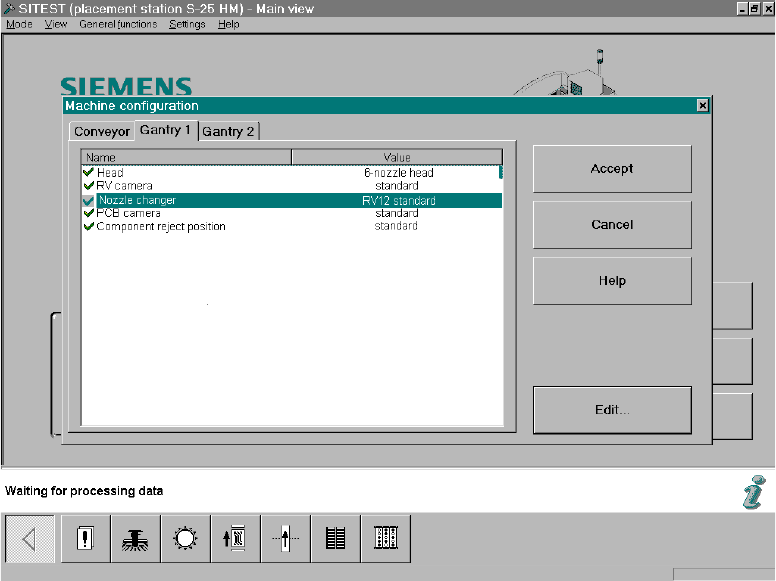
Å Starting from the main view, select -> Settings -> Machine configuration -> "Gantry 1" or "Gan-
try 2", depending on which feeder location the nozzle changer RV6 was installed at.
The following screen will appear:
2
Fig. 2.10.2 SITEST Screen "Machine Configuration"
Å Click on "Nozzle changer" -> Edit (button).
The following screen will appear: