00192377-02.pdf - 第119页
SIPLACE S-23 HM 2 Retrofitting Instruct. S-23 HM to SW V 502.xx incl. RV6-DLM 1 Head (Option) 07/01 Issue 2.13 Loading and Calibrating S ITEST Nozzle Change r RV6 Standard with Noz zles 119 Å Double -click on the line in…
2 Retrofitting Instruct. S-23 HM to SW V 502.xx incl. RV6-DLM1 Head (Option) SIPLACE S-23 HM
2.13 Loading and Calibrating SITEST Nozzle Changer RV6 Standard with Nozzles 07/01 Issue
118
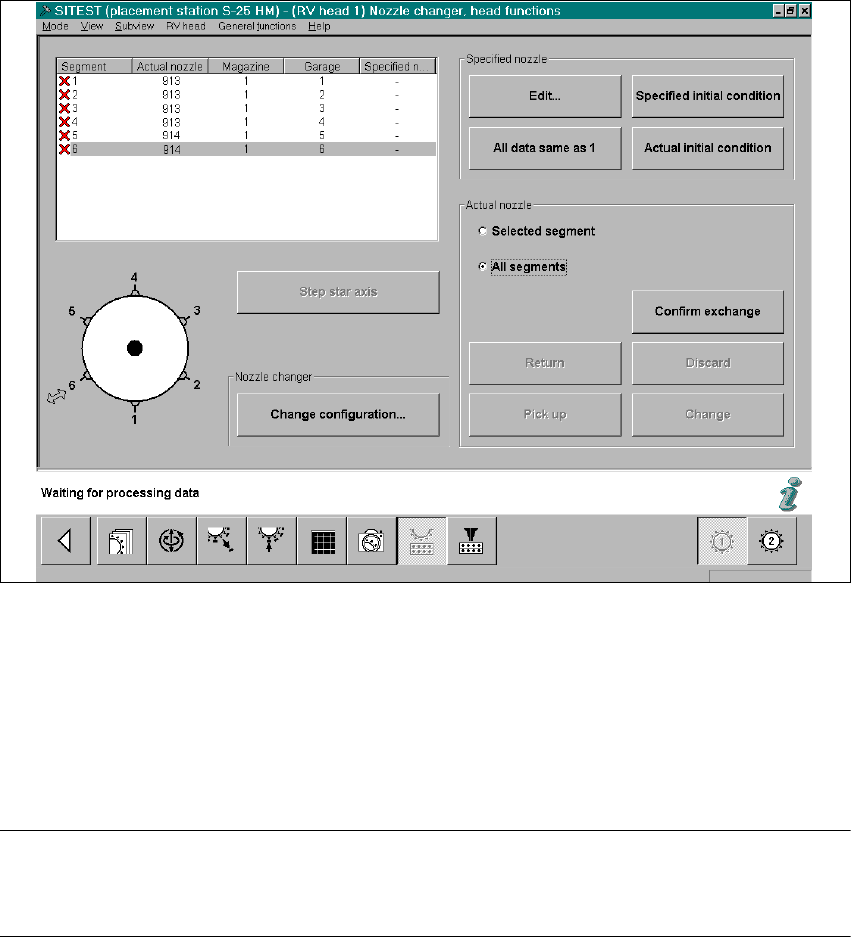
Fig. 2.13.1 SITEST: Nozzle Changer Head Functions (Example: RV6)
Å On the 6-segment revolver head, insert one 900 series nozzle and one 800 series nozzle.
In the event that you also measure the nozzle changer RV12:
In case of an 12- segment revolver head it is only necessary to insert a random 900 series noz-
zle on the head.
NOTE:
For RV12-nozzle changer there MUST be ONE large nozzle on the head or in garage 1 of the
magazine in question for the measurement of the large nozzles (800 series). 2
2
2
2
2
2
2
SIPLACE S-23 HM 2 Retrofitting Instruct. S-23 HM to SW V 502.xx incl. RV6-DLM1 Head (Option)
07/01 Issue 2.13 Loading and Calibrating SITEST Nozzle Changer RV6 Standard with Nozzles
119
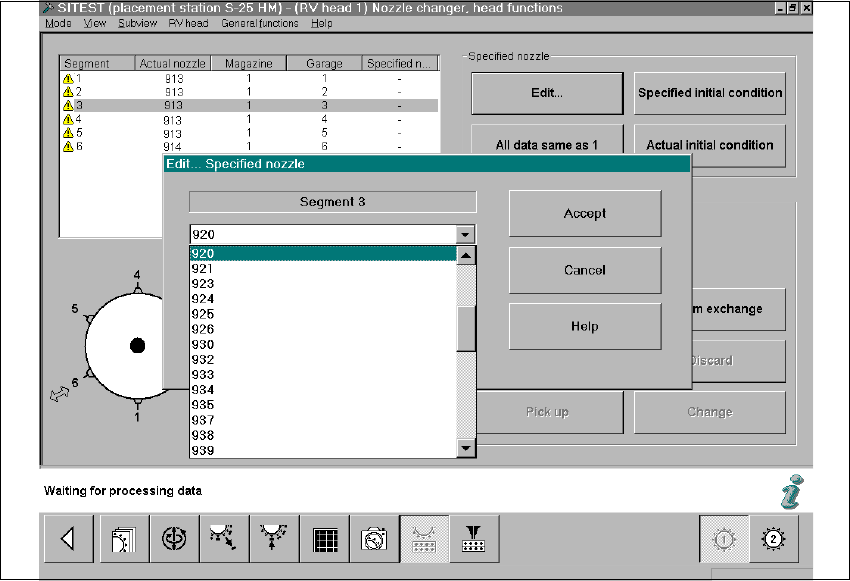
Å Double-click on the line in question as shown on the following screen or select "Edit" (button):
Fig. 2.13.2 SITEST: Nozzle Changer Head Functions, Edit ... Specified Nozzle (Example: RV6)
Å In the window that is opening, "Edit...", select the specified nozzle (e.g., type 920) that is con-
figured in the setup -> Select "Accept" (button).
Å Make this selection for each segment in succession.
Å In conclusion, select "Confirm exchange" (button).
2 Retrofitting Instruct. S-23 HM to SW V 502.xx incl. RV6-DLM1 Head (Option) SIPLACE S-23 HM
2.13 Loading and Calibrating SITEST Nozzle Changer RV6 Standard with Nozzles 07/01 Issue
120
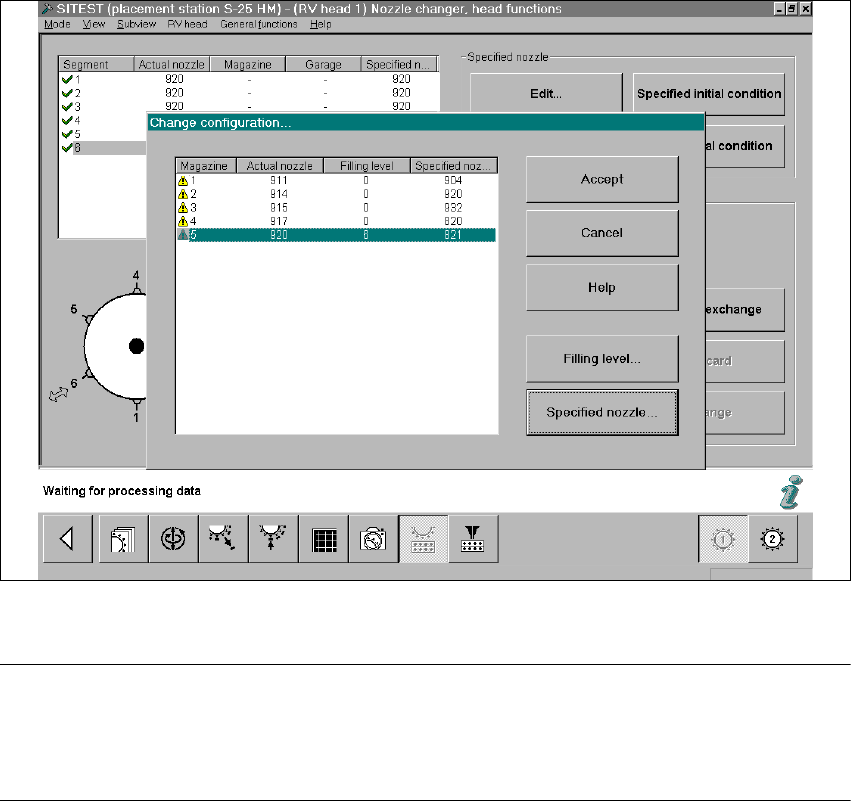
Å Select "Nozzle changer, head functions -> "Change configuration".
The following screen will appear:
2
Fig. 2.13.3 SITEST: Changing the Nozzle Changer Configuration (Example: RV6)
NOTE:
The RV6 nozzle changer must be configured complete with nozzles.
- 9 -series magazines must be defined with 9-series nozzle type (e.g., type 920),
- 8-series magazines with an 8-series nozzle type (e.g., type 820). 2
Å For each magazine, select the SPECIFIED nozzle (e.g., type 920 / 820) that was previously
defined on the head -> Select "Accept" (button) to accept this nozzle as the ACTUAL nozzle.
Å For each magazine, set the "Filling level" (button) to "0" -> Select "Accept" (button) -> Check
the filling levels.
Å If an RV6 head has already been installed on gantry 2, conduct the configuration process de-
scribed for gantry 2 (not necessary in the case of the 12-segment revolver head).