00191332-01.pdf - 第109页
User Manual Test Program SITEST 2 Functions for the Adjustment of the Machine Software Version 405.xx Issue 01/99 2.7 Wafflepack Changer Functions (SIPLACE 80F4/80F5) 2 - 37 ● In the "Axis" fie ld activate the …
2 Functions for the Adjustment of the Machine User Manual Test Program SITEST
2.7 Wafflepack Changer Functions (SIPLACE 80F4/80F5) Software Version 405.xx Issue 01/99
2 - 36
2.7.1 Wafflepack Changer Settings (SIPLACE 80F
4
/80F
5
)
CAUTION
The improper performance of the settings described in the following may result in the wafflepack changer be-
coming so maladjusted that it is no longer operable.
2
● In the "Wafflepack Changer" display (see Fig. 2.7.1) click on the icon to switch to the
"WPC settings" display.
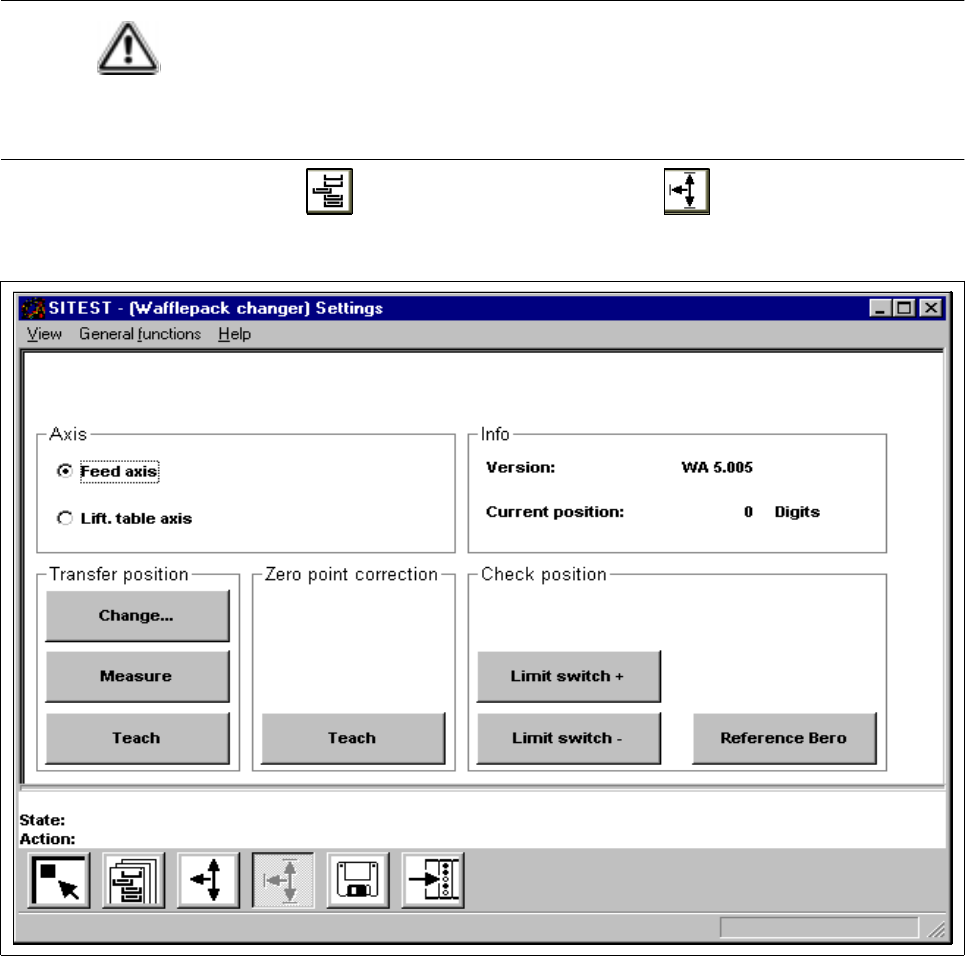
Fig. 2.7.2 "WPC settings" Display
The following functions are available in this display:
– Change to edit the transfer position
– Measure to determine and store the transfer position
– Teach ("Transfer position" field)to teach and accept the transfer position
– Teach ("Zero point cor.value" field)to teach and accept the zero point position
– Limit switch + to check the maximum limit switch position
– Limit switch - to check the minimum limit switch position
– Reference Bero to check the position of the reference Bero
User Manual Test Program SITEST 2 Functions for the Adjustment of the Machine
Software Version 405.xx Issue 01/99 2.7 Wafflepack Changer Functions (SIPLACE 80F4/80F5)
2 - 37
● In the "Axis" field activate the radio button of the axis (feed axis or lifting axis) for which you wish to per-
form settings or carry out checks.
● If you wish to change, measure or teach the value for the transfer position (component pick-up position
from the wafflepack tray), activate the radio button of the feed axis first.
● Click on the appropriate button in the "Transfer position" field and carry out the steps required for the
selected function.
● If you wish to change the zero point position, click on the
Teach
button in the "Zero point cor.value" field
and move the active axis to the desired position using the arrow keys. When the teaching procedure is
completed, a message box is displayed.
● Click on the
Yes
button if the current position is to be accepted as the new zero point.
● If you wish to check the position of a limit switch or of the reference Bero, remove all tray carriers from
the tray storage unit first.
● Click on the button of the desired function in the "Check position" field and carry out any activities that
may be required during the check.
2 Functions for the Adjustment of the Machine User Manual Test Program SITEST
2.7 Wafflepack Changer Functions (SIPLACE 80F4/80F5) Software Version 405.xx Issue 01/99
2 - 38