00191332-01.pdf - 第126页
3 Calibration Functions User Manual Test Program SITEST 3.6 Verification of the Calibration Tool Position Software Version 405.xx Issue 01/99 3 - 14
User Manual Test Program SITEST 3 Calibration Functions
Software Version 405.xx Issue 01/99 3.6 Verification of the Calibration Tool Position
3 - 13
3.6 Verification of the Calibration Tool Position
● In the main view click on the icon (for gantry 1 of SIPLACE 80S-20/S-23) or the icon (for the
gantry of SIPLACE 80F
4
/80F
5
)
to switch the screen display to the "Gantry" display (see Fig. 0.3.4).
● Click on the icon to reach the "Calibrate positions" display (see Fig. 3.5.1).
● Click on the
Approach
button in the "Calibration tool pos." field.
The active gantry moves the PCB camera over the calibration tool position. The screen display is
switched to the PCB camera.
● Check whether the calibration tool fiducial is visible in the PCB camera’s field of view.
● Press
ESC
to return the screen display to the normal program mode.
3 Calibration Functions User Manual Test Program SITEST
3.6 Verification of the Calibration Tool Position Software Version 405.xx Issue 01/99
3 - 14
User Manual Test Program SITEST 3 Calibration Functions
Software Version 405.xx Issue 01/99 3.7 Calibration of the IC Camera (SIPLACE 80F4/80F5)
3 - 15
3.7 Calibration of the IC Camera (SIPLACE 80F
4
/80F
5
)
● Carry out the preparatory steps proceeding as described in section 3.1.
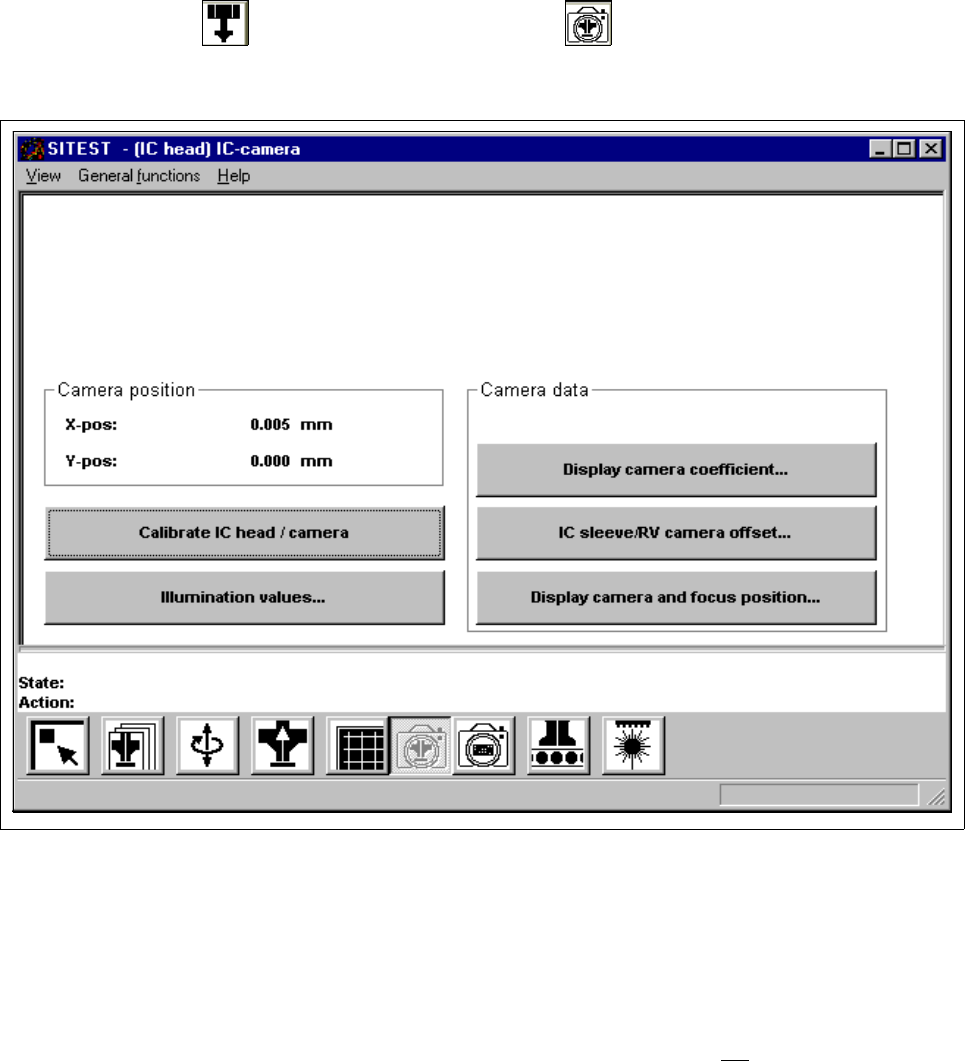
● In the "IC head" display (see Fig. 0.3.6) click on the icon to switch to the "IC head /
IC camera" display.
Fig. 3.7.1 "IC head / IC camera" Display
Overview of the functions:
– Calibrate IC head / camera to calibrate the IC head and the IC camera
– Illumination values... to display the illumination values
(Normally, the illumination values do not
need to be changed.
Changing the values in a non-expert manner will lead to
incorrect calibration results).
– Display camera coefficient... to display the IC camera values determined
– IC sleeve/RV camera offset... to display the offset between IC sleeve and RV camera in x and
y-direction, determined during calibration
– Display camera and focus position... to display the camera position and focus height determined