00191332-01.pdf - 第55页
User Manual Test Program SITEST 1 General Functions Software Version 405.xx Issue 01/99 1.5 Toggling Cycle Mode On/ Off 1 - 13 1.5 T og gling Cyc le Mode O n/Off ● F or toggl ing the c ycle mode fu nction, c lick on Gene…
1 General Functions User Manual Test Program SITEST
1.4 Reference Run Software Version 405.xx Issue 01/99
1 - 12
1.4.4 Reference Run of IC Head (SIPLACE 80F
4
/80F
5
)
● In the main view click on the icon and then (if required) the icon to reach the "IC head func-
tions" display (see Fig. 0.3.6).
● Click on the
Head reference run
button.
The reference run will be performed for all axes of the IC head.
1.4.5 Reference Run of WPC Axes (SIPLACE 80F
4
/80F
5
)
● In the main view click on the icon and then (if required) the icon to reach the "WPC functions"
display (see Fig. 0.3.10).
● Click on the
WPC reference run
button.
The reference run will be performed for all axes of the wafflepack changer.
User Manual Test Program SITEST 1 General Functions
Software Version 405.xx Issue 01/99 1.5 Toggling Cycle Mode On/Off
1 - 13
1.5 Toggling Cycle Mode On/Off
● For toggling the cycle mode function, click on
General functions
-->
Cycle mode...
on the menu bar,
or press the key combination
ALT
+
t
.
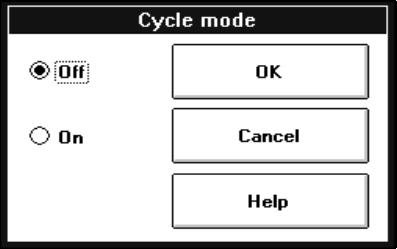
The "Cycle mode" setting box opens.
● Click on the
On
radio button to activate the cycle mode, or on the
Off
radio button to deactivate the
cycle mode.
● Click on the
OK
button. The cycle mode will be activated or deactivated.
1 General Functions User Manual Test Program SITEST
1.5 Toggling Cycle Mode On/Off Software Version 405.xx Issue 01/99
1 - 14