00191332-01.pdf - 第89页
User Manual Test Program SITEST 2 Functions for the Adjustment of the Machine Software Version 405.xx Issue 01/99 2.2 Head Board 2 - 17 2.2 Head Board The funct ions of th e head boar d are used to test the respec tive p…
2 Functions for the Adjustment of the Machine User Manual Test Program SITEST
2.1 Axis Functions Software Version 405.xx Issue 01/99
2 - 16
User Manual Test Program SITEST 2 Functions for the Adjustment of the Machine
Software Version 405.xx Issue 01/99 2.2 Head Board
2 - 17
2.2 Head Board
The functions of the head board are used to test the respective placement head. Normally, the test is per-
formed with the aid of the "Head continuous run" function (see display "RV head functions", Fig. 0.3.5).
2.2.1 Functions of the RV Head in the Placement and Pick-Up Circuits
● If you wish to test the head functions in the placement and pick-up circuits, click on the icon in
the "RV head" display (see Fig. 0.3.5) to switch to the "Head board RV head, placement and pick-
up circuit".
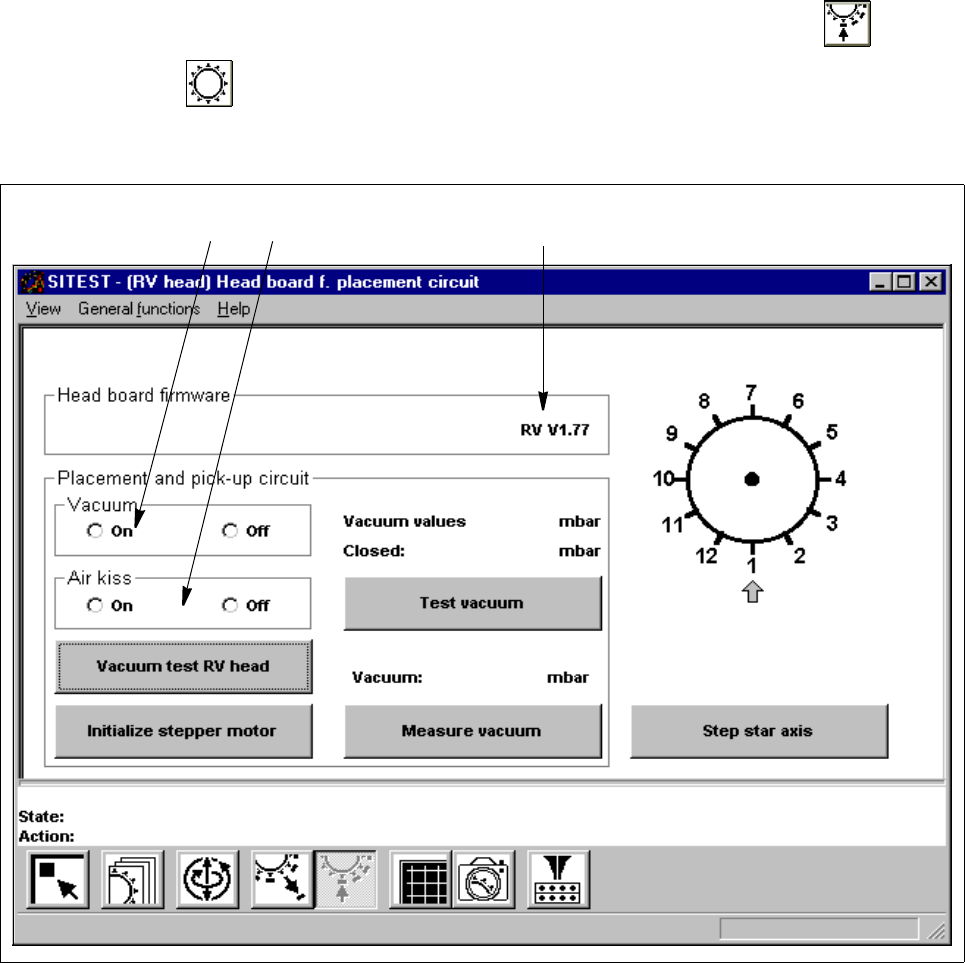
Fig. 2.2.1 "Head board RV head, placement and pick-up circuit" Display
Legend pertaining to Fig. 2.2.1
➀ to switch the vacuum on/off
➁ to switch the air-kiss function at the placement station on/off
➂ version number of the firmware
➀
➁
➂

2 Functions for the Adjustment of the Machine User Manual Test Program SITEST
2.2 Head Board Software Version 405.xx Issue 01/99
2 - 18
● To switch the vacuum on/off, activate the appropriate radio button in the "Vacuum" field.
● To switch the air-kiss function on/off, activate the appropriate radio button in the "Air kiss" field.
NOTE
Prior to the execution of the functions "Step star axis" and "Vacuum test RV head" described below, a head
reference run must have been performed on the RV head (see section 1.4.3).
2
● To index the star, continue to click on the
Step star axis
button until the number of the desired
(center) sleeve is displayed above the arrow (see Fig. 2.2.1).
● To measure the vacuum values of all nozzles with the vacuum both switched on and off, click on the
Vacuum test RV head
button. The measured values are displayed in a dialog box.
● Close the dialog box by clicking on
OK
.
● To move the stepper motor into neutral position (starting position), click on the
Initialize stepper motor
button.
● To check the vacuum, click on the
Test vacuum
button.
The values measured with the nozzle both open and closed, are displayed above the button.
● To measure the current vacuum values in the placement and pick-up circuits, click on the
Measure
vacuum
button. The measured value is displayed above the button.