00198501-02_IM_711.1_R18-1_EN.pdf - 第22页
Station Software V ersion 711.1 (R 18 - 1) / Installat ion Manual 05/2018 Edition 22 5.3.2 Installing .NET Framew ork The station soft ware setup require s .NET Framewor k 4.6.1 for suc cessful installat ion. The setup c…

Station Software Version 711.1 (R18-1) / Installation Manual 05/2018 Edition
21
5.2 Performing BIOS Update/Settings on the Station / Coplan / Feeder
Computers
The image files for the BIOS update/BIOS settings and the corresponding installation instruction
(readme file) are available on the V1.0 BIOS CD that can be ordered via the service technician or
downloaded from the ASM Software Download Center. For more information, see separate
Installation Manual for details on installing the Windows 7 system, item no. [00197737-xx].
5.3 Preparations before Installing the Software
5.3.1 Requirements
Requirements for installing the station software, Coplan computer software or feeder computer
software:
– The Windows Embedded Standard 7 SP1 (32-bit or 64-bit) must be installed on the station
computer and in two-computer operation on the Coplan computer or feeder computer (see
"Installation Manual Operating System Windows Embedded Standard 7", item number
[00197737-xx]).
– The "SIPLACE Windows Embedded Standard 7 Configurator" version 2.3.1 or higher must
have been run on the station computer. Selection: hardware type and usage – Station/Vision.
The computer configuration has to be selected and the touch screen calibrated. You must be
logged in as Administrator in order to be able to carry out this work.
– The station computer has to be equipped with at least 2 GB memory (RAM) with WES 7, 32-bit
and 4 GB memory (RAM) with WES7, 64-bit respectively. If necessary, station computers in the
field have to be exchanged or upgraded with a memory extension. Please refer to the
Technical Information TI2014-09E04.
– Also observe the requirements in section 6.2.1 that have to be met when installing the Coplan
computer software or feeder computer software via remote connection.
– The station software setup requires .NET Framework 4.6.1. If not installed, it must be installed
manually before the station software installation starts. Please refer to section 5.3.2.
Station Software Version 711.1 (R18-1) / Installation Manual 05/2018 Edition
22
5.3.2 Installing .NET Framework
The station software setup requires .NET Framework 4.6.1 for successful installation. The setup
checks whether the framework is installed or not. If not, the framework must be installed manually
before the station software installation starts. Please also refer to section 5.4.1.
The corresponding NetFramework4.6.1.exe file can be found on the installation DVD in the root
folder. .NET Framework 4.6.1 is compatible to all previous 7xx versions.
► Log in under the ASM_Admin user account.
► Insert the installation media.
► Open Windows Explorer.
► Double-click the NetFramework4.6.1.exe file to start installing .NET Framework.
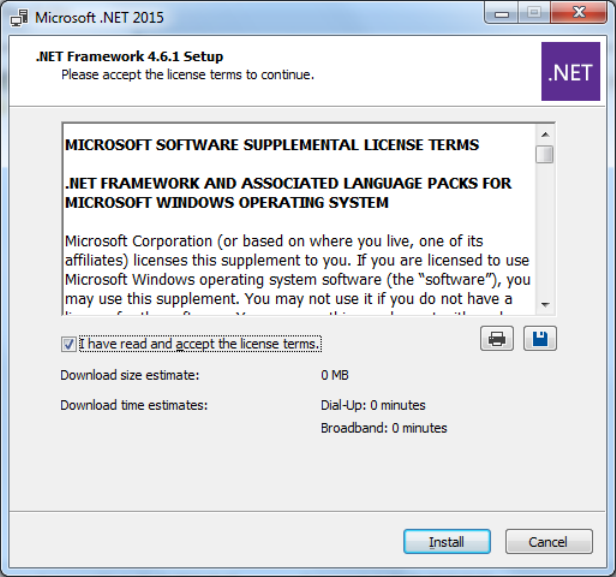
The .NET Framework 4.6.1 Setup dialog box is displayed.
Figure 5-2: Installing .NET Framework 4.6.1
► Accept the license terms.
► Click the Install button.
Usually, a restart of the system is required after this installation.
Station Software Version 711.1 (R18-1) / Installation Manual 05/2018 Edition
23
5.3.2.1 Error Handling
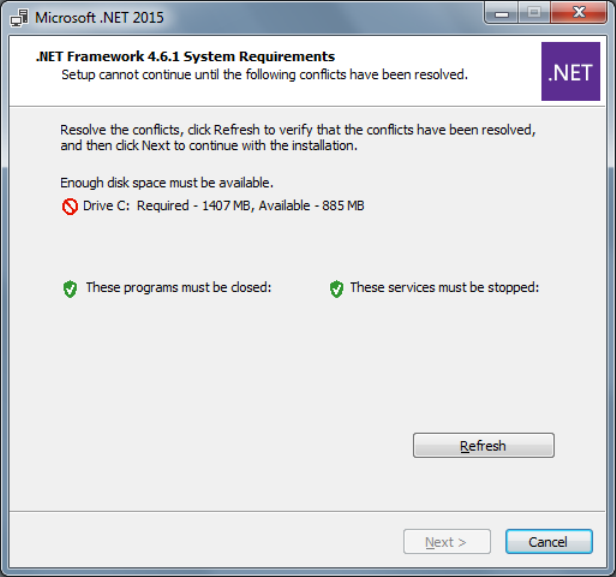
The following error message may be displayed after starting the .NET Framework installation.
Figure 5-3: Not enough free disk space
In this case, there is not enough free disk space on the "C:" drive to install .NET Framework 4.6.1.
At least 5 GB free disk space is recommended for the "C:" drive.
► Delete unneeded files to create free disk space on the "C:" drive.
► Click the Refresh button to verify that the conflict has been solved.
► Click the Next button to continue with the installation.