00198501-02_IM_711.1_R18-1_EN.pdf - 第7页
Station Software V ersion 711.1 (R 18 - 1) / Installat ion Manual 05/2018 Edition 7 2.3 Languages User Interfaces SIPLACE Station and SIPLACE Vision: The basic software contains German, English and Si mplified Chin ese v…
Station Software Version 711.1 (R18-1) / Installation Manual 05/2018 Edition
6
2 Scope of Delivery
2.1 Software Components
– Software SIPLACE Station 711.1 (R18-1) Basic including SIPLACE Vision Version 5.5.2
1)
All software belonging to R18-1 is available on the ASM Software Collection USB Medium
R18-1, item no. [00117883-xx]. This USB stick contains all basis product packages of R18-1.
Additionally, the individual software packages (*.iso files) contain the relevant software documents
(Installation Manuals, Software Version Descriptions, User Guides etc.).
(1)
The following standard applications are contained:
– Embedded software for conveyor
– Embedded software for axes
– Embedded software for component tables
– Embedded software for tape cutter
– Embedded software for heads
– Embedded software for vision modules
– Embedded software for I/O modules
– Embedded software for X-feeders
– Embedded software for X- adapter
– Embedded software for digital pressure regulation valve
– Embedded software for MTC2
– Embedded software for WPC5/WPC6
– Embedded software for wafer feeders
2.2 Hardware Components
– Station computer
– Coplan computer (option if 3D Coplan module is used)
– Feeder computer (option if SIPLACE BulkFeeder X is used)
Station Software Version 711.1 (R18-1) / Installation Manual 05/2018 Edition
7
2.3 Languages
User Interfaces SIPLACE Station and SIPLACE Vision:
The basic software contains German, English and Simplified Chinese versions. As for Simplified
Chinese a preliminary version is provided.
The final version of Simplified Chinese and other languages contained in the Language Pack are
optional. The Language Pack can be downloaded from the ASM Download Center.
Available languages for station software and SIPLACE Vision
– Bulgarian
*)
– Chinese (simplified)
– Czech
*)
– French
– Hungarian
– Italian
– Japanese
– Korean
– Polish
*)
– Portuguese (Brazil)
– Romanian
*)
– Russian
*)
– Spanish (Mexico)
– Vietnamese
*)
*)
GUI only (online help English)
Please refer to section 5.6 for detailed information on the Language Pack.
Station Software Version 711.1 (R18-1) / Installation Manual 05/2018 Edition
8
3 Upgrading to Station Software Version 711.1
This chapter describes which steps you generally have to attend when upgrading to the current
station software version and which steps are additionally required when upgrading from lower to
higher software versions.
Upgrading from previous station software versions (701.x – 709.x) to station software version 711.x
is not possible due to a change in the installation technology beginning with station software
version 710.0.
If a previous station software version is already installed on the station computer, it will be
automatically uninstalled by the setup wizard before the current station software gets installed.
Only if the installation of station software 711.x fails, the previous station software version has to be
manually uninstalled.
NOTICE
Individual machine data (calibration data) will not be deleted!
► Note some information before you start upgrading the station software.
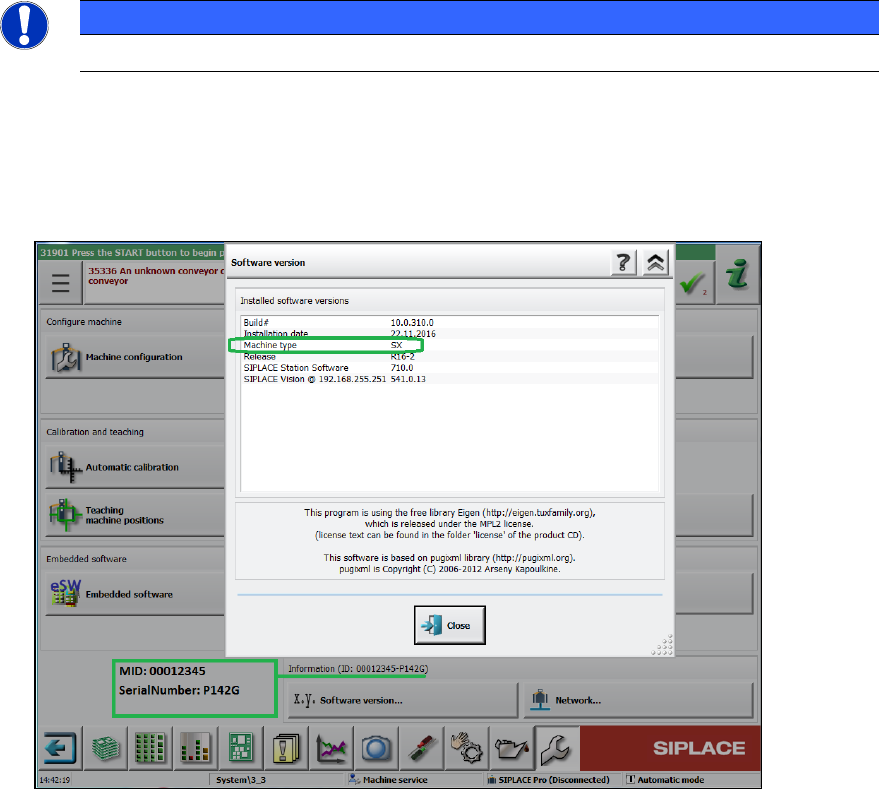
During installation of station software 711.1 you will be asked for machine type, MID number
and serial number. These settings will not be transferred during upgrading (no default
settings!). You find this information on the GUI of your current station software version:
Figure 3-1: Example of machine information
► When upgrading the station software, always check the eSW versions and download the
current versions if necessary.