Service Manual HS60.pdf - 第108页
4 G ant ri es HS- 6 0 S erv ice Ma nu al 4. 7 R ep laci ng th e X -ax is sc al e (0 03 293 16 -01 ) 03/ 200 3 US I ssue 106 Æ Lo osen t he eleven M 2.5 x 5 hexago n soc ket-head sc rews (item 3 in F ig. 4.7 - 1 ) with wa…
HS-60 Service Manual 4 Gantries
03/2003 US Issue 4.7 Replacing the X-axis scale (00329316-01)
105
4.7.3 Removing the X-axis scale
4
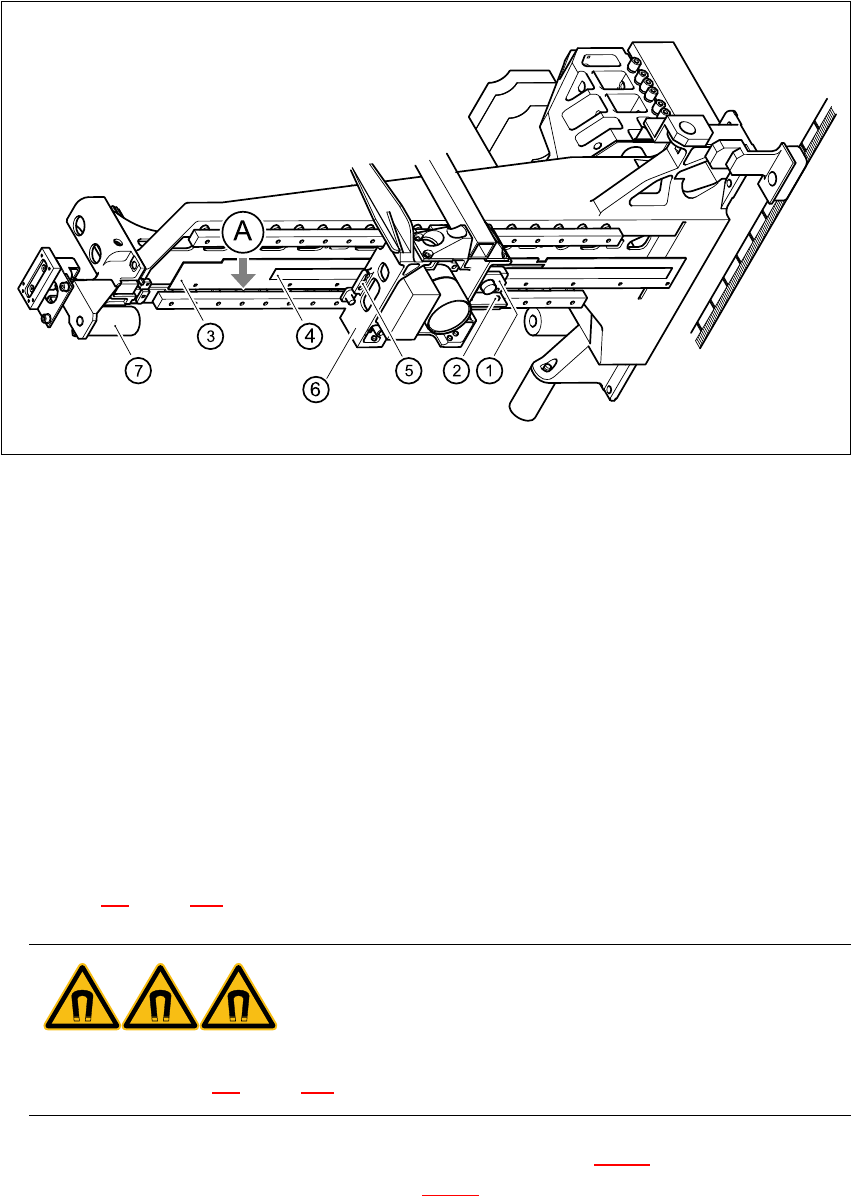
Fig. 4.7 - 1 Replacing the X-axis scale
Key
(1) Incremental encoder, X-axis
(2) 2 x M3 x 8 hexagon socket-head screws
(3) 11 x M2.5 x 5 hexagon socket-head screws with washers
(4) Scale, X-axis
(5) Proximity switch B1 and B2 for the X-axis
(6) Head mount
(7) Elastomeric spring
A Stop for the scale on the bars 4
Æ Switch the placement system off and secure it to prevent switching on again as described in
Section 4.4
, page 100 onward.
DANGER POWERFUL MAGNETIC FIELD 4
Always follow the special safety instructions when working in the vicinity of powerful magnetic
fields (see Section 4.5, page 101 onward). 4
Æ Loosen two M3 x 8 hexagon socket-head screws (item 2 in Fig. 4.7 - 1) to remove the incre-
mental encoder for the X-axis (item 1 in Fig. 4.7 - 1
).

4 Gantries HS-60 Service Manual
4.7 Replacing the X-axis scale (00329316-01) 03/2003 US Issue
106
Æ Loosen the eleven M2.5 x 5 hexagon socket-head screws (item 3 in Fig. 4.7 - 1) with washers.
Æ Move the head mount (item 6 in Fig. 4.7 - 1) across as far as the elastomeric spring (item 7 in
Fig. 4.7 - 1
) in order to prevent any damage to proximity switches B1 and B2 (item 5 in Fig. 4.7
- 1).
Æ Remove the scale (item 4 in Fig. 4.7 - 1).
4.7.4 Installing the X-axis scale
Æ Carefully insert the scale.
CAUTION 4
Do not touch the incremental tracks with bare fingers. 4
Æ Loosely tighten the eleven M2.5 x 5 hexagon socket-head screws with washer.
Æ Push the scale along the bars as far as the stop (item A in Fig. 4.7 - 1)
Æ Tighten the M2.5 x 5 hexagon socket-head screws.
Æ Use the feeler gauge to set the 0.4 mm gap between the incremental encoder and scale.
Æ Use the two M3x8 hexagon socket-head screws (item 2 in Fig. 4.7 - 1) to fix the incremental
encoder (item 1 in Fig. 4.7 - 1
) to the X-axis.
4.7.5 Settings
Æ Set and calibrate the collect&place head and gantry axes using the SITEST program.

HS-60 Service Manual 4 Gantries
03/2003 US Issue 4.8 Replacing the tensioning keys (00329478-01, 00329485-01)
107
4.8 Replacing the tensioning keys (00329478-01,
00329485-01)
4.8.1 Tools and equipment
– Set of DIN 911 Allen keys
– TSM belt tension measuring device, from item number 00326015-01
– "Measuring belt tensions" operating instructions
4.8.2 Parts
Designation From item number Item in Fig. 4.8 - 1
Tensioning key 00329478-01 (1)
Tensioning key 00329485-01 (2) 4
4.8.3 Removing the tensioning keys
Æ Switch the placement system off and secure it to prevent switching on again as described in
Section 4.4
, page 100 onward.
Æ Push the head mount towards the deflection pulley (item 6 in Fig. 4.8 - 1).
Æ To slacken the toothed belt (item 5 in Fig. 4.8 - 1)
– loosen the locknut (item 11 in Fig. 4.8 - 1
) and
– turn the hexagon socket-head screw counter-clockwise (item 3 in Fig. 4.8 - 1
).
Removing the tensioning key, item 1 (synchronizing disk, short) 4
Æ Loosen the M4 x 5 hexagon socket-head screw (item 8 in Fig. 4.8 - 1).
Æ Lift out the tensioning key.
Removing the tensioning key, item 2 (synchronizing disk, long) 4
Æ Unscrew the hexagon socket-head screw (item 3 in Fig. 4.8 - 1) from the spacer bolt (item 7 in
Fig. 4.8 - 1
).
Æ Lift out the tensioning key.