Service Manual HS60.pdf - 第117页
HS -60 Se rvic e Manu al 4 Ga ntr ies 03/ 200 3 US I ssue 4. 10 R e plac in g the X -ax is t oot he d be lt ( 00 33 1076 - 02) 115 4 F ig. 4. 10 - 1 R em ovin g th e X -ax is toot he d be lt Key (1) T ensioning key (2) T…
4 Gantries HS-60 Service Manual
4.10 Replacing the X-axis toothed belt (00331076-02) 03/2003 US Issue
114
4.10 Replacing the X-axis toothed belt (00331076-02)
4.10.1 Tools and equipment
– Set of DIN 911 Allen keys
– TSM belt tension measuring device, from item number 00326015-01
– "Measuring belt tensions" operating instructions
4.10.2 Parts
Toothed belt, Synchroflex 50 ATS5-1205 E9-11, from item number 00331076-01 4
4.10.3 Removing the X-axis toothed belt
Æ Switch the placement system off and secure it to prevent switching on again as described in
Section 4.4
, page 100 onward.
DANGER POWERFUL MAGNETIC FIELD 4
Always follow the special safety instructions when working in the vicinity of powerful magnetic
fields (see Section 4.5, page 101 onward). 4
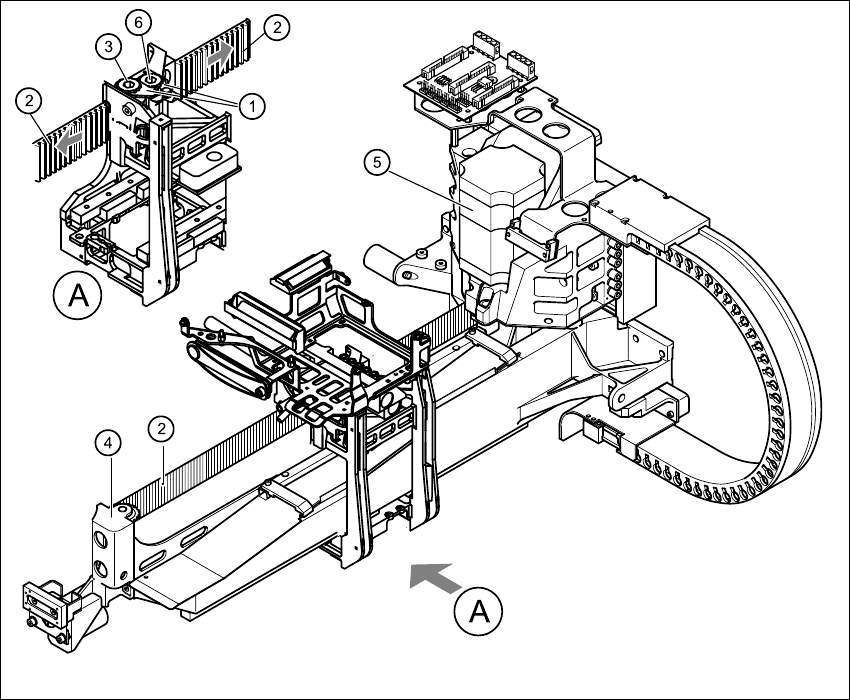
Æ Dismantle the two tensioning keys (item 1 in Fig. 4.10 - 1) (see Section 4.8.3)
Æ Remove the toothed belt from the two synchronizing disks (item 2 in Fig. 4.10 - 1).
Æ Unthread the toothed belt from the deflection unit (item 4 in Fig. 4.10 - 1).
Æ Remove the toothed belt from the synchronizing disk of the X-axis motor unit (item 5 in Fig.
4.10 - 1
).
HS-60 Service Manual 4 Gantries
03/2003 US Issue 4.10 Replacing the X-axis toothed belt (00331076-02)
115
4
Fig. 4.10 - 1 Removing the X-axis toothed belt
Key
(1) Tensioning key
(2) Toothed belt
(3) Synchronizing disk, long
(4) Deflection unit X
(5) X-axis motor unit
(6) Synchronizing disk, short
4 Gantries HS-60 Service Manual
4.10 Replacing the X-axis toothed belt (00331076-02) 03/2003 US Issue
116
4.10.4 Installing the X-axis toothed belt
Æ Place the toothed belt around the synchronizing disk of the X-axis motor unit (item 5 in Fig.
4.10 - 1
).
Æ Thread the toothed belt into the deflection unit (item 4 in Fig. 4.10 - 1).
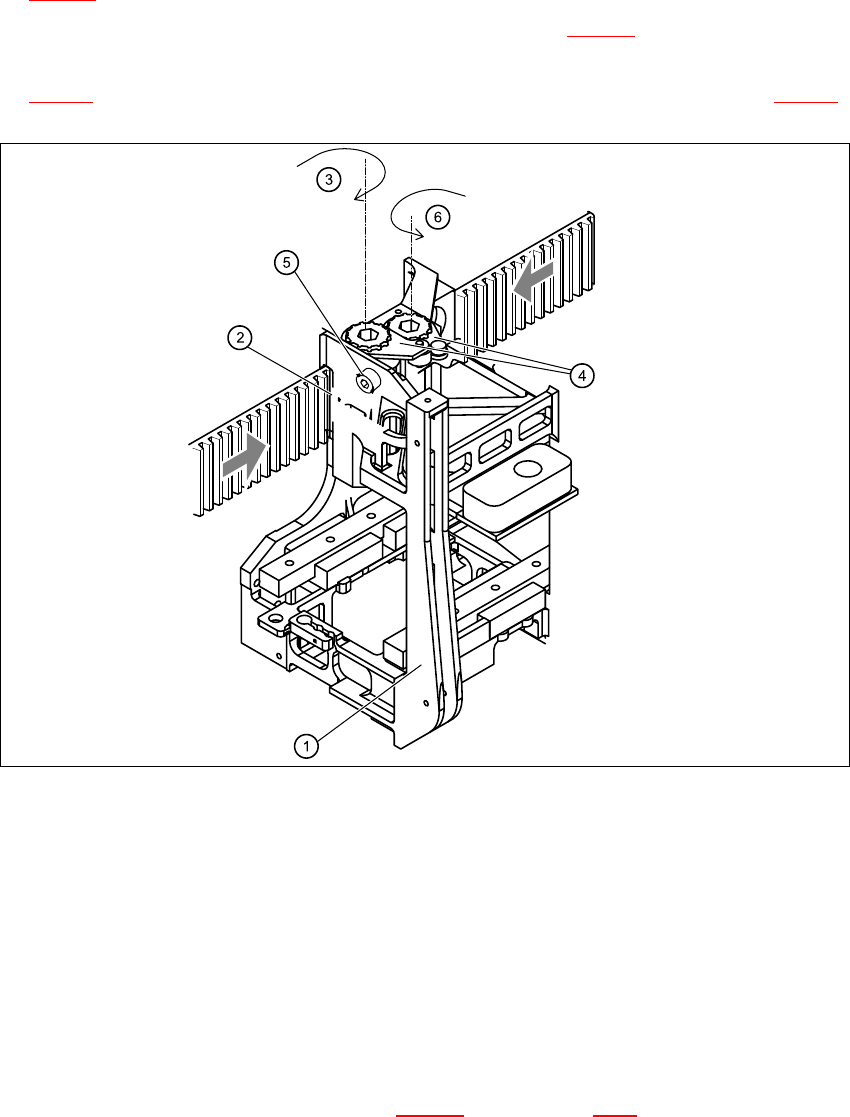
Æ Thread the two ends of the toothed belt into the openings on the tension jack (item 2 in Fig.
4.10 - 2
) until it runs approximately 270° around the synchronizing disks (item 3 in Fig. 4.10 - 2).
4
Fig. 4.10 - 2 Fixing the X-axis toothed belt to the tension jack
Key
(1) Head mount
(2) Tension jack
(3) Synchronizing disk, long
(4) Tensioning keys
(5) Hexagon socket-head screw for tensioning the toothed belt
(6) Synchronizing disk, short
Æ Fit the two tensioning keys (item 4 in Fig. 4.10 - 2) (see Section 4.8.4).