Service Manual HS60.pdf - 第153页
Se rv ice M a nu al HS- 6 0 5 P ne um at ic Cu tte r an d Em pt y-T ap e D uc t 03/ 200 3 U S Iss ue 5. 6 C h angi ng of pa rts 151 Æ M ount the short-stroke cylinder compressed air connections to the one-way restrictors…

5 Pneumatic Cutter and Empty-Tape Duct Service Manual HS-60
5.6 Changing of parts 03/2003 US Issue
150
If the cable of the solenoid valve is faulty:
Æ Carefully undo the corresponding cable tie (left or right) on the outside of the control board
box (see Fig. 5.6.7
-> 10).
-> Do not damage the cables in this process.
Æ Remove the cover from the control board (see Fig. 5.6.7 -> 9).
Æ Unplug the plug-and-socket connection of the cable "Control board for tape cutter - valve"
of the appropriate solenoid valve on the control board (see Fig. 5.6.5
-> 1, 2).
Æ Loosen the plug-and-socket connection of the cable "Control board for tape cutter - valve"
of the appropriate solenoid valve (see Fig. 5.6.5
).
Æ Take the cover off the cable pit (see Fig. 5.6.7 -> 5).
Æ Remove the cable and run the new cable "Control board for tape cutter - valve" (Item no.:
see Section 5.2
). Push the excess lengths of cable into the cable pit.
Æ Make the plug-and-socket connection on the board (see Fig. 5.6.5) and on the solenoid
valve with correct allocation (see Fig. 5.6.7
).
Æ Place the cover back on the control board (see Fig. 5.6.7 -> 9).
Æ Install the cover on the cable pit (see Fig. 5.6.7 -> 5).
Æ Use a cable tie to fasten the cables running to LH and/or RH side of the cable pit to the fixing
pedestal (on control board box).
The strain on the cable / plug-and-socket connections must be relieved (see Fig. 5.6.7
-> 8).
Æ Perform the appropriate “Final Steps” (see Section 5.6.8).
If the solenoid valve is faulty:
Æ Undo the 2 compressed air connections on the one-way restrictors at the faulty solenoid
valve (see Fig. 5.6.7
-> 1, 2, 6).
Æ Unplug the plug-and-socket connection of the cable "Control board tape cutter - valve"
on the faulty solenoid valve (see Fig. 5.6.7
-> 11).
Æ Undo the screws fastening the faulty solenoid valve (2 M3 screws: see Fig. 5.6.7 -> 4) and
remove the solenoid valve.
Æ Mount the new solenoid valve (Item no.: see Section 5.2) in the correct position, as shown
in Fig. 5.6.7. Make the plug-and-socket connection at the solenoid valve:
-> Tighten the screws to the correct torque -> see Table, Fig. 5.4.2
.
-> The strain on the cable must be relieved (see Fig. 5.6.7
-> 8).

Service Manual HS-60 5 Pneumatic Cutter and Empty-Tape Duct
03/2003 US Issue 5.6 Changing of parts
151
Æ Mount the short-stroke cylinder compressed air connections to the one-way restrictors on
the solenoid valve with the correct allocation (see Fig. 5.6.3
-> 6, 7, 8).
Æ Perform the appropriate “Final Steps” (see Section 5.6.8).
5.6.5 Exchanging the Inductive Proximity Switch
5.6.5.1 Removing the Proximity Switch
The cutter remains installed in the machine.
Æ Turn the machine and then the compressed air ON.
Æ Disconnect the movable component changeover table from the machine and move it out of the
machine.
Æ Turn the machine OFF, disconnect the machine from the mains and turn off the flow of com-
pressed air at the compressed air. Actuate the needle valve on the compressed air unit to
bleed the compressed air lines (see DANGER text in Section 5.1
).
Æ Remove the cover from the control board (see Fig. 5.6.5 -> 14).
Æ Carefully undo the corresponding cable tie (left or right) on the outside of the control board box
(see Fig. 5.6.5
-> 10).
-> Do not damage the cables in the process.
Æ Using a fine-tip permanent marker, precisely mark on the short-stroke cylinder the specified
position of the proximity switch that is to be exchanged.
Æ Disengage the plug-and-socket connection of the faulty proximity switch on the control board
(allocation: see Fig. 5.6.5
).
If you loosen more than one of the plug-and-socket connection simultaneously, mark the allo-
cation.
Æ Take the cover off the cable pit (see Fig. 5.6.7 -> 5).
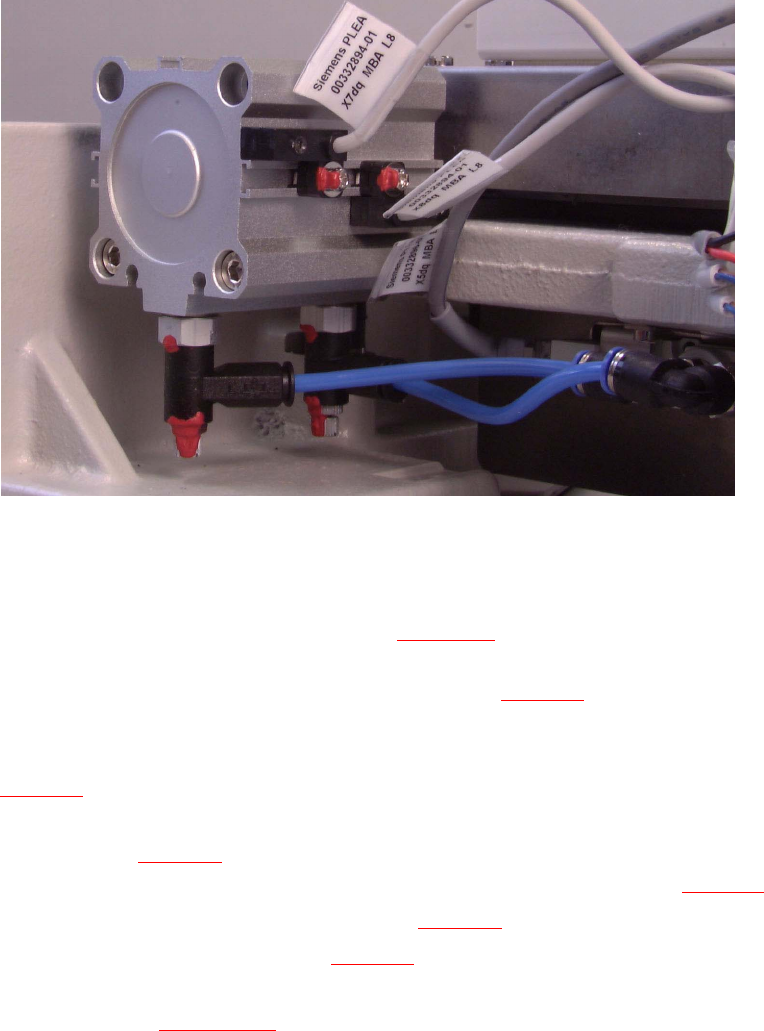
Æ Undo the screw fastening the proximity switch to the short-stroke cylinder (1 screw: see pic-
ture) and remove the proximity switch including the cable.
5 Pneumatic Cutter and Empty-Tape Duct Service Manual HS-60
5.6 Changing of parts 03/2003 US Issue
152
5
5
5.6.5.2 Installing the Proximity Switch
Æ Install the new proximity switch (Item no.: see Section 5.2) precisely in the position you marked
on the short-stroke cylinder with the permanent marker.
-> Tighten the screws to the correct torque -> see Table, Fig. 5.4.2
.
Æ Lay the cable in the cable pit and make the plug-and-socket connection to the proximity switch
on the control board with correct allocation to the proximity switch left/right and front/back (see
Fig. 5.6.5
) -> Push the excess lengths of cable into the cable pit.
Æ Use a cable tie to fasten the cables running to the cable pit to the fixing pedestal on the control
board box (see Fig. 5.6.7
-> 10).
The strain on the cables / plug-and-socket connections must be relieved (see Fig. 5.6.7
-> 8).
Æ Place the cover back on the control board (see Fig. 5.6.7 -> 9).
Æ Install the cover on the cable pit (see Fig. 5.6.7 -> 5).
Æ Perform the "Final Steps" including the substep "Load the SITEST program and initiate the cut-
ting strokes" (see Section 5.6.8
).