Service Manual HS60.pdf - 第212页
6 M odul ar PCB co nveyo r sys tem S er vice Ma nual HS-6 0 6. 13 Widt h a dj us tme nt 0 3/2 00 3 US I ss ue 210 6.1 3.5. 1 Re pla cin g the va l ve of the ad ju stme n t unit (0 03 6377 9-0 1) Par ts – 00363779-02 Adju…
Service Manual HS-60 6 Modular PCB conveyor system
03/2003 US Issue 6.13 Width adjustment
209
6.13.5 Adjustment unit for the width adjustment system
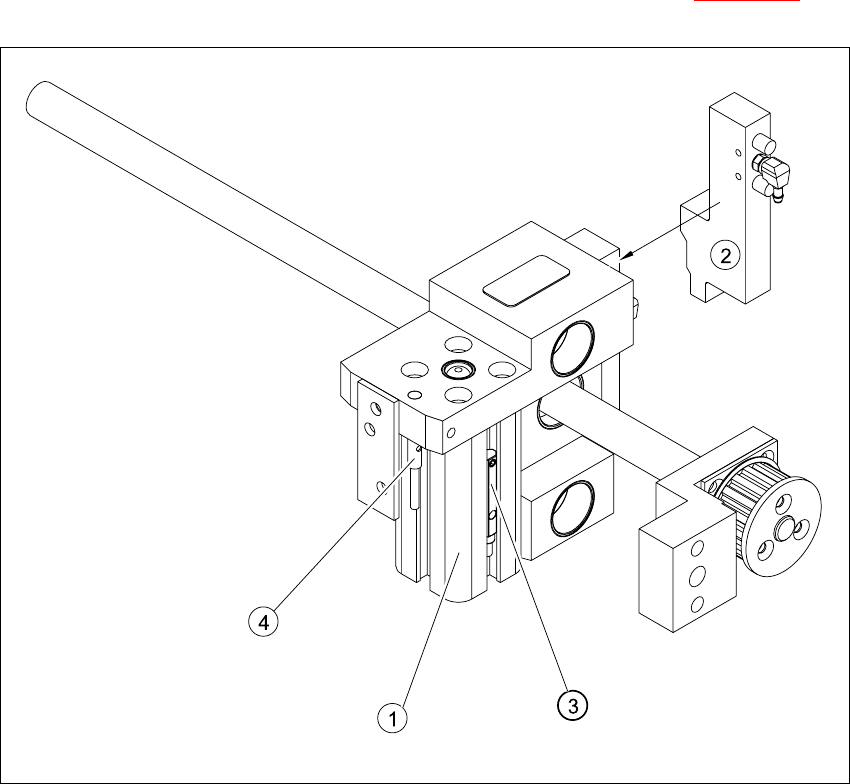
The position of the adjustment unit in the width adjustment system is shown in Fig. 6.13.21
Fig. 6.13.27 Overview of the adjustment unit for the width adjustment system
Key
(1) Short-stroke cylinder (3) Proximity switch
(2) Solenoid valve (4) Proximity switch for the adjustment unit

6 Modular PCB conveyor system Service Manual HS-60
6.13 Width adjustment 03/2003 US Issue
210
6.13.5.1 Replacing the valve of the adjustment unit (00363779-01)
Parts
– 00363779-02 Adjustment unit valve 1
– 00363780-02 Adjustment unit valve 2
Æ Move the PCB conveyor to the position which allows you best access to the adjustment unit.
Æ Move the Y-gantries into the area outside the PCB conveyor.
Æ Turn the machine off at the main switch and disconnect the machine from the mains voltage.
Æ Switch off the compressed air supply.
Æ Make sure the machine has been properly secured to prevent it being switched on again during
servicing.
Æ Undo and remove the screw fastening the connection plug (see also Fig. 6.13.27).
Æ Disconnect from the pneumatic system.
Æ Undo the two fastening screws and remove the valve from the short-stroke cylinder.
NOTE:
If you have discovered a break in the connection cable during a continuity check, the cable must
be woven out as far as the conversion board of the mounting tray (see circuit diagrams of the
same name) and unplugged at the corresponding point. (see also Section 6.16
and Section 6.17).
This may be somewhat complicated depending on the routing of cables inside the machine base.
You may wish to contact Siemens Dematic AG SMD Service regarding this work.
Æ Install the new valve and reconnect to the electrical and pneumatic systems.

Service Manual HS-60 6 Modular PCB conveyor system
03/2003 US Issue 6.13 Width adjustment
211
6.13.5.2 Replacing the proximity switch for width adjustment systems 1+2 (00363777-01)
The proximity switch on the adjustment unit cylinder should operate when the adjustment unit pin
is pushed out by the pneumatic cylinder and therefore connected to the conveyor side. This signal
enables the motor of the width adjustment system.
Parts
– 00363777-01 Proximity switch for width adjustment system 1
– 00363778-01 Proximity switch for width adjustment system 2
Æ Move the PCB conveyor to the position which allows you best access to the adjustment unit.
Æ Move the Y-gantries into the area outside the PCB conveyor.
Æ Turn the machine off at the main switch and disconnect the machine from the mains voltage.
Æ Switch off the compressed air supply.
Æ Make sure the machine has been properly secured to prevent it being switched on again during
servicing.
Æ Loosen the grub screw on the proximity switch (see also Fig. 6.13.27) and move the proximity
switch out of the lifting table guide rail.
Æ Extract the connection cable as far as the conversion board of the mounting tray.
Æ Run the connection cable for the new proximity switch.
Æ Insert the new proximity switch into the guide rail.
Æ Switch the machine on.
NOTE
The width adjustment system proximity switch is set adjusted in engaged mode.
Æ Move the width adjustment system until the proximity switch switches - LED (H36/H37) lights
up.
Engage the cylinder - i.e. the cylinders are moved to the upper limit by the controls
Æ Set the proximity switch so that the LED lights up when it is in engaged mode.
Æ Fix the position of the proximity switch with the grub screw.
6.13.5.3 Replacing the proximity switch for adjustment units 1+2 (00363775-01)
The proximity switch serves as a signal for controlling the pneumatic valve of the adjustment unit.
Once the switching point has been reached, the conveyor side is connected via the short-stroke
cylinder.