Service Manual HS60.pdf - 第278页
7 DL M2 Co llec t &P lace Head H S-6 0 S erv ic e Manu al 7. 7 R ep laci ng th e 2 4 x2 4 co mp on ent ca me ra (003 36 79 1-0 2) 03/ 2 003 U S I ssue 276 Æ Caref ully push the c amera agains t the c ollect&place…
HS-60 Service Manual 7 DLM2 Collect&Place Head
03/2003 US Issue 7.7 Replacing the 24x24 component camera (00336791-02)
275
7
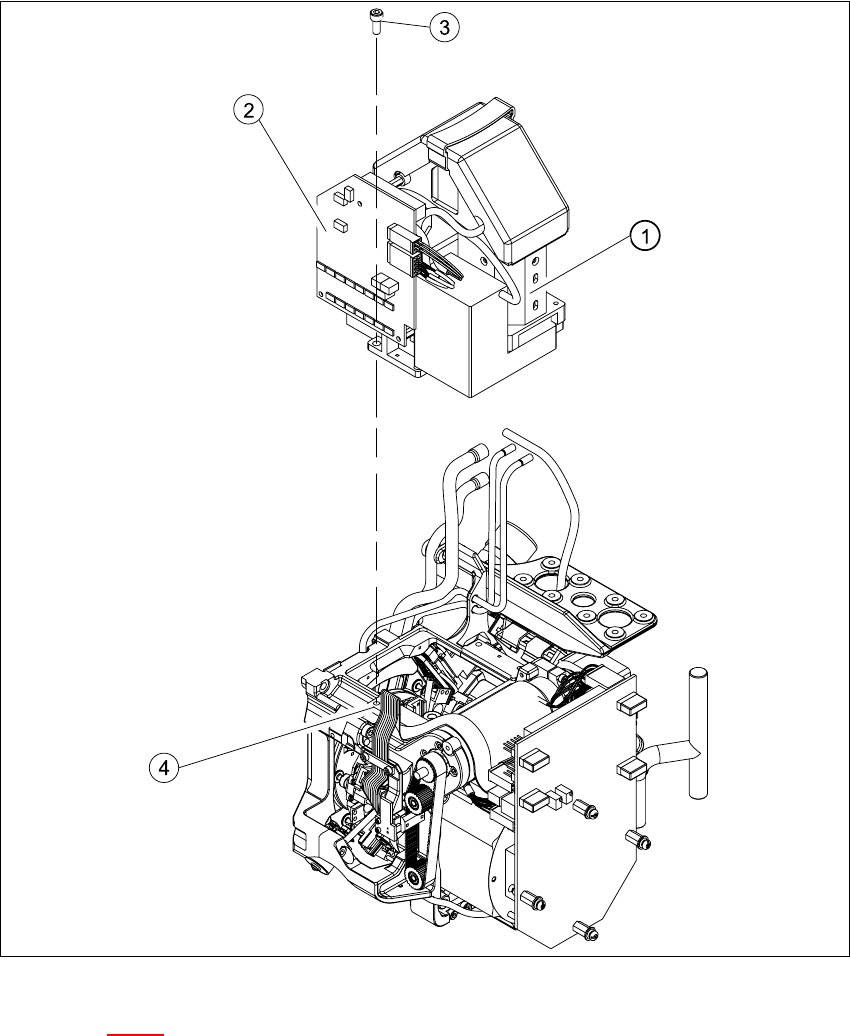
Fig. 7.7 - 1 Replacing the component camera
Key to Fig. 7.7 - 1
(1) 24x24 component camera
(2) "Component illumination controller" board
(3) 4 x M4x10 hexagon-socket head screws
(4) 2 parallel pins
7

7 DLM2 Collect&Place Head HS-60 Service Manual
7.7 Replacing the 24x24 component camera (00336791-02) 03/2003 US Issue
276
Æ Carefully push the camera against the collect&place head until the camera plinth is lying flat
on the contact surfaces on the front part of the collect&place head.
Æ Use the four M4x10 hexagon socket-head screws to fix the camera in place (see item 6 in Fig.
7.7 - 1
).
Æ Connect the ribbon cable to socket X3 on the "component illumination" board (see Fig. 7.5 - 1).
Æ Fit the front part of the collect&place head as described in Section 7.6.3, page 272.
Æ Fix the head cover in place.
7.7.5 Settings
Æ Start the placement system.
Æ Use the SITEST program to calibrate the collect&place head.

HS-60 Service Manual 7 DLM2 Collect&Place Head
03/2003 US Issue 7.8 Replacing the turning station (00341780-03)
277
7.8 Replacing the turning station (00341780-03)
7.8.1 Tools and equipment
– Set of DIN 911 Allen keys
– SITEST program
7.8.2 Parts
Turning station / DLM2, item no. 00341780-03 7
7.8.3 Dismantling the turning station
Æ Switch the placement system off and secure it to prevent switching on again as described in
Section 7.4
, page 261.
Æ Remove the plugs from sockets X12 and X18 on the head board.