Service Manual HS60.pdf - 第311页
HS -60 Se rvic e Ma nual 7 DLM2 Co l lect&Plac e Head 03/ 2 003 U S Iss ue 7. 16 Re plac ing the sta r (003 4118 1-0 1) 309 7.16.6 Fittin g the fro nt pa r t of the col lect&place h ead Æ Re move the gauge for th…
7 DLM2 Collect&Place Head HS-60 Service Manual
7.16 Replacing the star (00341181-01) 03/2003 US Issue
308
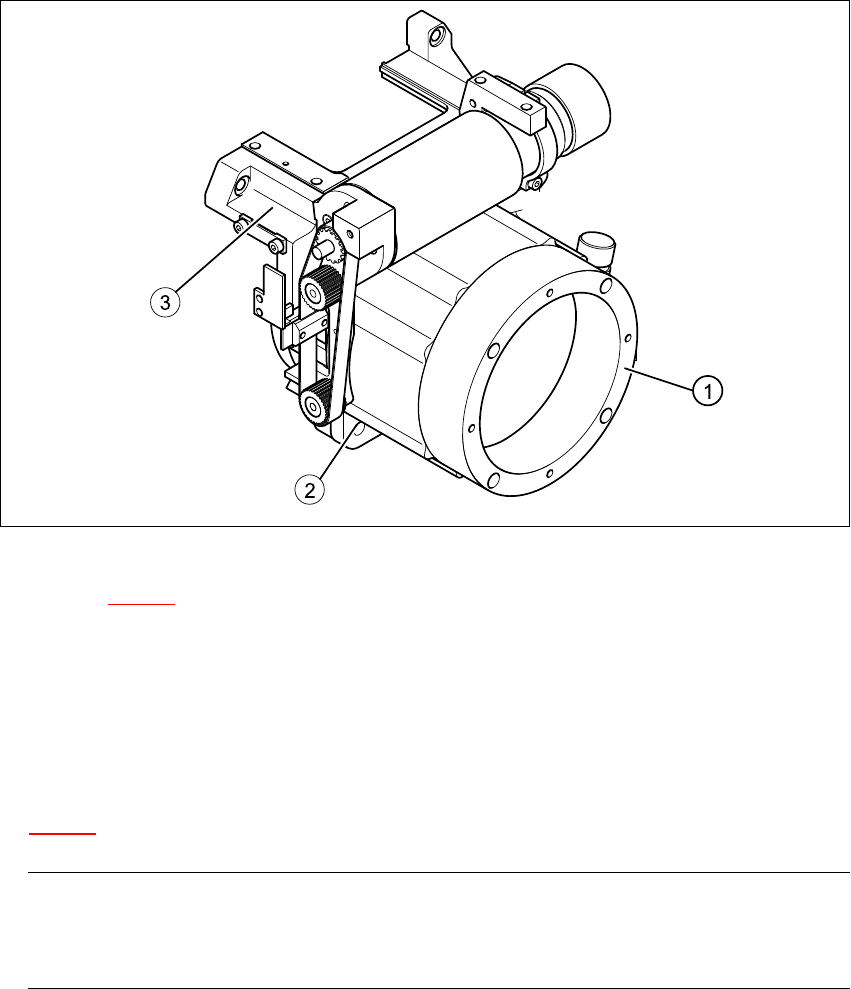
Fig. 7.16 - 2 Loosening the star drive
Key to Fig. 7.16 - 2
(1) Star drive, digital / DLM2
(2) M5x16 hexagon socket head screws, 4x
(3) Front part of collect&place head
7
Æ Loosen the three M3x8 hexagon socket head screws (item 5 in Fig.
7.16 - 1
) for fixing the star again and repeat the adjustment procedure.
PLEASE NOTE:
The star is fitted correctly until it no longer moves out of position when the gauge pin is
removed after disconnecting the star drive from the power supply. 7
HS-60 Service Manual 7 DLM2 Collect&Place Head
03/2003 US Issue 7.16 Replacing the star (00341181-01)
309
7.16.6 Fitting the front part of the collect&place head
Æ Remove the gauge for the star.
Æ Insert the power cable plug connector for the star drive into socket X5 on the intermediate ter-
minal block. The plug connector is an anti-rotation connector.
Æ Fit the front part of the collect&place head on the back part of the collect&place head (see Sec-
tion 7.6.3
, page 272).
Æ Adjusting the star with respect to the star's magnetic neutral position (see Section 7.16.5).
7.16.7 Use the SITEST program to determine the star zero point correction.
RISK OF HEAD CRASH
Always remove the gauge for the star, otherwise parts of the machine may be damaged when you
fit the front part of the collect&place head. 7
PLEASE NOTE:
Always remove all the sleeves from the star when you carry out the star zero point correction pro-
cedure. 7
Æ Load the SITEST program.
Æ Select "C&P Head" => "Head No." (HS-60) =>
"Axes" => "Star Axis" => "Positions" => "Zero Point Correction".
Æ Enter a "0" in the "Zero Point Correction" line and carry out the star axis reference run.
Æ Disable the star axis and turn the star clockwise until segment no. 1 is in the placement posi-
tion.
Æ Fit the "gauge for the star" on the front part of the collect&place head once more.
Æ Insert the gauge pin into the "gauge for the star" and into the hole in the segment no. 1, until it
reaches the stop.
Æ Select "Axes" => "Star Axis" => "Positions", and then exit the "Positions" menu option.
This will update the actual position display.
Æ Switch to "Positions" = > "Zero Point Correction", and enter the value for the updated actual
position (including the sign) on the "Zero Point Correction" line.
Æ Select "Accept".

7 DLM2 Collect&Place Head HS-60 Service Manual
7.16 Replacing the star (00341181-01) 03/2003 US Issue
310
Æ Remove the gauge pin from the gauge for the star.
Æ Carry out the star axis reference run.
Æ Check that the star zero point correction value that you entered is correct:
Æ Insert the gauge pin into the segment once more.
It must slide in easily.
Æ Remove the gauge pin once more.
Æ Detach the gauge for the star from the collect&place head.
RISK OF HEAD CRASH
Always remove the gauge for the star, otherwise parts of the machine may be damaged. 7
Æ Select "Save MA Data".
Æ Remove the gauge and all tools from the machine.
Æ Wear laboratory gloves when handling the sleeves.
Step the star and return all the sleeves to their correct positions.
Æ Calibrate the collect&place head or machine, as required.