VI User Manual.pdf - 第112页
.TST file edition 5 - 4 Vision 2007 4.10 User Manual Re v 01 Window ( C ) secti on: We must define a sear ch area to find the fiducia l. These par ameters form the sea rch wind ow around t he CAD coor dinates of the fidu…
.TST file edition
Vision 2007 4.10 User Manual Rev 01 5 - 3
5.2 Fiducials edition
The fiducials are edited once the .tst file has
been created.
The fiducials of the boards to be inspected can
be panel, board, or panel and board fiducials.
This is defined beforehand in the .vis file.
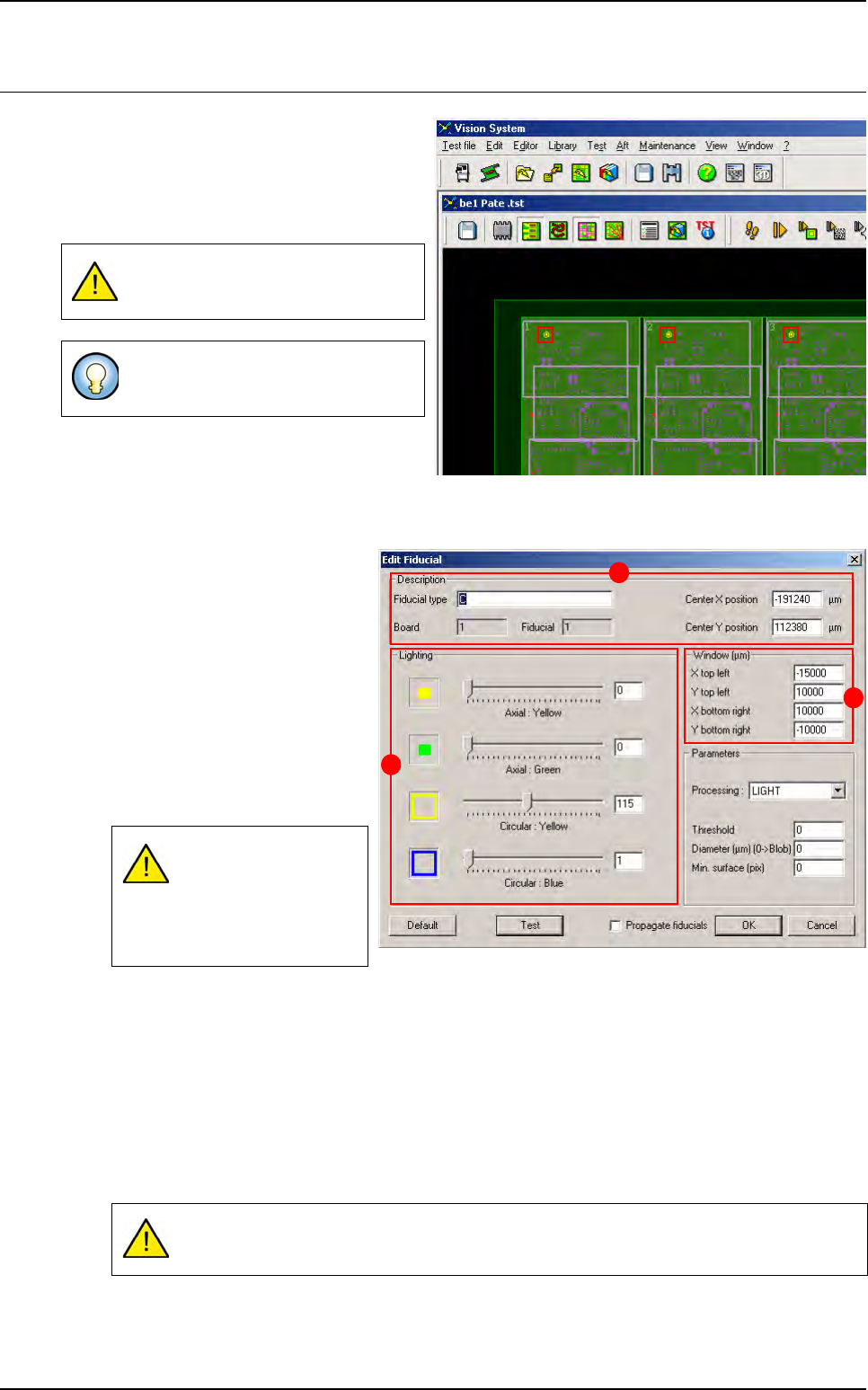
Click on any of the fiducial references. By de-
fault, they are yellow.
5.2.1 Edit fiducials window
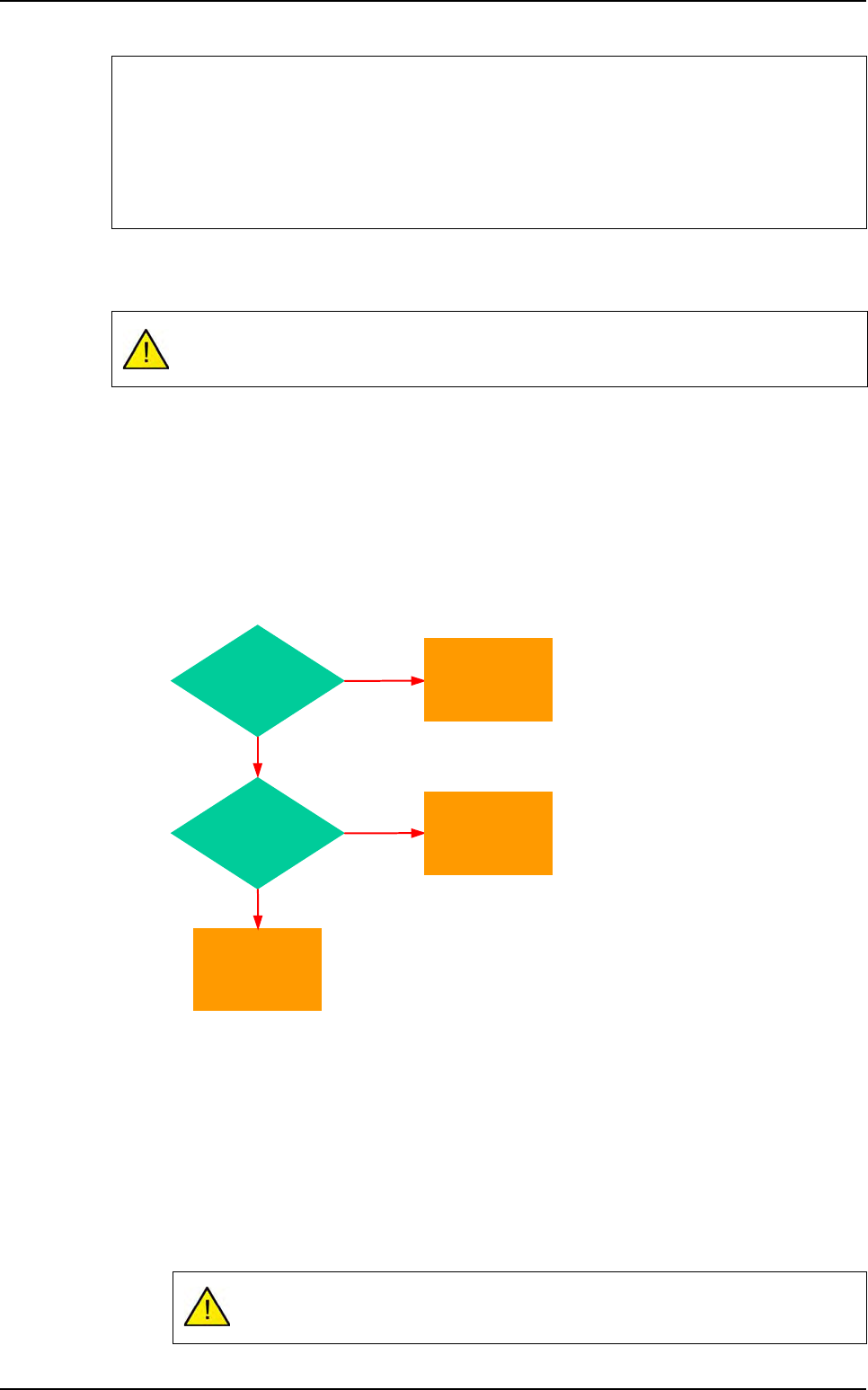
The Edit Fiducials window is
activated by clicking on any of
the fiducials present in the .tst
file.
All the fiducial parameters are
accessible from this window.
Description (A) section:
By default: name of the fiducial.
P: panel or global fiducial,
C: board or local fiducial
Fiducial reading index:
The first is used for positioning.
The second for calculating readjustment.
The fiducial coordinates are extracted from the CAD data of the .vis file used to generate the .tst file.
Lighting (B) section:
Click and move the cursors to modify the brightness of your various lighting types in order to ob-
tain the best possible image.
It is very important that fiducials are
properly lit
.
Vision 2007 only uses 2 fiducials to
realign components.
The fiducial type is use-
ful if you program a
model in the library. It
won’t change the re-
alignement type.
This lighting is specific to fiducials: it is used during board inspection.
A
B
C
.TST file edition
5 - 4 Vision 2007 4.10 User Manual Rev 01
Window (C) section:
We must define a search area to find the fiducial.
These parameters form the search window around the CAD coordinates of the fiducial, defining
the zone in which Vision 2007 will locate the fiducial. If the fiducials are not located in the fiducial
search window, an error message will appear.
All the dimensions are in µm.
5.2.2 Fiducial inspection
5.2.2.1 Priority order for fiducial inspection
5.2.2.2 Fiducial finder tool
Fiducial finder is the easiest fiducial tool to use if the fiducial is round and full. It is based
on the Vi-Pro treatment. To program the Fiducial finder, enter the Processing type and
the Diameter.
Definition of the fiducial type:
LIGHT (white circle on a black background),
DARK (black circle on a white background).
Fiducial diameter (in µm) only for circle fiducials.
Adjusting fiducial lighting
You must always adjust fiducial lighting to have the best possible image.
Move the camera above the fiducial until you can see the image of the fiducial when you adjust
its lighting.
Adjust the fiducial lighting to obtain a contrasted image of the fiducial.
The search window is defined in the PatMax parameters if you use a model in the library
to find a fiducial.
Available only for circular fiducials !
Yes
Library model
exists ?
No
Fiducial finder
configured ?
Yes
No
Use
Blob tool
parameters
Use
fiducial finder
Use
Library model
Fiducials edition

.TST file edition
Vision 2007 4.10 User Manual Rev 01 5 - 5
5.2.2.3 Blob tool
Blob is the tool used to identify non-round fiducials. To program the Blob tool, you just
have to enter the Processing type, the Threshold and Min. surface.
Definition of the fiducial type:
LIGHT (white circle on a black background),
DARK (black circle on a white background).
The threshold (in gray levels) specification is used to binarise the image (black and white).
The minimum surface (in pixels) of the identifiable fiducial.
5.2.2.4 Fiducial identification in library
If the fiducial is not circular, you can program a model in the library using the PatMax
treatment. This model must be called FIDUCIAL_C or FIDUCIAL_ P (according to the fi-
ducial type).
The light level used will be the one defined in the Edit Fiducials window. The Fiducial
search window will be the one defined in the PatMax treatment.
5.2.3 Profile propagation
Tick Propagate fiducials to extend all the parameters of this fiducial to all the fiducials of the
same type (P or C) in the .tst file. Click OK to validate parameter changes and / or propagate the
profile. Click Cancel to abort and return to the main window of Vision 2007.
If you choose to propagate parameters, a message will ask you to confirm the propagation of this
fiducial profile to all the other fiducials of the same type.
5.2.4 Fiducials test
To see if the fiducial parameters that you have just adjusted are correct, click on the Fiducials
test icon in the tool bar of the .tst file.
Fiducials edition