VI User Manual.pdf - 第175页
Tools library Vision 2007 4.10 User Manua l Rev 01 7 - 13 The Offset XY (mm) ( B ) is a shift in the geometric cent er of the component from its the- oretical center. Press Auto area ( C ) button to place the Vi-Pro tool…
Tools library
7 - 12 Vision 2007 4.10 User Manual Rev 01
7.3.2.1 Vi-Pro parameters
Configuration tab
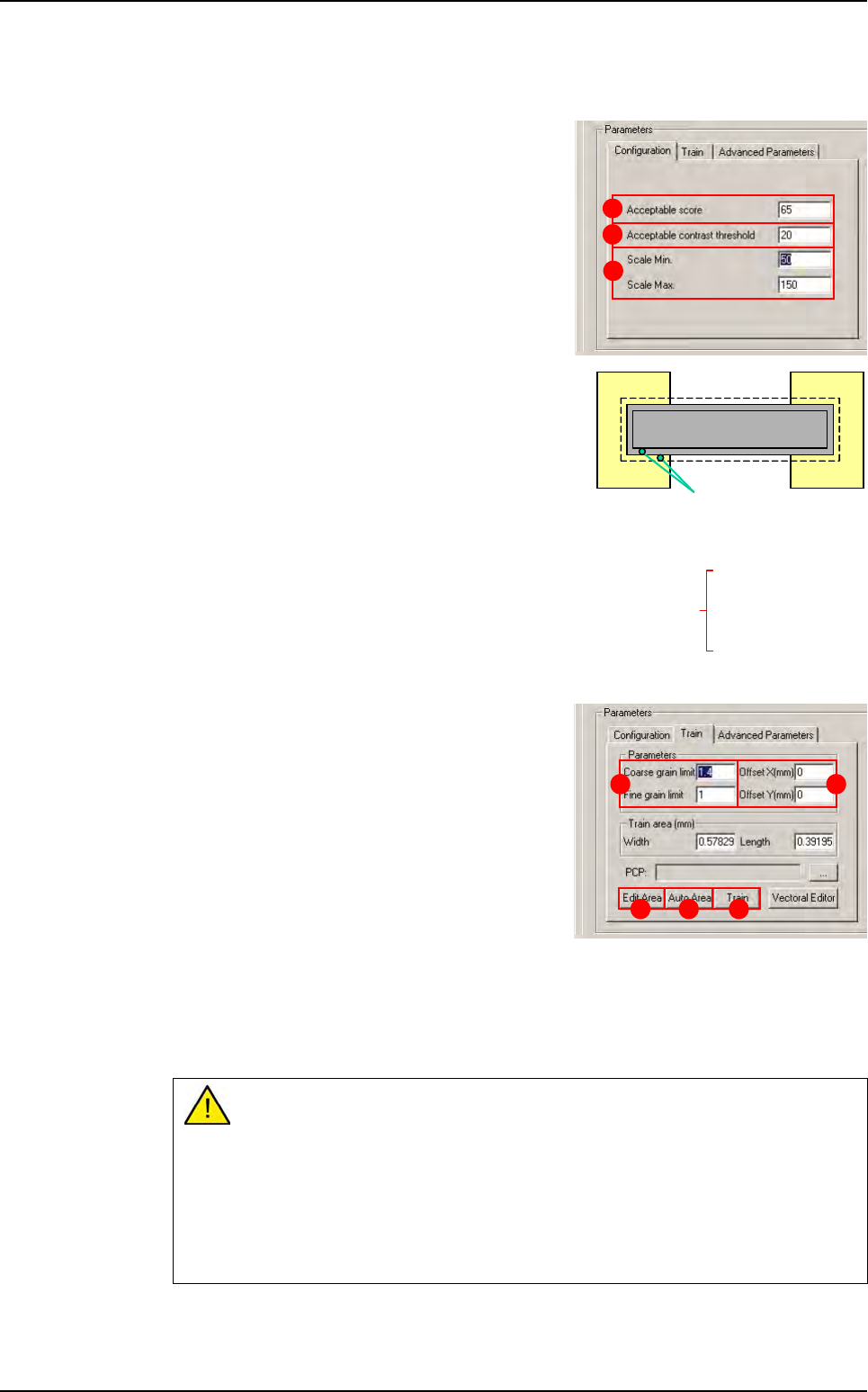
Click Configuration tab in the Parameters sec-
tion to access functional and decision parame-
ters.
The Acceptable Score (A) only considers the
coverage result of the test. This value is the mini-
mumthreshold at which the treatment result is ac-
cepted. If the treatment score is lower than this
threshold, the test result will be a score of zero.
The Acceptable contrast threshold (B) is de-
fined as the difference of an identified transition.
This value is the minimum threshold at which a tran-
sition will be accepted. Contrast is defined by a gray
level value. When you test the Vi-Pro tool, the con-
trast result should be above 80. This ensures ade-
quate definition between the foreground and
background and reduces the number of false de-
fects in production.
The Scale Min/Max (C) is the degree of freedom for
Vi-Pro model to allow uniform scale change for the
component.
Train tab
Click the Train tab to access the training in the
model characteristics.
The Coarse grain limit and Fine grain limit (A)
parameters are used to define the size of the vec-
tors used to detect transitions.
Large transitions are detected with the Coarse
grain limit or Fine grain limit, and small transi-
tions are detected with the Fine grain limit.
Vi-Pro uses the range created by the Coarse
grain limit and Fine grain limit limits:
Treatment speed is determined by the Coarse grain limit.
Treatment accuracy is determined by Fine grain limit.
The grain limit informs Vi-Pro which vectors have been detected in the image. The values
given by default are, in most cases, the most suitable.
If you increase the grain limit, Vi-Pro loses detection details.
Increase the Coarse grain limit:
- Increases treatment speed.
- Reduces accuracy.
- Body detection (reduces fine detection).
Reduce the Fine grain limit:
- Reduces treatment speed.
- Increases accuracy.
A
B
C
0 = black
256 gray levels
255 = white
20 - 40 (B)
150 -200 (A)
1
5
0
-
2
0
0
(
A
)
transitions
Contrast = A - B
Result ~ 100 (perfect score)
A B
D EC
Vi-Pro
Tools library
Vision 2007 4.10 User Manual Rev 01 7 - 13
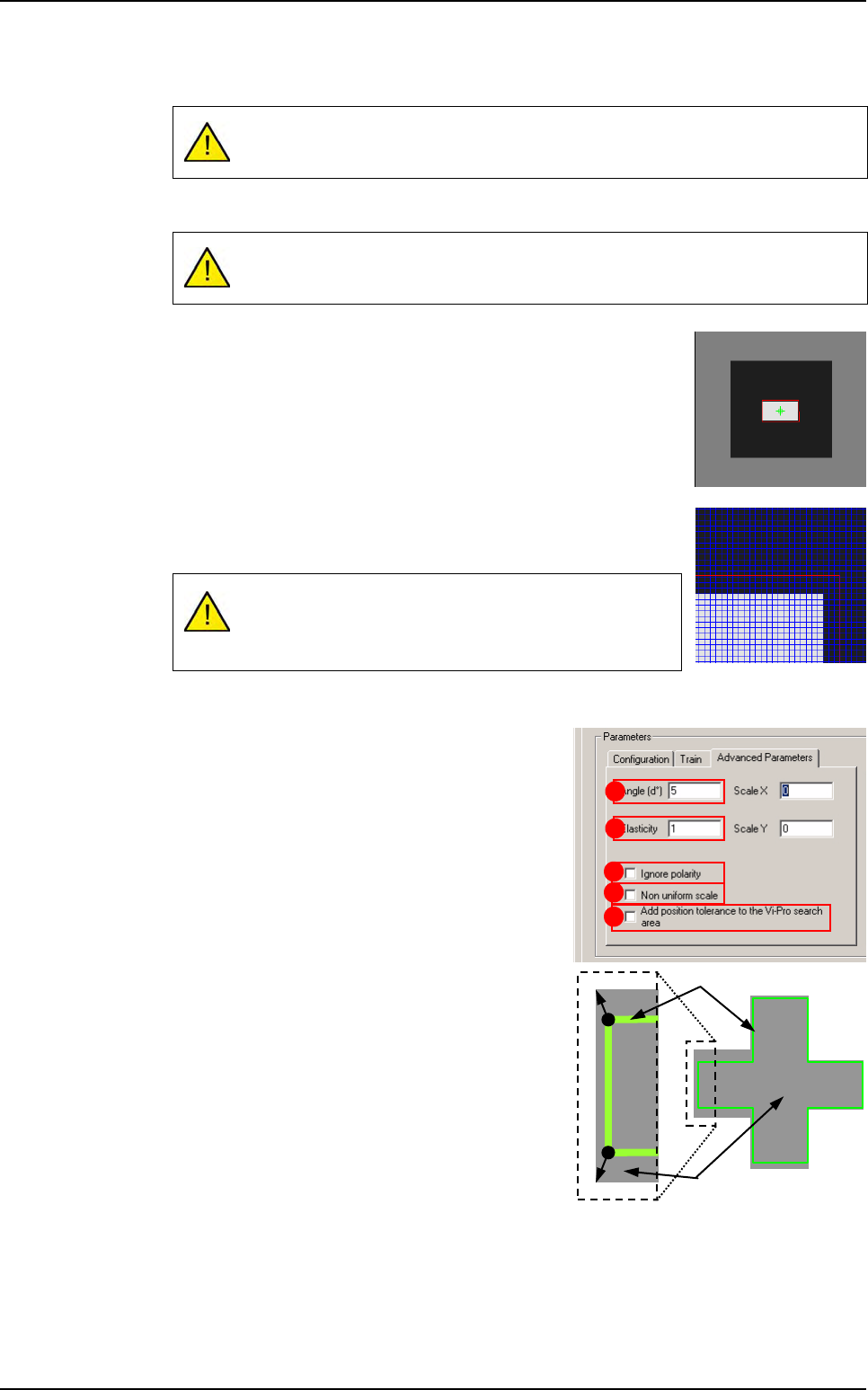
The Offset XY (mm) (B) is a shift in the geometric center of the component from its the-
oretical center.
Press Auto area (C) button to place the Vi-Pro tool train area exactly around the model.
Press Edit area (D) button to adjust the train area manually. The
handles appear on the red contour outlining the component in the
display screen.
Click on the red contour and adjust it so that it is 3 - 4 pixels larger
than the component itself.
Click ZOOM + to enlarge the image of the component in the dis-
play window.
Click PIXEL MAPPING to display the grid on the screen.
Click Train (E) to learn the Vi-Pro pattern.
Advanced parameters tab
Click Advanced parameters tab to access other
characteristics.
The Angle (d°) (A) is the degree of freedom for
Vi-Pro to find the component in the search area.
The Elasticity (B) is the degree of tolerance that
Vi-Pro will accept for non linearity of the compo-
nent. The elasticity unit is the pixel. Elasticity is
used to stretch or reduce the size of components
in all directions at once.
Repeat model training after any offset changes.
The Auto area function automatically positions this training area.
A window that is not centered on your training model will
result in a permanent position shift in the inspection re-
sults.
A
C
E
B
D
Image
Pattern
Vi-Pro
Tools library
7 - 14 Vision 2007 4.10 User Manual Rev 01
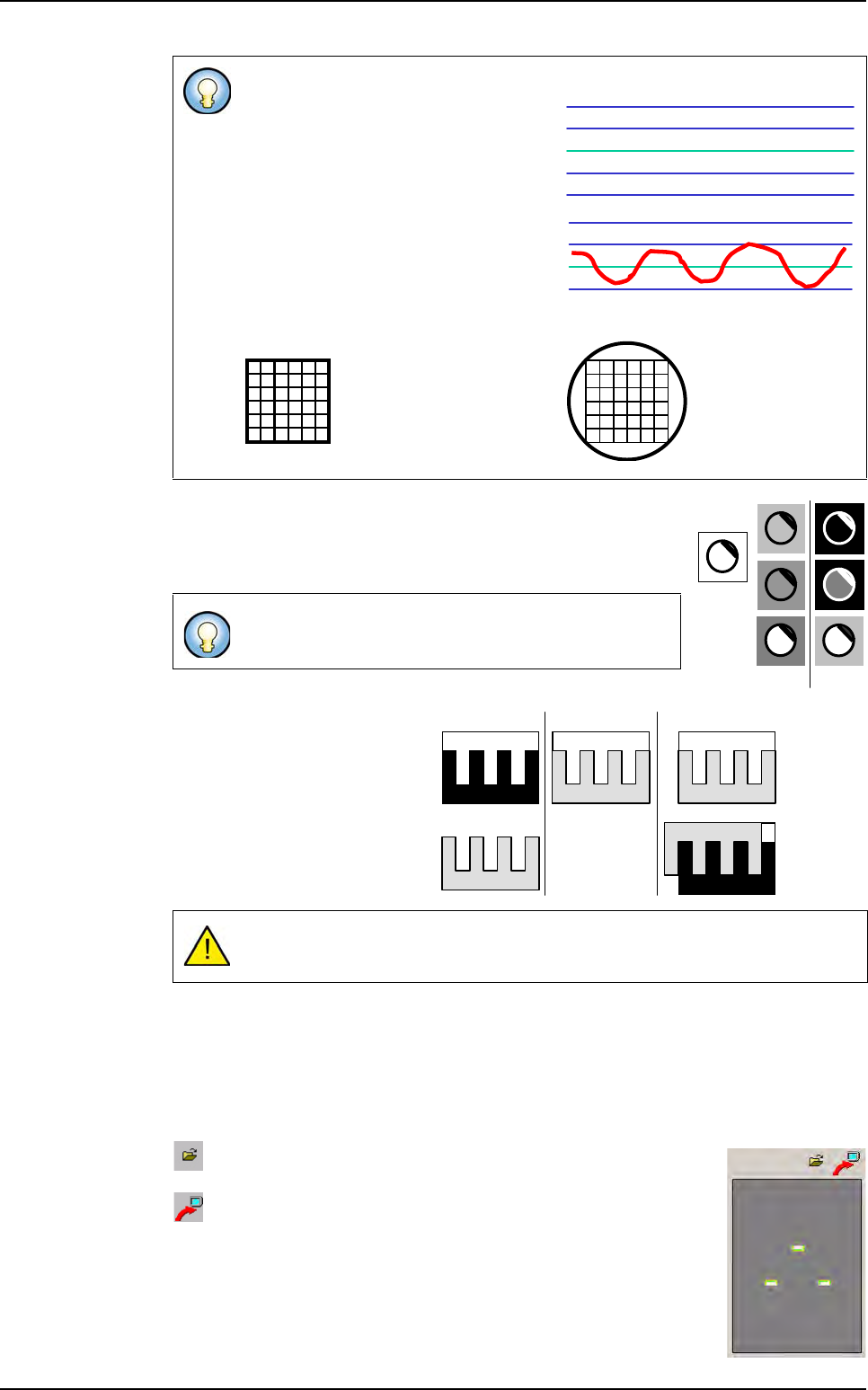
Tick Ignore polarity (C) to evaluate the transition vectors with
different polarities. The model's polarity is defined at each point
in the transitions as the transition direction (black => white or
white => black) and is not dependent on amplitude.
You can configure Vi-Pro to ig-
nore the model's polarity and only
use the shape vector information.
Polarity is a Vi-Pro parameter
which can make model corre-
spondence less ambiguous.
You should ignore polarity only
when the object is subject to po-
larity changes.
The Non uniform scale (D) tick box allows Vi-Pro to stretch the trained model in X or Y
and run a non-uniform scale. It can increase accuracy but is time consuming.
Tick Add position tolerance to the Vi-Pro search area (E) to add, the model's position
tolerances to the Vi-Pro search area at execution time.
Train image window
Save as you want the image extracted from Vi-Pro train and use
it as another synthetic image.
Load the Vi-Pro train in the COGNEX console.
Standard setting: between 0 and 1 (Max 6.0).
If you change the value to 0, only the
transitions near the straight line will be
detected. Detection accuracy is higher
but the transitions must be close to the
trained model.
If you change the value to 1, transitions
detected will be between 1 and -1 pix-
el. Accuracy is improved but the num-
ber of detections is reduced.
By default, Vi-Pro only recognizes models with the
same polarity as the trained model.
Incorrect use of this parameter may lead to false detections.
0*
* the model is perfect
1
0
-1
Elasticity = 0
If elasticity = 2,
then it detects
a circle!
Trained
model
Same
polarity
Different
polarity
Object
PatMax model
PatMax
using polarity
PatMax
ignoring polarity
Expected
correspondence
Incorrect
correspondence
Vi-Pro