VI User Manual.pdf - 第195页
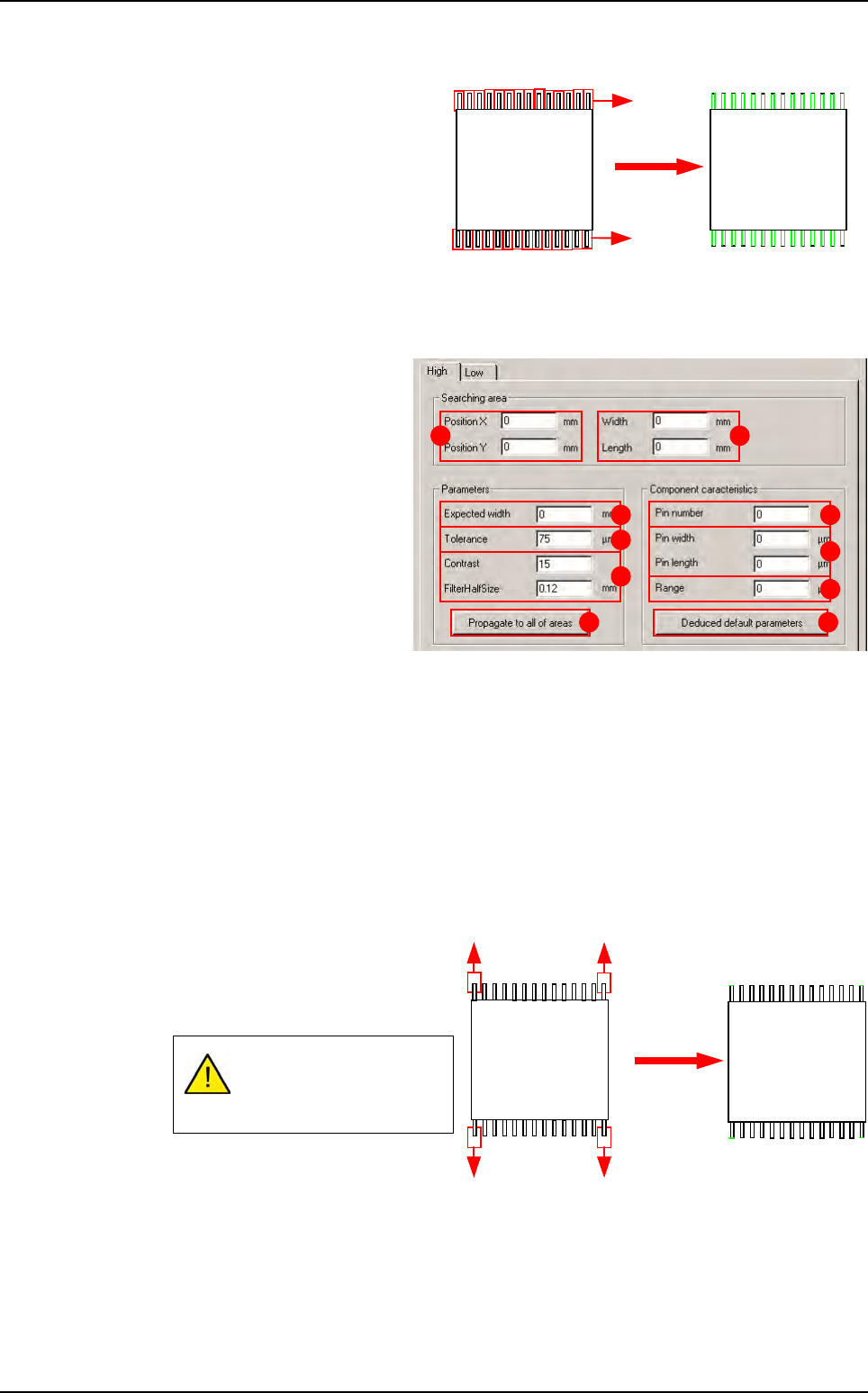
Tools library Vision 2007 4.10 User Manua l Rev 01 7 - 33 Searching area Position X & Y ( A ): offset for all edges. Width & length ( B ): edges size. Parameters Expected width ( C ): lead width. Tolerance ( D ) …
Tools library
7 - 32 Vision 2007 4.10 User Manual Rev 01
7.7.5.2 Component’s leads detection
Component’s leads detection po-
sitions a double transition edge
on each component lead in order
to find its position and send back
the averageIf this test fails, you
will have a missing error.
The component lead detection
button opens a window contain-
ing 2 tabs. One is for the leads at
the top of the component and one for the leads at the bottom.
Searching area
Position X & Y (A): all
edges offset.
Width & Length (B): edges
size.
Parameters
Expected width (C): lead
width.
Tolerance (D) on the ex-
pected width.
Contrast & Half size filter
(E): edge parameters used.
Propagate to all of areas
(F) button: propagation to the other tab.
Component characteristics
Pins number (G): number of pins.
Pin width & length (H): pin dimensions.
Range ( I ): distance between each pin.
Deducted default parameters (J) button: change the edge characteristics according to
the component.
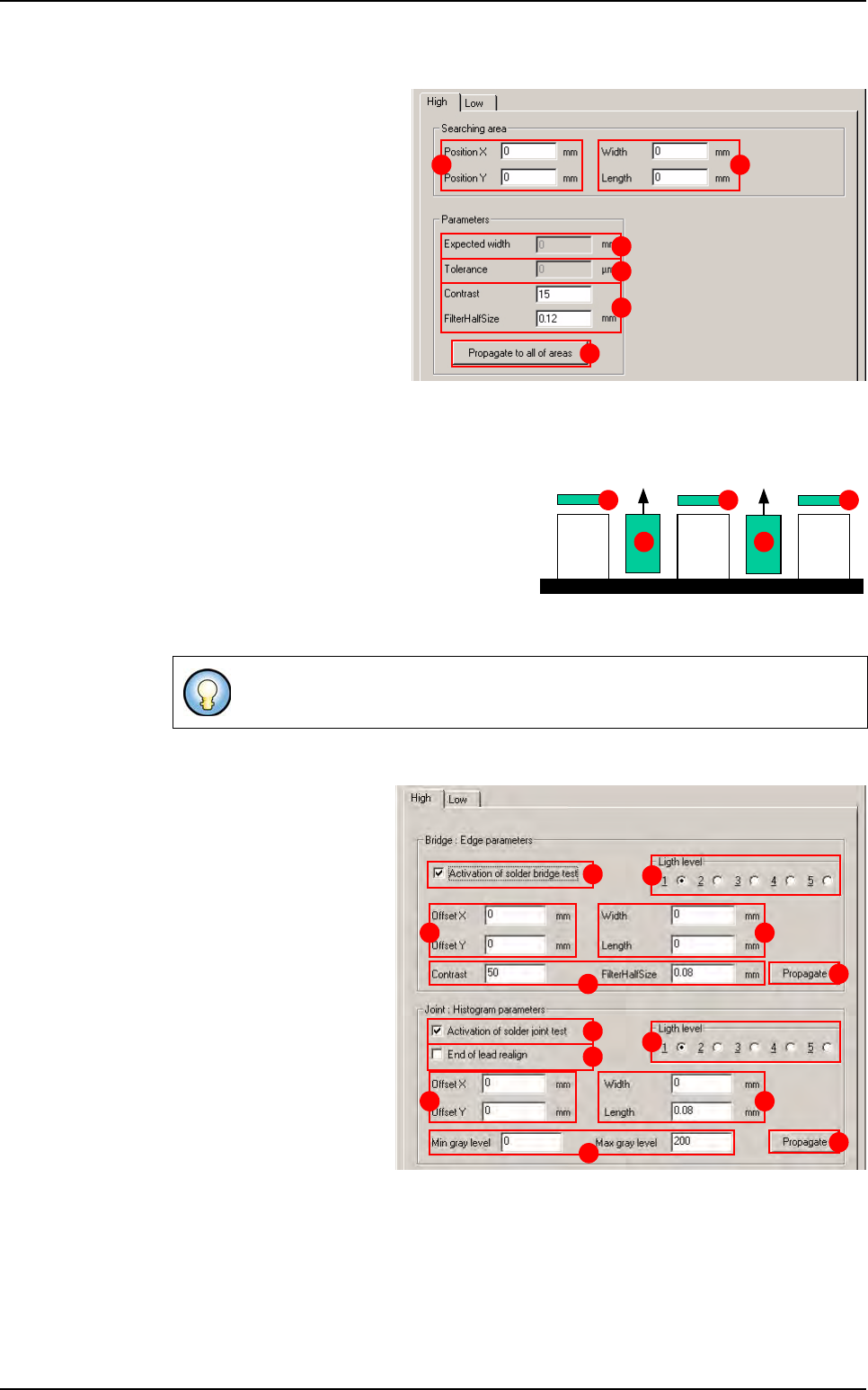
7.7.5.3 End of leads detection
End of leads detection places an
edge at each end of the component
leads and allows the Y position and
the component angle to be found.
If you click on the End of leads de-
tection button opens a window
containing 2 tabs. One is for the
leads at the top of the component and one for the leads at the bottom.
This diagram shows 4
edges. In fact, there are
edges on all the leads.
2N transition: black
Î
white and white
Î
black
Score by size
and contrast
N1
A B
C
D
E
F
G
I
H
J
Transition: white
Î
black
Score
by contrast
SO or QFP model
Tools library
Vision 2007 4.10 User Manual Rev 01 7 - 33
Searching area
Position X & Y (A): offset for
all edges.
Width & length
(
B
): edges size.
Parameters
Expected width (C): lead
width.
Tolerance (D) on the ex-
pected width.
Contrast & Half size filter
(E): edge parameters used.
Propagate to all of areas
(F) button: propagation to
the other tab.
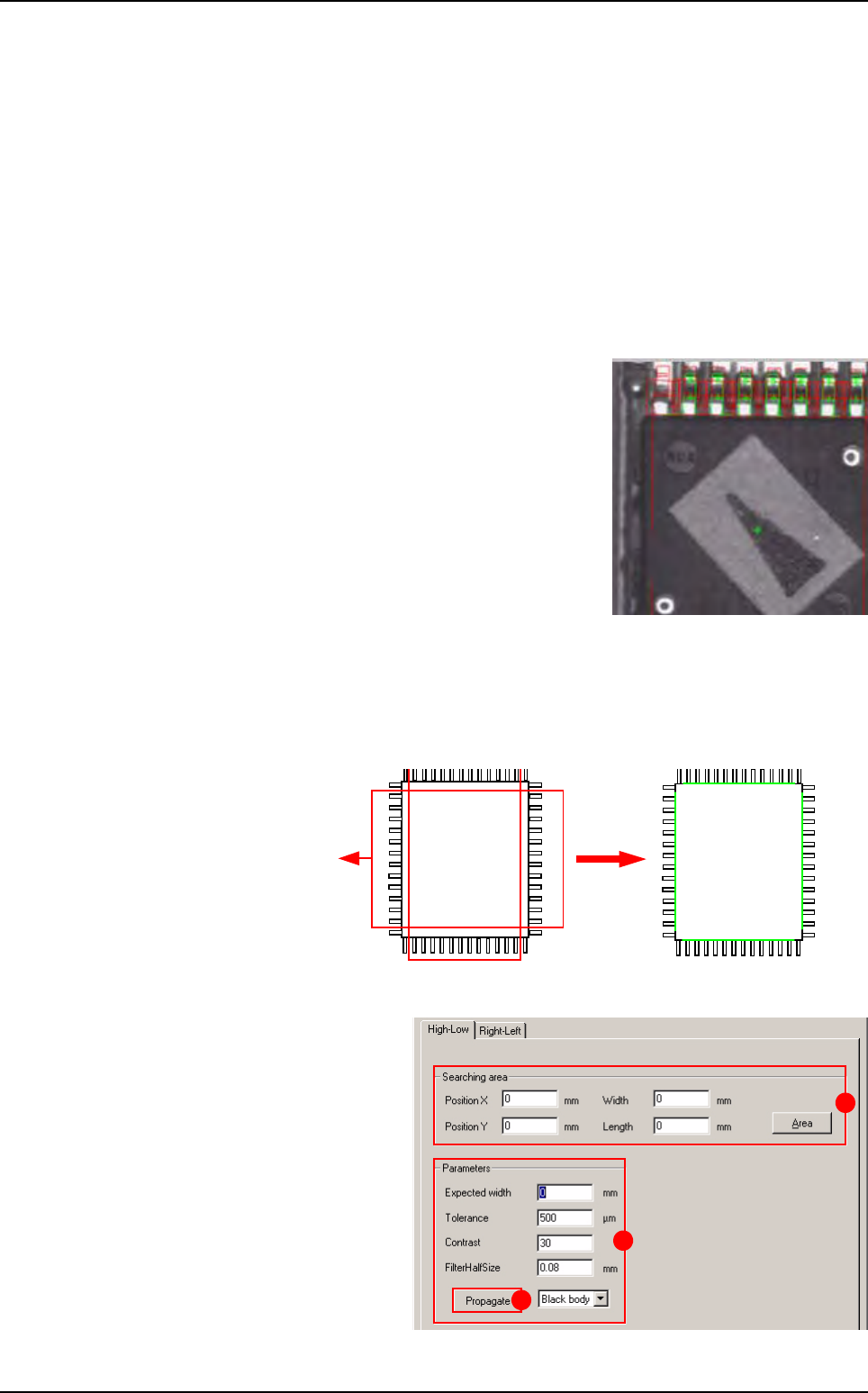
7.7.5.4 Solder joint and bridge detection
With Solder joint and bridge detection, a
histogram (A) is automatically positioned at
the end of each lead for the weld joints and an
edge (B) between each lead for solder bridge
detection.
With this window, you can adjust the parameters of the histograms and the edges which
check the joints and solder bridges.
Bridge: Edge parameters
Activation of solder
bridge test (A): activate or
deactivate the bridge test.
Light level (B): light level
for the bridge detection.
Offset X & Y (C): offset for
all edges.
Width & Length (D): edg-
es size.
Contrast & Half size filter
(E): edge parameters
used.
Propagate (F) button:
propagate the edge pa-
rameters to the other sides
of the component.
Declare 2 sides of the model.
A B
C
D
E
F
A A A
BB
C D
E
B
A
F
J K
L
I
G
M
H
SO or QFP model
Tools library
7 - 34 Vision 2007 4.10 User Manual Rev 01
Joint: Histogram parameters
Activation of solder joint test (G): activate or deactivate the joint test.
End of lead realign (H): activate or deactivate histogram positioning with regard to the
end of lead detection results.
Light level ( I ): light level for the solder joint detection.
Offset X & Y (J): offset for all histograms.
Width & Length (K): histogram size.
Min & Max gray level (L): histogram parameters used.
Propagate (F) button: propagate the histogram parameters to the other sides of the com-
ponent.
Welding fault, the histogram is shown in red.
7.7.6 QFP
The QFP tool returns the (X, Y, θ) position of the component with the joint faults and welding
bridge faults.
7.7.6.1 Body detection
Body detection is
performed by a
double transition
edge in both direc-
tions (X and Y).
This window appears when
you click on the Body detec-
tion button. In the Body de-
tection window, Searching
area (A) and Parameters
(B) are the same that for SO
(see § 6.7.5.1 Body detec-
tion).
Propagate to all of areas
(C) button: propagation to
the other tab.
Pos X2Pos X1
Pos Y1
Pos Y2
Transition: white
Î
black and black
Î
white
B
A
C
SO or QFP model