VI User Manual.pdf - 第278页
在线预览 VI User Manual.pdf PDF 文档。

Optical Character Verification
Vision 2007 4.10 User Manual Rev 01 8 - 15
8.5 Definitions
8.5.1 OCV versus OCR ?
8.5.1.1 OCV is for Optical Character Verification
We already know the string. We only perform a verification of each character in the string.
8.5.1.2 OCR is for Optical Character Recognition
We don’t know what to read. OCR is to recognize characters inside a string.
8.5.2 Confusion characters
Characters returning a similar score when performing a PatMax with the same model such has
B and 8.
8.5.3 Overlap
An amount by which model areas can overlap. If models overlap more than this amount, they are
considered to be the same model, and only 1 of them will be returned from a search operation.
8.5.4 Clutter
Extraneous features in a runtime image that are not part of the trained model.
Vision 2007 4.10 User Manual Rev 01 9 - 1
Chapter 9
2D solder paste inspection
To inspect solder paste, you need the screen printing mask drilling file. The files that Vision 2007 can import
are extended gerber type files (standard R274X).
9.1 Gerber file
9.1.1 Basics
During gerber importation, Vision 2007 extracts the position and surface of each paste pad and
represents it in the .tst file.
9.1.2 Import
In the Test file menu go to Import sub menu and select Gerber file to import the gerber file to
an existing .tst file for your panel.
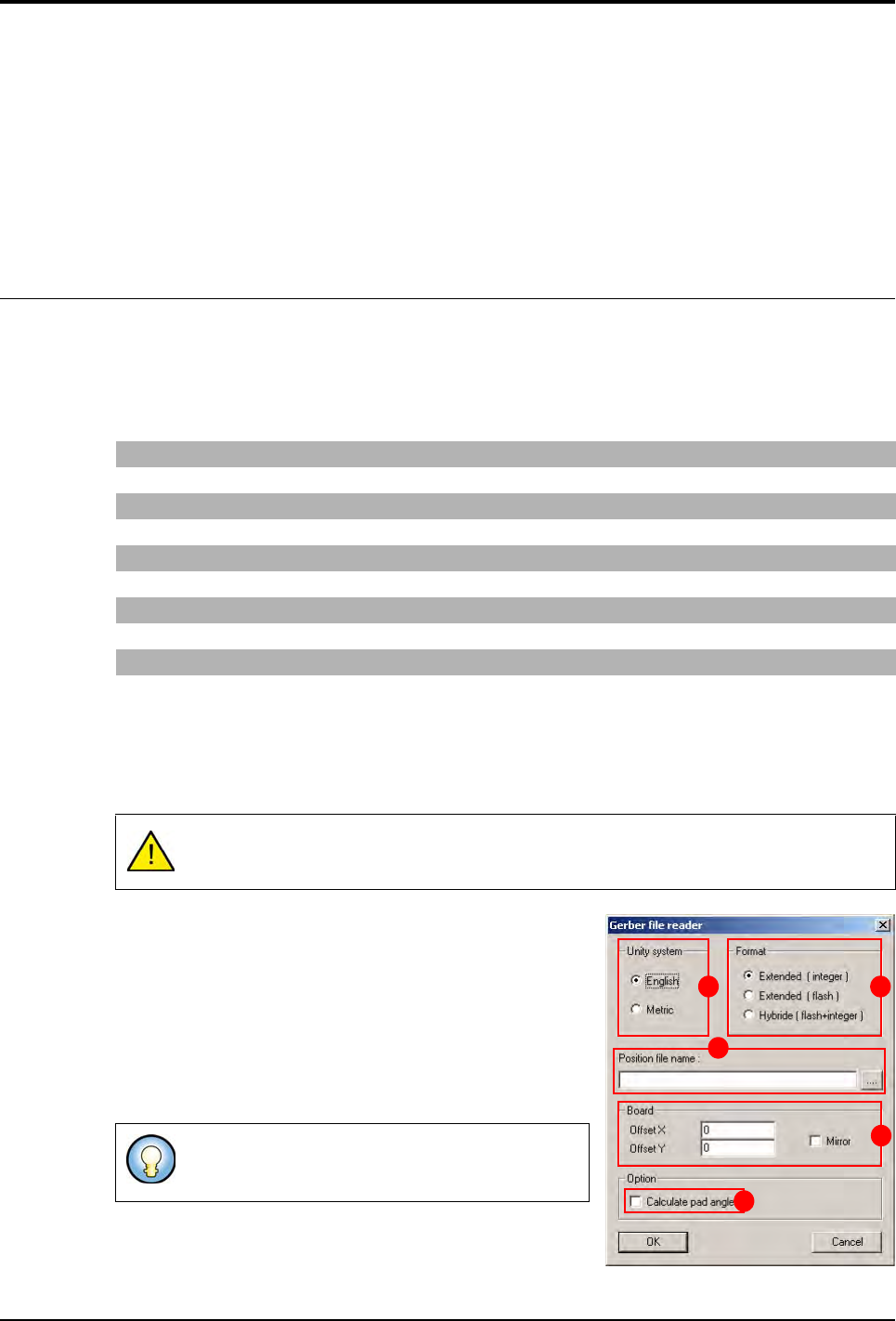
After selecting the previous menu, the Gerber file reader
window appears.
1. Choose the Unity system (A).
2. Choose the importation Format (B) of the gerber file:
Integer: all the elements even flash are imported as in-
teger (area calculated by sampling).
Flash: import only the flash elements.
Hybrid: this format combines the 2 importation formats.
The flash elements are imported as Flash format and
the others as Integer format.
G04 Generated on UCAM* G04 defines the start of a comment line
%FSLAX23Y23*% Scale definition 2 figures before and 3 after the decimal point
%MOIN*% Definition of the unit in inches (MOMM for mm)
%ADD10C,0.00472*% Definition of the 0.472 inch circular 10 tool
%ADD13R,0.02362X0.02756*% Definition of the 2.362 x 2.756 inch rectangular 13 tool
G54D10* Tool change (take circular 10 tool)
X1622Y2336D02* Movement with the tool up
X1629Y2334D01* Movement with the tool down
X1780Y1931D03* Movement of the tool in flash (up/down movement of the tool)
The .tst file must at least have the fiducial position.
Import in Flash does not take long and gives an idea
of the final result rapidly.
A B
C
D
E