VI User Manual.pdf - 第318页
Production 11 - 18 Vision 2007 4.10 User Manual Re v 01
Production
Vision 2007 4.10 User Manual Rev 01 11 - 17
11.4 MSA mode
MSA is Measurement System Analysis. This mode allows to record data from production mode for
MSA analysis in GraphStat software.
MSA data are saved in the supervisor MSA database (see chapter 12 Supervisor and chapter 15
GraphStat for settings and use of this MSA mode).
To start MSA mode:
1. Edit the DefaultValue .ini file and set the following keys accordingly:
2. From Vision 2007, open the .tst file to run the board.
Select some components to be followed in statistical monitoring (edit component and tick statistical
monitoring, or right click on the test file and select Put some jedecs on statistics).
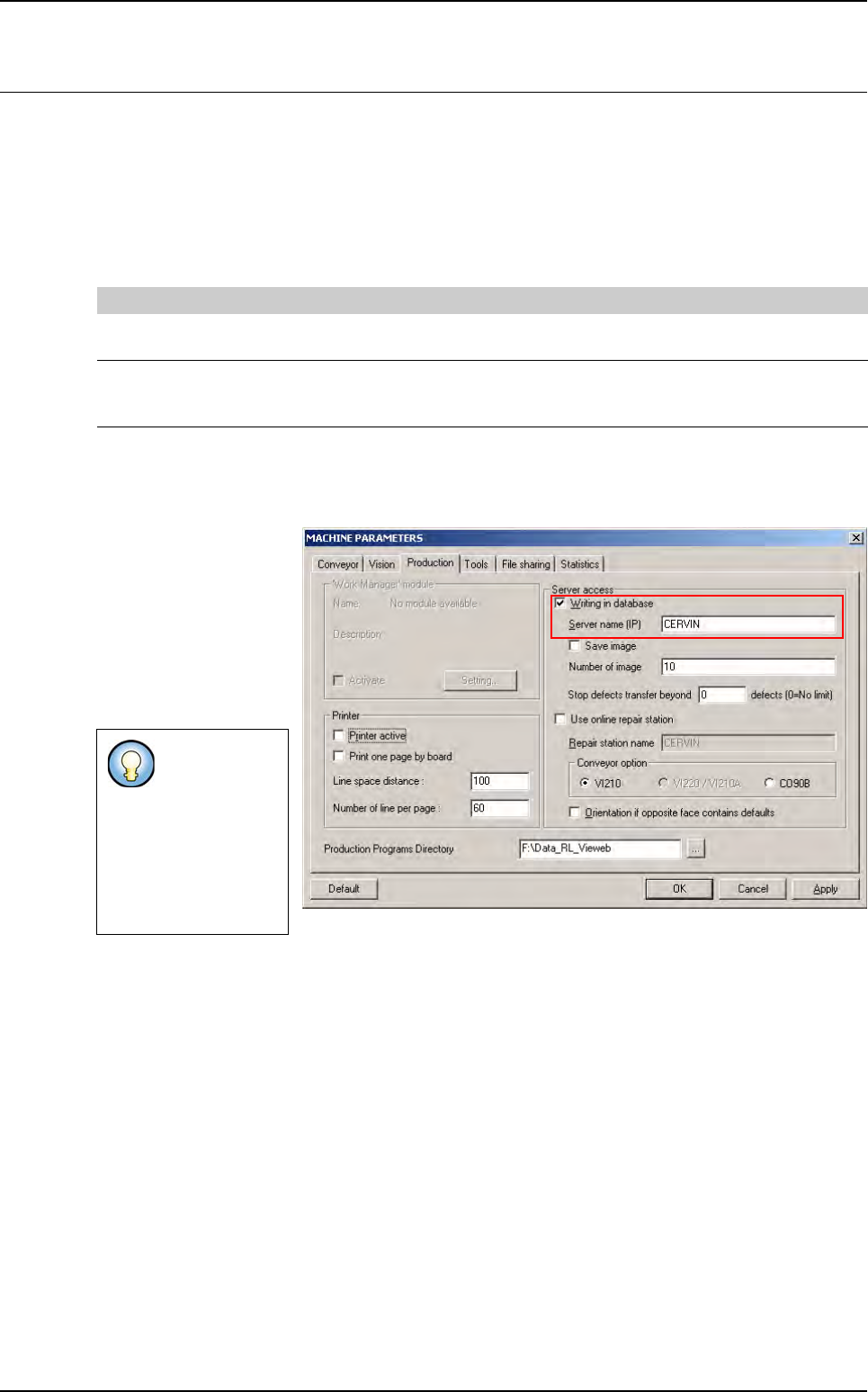
3. In Maintenance mode,
go in Machine Parame-
ters and select Produc-
tion tab, tick Writing in
database and enter the
Server name of the su-
pervisor PC (see chap-
ter 12 Supervisor for
settings).
4. From Vision 2007 Production menu, tick MSA mode and start production.
5. In Production mode, press GO and load a board in the AOI system.
The same board will be executed the number of cycle defined in the DefaultValue .ini file.
Results will be saved in the database.
Bar codes will be incremented according to the panel bar code of the board: XXX_MSA1,
XXX_MSA2, ...
[MSA]
Cycle number = 30 Indicates the number of time for the sameboard to be run
0 = MSA mode menu is gray out from Production mode
Clamp/unclamp mode = 0 Indicate if the board is unclamped between each run
0 = The board is not unclamped
1 = The board is unclamped and clamped again
Even if you se-
lect an on-line
station, it will
not be started
and used if you
start produc-
tion in MSA
mode.

Production
11 - 18 Vision 2007 4.10 User Manual Rev 01
Optimization
Vision 2007 4.10 User Manual Rev 01 12 - 1
Chapter 12
Optimization
12.1 Auto Fine Tune (AFT)
The Auto Fine Tune (AFT) tool is a programming assistant using Vi-Pro and Histograms for models
in the library. It automatically optimizes the library to obtain:
Increased accuracy and repeatability:
• Vi-Pro uniform scale, X and Y scale optimization.
Fewer false faults:
• Vi-Pro score and contrast threshold.
• Histograms used in presence and polarity equations.
Shorter cycle time:
• Link permutation.
• Unused link deletion.
AFT enables transfer of a Vi-3K Series library to a Vi-5000 Series and vice versa. It also enables
execution of a .tst file in the process mode (debug) on an offline station.
To optimize a library with AFT you will need:
The library to be optimized.
A .tst file with the components to be optimized activated for testing.
Several full and empty panels.